In the most recent posting on Jeff Atwood’s excellent developer blog Coding Horror, the question is posed:
Why does the Mac require the user to jump through a bunch of manual hoops to install an application? Why not use a traditional installer (a.k.a. setup.exe) that automates this manual work for you?
Rather than get into the details of the debate in the comments to that article over the ease of installing apps on the Mac the manual way, let me instead show you Jing’s answer to the question:
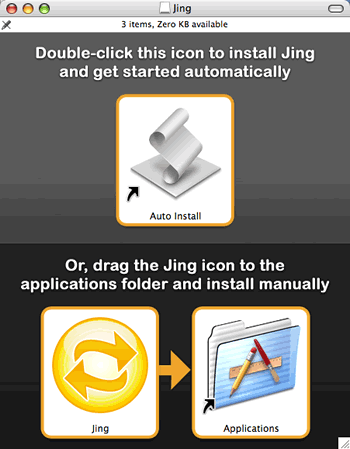
(I wrote about Jing in the last post.)
The Jing approach is to give you two options:
- The incredibly easy way: Double-click the installer script and you’ll be shown this a dialog box that tells you that you’re about to initiate an action that will:
- Copy Jing to the Applications folder
- Eject the disk image
- Start Jing
- The traditional manual way, in which you drag the app to the Applications folder. An alias to the Applications folder is provided, so you don’t have to open another Finder window.
No options dialog boxes, no EULAs, no extraneous messages for the purposes of marketing — just install and go.
I think it’s a good solution. What say you, Jeff?
4 replies on “Jing’s Approach to Installing on the Mac”
It’s great! I only wish more apps– on Mac *or* Windows– would offer this kind of “No-Questions-Asked” install option.
I don’t think either platform really gets this right, but at least the Jing and JGSoft approaches are much closer.
Flock the social web browser also does an install process like this. http://www.flock.com
Jeff,
What Apple apps have non-straightforward installers? Every Mac app, from the pro stuff (Final Cut, Logic) to the entry-level stuff has the same installer, just drag to the Applications folder….seems much quicker to me than the .EXE/extract an archive then click ‘setup.exe’ method.
GregB,
Just wanted to clear something up. I agree with the ease of install on the mac with either option but quite a few programs do come with a traditional installer. Apple provides one the same way windows does so programs that use it have a similar look and feel. Word 2008 is a good example of a installer. I’ve never thought about it until now but a good few of the programs that use a full installer are carryovers from the windows side.
In the end it all depends on how complicated the install is.
Rob