October 2010

RHoK: Random Hacks of Kindness

What is Random Hacks of Kindness?

Random Hacks of Kindness (RHoK) is a community of developers, geeks and tech-savvy do-gooders around the world, working to develop software solutions that respond to the challenges facing humanity today. RHoK is all about using technology to make the world a better place by building a community of innovation. RHoK brings software engineers together with disaster relief experts to identify critical global challenges, and develop software to respond to them. A RHoK hackathon event brings together the best and the brightest hackers from around the world, who volunteer their time to solve real-world problems. There’s an RHoK event taking place in Toronto in about a month!

Calling all Brains

We will need:

  • Hackers
  • Storytellers
  • Software engineers
  • Programmers
  • University students
  • Marketers
  • Web content creators
  • Emergency planners
  • International policy and development students
  • Teachers
  • Librarians
  • Videographers
  • Event planners
  • Organizers
  • Project managers
  • …and YOU!

Participants can select from a number of problem definitions. (The people at RHoK will post them in the new few weeks.)

Creating humanitarian software in a hackathon is a very special collective collaboration.

RHoK is Global

RHok will be a worldwide event connected by video screens and online tools like IRC, blogs, wikis and more. You could be collaborating and competing with any of the following countries as you solve problems and brainstorm:

  • Canada: Toronto
  • United States:
    • Chicago
    • New York
  • Brazil: Sao Paolo
  • Denmark: Aarhus
  • Germany: Berlin
  • India: Bangalore
  • Kenya: Nairobi
  • Mexico: Mexico City
  • Zambia: Lusaka

Registration

Click here to register for RHoK Toronto
Date: December 4, 2010: 9:00am – December 5, 2010 8pm. ALL NIGHT
Location: University of Toronto – OISE (Ontario Institute for Studies in Education)
252 Bloor Street West
Rooms 4410, 4414, 4418, 4426, 4420, 4422


T-shirts and stickers will be provided.

Scenes from an RHoK Event Last Year

My friend Heather Leson, from whom I heard about RHoK, attended one of their events in Sydney last year. Here are some scenes from that gathering:

Help RHoK by Sponsoring!

RHoK Toronto are looking for food and beverage sponsors for the upcoming event. They’ll need food and drinks for 30-50 volunteers for 6 meals. If you’d like to sponsor food and drinks to keep the kind hackers going, contact Heather AT textontechs.com or @heatherleson on Twitter.

This article also appears in Canadian Developer Connection.

{ 0 comments }

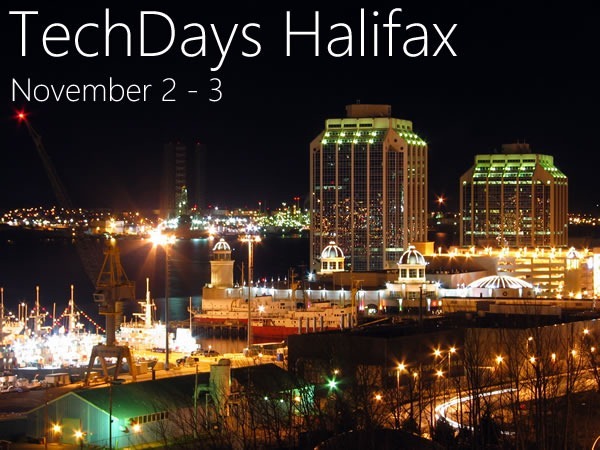
TechDays Halifax: November 2 – 3

by Joey deVilla on October 29, 2010

techdays halifax

TechDays, Microsoft Canada’s cross-country technical conference for developers and IT pros, heads to Halifax next week! So far, we’ve been to Vancouver, Edmonton and Toronto, and now it’s time to head out east.

TechDays Halifax will take place on Tuesday, November 2 and Wednesday, November 3 at the World Trade Centre (1800 Argyle Street). As with TechDays in every other city, there’s a lot going on:

  • CloudCamp on Monday, November 1. On the day before TechDays, we’re sharing our venue with the folks behind CloudCamp, the unconference on cloud computing. To find out more about CloudCamp, check out the registration page.
  • TechDays proper takes place on Tuesday, November 2 and Wednesday, November 3. We’re talking about 60 sessions on programming, systems administration, Microsoft technologies and “best practices” (I hate the use that term, but I’m at a loss for another phrase that captures its meaning). We take the content from big-ticket conferences like TechEd North America, MIX and PDC, give it to “local heroes” to present, bring it all to a city near you and charge a few hundred (instead of a few thousand) bucks.
  • TechDays Gives Back! We’re asking TechDays attendees to bring a non-perishable food item to the conference. All food will go to a local food bank.
  • Go DEVMental happens at the TechDays venue on the evening of Tuesday, November 2 – it’s our student event! If you’re a post-secondary student looking to get into web or phone development, you’ll want to catch Go DEVMental, where we’ll show you what’s possible with Microsoft tools and technologies, and you’ll walk away with a DreamSpark membership and fully-functional copies of Visual Studio Professional 2010 and Expression Blend. It doesn’t cost anything to attend; you just have to be a post-secondary student (with the ID to prove it. To attend, register here!
  • We’ll be holding a Windows Phone 7 Coffee and Code during the afternoon of Thursday, November 4 at Just Us Café on Barrington (1678 Barrington Street) from 2 to 5:30 p.m. Come on down, see Windows Phone 7 devices up close and personal, and if you’ve got an app that you want to test on a real device instead of the emulator, this is your chance!

See you next week!

This article also appears in Canadian Developer Connection.

{ 0 comments }

tuesday - androidto techdays

AndroidTO

Today is the day of Toronto’s conference for Android developers, AndroidTO. I’ll be in attendance, learning about Android development, seeing what Android developers are into and manning Microsoft’s Windows Phone 7 booth. That’s right, there’s going to be a Windows Phone 7 booth at an Android conference. Why? Because we’re gold sponsors.

I have to give kudos to Yorkville Media Centre, AndroidTO’s organizers, for seeing things the way I see it — and I see things as a guy who’s worked both the open source and proprietary sides of the computing fence. The mobile market of today reminds me of the personal computer market of the 1980s, the early days of desktop computing, where there were a number of vendors, each with a particular set of advantages, each with a decently-sized slice of the pie. You couldn’t develop for just one platform, but had to target at least a few of them. VisiCalc, the original spreadsheet, ran on the Apple ][, TRS-80, Atari and Commodore machines. Games like Miner 2049er ran on just about every machine under the sun, including the ColecoVision console. Pop open just about any computer of that era that had built-in BASIC, whether Apple, Radio Shack or Commodore, and what did you see on the ROM chips? A Microsoft copyright notice.

It’s the same today with mobile operating systems: if you really want an app to take off, you’ve got to build for many platforms. The folks behind Foursquare, Twitter, Bejeweled and Evernote think so, too. My thinking is: if you’re an Android developer, keep on cranking out those Android apps.,,but give Windows Phone 7 a look, too! You might like what you see, the layout markup and programming languages will be familiar to you, and you’ll be pleased with the speed with which you can pick up and develop apps.

Also: Windows 7 – that’s right, I’m talkin’ ‘bout the desktop OS now – is a great OS on which to develop Android apps. The JDKs run on it, Eclipse runs on it, NetBeans runs on it, a whole host of ancillary dev tools run on it, graphics, video and audio production tools run on it – everything that you need to build mobile apps on Android runs on it. And unlike you-know-who, System.out.writeln(“Java is not deprecated on Windows”);.

TechDays Eve

Today is also the day before TechDays Toronto, the Toronto edition of Microsoft Canada’s cross-country tech conference. In between my booth bunny duties at AndroidTO, I’ll also be attending a tech evangelist team meeting, setting up the rooms for TechDays’ two developer tracks, and attending the TechDays speaker dinner in the evening.

CloudCamp

The evening are downtime at TechDays’ venue, but we didn’t want that space to lie fallow. So we invited people to come and hold events in the TechDays venue when they weren’t in use, free of charge. CloudCamp took us up on our offer, and the Toronto edition takes place tonight. For more details about CloudCamp – it’s free to attend, so sign up if you’re available tonight – see this blog entry.

This article also appears in Canadian Developer Connection.

{ 0 comments }

Windows Phone App Challenge #2: Area Gas Prices

by Joey deVilla on October 26, 2010

app challenge - area gas prices

Last night, while picking up a Windows Phone that I’d loaned to a developer for the weekend so he could give his app a proper test on a real device instead of the emulator, I decided to fill up the gas tank on the Deathmobile, named after the car in the movie that inspired my academic career – Animal House.

(Yeah, it’s 12 years old, but with only 110,000 km on it – living in the city, doing lots of bike commuting and living right by a subway station has a lot to do with the low mileage.)

The gas station was in Vaughan, a suburb just north of Toronto, and regular gasoline sold for CAD$1.05 a litre (for my American readers, that’s USD$3.91 a gallon). As I got closer to home, I noticed that the gas stations were charging CAD$1.00 a litre, or USD$3.72 a gallon. I’d pumped 40 litres of fuel into my car, and had I waited until I got closer to home, I could’ve saved two dollars. For me and this one instance, that’s a minor loss, especially since I only have to fill my tank once every two or three weeks. For someone who does a daily commute, that sort of savings adds up.

However, this incident gave me an idea, and hey, two bucks is a small price to pay for inspiration. How about a phone app that lets you know whether you’re getting a good deal at the gas station?

Gas Price Sites

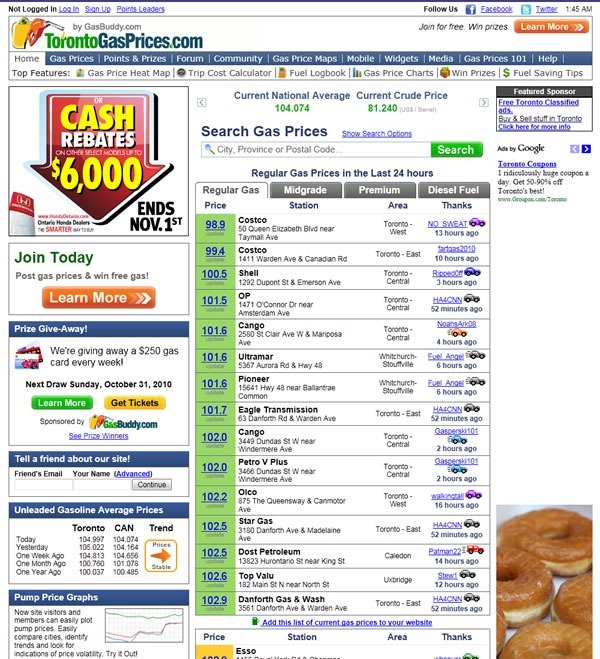
There are sites like GasBuddy.com, a network of just under 200 city-specific sites that track gas prices. According to their registration page, gas prices vary by 10 – 15 cents a litre (30 – 50 cents a gallon) within a city. The site boasts a membership of 700,000 people sharing gas prices in their area and acting as gas price data collectors and reporters. Each GasBuddy city’s site displays the latest prices reported for that city, along with the handle of the member who posted the price.

Here’s a screenshot of the Toronto-specific GasBuddy site, TorontoGasPrices.com:
torontogasprices site

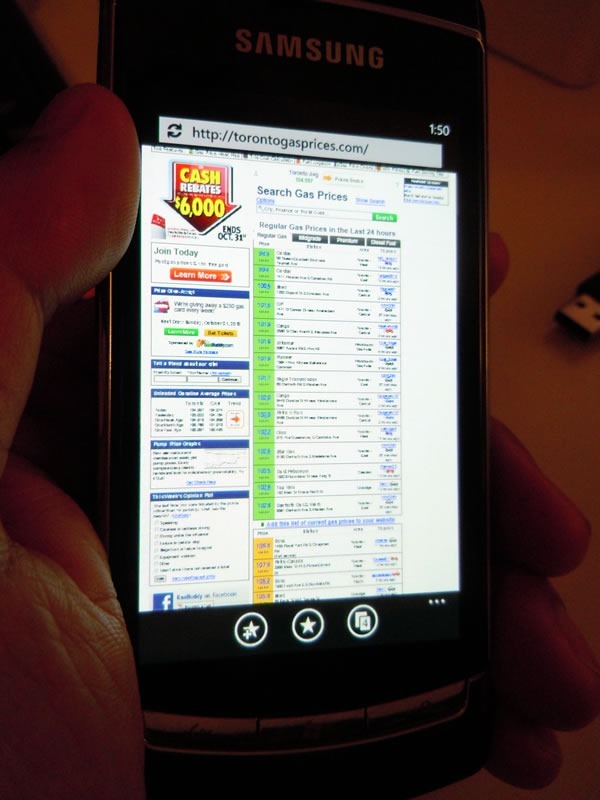
It’s one thing to cruise this site on a nice big monitor at home or a laptop or even a netbook. On a phone, it’s a bit of a challenge to read:
torontogasprices wp7

Yes, I know you can always use pinch zoom, but then you’re making the user do a lot of scrolling and paging, just to get an answer to a simple yes/no question: Am I getting a good deal at this gas station?

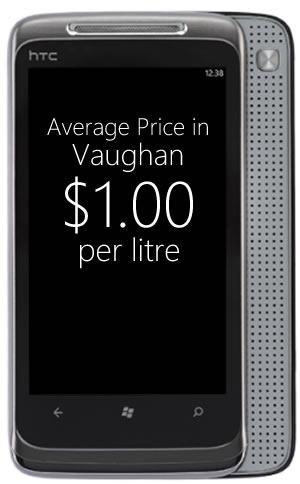
A mobile app that answers this question should adopt the Windows Phone 7 design philosophy of “Glance and Go”. It should give you the answer in a form like this:
gas app example

Getting the Info

For the app to work, you’ll need at least two pieces of information:

  • The area where the user is located
  • Gas prices for that area

Ideally, you’ll want to use GPS for getting the user’s location. You can access the GPS on Windows Phone 7 through the Location service, which lives in the System.Device.Location namespace. There’s pretty good coverage of it in the documentation, and I’ll post some code examples in a later article. You may also give the user the user the option of looking at gas prices in other cities, especially nearby ones.

Getting the gas prices for a specific area is a little trickier. You have a couple of options, listed in order from most to least feasible or realistic:

  1. Get the gas prices from an XML feed. Parsing it is the easy part – the XElement class of the System.XML.Linq namespace makes it pretty easy. Examples abound all over the ‘net – check out Scott Guthrie’s really simple WP7 Twitter app code for an example, and I’ll post an example in a later article.

    As for the feeds themselves, I know that GasTicker.com provides feeds for a number of North American cities. I have no idea how accurate they are – you may have to do a little field research, comparing their reported prices to actual prices in your town.

  2. Scrape the gas prices from a site that publishes them. Once again, the technical part is easy – the DownloadString method of the WebClient class in the System.Net namespace, given an URI (in either string or URI object form), returns a string containing whatever’s there. Once you’ve got the string, it’s up to you to apply whatever string-crunching magic you want to extract the gas price information from it.

    The trickier part is whether the site from which you’re scraping the prices minds. These sites often make their money from ads, and by scraping, you’re effectively bypassing them. Perhaps you can work out a deal with a site, but if you’re doing that, they might be able to give you the data in a more convenient form like an XML feed, and then you can go to method 1.

  3. Have an army of volunteers watch gas stations all over a given area like a hawk. They can then feed the data into some central repository – perhaps an XML feed that they update – and your app can retrieve that data as needed. You can scale this down and even go “hyperlocal” by focusing only on gas stations in your neighbourhood or even just one gas station.

There’s your challenge. I’ll write a follow-up article with example code, but in the meantime, fire up Visual Studio and get on it! If you write an app and submit it to Marketplace, drop me a line and let me know.

Previous App Challenges

pomodoro timer

This is the second in a series of Windows Phone 7 App Challenges, in which I present ideas for apps for Windows Phone 7 developers.

In the previous installment in this series, I presented users with the idea to write a timer that people could use for the Pomodoro Technique, a very simple but very effective method to boost your personal productivity. You can read more about it (and see some code, too) here.

This article also appears in Canadian Developer Connection.

{ 0 comments }

.NET MEAP Books at Half Price!

by Joey deVilla on October 25, 2010

halfoffsale

Perhaps you missed the sale earlier this month, but Manning’s holding one again! Today (Monday, October 25th), Manning Publications is holding a half-off sale on their MEAP — “Manning Early Access Program” – books. MEAP is their way for you to get an advance look at their in-progress books, and yes, once the book is complete, you also get the final version of the book in ebook form.

Want in on this deal? Enter the discount code dotd1025ccb when you check out at Manning.com.

Manning’s MEAP ebooks on .NET topics are:

  • ASP.NET 4.0 in Practice
  • C# in Depth, Second Edition
  • Continuous Integration in .NET
  • Dependency Injection in .NET
  • Hello! Silverlight
  • IronRuby in Action
  • Microsoft Entity Framework in Action
  • Multitouch on Windows
  • SharePoint 2010 Site Owner’s Manual
  • SharePoint 2010 Web Parts in Action
  • SharePoint 2010 Workflows in Action
  • SQL Server DMVs in Action
  • Windows PowerShell in Action, Second Edition

This article also appears in Canadian Developer Connection.
{ 0 comments }

What I’m Up To This Week

by Joey deVilla on October 25, 2010

It’s going to be a busy week for Yours Truly…

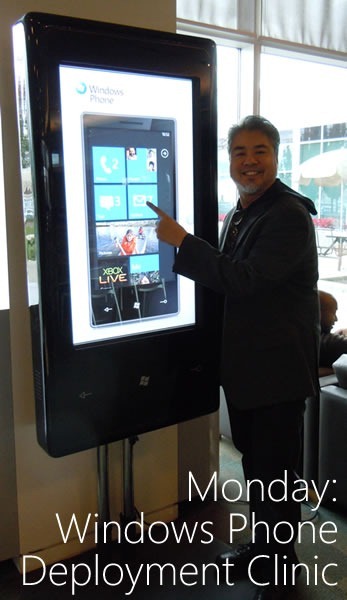
Monday: Windows Phone Deployment Clinic

monday - windows phone deployment clinic

On Monday, I’ll be helping out at the Windows Phone Deployment Clinic at Microsoft Canada HQ in Mississauga (1950 Meadowvale Boulevard, off Mississauga Road, north of Highway 401), where you can book some time to test your apps on a real Windows Phone 7 device. If you’ve got an app and you’re going to be in the area, drop me a line and book an appointment!

(By the bye, that thing I’m standing beside in the photo above is a promo device known colloquially as the “Big-Ass Phone”.)

Tuesday: AndroidTO and TechDays Setup

tuesday - androidto techdays

On Tuesday, I’ll be spending some time at the AndroidTO conference, a gathering of Android developers, where I’ll be minding the Windows Phone 7 booth. Yes, that’s right, Microsoft is a gold sponsor at an Android conference. Why? Because:

  • We feel that if you’re an Android developer, go ahead an build Android apps, but expand your market reach by developing for Windows Phone 7 too! The programming languages and layout markup are similar.
  • If you’re an Android developer, what’s the best OS for doing development? We think it’s Windows 7, which is a great environment for Java. Loads of great Java dev tools run on Windows, and we don’t consider Java to be deprecated.

AndroidTO takes place at the Polish Combatants Hall (206 Beverley Street, just south of College), is free-as-in-beer, and is alas, completely booked solid.

I’ll also be doing some setup for TechDays Toronto, which takes place on Wednesday and Thursday.

Wednesday: TechDays Toronto and Go DEVMental

wednesday - techdays godevmental

Wednesday brings with it TechDays, Microsoft Canada’s cross-country tech conference: two days of great sessions for developers and IT pros who are building stuff with the Microsoft stack. I’m the guy who picked the content for both developer tracks, “Developing for Three Screens and the Cloud” and “Optimizing the Development Process”. I strove for the best mix of both technology-specific stuff like Mark Arteaga’s Windows Phone 7 sessions and Kate Gregory’s Windows API Code Pack presentation as well as practice-of-programming sessions such as “Top 10 Mistakes in Unit Testing” and “Branching and Merging Strategies”. TechDays will occupy me from 7 a.m. until 5 p.m..

From 7 p.m. on, it’ll be Go DEVMental, the student event where we’ll show university and college students what’s possible with Microsoft’s web and mobile platforms. I’ll be doing a presentation on getting starting with game development for Windows Phone with an amusing little live-coded game called “BieberSmash”, starring the bubblegum pop idol of the moment. Go DEVMental is free and open to post-secondary students – just bring your student ID! You’ll get all sorts of goodies, including a DreamSpark token and Visual Studio 2010 Pro.

Both TechDays and GoDEVMental take place at the Metro Toronto Convention Centre’s South Building (222 Bremner Boulevard, right beside the CN Tower).

Thursday: TechDays, Day 2

thursday - techdays day 2

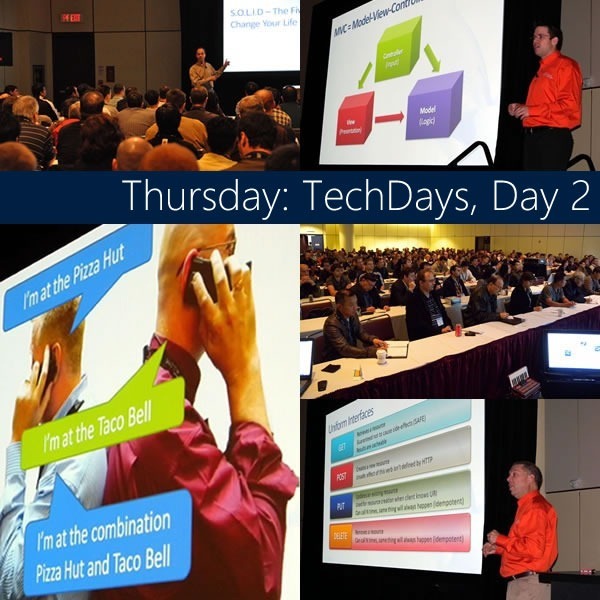
Thursday means another full day of the TechDays conference, to be followed by some very strong whiskey-based drinks.

Friday: Coffee and Code

friday - coffee and code

I’ll be running a Windows Phone 7 Coffee and Code this Friday from 11 a.m. to 5 p.m. at the Timothy’s at 225 Front Street West (in the Metro Toronto Convention Centre building). I’ll be hanging out at the cafe, working on Windows Phone 7 code on both the emulator and real Windows Phone devices. Want to learn more about Windows Phone 7, see a real-live phone, play some games or test your code? Come on down!

Saturday: ACSE Conference

saturday - acse conference

University of Toronto computer science prof Steve Engels invited me to speak in front of a group of high school teachers at the ACSE (Association for Computer Studies Educators) Conference taking place on Saturday. I’m going to be showing them programming for high school students on Windows Phone as well as with the Kodu game development environment.

…and Sunday?

sunday - zzzzz

Well, it won’t be all sleep. I’ll have to pack for my Monday flight to TechDays Halifax!

This article also appears in Canadian Developer Connection.
{ 0 comments }

CloudCamp Toronto is This Tuesday!

by Joey deVilla on October 24, 2010

cloudcamp toronto

It’s not too late to register for CloudCamp Toronto, the latest in a series of free cross-Canada unconferences for early adopters of cloud computing. It doesn’t matter whether your preferred cloud computing system is Microsoft’s, Amazon’s, Rackspace’s or anyone else’s – this gathering for anyone with an interest in the cloud, regardless of technology stack or vendor.

From the event description:

CloudCamp is an unconference where early adopters of Cloud Computing technologies exchange ideas. With the rapid change occurring in the industry, we need a place where we can meet to share our experiences, challenges and solutions. At CloudCamp, you are encouraged to share your thoughts in several open discussions, as we strive for the advancement of Cloud Computing. End users, IT professionals and vendors are all encouraged to participate.

CloudCamp Toronto will take place this Tuesday, October 26th at the South Building of the Metro Toronto Convention Centre.

Here’s the agenda:

Time What’s Happening
5:30 p.m. Registration and refreshments
6:00 Welcome
6:15

Lightning Talks:

  • Microsoft’s Barnaby Jeans on Azure
  • Reuven Cohen from Enomaly
  • One speaker to be named later
6:45 “Unpanel discussion”
7:15 Breakout session, round 1
8:15 Breakout session, round 2
9:00 Wrap-up
9:15 Where to next?

This article also appears in Canadian Developer Connection.

{ 0 comments }

We’re Looking for Canadian Windows Phone 7 Apps

by Joey deVilla on October 18, 2010

canadian wp7 apps

Windows Phone 7 hits the shelves of Bell, Rogers and Telus on November 8th, and we want to make sure that there’s a strong showing of apps written by Canadian developers in Marketplace when that happens. If you’re a developer based in Canada with an app that’s ready or near-ready, please contact me (Joey deVilla) via email as soon as possible! There are some things that I can do to help speed up the submission process that wouldn’t otherwise be available to you.

This article also appears in Canadian Developer Connection.
{ 1 comment }

31 Days of Windows Phone 7

by Joey deVilla on October 17, 2010

"31 Days of Windows Phone 7": Windows Phone showing the calendar for the month of October

Keep an eye on Jeff Blankenburg’s blog for the rest of the month! Every day in October, he’s posting an article on Windows Phone 7 development in a series called 31 Days of Windows Phone 7.

As of this writing, he’s posted these articles:

Jeff talked about his “31 Days” series (previous;y, he did a 31 Days of Silverlight series and 28 Days of Did-You-Knows in Technology one as well) on show 5 of Silverlight guru Jesse Liberty’s podcast.

This article also appears in Canadian Developer Connection.
{ 0 comments }

I’ll Take Two for My Desk, Please

by Joey deVilla on October 16, 2010

steve and giant monitor 1

I may have to take a course at ObjectSharp/New Horizons Toronto just to get close to the toys! After the Windows Phone 7 Coffee and Code on Thursday, Barry Gervin and Steve Syfuhs (who just got started working at ObjectSharp, an indirect result of my stunt where I wore assless chaps at CodeCamp a little while back) took me on a tour of their new office. It’s gorgeous, with a nice large social area in the centre and great-looking training rooms with two-monitor workstations for students and these gigantic Samsung touch- and pen-sensing screens at the front of the class. These photos show Steve demoing the big screen’s pen-sensing capability with a simple whiteboard app.

The ObjectSharp folks tell me that they’re making their space available to user groups. I just might have to take them up on that offer.

steve and giant monitor 2

Just in case you’re not clear: ObjectSharp is the part of the company that does the software development and business intelligence work, and New Horizons is the part of the company where you go for training for Microsoft tools and technologies. The new office puts them all in one place – 11 King Street West, 14th floor, falling distance from King subway station.

This article also appears in Canadian Developer Connection.
{ 0 comments }

Drupal Camp Toronto 2010

by Joey deVilla on October 15, 2010

drupal camp toronto 2010

Drupal Camp Toronto 2010 is happening in Toronto today and tomorrow! It’s a gathering to discuss all things Drupal, featuring keynote speakers such as ones: Dries Buytaert, Jeff Eaton, and Mark Brown. It’s at a nice, central, easy-to-get-to location, the Toronto Reference Library (a few steps north of the corner of Yonge and Bloor). And here’s something you might not expect – Microsoft Canada is a Platinum Sponsor.

port 25 canadaFor more about Drupal Camp Toronto 2010, I refer you to Microsoft Canada’s open source community blog, Port25.ca, which is run by the Open Source/Interoperability team of Nik Garkusha, Julia Stowell and Jenna Hoffman (whom you might remember from Make Web Not War earlier this year in Montreal). They’ve got some articles on Drupal and Drupal Camp Toronto, including:

This article also appears in Global Nerdy.

{ 0 comments }

imaginet unlock the power

Our friends at Imaginet are hosting two-hour events in Vancouver, Edmonton and Calgary where they’ll show Visual Studio developers how to get up to speed with all the goodies that have packed into Visual Studio 2010. Here’s what they’ll cover:

What’s new in Team Foundation Server 2010

Learn about important updates and enhancements to Team Foundation Server in the 2010 release.  Understand key components such as: Branches as a first class citizen, Branch visualization, and Change set history visualization.  See how using Team Project Collections can improve manageability and scalability.  Imaginet will demonstrate hierarchical work items and typed work item relationships as well as improvements to Team Build including features such as Buddy Builds and Gated Check In.

Testing Tools & Rich Developer-Tester Interaction with Visual Studio 2010

Imaginet will demonstrate the new testing tools in Visual Studio 2010 and how the generalist tester is now brought into the full Microsoft ALM platform.  The new Test Professional product is a purpose-built tool for test professionals to plan, execute and manage testing of your web, Windows Forms or WFP application.  See how the rich defect reporting including IntelliTrace and other information about the execution and system under test, helps eliminate the “I can’t reproduce the bug” response from development.  Test Lab Management can also assist in streamlining the setup and teardown of test labs for test.

These events are free, and they’ll be taking place in the following cities on the following dates:

City When Where
Vancouver
(click here to register)
Monday, October 25 Fairmont Waterfront Hotel
Malaspina Room
900 Canada Place Way
Calgary
(click here to register)
Monday, November 8 Met Centre
Grand Lecture Hall
333 Fourth Avenue SW
Edmonton
(click here to register)
Tuesday, November 9 Shaw Conference Centre
Salon 12
9797 Jasper Avenue

This article also appears in Canadian Developer Connection.
{ 0 comments }

Windows Phone App Challenge #1: The Pomodoro Timer

by Joey deVilla on October 14, 2010

app challenge - pomodoro timer

Introducing the Windows Phone App Challenge

“I’d love to write an app for launch,” a number of people have told me, “but I can’t think of an app to write. Got any ideas?”

Sure. I have lots of ideas. A few of them are even good (and won’t get anyone put in a compromising position, thrown in jail, or both)! My plan is to take those good ideas and present them to you, the potential Windows Phone 7 developer, as a challenge to turn those ideas into apps and submit them to Marketplace. You can make them available for free or charge for them, and I’ll ask for only one thing: email me and let me know that you’ve submitted an App Challenge app (that goes double if you’re a developer based in Canada)!

Here’s the first App Challenge: Build a Pomodoro Timer app. It’s a simple app, you can write a basic one in a hurry, but if you dress it up a little, you just might be able to sell it and make some decent coin. Sound tempting?

The Pomodoro Technique

pomodoro technique bookWhen you multitask – and a lot of programmers do – you might think that you’re getting more done, but in the end you end up with a set of half-finished tasks half-heartedly done. The way to really get stuff done and get into the much-vaunted “flow” state is to focus on a single task at a time.

The problem is that our brains aren’t evolved for doing that sort of thing for really long stretches. Being able to focus on a single task for hours would’ve gotten us killed by sneaky predators or the other horrible things that Mother Nature came up with in her infinite wisdom and even more infinite sadism. The tendency to get distracted by other things is a great safety feature in the wild, but not so useful in the white-collar 21st century world.

The Pomodoro Technique is a way to be productive that also takes both the need to focus and our limited attention span into account. Francesco Cirillo came up with the idea in the late 1980s and formally defined it in 1992, and there are a lot of people, Yours Truly included, who use it to get stuff done. Here it is in a nutshell:

  • Choose a task that you want to get done. It can be anything: writing some code, filing your expenses, answering your email, filling out TPS reports, cleaning the garage – anything that you need to get done.
  • Set a timer for 25 minutes. Francesco Cirillo used one of those wind-up kitchen timers shaped like a tomato, which in Italian is pomodoro, from which the technique got its name.
  • Do that task, and only that task, until the timer goes off. Focus completely on the task.
  • When the timer goes off, you have completed a Pomodoro! Take a five-minute break. Stretch. Walk around. Get a drink of water.
  • Repeat. You can either continue with the same task, or pick another one. Whatever task you pick, you must completely focus on it for 25 minutes.
  • Every 4 Pomodori (that’s the plural form), take a longer break. You’re only human.

That’s it!

Here’s why it works:

  • 25 minutes doesn’t seem so bad. Ever looked at a pile of work that you had to do and felt the fingers of icy dread wrap around your heart? That’s because you’re picturing the hours, days, weeks, months and even years that it will take. This is the sort of thing that leads to procrastination, and take it from me, procrastination will screw you up in so many ways. Looking at work in bite-sized chunks make it easier to deal with, in the same way that breaking down a program into bite-sized blocks of code makes it easier to deal with.
  • It’s simple. The more complex a working methodology, the less likely it is that you’ll follow it. Pomodoro is dirt easy — it takes only a minute to explain (and less than a minute if you talk quickly), and the only technology you need is a countdown timer that can measure a 25-minute interval.
  • It harnesses the most powerful force in the universe: compound interest. (Okay, you can argue that love is the most powerful force in the universe, but for the moment, let’s say it’s compound interest.) Compound interest is the result of tiny gains made over time. Each interest payment is almost too small to notice on its own, but collectively, and with enough time, the total interest is huge. Every Pomodoro is a compound interest payment in your “stuff done” bank, and over time, it really adds up!

If you’d like to find out more about the Pomodoro Technique, you can check out the book by its inventor, The Pomodoro Technique, which is available free of charge in electronic form from the Pomodoro Technique site. You might also want to look at Pomodoro Technique Illustrated, written by Staffan Noteberg and published by the Pragmatic Programmers.

Your Challenge: Build a Pomodoro Timer App

The 25-minute countdown timer is incredibly important to the Pomodoro Technique. You can’t truly practice Pomodoro without it; you’d have to occasionally check the time, which takes away from the one thing you’re supposed to do during a Pomodoro: focus.

Here’s the basic user story:

  • The user picks a task that s/he wants to focus on during the Pomodoro sprint.
  • The user starts the timer and begins working.
  • 25 minutes later, the timer makes some kind of sound signalling the end of the sprint.

Because I’m a nice guy and want you to succeed, I’m going to give you the starting point for a basic Pomodoro timer and leave it to you to finish it.

pomodoro app

It’s past any sane person’s bedtime as I write this, so I decided to save myself a little trouble and use Nigel “Compiled Experience” Sampson’s Minutes to Midnight app as the basis for my dirt-simple Pomodoro timer example. I left the XAML pretty much as-is; here’s the underlying code:

using System;
using System.Windows;
using System.Windows.Threading;

namespace Pomodoro
{
  public partial class MainPage
  {
    private DispatcherTimer timer;
    private DateTime endTime;

    public MainPage()
    {
      InitializeComponent();
      Loaded += OnLoaded;
    }

    private void OnLoaded(object sender, RoutedEventArgs e)
    {
      timer = new DispatcherTimer
      {
        Interval = TimeSpan.FromSeconds(1)
      };

      timer.Tick += OnTick;
      endTime = DateTime.Now.AddMinutes(25);
      timer.Start();
    }

    private void OnTick(object sender, EventArgs e)
    {
      var timeLeft = endTime - DateTime.Now;

      Countdown.Text = String.Format("{0:D2}:{1:D2}",
                         timeLeft.Minutes, timeLeft.Seconds);
    }
 
  }
}

The Minutes to Midnight app counts down the hours, minutes and second to midnight , which is pretty close in spirit to what a Pomodoro timer does. It uses a DispatcherTimer object and its Tick event to update the display of the time remaining to midnight every second.

I simply took the app and made the following changes:

  • Changed the namespace to Pomodoro
  • Declared a new instance variable, endTime, which would store the time when the Pomodoro should end.
  • In the OnLoaded event handler, I initialized endTime to the current time plus 25 minutes.
  • In the OnTick event handler, I:
    • Changed the calculated value of timeLeft so that it was equal to the amount of time remaining until the end of the Pomodoro.
    • Changed the formatting of the displayed time so that only the minutes and seconds remaining were shown.

Now it’s your turn! Can you:

  • Make the timer stop when the 25 minutes is up?
  • Make it play a sound when the 25 minutes is up?
  • Add controls so the user can start, stop and reset the timer?
  • Let the user type in the name of the task that s/he is supposed to focus on during the Pomodoro?
  • Store the number of achieved Pomodori and catalog them by task type and date?
  • Give the user a “medal”, “trophy” or “achievement” for completing large numbers of Pomodori?
  • Break away from the digital readout and make it look and feel more like a tomato-shaped kitchen timer? (See this article for inspriation.)
  • Make the code less like “example” code and more like “real” code (for instance, moving the main program logic out of the event handlers)?
  • Add a screen or two that explains the Pomodoro Technique?
  • Come up with other enhancements?
  • Write and submit a finished, polished Pomodoro timer app and submit it to Marketplace in the next couple of days?

There’s your challenge! Go write a Pomodoro timer app, submit it to Marketplace, and don’t forget to let me know about it!

This article also appears in Canadian Developer Connection.

{ 1 comment }

Lit match: "Ignite your mobile development"

You might be familiar with the Ignite Your Coding LinkedIn group, a great place to keep up with all sorts of development news (and not just for the Microsoft’s platforms, but for all of them). But did you know that there’s also a Mobile Development LinkedIn group that’s a subgroup of Ignite Your Coding? Join it, keep up with mobile development news, share your knowledge, join the discussions and get to know the Canadian mobile dev community!

This article also appears in Canadian Developer Connection.
{ 0 comments }

The incredibly low-resolution dragon from the Atari 2600 game "Adventure": "In A.D. 2010, dragon was awakening".

Who Poked the Sleeping Dragon? asks The Next Web in response to the changes in Microsoft and its offerings as of late, from Windows 7 to Internet Explorer 9 to Windows Phone 7. Frederic Lardinois of ReadWriteWeb posts on his personal tech blog, NewsGrange, that The Microsoft Tanker Has Turned and You Ignore It at Your Peril. TechCrunch’s resident Apple fanboy (he says so himself) MG Siegler titled a recent article Wow, With Windows Phone 7, Did Microsoft Actually Bring a Gun to a Gunfight? It’s interesting to see the sort of articles the tech pundits are cranking out these days about the company for which I work – and the metaphors they’re employing.

This article also appears in Canadian Developer Connection.

{ 0 comments }