November 2011

The Shopify Fund: A Quick Update

by Joey deVilla on November 30, 2011

"What's up with the Shopify fund?": Photo of a pile of US bills

Today is November 30th, the last day for which you can apply to the Shopify Fund. If you’re a developer with an idea for a Shopify app or a developer without an idea for an app but the skills to write one, go visit the Shopify Fund page and sign up! Just do it soon, because the deadline’s coming up quickly.

The Shopify Fund is our way of creating a win-win situation for both Shopify and developers. It lets us pay developers to work full-time on a Shopify app (an application that makes use of the Shopify API to add features to or extend the capabilities of Shopify shops or that integrates Shopify shops with other services) without them having to take on other jobs to pay the bills. In exchange, we get more apps in the Shopify App Store, and with those apps, more features and functionality and in turn, happy shopowners.

Starting tomorrow, the day after the deadline for applying to the Shopify Fund, we’ll review the submissions. We’ll spend the month of December looking at people’s proposed apps or the resumes and portfolios of developers who don’t have app ideas and want to build apps. Then in the new year, we’ll make our final decisions, start funding app development and get more apps into the Store. If you want a more detailed explanation of how the Shopify Fund’s funding works, see this earlier article: The Shopify Fund, Explained.

If you’ve got an idea for a Shopify app or the chops to write one, apply to the Shopify Fund while there’s still time!

This article also appears in the Shopify Technology Blog.

{ 0 comments }

"Shopify/Twilio Developer Contest": 1960s photo of a woman at a "futuristic" computer console

Shopify and Twilio are Holding a Contest!

Shopify, the ecommerce platform that makes it easy to set up online shops, is teaming up with Twilio, the platform for voice-over-phone, voice-online and SMS messaging, to create a developer contest where you’re challenged to write an app that makes use of both platforms.

Perhaps it’s an app that phones customers or sends them an SMS message when their order has been shipped. Or voice notification to a bricks-and-mortar store that tells the staff that a customer is coming to pick up their order. With a little creativity, some coding and our APIs, you can write an app that’s both useful and cool enough to win one of our prizes…

The Prizes

First prize: Macbook Air and Apple Cinema Display

First prize is from Shopify: it’s Edward from Shopify’s preferred rig! A hot-rodded 11-inch Macbook Air with 256GB solid-state drive and 1.8 GHz CPU along with a gigantic 27-inch Apple Cinema Display. Small and light for when you’re on the go, a nice big screen for when you’re at home, the office of wherever you decide to keep the display and plenty of horsepower to build apps.

Second prize: Lego Mindstorms robot

Second prize comes from Twilio and it’s a robot hacker’s dream: a stacked LEGO Mindstorms swag bag with the NXT 2.0, a bundle of touch, light and sound sensors, and a Bluetooth dongle to keep your creations connected. I, for one, welcome our new LEGO robot overlords.

Third prize: Amazon Kindle Fire

Third prize is a joint Shopify/Twilio effort: a Kindle Fire, the newest multi-touch full-color hotness from the world of ebook readers.

The Rules

We try to keep things simple – it’s about building cool apps, not being buried in regulations!

Okay, How Do I Get In on This Action?

This article also appears in the Shopify Technology Blog.

{ 1 comment }

Featured Shopify App: Kudyou

by Joey deVilla on November 29, 2011

Kudyou LogoThe Shopify App Store has over 100 apps to extend the features and capabilities that already come “out of the box” with your Shopify shop. We’ve been featuring apps from the Store for the past little while, covering apps that help you run your shop, make tedious tasks easier and help you connect with your customers.

Today, we take a look at Kudyou, an app that lets you offer your customers cash rewards that they can save or give to their favorite causes. We interviewed the Kudyou team and shared their answers.

What does Kudyou do?

Kudyou helps shopowners generate higher sales though personalized customer rewards. It allows brands to present one reward that customers can personalize to suit their unique needs, either by saving up cash or donating to any cause of their choice.

What are Kudyou’s key features?

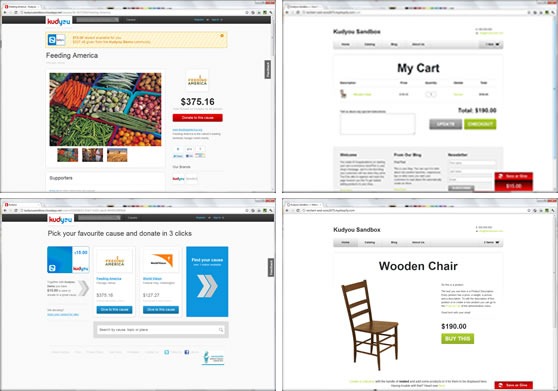
Screenshots of various pages from the Kudyou app

Kudyou does the following:

  • Generates higher and more profitable sales by creating campaigns where customers can personalize their rewards, post-purchase
  • Helps your customers support causes they are very passionate about, which leads to more referrals and sharing of offers
  • Delivers these campaigns in a cost effective manner. Kudyou is more like payments processing pricing than daily deals charges
  • Better presents the causes you support and extend the reach of your existing socially responsible initiatives to a receptive Kudyou community
  • Learns about what causes your customers support in order to create more focused sales campaigns in the future

Why should shopowners use Kudyou?

Kudyou wants to help shopowners generate profitable sales and more beneficial engagements with consumers.

Shopowners benefit from higher sales and referrals from customers sharing these more meaningful offers with their friends.

Kudyou manages the campaign funds and social sharing of these offers on behalf of shopowners while delivering a great redemption process for shoppers in the process.

Tell us a little about yourself.

Three of the four people who make up Kudyou

Kudyou is a core team of 4 people (with the usual support from loads of others) looking to build our start-up venture.

We’re actually split between 2 locations on 2 continents! We’re all Irish born, but John is based in Silicon Valley and has lived in the US since 2000. The rest of the team, Hugh, Karl and Des are all based on Dublin, Ireland. John and Hugh have known each other for over 16 years but that’s small change compared to Karl and Des, who met in kindergarten!

John had the original idea and is the business guy but only possesses enough technical knowledge to get himself in trouble. Hugh is technical so he manages the product strategy and John’s ideas. Karl
and Des, well they’re the engine, the coders who make all this a reality.

So, that’s Kudyou. You can find us in all the usual places, so check us out on the web, Facebook, Twitter etc. We look forward to hearing what people think about what we’ve built and seeing how people use it.

Where did you get the idea for your app?

We built this app for a number of reasons. Firstly, we felt that this was something missing from the market across all channels. Based on feedback from merchants, shoppers, donors and causes we set out to build our vision of this functional utility that would enable everyone to benefit. One of our advisors, Tamsin Smith who previously ran (RED), terms this “Beneficial Buying”.

Shopowners are looking to create better engagement experiences, enhance the attributes of their brand and get closer to their customers. From a sales campaign perspective, offering discounts
is easy but competing on price is not always a winning strategy; there needs to be more. Shopowners are doing a lot more socially responsible campaigns and these do resonate with consumers. Over
$200 billion is donated in the US by individuals each year and there are over one million active non-profits, so the question becomes from a shopowners perspective, which causes are right for them and their customers?

Giving is something very personal as is the need to sometimes save money. People want the choice to save or give to something they care about and want sales campaign to be relevant, genuine and
transparent. We believe that a lot of people are looking for more meaning, choice and control in their life. Giving customers the ability to choose how they would like to direct their reward is something positive and an experience they are willing to share with friends.

With all this in mind we set about building out the Kudyou service. We also knew that we would need to partner with others. Tamsin introduced us to Shopify since she was talking with Shopify about her
new business venture. We also knew some others who wanted to try out Kudyou, such as Willow Glen Charm, so we referred them to Shopify, given it’s such a great and easy platform to sell from.

It’s going to be interesting to see how people use Kudyou, from all perspectives.

Where can I find out more about Kudyou?

Kudyou Icon

You can find more about the Kudyou app on its page in the Shopify App Store and about Kudyou on their site.

This article also appears in the Shopify Technology Blog.

{ 2 comments }

Featured Shopify App: Yotpo

by Joey deVilla on November 22, 2011

An Elmo doll sitting beside the Yotpo logo

There’s nothing like word of mouth to drive customers to your doorstep. Consider the following:

If you run an online shop, you’d do well to harness the power of word of mouth, and Yotpo, one of the apps in Shopify’s App Store, is a great way to do this. We talked with Yotpo co-founder Tomer Tagrin about his company’s app and we’re sharing what he told us in this article.

What does Yotpo do?

Yotpo Logo: "Yotpo. Makes Customers Happy."Yotpo is the first social micro-reviewing app. It enables your customers to read reviews from his/her friends and provides a quick and elegant way for them to write social reviews through the your shop. Our app uses patented software to build a social graph of your customers and provides social data on your top customers and leverages it to to increase your sales and customers’ experience.

What are Yotpo’s key features?

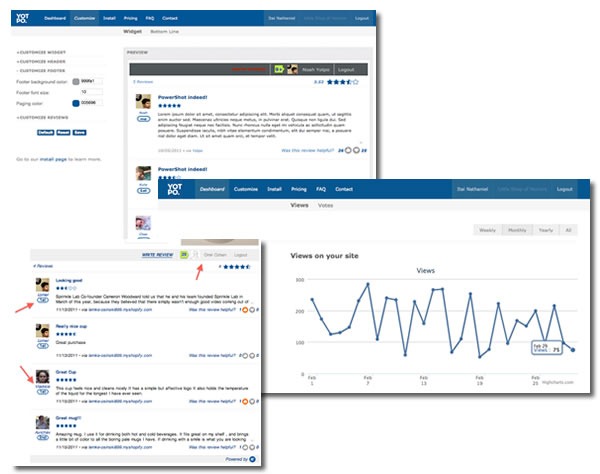
Screenshots of Yotpo's various screens

Yotpo’s key features are:

  • Builds a social report on your customers, improving sales and engagement.
  • Enables customers to read and write reviews using their social media accounts: Facebook, Twitter, Linkedin and Foursquare.
  • Provides an analytics tool for each reviewer, which draws customers to come back to your shop and check their reviewer analytics regularly.
  • Improves your shop’s SEO using social data.
  • Builds a social graph of your shop’s the site social graph of customers.
  • Full customization capabilities.
  • Stays in touch with your customers: after making their purchase each customer is automatically emailed and invited to review the items he/she bought.

Why should shopowners use Yotpo?

If you’re looking to make more money, Yotpo is for you! Yotpo gives your shop an easy, beautiful social review system to engage your customers, bring them back and buy more.

If you want to get a clear view of your shop’s top customer, Yotpo is for you! It establishes the social graph of your shop’s customers and lets you know who your top customers are.

If you want to give your customers a reason to come back, Yotpo is for you! Yotpo entices customers to make return visits to check their reviewer analytics.

Tell us a little about yourself.

The Yotpo team, all gathered on a couch in their office

Yotpo is an 8-person machine based in Tel Aviv. We’re divided into R&D, sales, marketing and customer service and got an $800K investment in early 2011. We’re big believers in providing quality content to our customers. Check out our blog; we have even an article from Shopify’s CEO!

We’re going to disrupt the way users read and write reviews. We’re working on taking reviews into the social space by both providing e-commerce sites a true social solution and by building customers a fun, influential way to read and write reviews. We’re working on being a cross platform solution for shopowners and customers.

Feel free to reach us at through our social networking profiles on Twitter or Facebook!

Where did you get the idea for Yotpo?

A "Tasmanian Devil" doll, sitting between two Yotpo logos

Me and my co-founder Omri got the idea from just being internet shoppers. We were frustrated with the way reviews worked on ecommerce sites. Many of them carried very cool products that I wanted to review but the writing process was bad — really bad.

We wanted to enable customers to write social reviews and influence their social graph. We also talked to many online shopowners saw that they weren’t using reviews to establish a true social graph of their store.

If you think about it, the review space isn’t all that different from the social netowrking revolution. Yotpo is just that: a true social, fun and influential way to read and write reviews among friends.

Where can I find out more about Yotpo?

The Yotpo icon, as seen in the Shopify App Store

You can find more about Yotpo, along with over 100 other apps to add features and functionality to your Shopify shop, at the Shopify App Store.

This article also appears in the Shopify Blog.

{ 0 comments }

"Pragmatic Bookshelf's Black Friday Sale": photo of people in line at a Black Friday sale

On Black Friday – for those of you outside the U.S., that’s Friday, November 25th, they day after Thanksgiving and the biggest shopping day of the year – most of the Pragmatic Bookshelf’s books, PDFs and screencasts will go on sale for 40% off. Only a few titles, such as The SPDY Book and Exceptional Ruby, will be exempt, but everything else will be available at a 40% discount.

All you have to do to get the discount is use the discount code “turkey” while checking out at the Pragmatic Bookshelf store on Friday, November 25th between 00:00 PST (3:00 a.m. Eastern / 0800 GMT) and 23:59 PST (2:59 a.m. on Nov. 26th Eastern / 0759 on Nov. 26th GMT).  Just enter “turkey” in the coupon code field, then select your payment method to apply the discount to your order.

This article also appears in the Shopify Technology Blog.

{ 0 comments }

Rob Conery: Setting Up Rails on Your Mac for Microsofties

by Joey deVilla on November 17, 2011

Joey deVilla's MacBook Pro, with an IE9 sticker on it

Why, oh why, didn’t Rob Conery’s guide to setting up Rails on a Mac for Microsofties exist back in May? While I did fine following Cowboy Coded’s excellent guide to setting up Rails 3 on Snow Leopard useful (and hey, prior to joining Microsoft, I did Rails 1.x development), a ‘Softie-friendly guide from the other famous guy to leave Microsoft for the Rails world would’ve been nice. If you’re from the world of ASP.NET MVC development – or worse, plain old ASP.NET or worse still, oldie-von-moldie ASP – Rob does a pretty good job of giving you the background details on all those things that Rails developers use that you probably didn’t – XCode, Homebrew, Git, gems, bundles and so on.

Once you’ve followed Rob’s steps, all you’ll need to truly be a Rails-on-a-Mac developer is a fauxhawk and perhaps a fixie. I’ll refer you to my hipster stereotype coworker Edward for those subjects:

Photo of Edward Ocampo-Gooding in a Canada Goose parka, wearing a scarf, smoking a pipe and with an Xbox 360 achievement: "ACHIEVEMENT UNLOCKED: Maximum hipster level reached"

This article also appears in the Shopify Technology Blog.

{ 1 comment }

50 Cent is Now on Shopify!

by Joey deVilla on November 17, 2011

Curtis Jackson, the rapper better known to the world as “Fitty Cent”, has a company called SMS Audio and they launched their Shopify-based shop today. The shop is called SMS By 50 and it’s the go-to place for premium headphones.

Headphones offered by SMS By 50: Earbuds, wired and wireless

The headphones come in three flavours: wired, wireless and earbuds. They’re currently available for pre-sale and range in price from $129.95 to $399.95, which is “right in line with current market trends” according to this TechCrunch article. SMS Audio recently bought KonoAudio, who’ve been making funky high-end headphones for ages, presumably for their headphone manufacturing expertise, which will be backed by Fitty’s street cred.

SMS By 50 T-shirt and Cap

In addition to headphones, SMS By 50 also carries shirts and caps, suitable for just plain old hangin’ or hittin’ da club.

Screen capture of the main page of the SMS By 50 shop

If you’re working on your own Shopify shop or designing Shopify themes, give SMS By 50 a look. It’s got a great design whose look and feel works for its audience; it also shows you how flexible Shopify’s templating system is.

Oh, and by the way, if you think you’re not “street” enough to sport “Fitty” gear, here’s something just for you:


This article also appears in the Shopify Technology Blog.

{ 0 comments }

Featured Shopify App: Accessify

by Joey deVilla on November 16, 2011

"Accessify": Computer keyboard with highlighted blue key with wheelchair symbol 

According to the President’s Committee on Employment of People with Disabilities, there are about 50 million people in the United States with some kind of disability. We also have an aging population, who have their own accessibility issues. And finally, the odds are that sooner or later, most of us will have to cope with some kind of temporary or permanent limitation through illness or injury. People who fall into these categories rely on web accessibility and making sure that they can use your shop isn’t just the right thing to do; it also makes good business sense.

We’ve got over a hundred apps in the Shopify App Store, and Acessify is today’s featured app. It’s a handy tool for checking the accessibility of your shop and helping ensure that customers who use screen readers and other assistive technologies with their computer can use it. We asked Brian Getting, the creator of Accessify, and we’re sharing his answers with you.

What does Accessify do?

Screenshot of Accessify's settings page

Accessify automatically scans your Shopify shop each week for accessibility issues. When accessibility issues are found, it sends you an email report showing which pages had issues, what those issues are and links to more information about resolving them.

What are Accessify’s key features?

Screenshot of Acceessify's report page, showing accessibility warnings and hints

  • It saves shopowners time by automating accessibility scans.
  • It helps shopowners address accessibility issues.
  • It provides shopowners with records of their stores’ accessibility status.

Why should shopowners use Accessify?

Shopowners should use Accessify because there are tens of millions of customers with disabilities in the United States alone. Worldwide the number of potential customers that have disabilities affecting their ability to interact with a computer (visual impairments, broken hand, and so on) is staggering, and general the PWD (People with Disabilities) community relies on the Internet even more heavily than the average customer.

There’s also the matter of accessibility regulations varying from country to country, and Accessify can help with documenting accessibility efforts.

Tell us a little about yourself.

Screenshot of Terra Firma Design and Consulting's web page

My name is Brian Getting, and I operate Terra Firma Design & Consulting located in Newport, Oregon. We are also the people behind Chimpified, another Shopify app.

Where can I find out more about Accessify?

Icon for Acessify app in the Shopify App Store

You can find out more about Accessify on its page in Shopify’s App Store.

{ 0 comments }

Ruth Morton Asks: Can IT Pros Benefit from Agile Metholodologies?

ruth mortonOne of the people with whom I had the pleasure of working during my days at Microsoft was technology Advisor Ruth Morton, who’s based near Microsoft Canada’s headquarters just outside Toronto. While my audience was developers, hers is what Microsoft calls “IT Pros” – the people who set up the machines, install/deploy/update the software, set up and keep the network running and do all those other things that we who write code consider to be Someone Else’s Problem. In addition to showing IT Pros the latest and greatest Microsoft tech, she talks to tech managers about using technology in the service of keeping their businesses running smoothly, to women about careers in IT and to students about their futures in the field of technology. Right now, she’s in Vancouver at the TechDays cross-Canada conference, where she’s running the Security, Identity and Management track.  If you’re in the Toronto area and do sysadmin-y stuff or deploy Windows and Office for a business, you’d do well to get to know Ruth!

In her latest post at Microsoft’s IT Manager Connection blog, Ruth writes about applying agile methodologies in places beyond its original domain of software development. She asks:

Even though the Agile Manifesto was born of a desire to create a mechanism for better software delivery, I see applications outside of that world too. In life, keeping an eye on your goals while planning a little at a time allows you to adjust for change, take advantage of opportunity and be released from disappointment because The Grand Plan didn’t pan out exactly how you anticipated. In desktop deployment projects, applying elements of the Agile methodology should allow you to be more flexible, adapt as issues are discovered and respond to your client’s needs. Less documentation, more collaboration with the customer and being responsive to change.

Now, I’m not out there deploying Office and Windows these days, so I don’t have the opportunity to put my theory into practice. What do you think? Is it possible to be "more agile” in client deployments?

(You might want to take a look at the Agile Business infographic in my last blog post.)

If your line of work is along the lines of “IT Pro” or sysadmin and you’ve got an opinion, let Ruth and company know over at her AlignIT for Infrastructure and Development Managers LinkedIn group.

Go for IT: My “Last Lecture” at Microsoft

In her article, Ruth mentions a presentation I created titled Go for IT: How to Have an Awesome Career and Life. While working at The Empire, I gained a bit of notoriety for building offbeat presentations that veered away from the standard Microsoft template. That, coupled with the fact that I had a good rapport with students, was probably why one of my last assignments was to create a new presentation about career planning aimed at students in college and university.

In making the presentation, I read a lot of Daniel Pink, watched Randy Pausch’s Last Lecture and looked back at some twists that had taken place in my own life. These all served as inspiration for Go For IT, and I’m sharing it with you now. It comes with copious speaker notes; with only a little practice, you too can deliver this presentation to students thinking about going into a technology career and asking themselves “What now?”

If you’d like the original slide deck in either PowerPoint of Keynote format, drop me a line and I’ll send it your way.

{ 0 comments }

“The Agile Business” Infographic

by Joey deVilla on November 10, 2011

The folks at Gist, who make a manage-the-firehose-of-your-communications web application (I’m taking the beta for a spin) have created an infographic titled The Agile Business which covers how agile software development methods are being adapted for running a business today. Here’s a shrunken-down version:

"The Agile Business" infographic

The original infographic is larger and easier to read; you can grab it from the Gist Blog.

At Shopify, the biz dev team have taken the underlying principles of agile development – the focus on individuals and interactions, stuff that works, customer collaboration and responding to change – and applied it to what their work, which involves drumming up new partnerships and business collaborations. Business development processes, which I’ve seen stretch on for months at my last job (a Fortune 50 company; I’ll leave it to you to ratiocinate which one, and it’s not that hard to figure out) take only weeks and are sometimes even pared down to days at Shopify. Harley and his people call it “Agile Bizdev”.

One minor quibble – note the graphic used to depict the gathering of software developers putting together the Agile Manifesto:

quibble

I’m familiar with the story of how and where the Manifesto got put together. I’ve even talked with The Pragmatic Programmers’ Andy Hunt, one of the guys who was there, about it. They most certainly weren’t sitting at a round boardroom table; they were at a ski lodge. In my interview with Andy, I asked if the get-together where they drafted the Manifesto was anything like Hot Tub Time Machine, and he gave a quick non-reply and changed the topic. So I choose to believe it was!

This article also appears in the Shopify Technology Blog.

{ 1 comment }

Featured Shopify App: Portable

by Joey deVilla on November 9, 2011

Large icon for the Portable app

If you haven’t visited Shopify’s App Store lately, take a look now! There are now over 100 apps there, each of which adds new capabilities to your shop. From apps that simplify the task of cranking out shipping address labels to managing your social media presence to rewarding loyal customers, we’ve got lots of ways to make your shop even better.

Portable is one of the currently featured apps, and it brings customer data to an application you can use any time and can access from anywhere: Gmail. It’s a great way to quickly get information about any of your customers and stay on top of your customer relationships.

We had a Q & A session with Justin Burdett, Portable’s developer, and his answers follow.

What does Portable do?

Portable brings Shopify customer details and brings your customers into where you’re interacting with them most: your email. Portable looks up any of the details about a customer using their email address. If the email address belongs to a customer, important details about that customer will be displayed, all within your Gmail window.

Portable currently works with Gmail through Rapportive, but we’re hoping to expand to other email software in the future.

What are Portable’s key features?

Screenshot of Portable working within Gmail

Portable brings the following customer details right to your inbox:

  • A direct link to that customer’s profile in your Shopify store
  • Lifetime value details like total number of orders and total spent, localized for your country and currency
  • Recent orders, including a direct link to the recent orders in your Shopify store, the order number, and the financial status, shipping status and order status
  • Primary address and phone details for that customer
  • Any notes you’ve entered about that customer

Why should shopowners use Portable?

Portable will save you time and effort by bringing customer details right to you when you get support requests. You will be able to provide faster support by cutting down on the time it takes to find the information you need and better support by gaining valuable insights into the customer.

Tell us a little about yourself.

I’m a geek from Pittsburgh, PA. I’ve got a couple of different projects I like work on. In my spare time, I like to play disc sports like Ultimate and disc golf. You can find more about me on my website or follow my dumb jokes on Twitter at @jburdeezy.

Where did you get the idea for Portable?

I was thinking about opening a Shopify store for another project of mine and I thought that I’d like something like Portable. I found Shopify’s API and got to work. Boom! Portable was born.

How long did it take for you to build Portable?

It only took me a few days to get an early version of the app and spent about a week in beta testing.

Where can I find out more about Portable?

Screenshot of the Shopify App Store, with Portable as a featured app

You can find out more about Portable on its page in the Shopify App Store.

This article also appears in the Shopify Blog.

{ 0 comments }

The Shopify Fund, Explained

by Joey deVilla on November 9, 2011

"The Shopify Fund, Explained": stacks of $100 bills arranged into an "S" shape

Shopify, its API and the App Ecosystem

Every now and again, I get asked this question: “Okay, I’ve heard of Shopify, but what does Shopify actually do?” The answer I give depends on who’s asking:

  • The shortest, quickest, clearest, layperson-friendliest answer is something along the lines of “Shopify is a web app that lets you run your own online shop.”
  • I tell people interested in selling stuff online (as well as people whose inclinations are more towards business) that the stores for Angry Birds, Epic Meal Time, Evisu Jeans, Foo Fighters, General Electric, LMFAO, Penny Arcade and Pixar are all powered by Shopify.
  • And finally, for more technically-inclined people, I say “It’s an easy-to-use, themeable hosted ecommerce platform that’s extensible through an API.”

Let talk about Shopify’s API. It lets you write apps that add functionality to or extend the capabilities of a shop. Most of the things that a shopowner can do from the admin panel can be done programmatically via the API; the API also makes it possible for you to get information from a shop so that you can integrate it with other services. You can write an app that will be used only by your shop, or you can write one for use by any shop, which you can sell to shopowners at the App Store.

The API designed to be simple and straightforward. You can call it using either XML or JSON, and it exposes different parts of a shop – such as products (things you sell in a shop), orders (orders placed by customers) and collections (groups of products within a shop) – as resources, each with its own URL and you manipulate the resources using the HTTP verbs GET, POST, PUT and DELETE. We’ve made it as RESTful as possible.

Screenshot of the Shopify App StoreWhat sort of apps have been written? There are about 100 in the App Store, and they do all sorts of things. Apps that have been featured recently on the Shopify Blog and Shopify Technology Blog include:

The Fund

Last month, Shopify landed a sweet $15 million in series B funding, which we’re using to grow the company in all sorts of ways:

  • Some of it will be used to hire the best developers, designers and businesspeople out there.
  • Some of it will be used to fund strategic partnerships and make some acquisitions.
  • Some of it – one million dollars’ worth – will be used to create the Shopify Fund.

"Dr. Evil" from "Austin Powers", touching his lips with his pinky

That’s right, it’s one. Meeeellion. Dollars.

The purpose of the Fund is to encourage the development of Shopify apps. Apps make everyone happy:

  • Shopowners: because they extend the capabilities of their shops.
  • Customers: because when a shop is running well, they get the stuff they want.
  • You, the developer: because you write software for a living.

Joey deVilla on CTV News with the caption "Joey deVilla: Internet Software Developer"

Not only was I a software developer, I played one on TV!

Most of us at Shopify, myself included, come from a development background, and we’ve all done freelance and contract work. We know what it’s like to worry about where this month’s rent is coming from and to juggle and prioritize clients. Wouldn’t it be nice if you had a nice big client that paid you enough to concentrate full-time on a single project?

We want to be that big client! We created this fund to create a mutually beneficial arrangement: you get paid enough to work full-time on a Shopify app for a few weeks without having to take on other contracts and still make a living, and we get apps that extend the capabilities of our platform.

How Much Money are We Talking About Here?

Jack Nicholson's "Joker", dancing in a storm of bills

We expect that most of the projects will range from a couple of weeks’ to a couple of months’ worth of work. We’re looking at a ballpark figure of about $5,000 – $10,000 per app. The amount will vary with the scope and complexity of your project.

How Do You Get In on Some of This Action?

Screen capture of the Shopify Fund page

There are two ways that you can get in on the Shopify Fund:

  1. If you’re a developer with an idea for an app and we think it’s a good one, we’ll pay you to develop it.
  2. If you’re a developer with the talent to build apps but no idea of what to write, take a look at our App Wishlist and see if there’s an app idea you’d like to implement. If you can prove to us that you can deliver, we’ll pay you to develop it.

If you fall into either one of these categories and would like to get funded, visit the Shopify Fund page and fill out the form. We’re accepting submissions until Wednesday, November 30th.

After the submissions close on November 30th, we’ll spend December and a little bit of January reviewing the submissions. App development and funding will start around mid-January.

What Happens If You Get Funded?

A scattered pile of $100 bills

I like to describe the funding as being "like the advances paid to book authors, but nicer".

Suppose your app gets selected (or you get selected to write an app) and we decide to fund your project with $5,000. Here’s what happens:

  1. At the start of the project, we’ll pay you the first half of the “advance”. In this example, that amount is $2,500.
  2. You work on your app. We’ll check in with you regularly during this time.
  3. When the app’s done, you’ll get the second half of the “advance” — the other $2,500.
  4. Your app goes into the Shopify App Store. For every sale of the app, the revenue share between you and Shopify will be 50/50; you receive 50% and we receive 50%. This 50/50 revenue sharing will continue until Shopify’s total of the 50% share equals the advance we gave you (or in other words, until your app rakes in a total of $10,000).
  5. Once our 50% share is equal to the advance we gave you, the revenue share changes to Shopify’s standard 80/20 ratio for sales in the Shopify App Store: you receive 80% and we receive 20%.

See what I mean by “like a literary advance, but better”? With a literary advance, you don’t earn any money until your sales have paid off the advance. With the Shopify Fund, you’re always taking in money, even while you’re “paying off the advance”.

How Do I Find Out More?

If you have any questions or comments, please feel free to drop us a line at fund@shopify.com! We’d be very happy to answer your questions.

This article also appears in the Shopify Technology Blog.

{ 0 comments }

Toronto Techie Dim Sum - 11/11/11, a.k.a. "Nerd New Year" - photo of har gow in a steamer

This Friday, November 11, 2011, can also be written down as 11/11/11, which is why a number of people have declared it “Nerd New Year”. Seeing as that’s the designation for the day, and seeing as we’re slightly overdue for another Toronto Techie Dim Sum, I’m calling one for this Friday at noon, Nerd New Year, at our regular place: Sky Dragon at Dragon City Mall (southwest corner of Dundas and Spadina).

In case you missed the one in September, I took some photos and wrote up a quick summary here.

As with the Toronto Techie Dim Sums, this is just a lunch gathering of folks who like tech. There’s no agenda, no set topics, no presentations – just good people, good conversation and good (and inexpensive) food. You don’t have to be a developer to attend! If you take part in the activity ofwriting software, building web sites or cobbling together technologies, or if you just like hanging out with the very nice people who comprise Toronto’s active and vibrant tech scene, please join us for a Nerd New Year lunch!

As always, we all pitch in on the final bill. For the past several dim sum lunches, it’s never gone over $12 a person including tip, and it’s sometimes been less. You’re not going to find a better deal or a better crowd!

It’s an open event – invite people, friends and colleagues! If you and your friends are interested in joining us for lunch at Toronto Techie Dim Sum, please RSVP on the Facebook event page. It’ll give me an idea of the number of people who’ll be attending and will let me make the proper arrangements with the restaurant.

This article also appears in The Adventures of Accordion Guy in the 21st Century.

{ 3 comments }

ClearFit’s Looking for a Rails Developer

by Joey deVilla on November 8, 2011

Clearfit [hearts] Rails, GitHub and Amazon Web Services

My friend Robert Nishimura’s looking for a Rails developer for his company, ClearFit, which is based in uptown Toronto. He sent me some details about the position he’s trying to fill; I’ve posted them below.

If you’ve got the skills and if the position sounds interesting to you, you should drop him a line at robert@clearfit.com!

Company Information

ClearFit is changing the way small businesses hire. Most people know that ‘fit’ is the most desirable attribute for employees and employers — that intangible sense that can’t be found in a resume and is difficult to glean from a job interview. It’s a huge problem — employers spend billions every year on staffing in Canada alone.

Most small business owners don’t know where to even start when hiring a new employee. Ask around for referrals, “pay and pray” with a job board or deal with an avalanche of resumes from Craigslist? 

We have built the system that some describe as “an eHarmony for jobs”. We have over 2500 registered employers and tens of thousands of registered career seekers which barely scratches the surface of a multi-billion dollar market. All this and we just completed our first round of investment so we are poised for stellar growth.

We are located in the Yonge/Eglinton neighbourhood, strategically situated between 3 Starbucks and 3 minutes from Bulldog Coffee. We’re also upstairs from Copacabana Brazilian BBQ.

Skills & Requirements

Skills:

  • Minimum 2 years experience coding in Ruby on Rails
  • Minimum 2 years experience with HTML/CSS
  • Experience with Javascript (Prototype, JQuery)
  • Experience with Postgres SQL
  • Experience with Ubuntu/Nginx
  • Experience with GitHub

Bonus points:

  • Experience with Amazon EC2
  • Experience integrating with other web apps
  • Photoshop and front-end web development skillz
  • iOS development experience

What ClearFit Offers

  • Salary between $80K and $100K based on experience
  • Snacks and drinks in our kitchen
  • Wicked awesome coffee from our new Nespresso machine
  • 15 days paid vacation per year
  • Full group benefit plan which includes vision, dental

If this sounds like something you’re interested in, contact Robert Nishimura directly at robert@clearfit.com

{ 1 comment }

Three Months of CoffeeScript

by Joey deVilla on November 7, 2011

coffeescript

Guest Post by Kamil Tusznio!

Kamil’s a developer at Shopify and has been working in our developer room just off the main “bullpen” that I like to refer to as “The Batcave”. That’s where the team working on the Batman.js framework have been working their magic. Kamil asked if he could post an article on the blog about his experiences with CoffeeScript and I was only too happy to oblige.

CoffeeScript

Since joining the Shopify team in early August, I have been working on Batman.js, a single-page app micro-framework written purely in CoffeeScript. I won’t go into too much detail about what CoffeeScript is, because I want to focus on what it allows me to do.

Batman.js has received some flack for its use of CoffeeScript, and more than one tweet has asked why we didn’t call the framework Batman.coffee. I feel the criticism is misguided, because CoffeeScript allows you to more quickly write correct code, while still adhering to the many best practices for writing JavaScript.

An Example

A simple example is iteration over an object. The JavaScript would go something like this:

var obj = {
  a: 1,
  b: 2,
  c: 3
};

for (var key in obj) {
  if (obj.hasOwnProperty(key)) { // only look at direct properties
    var value = obj[key];
    // do stuff...
  }
}

Meanwhile, the CoffeeScript looks like this:

obj =
  a: 1
  b: 2
  c: 3

for own key, value of obj
  # do stuff...

Notice the absence of var, hasOwnProperty, and needing to assign value. And best of all, no semi-colons! Some argue that this adds a layer of indirection to the code, which it does, but I’m writing less code, resulting in fewer opportunities to make mistakes. To me, that is a big win.

Debugging

Another criticism levelled against CoffeeScript is that debugging becomes harder. You’re writing .coffee files that compile down to .js files. Most of the time, you won’t bother to look at the .js files. You’ll just ship them out, and you won’t see them until a bug report comes in, at which point you’ll be stumped by the compiled JavaScript running in the browser, because you’ve never looked at it.

Wait, what? What happened to testing your code? CoffeeScript is no excuse for not testing, and to test, you run the .js files in your browser, which just about forces you to examine the compiled JavaScript.

(Note that it’s possible to embed text/coffeescript scripts in modern browsers, but this is not advisable for production environments since the browser is then responsible for compilation, which slows down your page. So ship the .js.)

And how unreadable is that compiled JavaScript? Let’s take a look. Here’s the compiled version of the CoffeeScript example from above:

var key, obj, value;
var __hasProp = Object.prototype.hasOwnProperty;
obj = {
  a: 1,
  b: 2,
  c: 3
};
for (key in obj) {
  if (!__hasProp.call(obj, key)) continue;
  value = obj[key];
}

Admittedly, this is a simple example. But, after having worked with some pretty complex CoffeeScript, I can honestly say that once you become familiar (which doesn’t take long), there aren’t any real surprises. Notice also the added optimizations you get for free: local variables are collected under one var statement, and hasOwnProperty is called via the prototype.

For more complex examples of CoffeeScript, look no further than the Batman source.

Workflow

I’m always worried when I come across tools that add a level of indirection to my workflow, but CoffeeScript has not been bad in this respect. The only added step to getting code shipped out is running the coffee command to watch for changes in my .coffee files:

coffee --watch --compile src/ --output lib/

We keep both the .coffee and .js files under git, so nothing gets lost. And since you still have .js files kicking around, any setup you have to minify your JavaScript shouldn’t need to change.

TL;DR

After three months of writing CoffeeScript, I can hands-down say that it’s a huge productivity booster. It helps you write more elegant and succinct code that is less susceptible to JavaScript gotchas.

Further Reading

This article also appears in the Shopify Technology Blog.

{ 6 comments }