June 2008

Joey\'s Unofficial Ruby Fringe Guide to Toronto - Small logoWelcome to the third installment in Joey’s Unofficial RubyFringe Guide to Toronto, a series of offbeat articles to acquaint attendees of the upcoming RubyFringe conference with Accordion City.

There’ve been two articles in the series so far:

  1. Where Did All the Cigarettes Go?
  2. Getting from the Airport to the Hotel

In this article, I’ll cover the social lubricant that helps keep a good tech conference going: booze!

The Legal Drinking Age in Ontario: 19

If you look at Wikipedia’s Legal Drinking Age page, there are generally two places with a drinking age of 21 and some regions which ban the sale (and sometimes consumption) of alcohol:

  • A handful of Muslim countries that allow alcohol: Indonesia (except Bali), Oman, Pakistan and United Arab Emirates, and
  • the United States of America

Here in Ontario, as with most of Canada, the legal age drinking age is 19. Underage drinking is permitted at home under adult supervision. No, underage RubyFringers, you cannot come to my house to drink. A number of RubyFringe after-conference events will be taking place in or near licensed establishments, so be sure to bring some government ID with you — a driver’s licence or passport will do.

Where Do You Buy Liquor and Beer in Ontario?

If Ontario has a more civilized legal drinking age, we pay for it in terms of where we can buy it. The sale of beer and liquor is limited — with a few exceptions — to two types of stores:
Logo for LCBO (Liquor Control Board of Ontario) stores

The first type: the LCBO (short for the Liquor Control Board of Ontario), a set of stores run by the Ontario government that carries, spirits, wines and beers.

Storefront for \"The Beer Store\"

The second type: The Beer Store. Its official name is Brewers Retail, but since everyone calls it “The Beer Store”, that’s what they typically display on their storefronts. They sell beer and beer paraphernalia.

Okay, Enough Preamble. Where’s the Alcohol Store Closest to the Hotel?

Of the two types of store, the closest one to the Metropolitan Hotel Toronto is the LCBO at the Atrium on Bay, a shopping centre located a mere two blocks away. If you walk out of the hotel, take a left until you hit Dundas Street, then turn right and walk two blocks. The LCBO is on the lower level, about half a block into the shopping centre. Here’s a map:
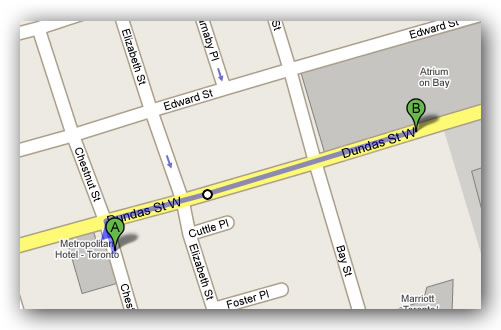
Map showing the path from the Metropolitan Hotel Toronto to the LCBO at the Atrium on Bay

This LCBO keeps these hours:

  • Monday – Wednesday: 10:00 a.m. – 9:00 p.m.
  • Thursday – Saturday: 10:00 a.m. – 10:00 p.m.
  • Sunday: 12:00 p.m. – 5:00 p.m.

The Beer Hunter is Your Friend!

The \"Beer Hunter Guy\"

The Beer Hunter is a Google Maps mash-up that shows you the locations and hours of alcohol retail outlets in Ontario, aswell as which stores are open right now. It’s a creation of local web development shop Bad Math, and was recently featured in at New York’s Metropolitan Museum of Modern Art’s exhibit, Design and the Elastic Mind.

I’m Crashing at a Friend’s House. Can I Get Booze Delivered There?

Yes, you can! For a CDN$8.00 delivery charge, The Beer Guy lets you order alcohol online for home delivery in one hour.

Okay, Enough About Stores. What About Bars? Any Good Ones Near the Hotel?

There are a number of bars within walking distance of the hotel. Here are three decent ones that I used to frequent when I lived in the neighbourhood. They’re not cookie-cutter drinking establishments that you can find anywhere, but places with some character and local vibe.
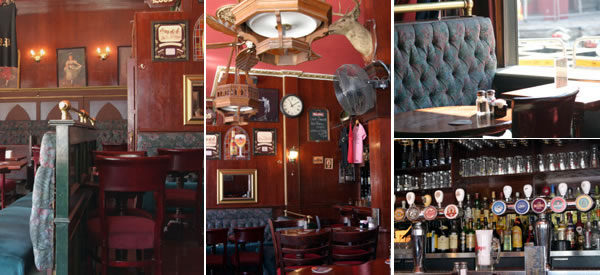
Interior shots of The Village Idiot Pub

The Village Idiot Pub (126 McCaul Street, about 6 minutes’ walk from the hotel). This one’s a hangout for locals as well as art students from the Ontario College of Art and Design or visitors to the Art Gallery of Ontario, both of which are just across the street. The bar has about two dozen higher-end beers on tap, from imports like Guinness, Leffe Brune and Kronenberg 1664 to local microbrews like Waterloo Dark (a favourite of mine) and Brick Honey Brown. The outer walls of the bar are garage doors which are rolled up in the summer to let the air in.

I made some decent coin (and a lot of beer!) busking here during the great blackout of 2003.
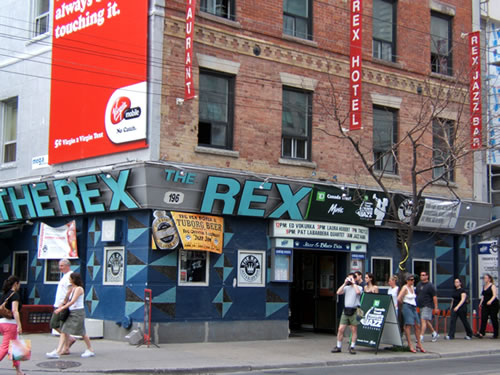
The Rex Hotel

The Rex Hotel Jazz and Blues Bar (194 Queen Street West, about 10 minutes’ walk from the hotel). A jazz and blues institution since I was in high school, The Rex is a retro, just-divey-enough place that has a decent selection of beer and live blues and jazz. I’ve seen some pretty good acts here and have stumbled home tipsy many a night from this joint.
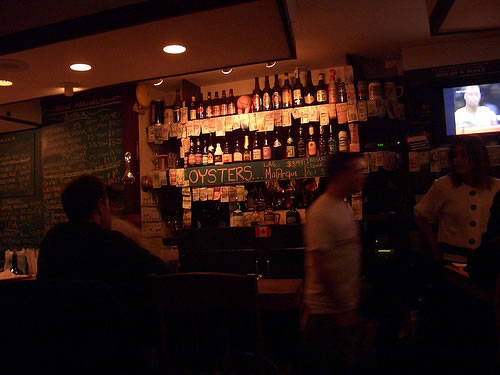
Interior of Smokeless Joe

Smokeless Joe (125 John Street, about 12 minutes’ walk from the hotel). This is a place for the serious beer enthusiast. With a half-dozen taps and a couple hundred bottled beers, this tiny, friendly place was my preferred watering hole when I lived in the neighbourhood. If you want some food to go with your beer, they have delicious sandwiches and some pretty good oysters.

I’ve been there on some pretty good dates, such as this one as well as my first date with The Ginger Ninja.

When is Last Call in Ontario?

Bars and pubs have to stop serving alcohol at 2 a.m..

Is There Any Way to Get Served Booze After 2 a.m.?
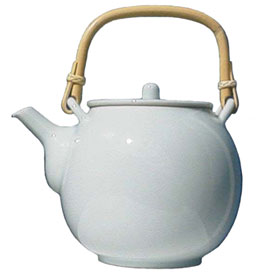
teapot

I can neither confirm nor deny the veracity of the urban legend of “cold tea”, only that the urban legend exists. It does, after all, exist as an entry in Urban Dictionary.

There are speakeasies in town; the local term for them is “booze cans”. Their locations change over time, and the ones from my days as a single guy probably no longer exist. The best way to locate these places is to ask anyone who works in the entertainment/service industry such as a bartender or waiter; they’re where they go when their shifts end.

Be advised that you’ll get more out of the conference if you get some decent sleep and aren’t hung over…

{ 8 comments }

Fear and Loathing at RailsConf

by Joey deVilla on June 26, 2008

In Fear and Loathing at RailsConf, Giles Bowkett examines what it means to “Keep RailsConf weird”. It’s worth a read, especially if you’re attending, planning or gate-crashing RubyFringe.

{ 2 comments }

This is Me and Regular Expressions

by Joey deVilla on June 26, 2008

Unless they’re painfully simple, I never write my regular expressions correctly the first time. Usually my first attempt gets results like this:

\"Before and after\" photos of a radio-controlled Hummer mishap
Photo courtesy of Miss Fipi Lele.

(For the full story behind these photos, see this entry on the Accordion Guy blog.)

{ 0 comments }

Why Don’t Browsers Have File Upload Progress Bars?

by Joey deVilla on June 26, 2008

Michael Kimsal asks a very good question: Why do browsers still not have file upload progress bars?

{ 0 comments }

Joey\'s Unofficial Ruby Fringe Guide to Toronto - Small logoIn preparation for people coming to Accordion City to attend the RubyFringe conference (as well as those of you who are coming here this summer for other reasons), I’m writing Joey’s Unofficial RubyFringe Guide to Toronto, a series of articles with useful tips for visiting our fair city.

So far, I’ve published one article: Where Did All the Cigarettes Go?, in which I explained to visiting smokers that you can buy cigarettes in stores here; they’re just hidden in large, featureless cabinets behind the counter.

In this article, I’m going to cover the cheapest way to get to the conference hotel, the Metropolitan, from the airport.

There are Two Metropolitan Hotels!

This may be a source of confusion, so make sure you’re aware of this: there are two Metropolitan Hotels in town. Both are owned by the same hotel chain, and they’re a fifteen-minute walk from each other!

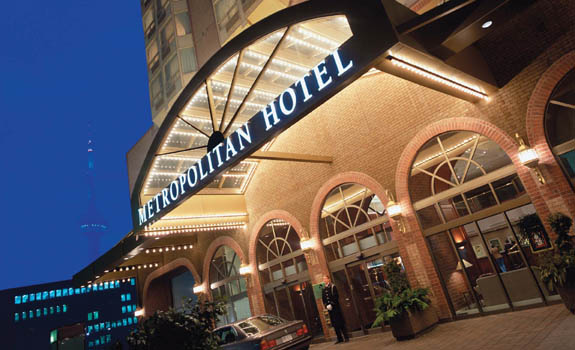
RubyFringe is taking place at the Metropolitan Hotel Toronto, located at 108 Chestnut Street, which is behind City Hall and on the edge of Chinatown. If the front of the hotel looks like the photo below, you’re in the right place:

Front entrance of the Metropolitan Hotel Toronto

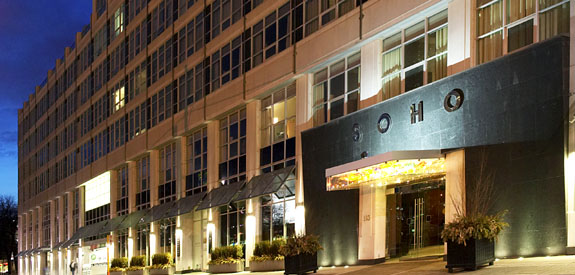
The other hotel is the SoHo Metropolitan Hotel on 318 Wellington Street West and is a hop, skip and a jump away from Toronto’s domed stadium, The Rogers Centre. If the front of the hotel looks like the photo below, you’re in the wrong place!

Front of the SoHo Metropolitan Hotel

(There’s nothing wrong with the Soho Met: it’s a nice place and swankier than the Metropolitan Toronto; it’s just that the conference isn’t taking place there.)

For this article and any other in this series, when I refer to the Metropolitan Hotel, I’m referring to the Metropolitan Toronto, the conference venue.

The Distance

Lester B. Pearson International Airport (airport code YYZ, which is where Rush got the name for their song with Neil Peart’s legendary drum solo) is a bit of a hike from downtown Accordion City. It’s 27 kilometres (about 17 miles) from the airport to the Metropolitan Hotel, a span on par with the distances between Los Angeles International Airport and its downtown core, Chicago’s O’Hare Airport and the Chicago Loop and Newark’s Liberty Airport and midtown Manhattan.

The Most Expensive Way: Renting a Car and Driving (Round trip: $lots)

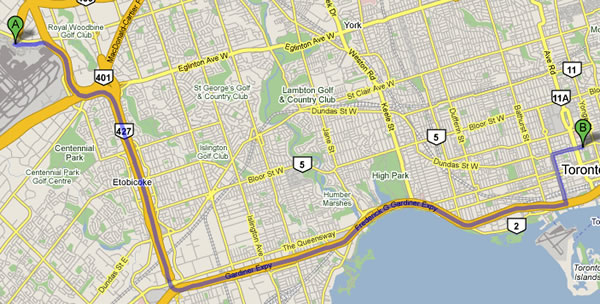
If you were to drive from the airport to the hotel, you’d get on Highway 427 and go south to the Gardiner Expressway and follow it east. Google Maps says to exit at Spadina, I say take the Bay/York Street exit and follow York Street to where it forks and take the University Avenue fork (Spadina has fewer lanes and is downtown Chinatown’s main drag, which makes it slower going). Either way, you go north to Dundas, at which point you turn east and go a short way to Chestnut Street, where the hotel is.

Map showing road directions from Pearson Airport to Metropolitan Hotel Toronto
Google Map showing directions from Pearson Airport to the Metropolitan.
Click the map to see it on its Google Maps page.

The Second Most Expensive Way: Taking a Cab or Airport Limo (Round trip: $90 – 100)

If you were take a cab or airport limo from the airport to the hotel today, it would cost around $40. However, cab fares are going up in July because of skyrocketing gas prices, so a cab ride will probably cost more by the time RubyFringe takes place. The trip should take about 35 – 40 minutes if traffic isn’t too bad. It’s probably the fastest, lowest-hassle way to get to the hotel from the airport.

The Cheapest Way: The TTC (Round trip: $5.50)

The cheapest way to get to the hotel is via public transit — the TTC. It will cost you a grand total of $2.75 and take about 45 minutes to an hour. It involves a bus trip, followed by a ride on the subway.

The first leg of the trip is to take the 192 Airport Rocket bus. It stops at both Terminal 1 and Terminal 3.

(Don’t worry about it not stopping at Terminal 2: it’s being renovated and not being used for anything!)

I know that going to a strange town and not knowing what things look like can throw you off, so I’ve gathered some photos to help orient you. TTC bus stops are marked by signs that look like this:

TTC bus stop sign

Here’s what the airport bus stop looks like:

\"Airport Rocket\" bus pulling into the airport bus stop

And here’s what a TTC bus looks like:

TTC bus

Make sure that you board only the 192 Airport Rocket bus; it’s an express bus that goes straight to the subway station. The others will eventually take you to a subway station, but they’re regular bus routes and take much longer.

In case you were wondering, the $2.75 fare you pay on the bus will cover the whole trip to the hotel.

Here’s the schedule for the Airport Rocket. The trip to Kipling subway station should take about 20 minutes.

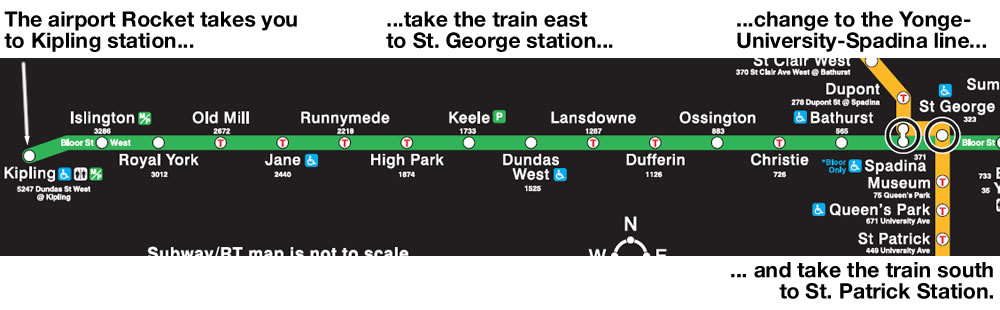
Once you’re at Kipling station, take the train east to St. George station. At St. George station, you’ll go up one floor, which takes you to the north-south-running trains on the Yonge-University-Spadina line. Take the train south to St. Patrick station.

Map showing TTC subway trip from Kipling to St. Patrick station
Click the map to see it at full size.

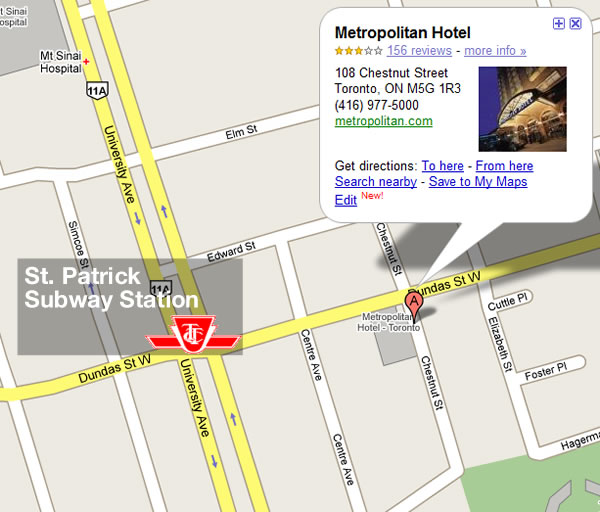
Exit St. Patrick station, and you’ll be a mere two blocks away from the hotel:

Map showing St. Patrick subway station and Metropolitan Toronto Hotel

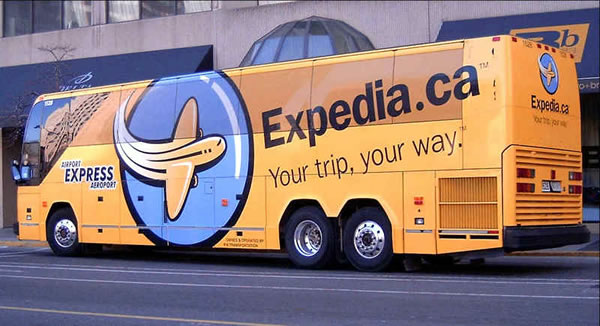
The Middle-of-the-Road Way: Airport Express Bus (Round trip: $29.95)

Airport Express bus (Toronto)

The Airport Express bus stops at both Terminals 1 and 3, involves less lugging stuff around than taking the subway and takes slightly longer than a cab would. It stops at a number of hotels in the downtown core, including the Metropolitan.

They advertise that their buses are WiFi equipped, which might come in handy if you really feel the need to check your email or IM everyone that you’ve arrived.

{ 6 comments }

Here we are the third installment of Enumerating Enumerable, my attempt to do a better job of documenting Ruby’s Enumerable module than RubyDoc.org does. In this installment, I cover Enumerable#collect and its syntactic sugar twin (and the one I prefer), Enumerable#map.

In case you missed the earlier installments, they’re listed (and linked) below:

  1. all?
  2. any?

Enumerable#collect/Enumerable#map Quick Summary

Graphic representation of Ruby\'s \"Enumerable#collect / Enumerable#map\" methods

In the simplest possible terms Create a new array by performing some operation on every item in the given collection. collect and map are synonyms — you can use either. I personally prefer map as it’s shorter and makes sense if you think of the method as being like functional mapping.
Ruby version 1.8 and 1.9
Expects A block containing the criteria. This block is optional, but you’re likely to use one in most cases.
Returns An array made up of items created by performing some operation on the given collection.
RubyDoc.org’s entry Enumerable#collect / Enumerable#map

Enumerable#collect/Enumerable#map and Arrays

When used on an array and a block is provided, collect/map passes each item to the block, where the operation in the block is performed on the item and the result is then added to the result array. Note the the result array has the same number of elements as the given array.

[1, 2, 3, 4].map {|number| number ** 2}
=> [1, 4, 9, 16]

["Aqua", "Bat", "Super", "Wonder Wo"].map {|adjective| adjective + "man"}
=> ["Aquaman", "Batman", "Superman", "Wonder Woman"]

When the block is omitted, collect/map uses this implied block: {|item| item}, which means when applied on an array without a block, collect/map is the identity function — the resulting array is the same as the given array.

[1, 2, 3, 4].map
=> [1, 2, 3, 4]

["Aqua", "Bat", "Super", "Wonder Wo"].map
=> ["Aqua", "Bat", "Super", "Wonder Wo"]

Enumerable#collect/Enumerable#map and Hashes

When used on a hash and a block is provided, collect and map pass each key/value pair in the hash to the block, which you can “catch” as either:

  1. A two-element array, with the key as element 0 and its corresponding value as element 1, or
  2. Two separate items, with the key as the first item and its corresponding value as the second item.

Each key/value pair is passed to the block, where the operation in the block is performed on the item and the result is then added to the result array. Note the the result array has the same number of elements as the given array.

burgers = {"Big Mac" => 300, "Whopper with cheese" => 450, "Wendy's Double with cheese" => 320}

# What if I had just half a burger?
burgers.map {|burger| burger[1] / 2}
=> [160, 150, 225]

burgers.map {|sandwich, calories| calories / 2}
=> [160, 150, 225]

burgers.map {|burger| "Have a tasty #{burger[0]}!"}
=> ["Have a tasty Wendy's Double with cheese!", "Have a tasty Big Mac!",
 "Have a tasty Whopper with cheese!"]

burgers.map {|sandwich, calories| "Have a tasty #{sandwich}!"}
=> ["Have a tasty Wendy's Double with cheese!", "Have a tasty Big Mac!",
 "Have a tasty Whopper with cheese!"]

burgers.map {|sandwich, calories| ["Half a #{sandwich}", calories / 2]}
=> [["Half a Wendy's Double with cheese", 160], ["Half a Big Mac", 150],
 ["Half a Whopper with cheese", 225]]

When the block is omitted, collect/map uses this implied block: {|item| item}, which means when applied on an hash without a block, collect/map returns an array containing a set of two-item arrays, one for each key/value pair in the hash. For each two-item array, item 0 is the key and item 1 is the corresponding value.

burgers = {"Big Mac" => 300, "Whopper with cheese" => 450, "Wendy's Double with cheese" => 320}

burgers.map
=> [["Wendy's Double with cheese", 320], ["Big Mac", 300], ["Whopper with cheese", 450]]

Special Case: Using Enumerable#collect/Enumerable#map on Empty Arrays and Hashes

When applied to an empty array or hash, with or without a block, collect and map always return an empty array.

# Let's try it with an empty array
[].map
=> []

[].map {|item| item * 2}
=> []

# Now let's try it with an empty hash
{}.map
=> []

{}.map {|sandwich, calories| "Have a tasty #{sandwich}!"}
=> []

{ 8 comments }

Enumerating Enumerable: Enumerable#any?

by Joey deVilla on June 24, 2008

Welcome to the second installment of Enumerating Enumerable, my project to do a better job of documenting Ruby’s Enumerable module than RubyDoc.org. This installment will cover Enumerable#any?, which I like to think of as Enumerable.all?‘s more easy-going cousin (I covered Enumerable.all? in the previous installment).

Enumerable#any? Quick Summary

Graphic representing Ruby\'s Enumerable#any? method

In the simplest possible terms Do any of the items in the collection meet the given criteria?
Ruby version 1.8 and 1.9
Expects A block containing the criteria. This block is optional, but you’re likely to use one in most cases.
Returns true if any of the items in the collection meet the given criteria.

false if none of the items in the collection does not meet the given criteria.

RubyDoc.org’s entry Enumerable#any?

Enumerable#any? and Arrays

When used on an array and a block is provided, any? passes each item to the block. If the block returns true for any item during this process, any? returns true; otherwise, it returns false.

# "Fromage de Montagne de Savoie" is the longest-named cheese in this list
# at a whopping 29 characters
cheeses = ["feta", "cheddar", "stilton", "camembert", "mozzarella", "Fromage de Montagne de Savoie"]

cheeses.any? {|cheese| cheese.length >= 25}
=> true

cheeses.any? {|cheese| cheese.length >= 35}
=> false

When the block is omitted, any? uses this implied block: {|item| item}. Since everything in Ruby evaluates to true except for false and nil, using any? without a block is effectively a test to see if any of the items in the collection evaluate to true (or conversely, if all the values in the array evaluate to false or nil).

cheeses.any?
=> true

cheeses = [false, nil]
=> [false, nil]

cheeses.any?
=> false

# Remember that in Ruby, everything except for false and nil evaluates to true:
cheeses << 0
=> [false, nil, 0]

>> cheeses.any?
=> true

Enumerable#any? and Hashes

When used on a hash and a block is provided, any? passes each key/value pair in the hash to the block, which you can “catch” as either:

  1. A two-element array, with the key as element 0 and its corresponding value as element 1, or
  2. Two separate items, with the key as the first item and its corresponding value as the second item.

If the block returns true for any item during this process, any? returns true; otherwise, it returns false.

# Here's a hash where for each key/value pair, the key is a programming language and
# the corresponding value is the year when that language was first released
# The keys range in value from "Javascript" to "Ruby", and the values range from
# 1987 to 1996
languages = {"Javascript" => 1996, "PHP" => 1994, "Perl" => 1987, "Python" => 1991, "Ruby" => 1993}

languages.any? {|language| language[0] < "Pascal"}
=> true

languages.any? {|language, year_created| language < "Pascal"}
=> true

languages.any? {|language| language[0] < "Fortran"}
=> false

languages.any? {|language, year_created| language < "Fortran"}
=> false

languages.any? {|language| language[0] >= "Basic" and language[1] <= 1995}
=> true

languages.any? {|language, year_created| language >= "Basic" and year_created <= 1995}
=> true

languages.any? {|language| language[0] >= "Basic" and language[1] <= 1985}
=> false

languages.any? {|language, year_created| language >= "Basic" and year_created <= 1985}
=> false

Using any? without a block on a hash is meaningless, as it will always return true. When the block is omitted, any? uses this implied block: {|item| item}. In the case of a hash, item will always be a two-element array, which means that it will never evaluate as false nor nil.

And yes, even this hash, when run through any?, will still return true:

{false => false, nil => nil}.any?
=> true

Special Case: Using Enumerable#any? on Empty Arrays and Hashes

When applied to an empty array or hash, with or without a block, any? always returns false. That’s because with an empty collection, there are no values to process and return a true value.

Let’s look at the case of empty arrays:

cheeses = []
=> []

cheeses.any? {|cheese| cheese.length >= 25}
=> false

cheeses.any?
=> false

# Let's try applying "any?" to a non-empty array
# using a block that ALWAYS returns true:
["Gruyere"].any? {|cheese| true}
=> true

# ...but watch what happens when we try the same thing
# with an EMPTY array!
[].any? {|cheese| true}
=> false

…now let’s look at the case of empty hashes:

languages = {}
=> {}

languages.any? {|language| language[0] < "Pascal"}
=> false

languages.any? {|language, year_created| language < "Pascal"}
=> false

languages.any?
=> false

# Let's try applying "any?" to a non-empty hash
# using a block that ALWAYS returns true:
{"Lisp" => 1959}.any? {|language| true}
=> true

# ...but watch what happens when we try the same thing
# with an EMPTY hash!
{}.any? {|language| true}
=> false

{ 13 comments }

The \"Laugh Out Loud\" cats riding on the Twitter Fail Whale as it\'s being carried aloft by the birds: \"I still prefer riding teh rails.\"
Click the comic to see it on its Flickr page.

[Found via Laughing Squid.]

{ 1 comment }

Ten Most Densely Populated Technology Startup Regions is a list created by Valleywag by using the Google Maps mashup Startup Warrior. The regions listed are: Downtown Palo Alto, San Francisco around the 101 between McAllister and Grove, Mountain View near Google, Midtown Manhattan between 34th and 40th, Downtown Manhattan just west of South Street Seaport, Seattle near James Street, Santa Monica near where the Santa Monica Freeway turns into Palisades Beach Road, Sunnyvale near Yahoo!, Austin around Congress Avenue, Downtown Vancouver – especially around Gastown.

{ 3 comments }

Joey\'s Unofficial RubyFringe Guide to Toronto

We’re less than a month away from RubyFringe, the self-described “avant-garde conference for developers that are excited about emerging Ruby projects and technologies” being put on by my friends at Unspace. RubyFringe promises to be an offbeat conference organized by the offbeat people at Unspace, an offbeat software development shop, with offbeat speakers and MCs (I’m one of them) making some offbeat presentations, which will be followed by offbeat evening events. It stands to reason that it should come with an offbeat guide to its host city, and who better than Yours Truly, one of the city’s most notorious bloggers and a long-time resident, to write one?

From now until RubyFringe, I’ll be writing a series of articles posted under the banner of Joey’s Unofficial RubyFringe Guide to Toronto, which will cover interesting things to do and see here in Accordion City. It’ll mostly be dedicated to the areas in which RubyFringe and associated events will be taking place and provide useful information about Toronto for people who’ve never been here (or even Canada) before. I’ll also try to cover some interesting stuff that the tourist books and sites don’t. If you’re coming up here — for RubyFringe or some other reason — I hope you’ll find this guide useful.

I thought I’d start the series by covering a topic with which I have almost no familiarity: smoking. It’s a safe bet that at least a few smokers will be coming to the conference from outside Ontario: if you’re one of these people, this article’s for you.

The Rules for Smoking in Ontario

If you really feel like poring over a legal document, you can read the Smoke-Free Ontario Act. If you’d rather not slog through the legalese, they can be boiled down to these two rules:

  • You have to be at least 19 years old to purchase cigrarettes.
  • No smoking indoors in public places.

Canadian Cigarette Brands

You’re going to have to ask someone else about which Canadian brands to smoke. Beyond “quit now,” I can’t really make any recommendations. What I know about Canadian cigarettes versus American ones isn’t much:

  • I am told that American cigarettes are “raunchier” than Canadian cigarettes. Can any cross-border smokers comment on this?
  • If you’re really homesick for Marlboros, you can get “Rooftop” brand cigarettes, which are Marlboros with packaging that makes use of Marlboro’s “rooftop” design but not the word “Marlboro”. The cigarette marketing site Filter Tips explains these “no-name” Marlboros, if you’re interested.

Canadian Cigarette Warning Labels

If you’re a smoker coming in from the United States and don’t travel outside the country much, you might not be aware that your country has the teeniest cigarette warning labels in the world, despite being the first to put warnings on cigarette packs in the first place.

Here in Canada, cigarettes have to devote half the visible surface of cigarette packaging to health warnings, which have livelier copy and are backed with pictures. Here are my two favourite warnings: first, the “mouth cancer” one…

Canadian cigarette warning label: \"Cigarettes cause mouth diseases\"

…and the “trying to stick a marshmallow into a parking meter” one:

Canadian cigarette warning label: \"Tobacco use can make you impotent\"

If you’re going to ignore the warnings, you might as well be entertained by them, right?

Canadian Cigarette Displays

And finally, I’ll come to the title of this post, Where Did All the Cigarettes Go?

If you set foot into a convenience store here, the first thing you’ll notice after the bilingual packaging is that there are no cigarettes to be seen. What you might see is a blank wall behind the shopkeeper that is almost completely devoid of features or markings. It’s a cigarette cabinet:

Artcube cigarette cabinets
An Artcube cigarette cabinet.

This started only a couple of weeks ago in Ontario, when the law banning the open display of cigarettes in stores came into effect. This “out of sight, out of mind”-inspired law requires people who sell cigarettes to store them in featureless cabinets, and it seems that they’re not allowed to post anything on them, even if it’s not tobacco-related. If you wander into a convenience store and are wondering where the cancer sticks are, they’re in the blank cabinets.

{ 17 comments }

Enumerating Enumerable: Enumerable#all?

by Joey deVilla on June 23, 2008

The Return of Enumerating Enumerable

Back in January, I wrote that although the Ruby documentation site RubyDoc.org was useful, I found its writing unclear or confusing and some of its entries lacking in important information. In the “do it yourself and share it afterwards” spirit of open source, I started cataloguing the methods in Ruby’s workhorse module, Enumerable in a series of articles called Enumerating Enumerable. Enumerable is a pretty good place to start: its methods are often used and RubyDoc.org’s writeups of its methods are sparse (and in some cases, barely intelligible), especially when it comes to applying them to hashes.

In observance of another spirit of open source — that part that makes me sometimes yell “Free as in crap!” — I dropped the ball. There’s nothing like a little company turbulence and a sudden and very complete change in jobs to completely throw a wrench in a not-for-profit, self-driven, spare-time scratch-an-itch project like Enumerating Enumerable. Each time I started to write a new installment of Enumerating Enumerable, something would come up and I’d say “I’ll write it later.” As you know, later often turns into never.

I’ve been meaning to bring programming articles back to Global Nerdy for some time. In spite of the fact that my career track has been taking me away from day-to-day programming, I still plan to keep my skills sharp with writing development articles and working on hobby coding projects. With the RubyFringe conference coming up (I’m MCing the first evening’s commencement event) and my feeling a bit Ruby-rusty, I thought “What better time than now to reboot the Enumerating Enumerable series?”

So here begins version 2.0 of Enumerating Enumerable. I’ll be working my way through Enumerable‘s methods in alphabetical order, from Enumerable#all? to Enumerable#zip, each method covered for both arrays and hashes as well as special cases, supplemented with easy-to-grasp tables and graphics. I hope you find it useful!

Enumerable#all? Quick Summary

Graphic representation of Ruby\'s Enumerable#all? method

In the simplest possible terms Do all items in the collection meet the given criteria?
Ruby version 1.8 and 1.9
Expects A block containing the criteria. This block is optional, but you’re likely to use one in most cases.
Returns true if all the items in the collection meet the given criteria.

false if at least one of the items in the collection does not meet the given criteria.

RubyDoc.org’s entry Enumerable.all?

Enumerable#all? and Arrays

When used on an array and a block is provided, all? passes each item to the block. If the block never returns false or nil during this process, all? returns true; otherwise, it returns false.

# "feta" is the shortest-named cheese in this list
cheeses = ["feta", "cheddar", "stilton", "camembert", "mozzarella", "Fromage de Montagne de Savoie"]

cheeses.all? {|cheese| cheese.length >= 4}
=> true

cheeses.all? {|cheese| cheese.length >= 5}
=> false

When the block is omitted, all? uses this implied block: {|item| item}. Since everything in Ruby evaluates to true except for false and nil, using all? without a block is effectively a test to see if all the items in the collection evaluate to true (or conversely, if there are any false or nil values in the array).

cheeses.all?
=> true

cheeses << false
=> ["feta", "cheddar", "stilton", "camembert", "mozzarella", "Fromage de Montagne de Savoie", false]

cheeses.all?
=> false

Enumerable#all? and Hashes

When used on a hash and a block is provided, all? passes each key/value pair as a two-element array to the block, which you can “catch” as either:

  1. A two-element array, with the key in element 0 and its corresponding value in element 1, or
  2. Two separate items, the first being the key, the second being the corresponding value.

If the block never returns false or nil during this process, all? returns true; otherwise, it returns false.

# Here's a hash where for each key/value pair, the key is a programming language and
# the corresponding value is the year when that language was first released
# The keys range in value from "Javascript" to "Ruby", and the values range from
# 1987 to 1996
languages = {"Javascript" => 1996, "PHP" => 1994, "Perl" => 1987, "Python" => 1991, "Ruby" => 1993}

languages.all? {|language| language[0] >= "Delphi"}
=> true

languages.all? {|language, year_created| language >= "Delphi"}
=> true

languages.all? {|language| language[0] >= "Visual Basic"}
=> false

languages.all? {|language, year_created| language >= "Visual Basic"}
=> false

languages.all? {|language| language[0] >= "Delphi" and language[1] <= 2000}
=> true

languages.all? {|language, year_created| language >= "Delphi" and year_created <= 2000}
=> true

languages.all? {|language| language[0] >= "Delphi" and language[1] > 2000}
=> false

languages.all? {|language, year_created| language >= "Delphi" and year_created > 2000}
=> false

Using all? without a block on a hash is meaningless, as it will always return true. When the block is omitted, all? uses this implied block: {|item| item}. In the case of a hash, item will always be a two-element array, which means that it will never evaluate as false nor nil.

And yes, even this hash, when run through all?, will still return true:

{false => false, nil => nil}.all?
=> true

Special Case: Using Enumerable#all? on Empty Arrays and Hashes

When applied to an empty array or hash, with or without a block, all? always returns true. That’s because with an empty collection, there are no values to process and return a false value.

Let’s look at the case of empty arrays:

cheeses = []
=> []

cheeses.all? {|cheese| cheese.length >= 4}
=> true

cheeses.all?
=> true

# Let's try applying "all?" to a non-empty array
# using a block that ALWAYS returns false:
["Gruyere"].all? {|cheese| false}
=> false

# ...but watch what happens when we try the same thing
# with an EMPTY array!
[].all? {|cheese| false}
=> true

…now let’s look at the case of empty hashes:

languages = {}
=> {}

languages.all? {|language| language[0] >= "Delphi"}
=> true

languages.all? {|language, year_created| language >= "Delphi"}
=> true

languages.all?
=> true

# Let's try applying "all?" to a non-empty hash
# using a block that ALWAYS returns false:
{"Lisp" => 1959}.all? {|language| false}
=> false

# ...but watch what happens when we try the same thing
# with an EMPTY hash!
{}.all? {|language| false}
=> true

{ 17 comments }

How Not to Approach an Investor

by Joey deVilla on June 21, 2008

“After reviewing your public profile, blog, general google results, we’ve concluded that we can allow your firm the opportunity to review our company for investment.” Rick Segal (an investor in my company, b5media) tells a story that explains how not to approach an investor.

{ 0 comments }

Search Engine Strategies 2008 Toronto logo

Here are my notes on the presentation Search Behaviour: A Tour of the Golden Triangle presented by Enquiro Research’s Gord Hotchkiss as part of the Search User Behaviour panel at Search Engine Strategies 2008 Toronto.


The Golden Triangle

The Golden Triangle refers to that upper left-hand corner of a search engine results page where the reader’s eye spends most of its time. The phrase was coined by the search engine marketing firm Enquiro Research based on the results of their 2005 eye-tracking study, in which they tracked the eye movements of readers of Google results pages.

The Area of Greatest Promise

Why is the first listing seen so important? Because it’s in the Area of Greatest Promise. That’s the upper left-hand corner of the page. We found that the average time that users spend on a search results page is about 10 to 12 seconds. During the first 2 seconds of that time — or basically 20% of the time people spend on a search page — users’ eyes are mostly focused on the Area of Greatest Promise.

We ran a test: we took a Microsoft search results page and changed one thing: the sponsored link at the top of the page — in other words, an advertisement in the Area of Greatest Promise. In some cases we showed an ad that was highly relevant to the search, in others, we showed a non-relevant ad. We then asked our test subjects:

  • if they would use the search engine for a similar query
  • if they would use the search engine for other queries
  • if they would recommend the search engine to a friend
  • if they would make the search engine their preferred one

Here’s a photograph of a chart showing the results that shows test subjects who were shown relevant and non-relevant ads in the Area of Greatest Promise:

For every question, the test subjects who were shown relevant ads in the Area of Greatest Promise answered “yes”. The lesson is that the quality and relevance of that top ad in a search engine results page is critical.

Why do We Scan Search Results in Groups of 3 or 4?

When you look at the hot spots in our eye tracking “heat maps”, you’ll see that the first 3 or 4 items are scanned, and subsequent results are also scanned in groups of three or four. That’s because of the way our brains our wired. Human memory isn’t stored in a convenient clumps, but instead each memory is broken into fragments and stored in different parts of the brain, depending on the context. When we retrieve a memory, these fragments are reassembled on a “bench” which we call working memory or executive function. Channel capacity — that is, capacity of working memory — is limited to “seven, plus or minus two” items.

We see this all the time in purchasing behaviour. When you think of laptop for purchase, you typically consider 3 or 4 brands. We take shortcuts when thinking of something, cutting things down into graspable chunks. This approach is sometimes called satisficing. Search engines give us a playground to satisfice, and it all happens in the Golden Triangle.

Why is branding so important?

Although we want to narrow things down to as few selections as possible when making a purchase, we feel that a result set is more useful when there are alternatives presented. In an experiment where we presented test subjects looking for Brand A in search results pages with:

  1. Brand A as both the top organic and sponsored result
  2. Brand A as the top organic result, Brand B as the top sponsored result
  3. Brand A as the top organic result, Brands A and B as the top sponsored results

…the test subjects recalled, purchased and clicked more when presented with more brands in the PPC area of the page.

Another strange thing we noticed while doing eye tracking on searches for laptops. We kept seeing “bounces”, where our test subjects’ eyes kept moving away from the Golden Triangle and over to the right sidebar of the search results page where the advertising was. This would happen about 2 or 3 seconds into their scanning the page. We found out that it was because Dell wasn’t a brand returned in the top set of our tests — they were looking for Dell in the sidebar.

\"The Brand Click Paradox\" graph

This led us to do more research and we ended up finding that there is a 16% “lift” in brand association when your brand is in both the top organic and sponsored results.

\"Brand Lift Numbers\" graph

How Rogers Missed the Boat on the iPhone Announcement

Rogers recently announced that they were going to the be exclusive iPhone carrier in Canada. We know there was a lot of interest in this development because Google queries in Canada for the search term “iPhone” tripled. If you looked at the Google search results page for “iPhone” on the day Rogers made the announcement, you’d have seen this:

Google results for \"iPhone\" on June 10, 2008.

Rogers is nowhere to be seen on the Google results page — not in the organic results, and not in the PPC results. But you know who bought an ad? BlackBerry. Rogers’ heads are up their asses.

“Canada is so far behind in search, it’s embarrassing.”

{ 1 comment }

Search Engine Strategies 2008 Toronto logo

Whistler\'s mother

Here are my notes from Pavan Li’s presentation on “Searcher Moms” in the Search User Behaviour presentation at Search Engine Strategies 2008 Toronto conference. She’s been conducting research on the search patterns of a demographic we all know and love — Moms!


I’ve been reseraching search usage in the “moms sector”. Moms are key decision makers for purchases of so many things — from cereal and clothes to vacations and financial planning.

In partnership with DoubleClick Performics and ROIResearch, we measured 1000 moms’ internet usage and media consumption. We found that their search engine usage and the role search engines play in their online and offline purchases in a number of categories:

  • travel
  • furniture
  • consumer electronics
  • appliances
  • automobile
  • packaged goods
  • personal care
  • baby care
  • household food
  • soft drinks

We found that moms are driven to search by offline advertising: two-thirds of them used search after seeing an ad.

60% of moms have college or higher education. One-third come from a house with a household income over $100,000 or higher. One-third have a child 18 years of age or younger. Moms are a valuable market, with the combination of:

  • education
  • buying power
  • need to purchase for family

76% of moms use the internet at least 1 hour a day. 36% of them use it at least 3 hours a day.

Moms are experienced and tenacious searchers. They consider search the most efficient way of getting information for products and services. If they can’t find what they’re looking for, they’ll go through multiple result pages before switching search engines. They’re a very loyal group.

What’s the number one thing moms look for? Deals. Promotions, sales and specials. Their top
two concerns:

  1. store location
  2. information about offline promotions

The higher the price of a product, the more they use search.

{ 1 comment }

Search Engine Strategies 2008 Toronto logo

More notes from Search Engine Strategies 2008 Toronto — this set is from the session Introduction to Search Engine Marketing, whose description is:

“Search Engine Marketing” (SEM) is a general term that encompasses the entire field of web search visibility, including paid search ads (sometimes called “PPC” for pay-per-click) and improving visibility in unpaid organic search listings (generally referred to as SEO, for “search engine optimization”). This session will provide a broad-ranging and concise survey of how search engines work, where to prioritize your time and effort, and key marketing concepts. The session is particularly useful for newcomers to the field, and first-time SES attendees.

Search Engine Marketing

Search engine marketing (SEM):

  • is a general term that encompasses the entire field of web search visibility.
  • includes improving visibility in unpaid “organic” search listings. The process of improving this visiblity is SEO, search engine optimization.
  • includes paid search adverising, also known as PPC, pay per click.

Google’s Algorithm

One of the things Google will admit: there are over 200 factors in their algorithm. They won’t say what those factors are, though. In spite of this, you can still take Google and boil it to these two components:

  • PageRank: An index of the “importance” of your page, based on things like who links to you.
  • The words on your page.

Google has been getting cleverer with how they treat the words on your page. Features like latent semantic indexing allows them to recognize synonyms and related words. They also have the flexibility to respond to challenges such last year’s SEOmoz campaign to make Stephen Colbert the number one result for the search term “greatest living American” through Googlebombing and similar gaming. “Every now and then, when you think you have Google figured out, they’ll surprise you.”

Keywords

The first phase in any SEO/SEM campaign is keyword research. For this, we recommend The Search Engine Marketing Kit by Dan Thies and Dave Davies.

The old way of marketing was: we create a slogan, then hammer it into people. It doesn’t fit search. When people are looking for an affordable hotel, they type the search term “cheap hotel”. “Cheap hotel” is not something that a brand manager would want associated with his or her hotel, but it’s what potential guests are looking for.

The first step in keyword research is thinking like your customer. Think about the words users would type to find your pages. Brainstorm keyword categories that address your customers’ wants. Compile the brainstormed keywords for further review of traffic potential, competition and other factors.

Recommended keyword research tools:

  • Adwords keyword tool — you can “use it in reverse” to do SEO research.
  • Google Trends is “good for the executives”. You can use it to show them how pathetic the search terms they’re coming up with are.
  • Microsoft adCenter. This is new, and has some new features, including a feature that projects keyword trends 3 months into the future. It also gives you a sense of demographics — who’s more likely to use a given term?
  • Trellian and Wordtracker are also useful. They’re available in both free and commerical versions.
  • Overture is no longer on the list. Yahoo! stopped updating it about 2 years ago.

Once you have the data, the temptation is go for most popular keyword. Typically, it’s one word, and the likeliness of “winning” the one-word term is nil. Besides, the average search term is two or three words long, so use two- and three-word key phrases. Examples: “Russian nesting dolls” and “online press release” (which also contains the often-looked-up “press reelase”). Build each page around the top two or three phrases that you would like it to be for: company or description, products or categories, benefits or lcoations.

Follow Google’s Guidelines, Use Google’s Tools

Follow Google’s design, content, technical and quality guidelines. Make sure that you keep up with the webmaster guidelines, as they’ve been updated a lot. The guidelines, used to be cryptic and vague, with suggestions like “It’s good to have links, but not bad links”. Google doesn’t really want to be cryptic, but they also don’t want to be gamed.

Over the last couple of years, they’ve creating some webmaster tools that will help diagnose your site and show you what they’re having trouble crawling. You have to sign up for it.

Content

Good SEO requires a mix of “writing and crossword puzzle” skills.

Some page writing tips:

  • Include key phrases in your <title> tag.
  • Titles should ideally be created by the marketing department.
  • Find a natural way to reinforce the title tag with headings and subheadings
  • Headings and subheadings also break up the text in a natural fashion and enhance readability
  • Crawlers use an “inverted pyramid mentality”.

SEO copywriters need to learn white-hat linkbaiting techniques — see Matt Cutts’ January 24th, 2006 blog entry for more on this. In fact, be sure to follow his blog: he’ll clarify issues even faster than Google’s official pages, and what he writes often becomes policy.

Getting Links

Link building is as hard as getting publicity in the Globe and Mail. Quantity, quality and relevance of links count towards your rating. One high-quality link is better than many low quality links.

Getting listed on directories is tricky. Being listed on some directories is okay with Google, being listed on some others is not. There’s always some confusion: welcome to our world!

Another good source of links is the “Buzzing Blogosphere”. You need to understand blogger link love!

Be sure to read Eric Ward’s blog entry titled LinkMoses’ Linking Commandments, Part One (there’s only one part). If you follow only one of them, follow this one: “Thou shalt not use the name of Matt Cutts in vain (at least not publically or where it could be dugg)”.

Social Media Optimization: a new frontier, a new world shaped by Digg, Flickr and so on.

Pay Per Click

  • 97% of PPC programs use Google AdWords. They’re the most expensive. (“If you don’t get it right, you’re putting money in Google’s pocket, not yours.”)
  • 70% of PPC programs use Yahoo! Panama. Cost-wise, they’re in the middle.
  • 53% of PPC programs use Microsoft adCenter. They’re the cheapest.

Analytics

Analytics tells you more than how many visitors you got this month.

A thought about Google Analytics: Google is selling you the ads and knows what people are clicking on. Some people think that’s too much information for a sales vendor to have. Use multiple vendors so you can maintain control over your information — split it up, use tools that belong to different entities.

Vertical search has been around a long time. Not much attention has been paid to it, but there are all sorts: B2B, book search, blog search, local search, image search, news search.

Here’s an important tip: optimize press releases for search. A well-optimized press release can hold its ranking for a long time. I’ve seen a 2003 press release that’s still a #4 result in searches today.

Google Universal Search

Google Universal Search: one of those things that search engine companies are creating that we’re still inventing words for. “This is the challenge that you have entered into.” It blends results from its vertical searches — images, news, video — with the organic results. Search results aren’t just about text anymore! If you’re thinking about optimizing your multimedia assets, now is the time to do it!

Google has not rolled out universal search universally. Only about 17% of searches will feature universal search results.

{ 1 comment }