While this is actually not about computer security nor about the Python programming language (which I’ll cover in some articles soon), I thought my Pythonista readers might find it amusing…
Even if you saw yesterday’s post about celebrity tech endorsements, do check it again — I’ve been updating it with more ads for computers and videogames featuring celebrities, and I still have to add a few more.
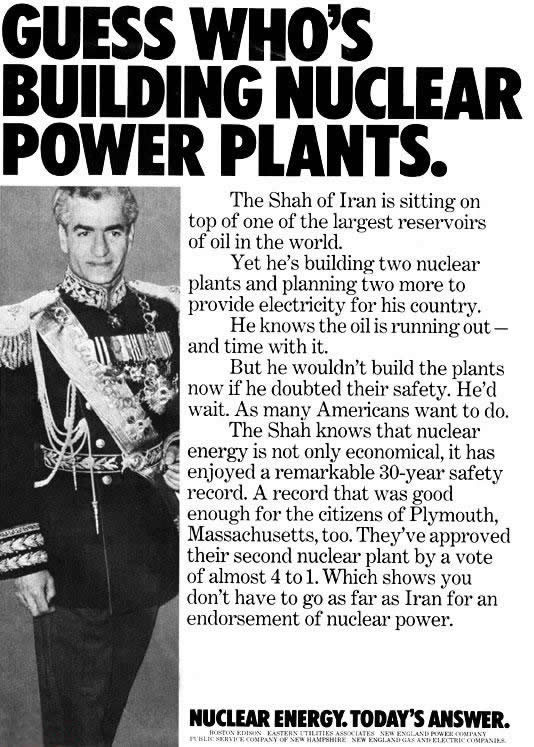
Here’s an 1970s print ad that seems gallows-humor funny today, considering that there are people itching to attack Iran before they develop nuclear weapons. It features the Shah of Iran as a poster boy for a campaign encouraging more nuclear power plants in the U.S.:
Here’s the text of the ad:
Guess Who’s Building Nuclear Power Plants
The Shah of Iran is sitting on top of the largest reservoirs of oil in the world.
Yet he’s building two nuclear plans and planning two more to provide electricity for his country.
He knows the oil is running out — and time with it.
Be he wouldn’t build the plants now if he doubted their safety. He’d wait. As many Americans want to do.
The Shah knows that nuclear energy is not only economical, it has enjoyed a remarkable 30-year saftey record. A record that was good enough for the citizens of Plymouth, Massachusetts, too. They’ve approved their second nuclear plant by a vote of almost 4 to 1. Which shows you that you don’t have to go as far as Iran for an endorsement of nuclear power.
For more about Iran’s history with nuclear power (and how it intertwines with U.S. foreign policy), see this article at Foreign Policy in Focus.
Hello, Boing Boing readers! (And thanks, Cory!) I’ve added a whole whack of new videos to this entry including John Cleese’s 1980s ads for Compaq, Tom Baker’s ads for Prime Computer, plus celebrity ads for Intel Centrino, Apple, Nintendo DS and more!
What’s Up with That?
By now, you’ve probably heard that Microsoft latest move to counter the incredibly popular “I’m a Mac / I’m a PC” ads was to hireJerrySeinfeldastheirnewpitchman. The new campaign, which is rumored to be based on the slogan “Windows, Not Walls”, is expected to cost US$300 million — $10 million of which is earmarked for Seinfeld — is expected to debut on September 4th. As Jerry would say in his own stand-up routines: “What’s up with that?”
Yes, because if there’s one surefire way to convince everyone Vista is cool, cutting edge and not liable to get frazzled by life’s minor complications, it’s hiring a 1990s sitcom star and professional kvetcher! Who, um, very visibly owned a series of Macs on his show. This is Microsoft’s worst promotional concept since, well, since its last Vista campaign, the Mojave Experiment, which decisively proved that people hate Vista but will use it if they are tricked into thinking it’s something else, like a stable, functional tool. Here’s how Madison Avenue is responding:
“They are not seen as cool,” says Robert Passikoff, president of Brand Keys, a New York branding firm. “Apple is cool. Can anyone even recall a Microsoft ad? No.”
Microsoft’s hiring of a celebrity who peaked back in the 1990s is a perfect metaphor for a two of their biggest problems:
They’re hamstrung by the need to maintain backward compatibility with 1990s applications (Raymond Chen’s blog has the best stories about these issues).
They’re still using their 1990s approach to marketing: throwing a lot of money around.
I expect that Microsoft’s ads will be the exact opposite of Apple’s: instead of two unknown (at least prior to the ads) guys against a plain white background, they’ll feature a celebrity against a glitzy background. Also unlike Apple’s ads, I suspect theirs won’t be all that effective.
To borrow another Seinfeld line: “Good luck with all that.”
Seinfeld in One of the Old “Think Different” Ads
Mark Evans found this old Apple “Think Different” ad — one of those “Here’s to the crazy ones” ads with Richard Dreyfuss doing the voice-over — that features, of all people, a young Jerry Seinfeld.
Seinfeld in an HP Ad
In this HP ad, Seinfeld promotes not just one, but two flops: Windows Vista and Bee Movie:
A Brief History of Celebrity Computer Endorsements
Microsoft’s hire of Seinfeld led me to search for computer and videogame system ads featuring celebrities. Here’s what I found:
Commodore: William Shatner
In the original Star Trek series, Shatner’s character Captain James T. Kirk actually destroyed a number of computers just by talking to them. That’s why I always thought Shatner was an odd choice as Commodore’s pitchman. In the ad below, he’s promoting the Vic-20:
Commodore Amiga: Tommy Lasorda, the Pointer Sisters, NASA Astronauts and Thomas “Tip” O’Neil
This is probably the most celebrity-laden ad I’ve ever seen for a computer, the woefully under-appreciated Commodore Amiga:
Bill Cosby: Texas Instruments TI 99/4
Here’s Bill Cosby, who was the spokesperson for Texas Instrument’s incredibly lame TI 99/4:
George Plimpton: Mattel Intellivision
Bak in the early 1980s, we had the first console war: the Atari VCS (later renamed the Atari 2600) versus Mattel Intellivision. Atari had an unknown — a nerdy blond kid with big glasses — as their spokesperson. Mattel went with a celebrity: George Plimpton.
While the Intellivision’s better graphics and sound made it a much better console for sports games, Atari had the far better gameplay, especially for arcade games. Star Strike, which Plimpton hawks in the video below, was far less fun than Asteroids, even if it featured “the total destruction of a planet”:
Finally, here’s an Plimpton ad that gets downright creepy at the end. It features Henry Thomas (he played “Elliott” in E. T. and was a big star at the time), who’s about to make the classic “Oh, let’s get in the playground candyman’s van…he seems legit!” mistake…
Matthew Perry and Jennifer Aniston: Windows 95 Training
Although this isn’t an ad but a training video, it’s still got considerable late-’90s star power in the form of Matthew Perry and Jennifer Aniston from Friends. This features the painful line: “Taskbar? Is that like a Snickers bar?”
Here’s part one:
and here’s part two:
Hewlett-Packard’s Ads
And finally, celebrity ads for half-decent computers (I’ve generally had good experiences with HP machines, and not just the printers).
Back in the early 1980s, Compaq was synonymous with “portable computer”. I remember being stunned that you could actually carry a computer around! I also remember being stunned that John Cleese was doing ads for them.
Here’s Cleese asking the most important question about portable computers: “Does it have a handle?”
“We don’t need a portable. We have Bruno”:
This one’s an ad for the Compaq III that was only shown in the U.K.:
This one targets “that trendy computer” — the original Macintosh. Guess which company is still around?
In which he compares the Portable II to a fish:
Forget about our earlier commercials about portable computers, we make desktops now!
In case you’re not sure how to spell “Compaq”:
“How could a computer be made from three hundred and eighty six chips and 32 bits from a bus?”
The “Trust the well known name” ad is very Pythonesque:
Here’s one for the Compaq DeskPro: “70 megabytes. 8 mega-hertz. Two hundred and eighty-six chips. Dual-mode monitor.”
Here’s another one where he uses the “three hundred and eighty six chips and 32 bits of a bus” line:
“The decision stank”:
“I need a vaction!”
“Three cheers for it!”
Again with “three hundred and eighty six chips and 32 bits of a bus” gag:
He wants 1 million pounds in ransom from IBM:
This one plays on the old adage “Nobody ever got fired for buying IBM”:
In this one, he’s talking about the new Compaq plant in Glasgow:
And finally, an internal promo video for Compaq UK’s dealers:
Intel Centrino: John Cleese, Tony Hawk and Seal
It could be the opening line to a joke: “John Cleese, Tony Hawk and Seal walk into a commercial…”
Prime Computer: Tom “Doctor Who” Baker
Tom Baker played one of my favorite incarnations of Doctor Who; he also shilled for Prime Computer. Here he is with Lalla Ward, who played “Romana” on Doctor Who:
Apple
Here’s an old one for the Lisa (the predecessor to the Mac) featuring Kevin Costner:
Apple’s had a few celebrities in recent ads. Here’s an “I’m a Mac / I’m a PC” one with Gisele Bundchen:
This one features Judy Greer as the cute-but-unstable yoga instructor:
I think HAL 9000 is enough of a celebrity to count, don’t you?
Nintendo DS
Why is Captain Picard Starfleet’s greatest strategist? Because of Nintendo brain training! Here’s Patrick Stewart and Julie Walters with a DS:
Microsoft UK: Ricky Gervais and Stephen Merchant (The Office, the UK Version)
Here’s a four-parter featuring Ricky Gervais and Stephen Merchant in their The Office characters starring in a Microsoft UK training video titled The Office Values:
IBM: Avery Brooks
We’ve had Kirk and Picard…why not Sisko? Here’s Avery Brooks’ ads for IBM. The “Where are the Flying Cars?” ad struck a chord with a number of friends:
Here’s another one, “Epiphany”:
And here’s one on Linux:
Atari “XL” Series Computers
In those “pre-internet” days, there were considerably fewer uses for computers. As a result, there semmed to be many more ads for the computer as an educational tool than today. Here’s Alan Alda talking about how his Atari XL computer is teaching him Italian:
Here’s one demonstrating Typing Attack, a videogame that teaches touch typing. There were a number of apps like that back then:
Here’s an ad featuring “Atari Writer”, Atari’s word processing package. You have to keep in mind that at this point in time, many people still used typewriters:
IBM: The Cast of M*A*S*H
Alan Alda didn’t just do ads for Atari, he also appeared in an IBM commercial, and so did some of his castmates from M*A*S*H. The video below features two ads: Jamie Farr is in the ad for the PS/2 series of computers, and Alan Alda, Harry Morgan and Gary Burghoff are in the ad for the AS/400 series.
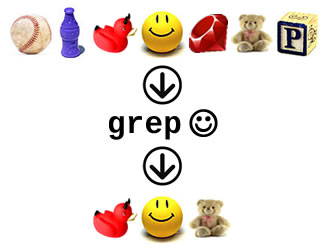
Once again, it’s Enumerating Enumerable time! This is the latest in my series of articles where I set out to make better documentation for Ruby’s Enumerable module than Ruby-Doc.org’s. In this installment, I cover the grep method.
In case you missed any of the previous articles, they’re listed and linked below:
The grep method’s name implies regular expressions, and that’s one of its uses. When given a regular expression as an argument and used without a block, grep returns an array containing the items in the original array that match the given regular expression.
# Here's a list of countries, some of them with "stan" in their names.
#
# I'm including Stan Lee, creator of many wonderful superhero comics simply because
# he's cool enough to be his own country.
countries = ["Afghanistan", "Burkina Faso", "Kazakhstan", "France", "Tajikistan",
"Iceland", "Uzbekistan", "Australia", "Stan Lee"]
=> ["Afghanistan", "Burkina Faso", "Kazakhstan", "France", "Tajikistan",
"Iceland", "Uzbekistan", "Australia", "Stan Lee"]

# Which countries have the string "stan" in their names?
countries.grep(/stan/)
=> ["Afghanistan", "Kazakhstan", "Tajikistan", "Uzbekistan"]

# Note that "Stan Lee" wasn't included in that list. "Stan" and "stan" aren't the
# same thing, but that's easy to fix:
countries.grep(/[S|s]tan/)
=> ["Afghanistan", "Kazakhstan", "Tajikistan", "Uzbekistan", "Stan Lee"]
When a block is used with grep, the contents of the result array are passed through the block and the resulting array is returned. Think of it as grep followed by a collect/map operation.
# Let's get a look at those countries with "Stan" and "stan" in their names again:
countries.grep(/[S|s]tan/)
=> ["Afghanistan", "Kazakhstan", "Tajikistan", "Uzbekistan", "Stan Lee"]

# Let's get the lengths of the names of those countries:
countries.grep(/[S|s]tan/) {|country| country.length}
=> [11, 10, 10, 10, 8]

# It's a slightly shorter version of this:
countries.grep(/[S|s]tan/).map {|country| country.length}
=> [11, 10, 10, 10, 8]

# This time, let's find all the "stans" and uppercase them
countries.grep(/[S|s]tan/) {|country| country.upcase}
=> ["AFGHANISTAN", "KAZAKHSTAN", "TAJIKISTAN", "UZBEKISTAN", "STAN LEE"]

# And here's the version that uses map:
countries.grep(/[S|s]tan/).map {|country| country.upcase}
=> ["AFGHANISTAN", "KAZAKHSTAN", "TAJIKISTAN", "UZBEKISTAN", "STAN LEE"]
What Enumerable#grep Really Does: The === Operator
Here’s grep‘s secret: what it actually does is take each item in the array, compares it against the given argument using Ruby’s === (the “triple equals”) operator and returns an array of those items in the original array for which the comparison returns true.
For regular expressions, the === operator is grep-like. The expression r === s operator returns true if there is a match for regular expression r in string s.
Different classes implement === differently. For example, in the Range class, === is used to see if an item is within the range. The expression r === x returns true if x is in range r. Here’s grep in action when its argument is a range:
# These are the years when the band Radiohead released an album
radiohead_album_years = [1993, 1995, 1997, 2000, 2003, 2007]
=> [1993, 1995, 1997, 2000, 2003, 2007]

# And these are the years when Radiohead released an album between 1996 and
# 2002 inclusive
radiohead_album_years.grep((1996..2002))
=> [1997, 2000]
Generally speaking, collection.grep(thing_to_compare) compares thing_to_compare with each item in collection using the === operator as defined for thing_to_compare‘s class. It returns an array of those items in the original array for which the comparison returned true.
Don’t forget the extra processing — a map operation — comes “free” if you provide grep with a block:
I’ll put it simply: Enumerable#grep isn’t terribly useful with hashes. Like most methods of Enumerable, when applied to a hash, grep, as it iterates through the hash, converts each key-value pair into a two-element array where the first element is the key and the second element is the corresponding value.
As I mentioned earlier, grep uses the === operator to do its comparison, and for arrays, === returns true only when comparing identical arrays:
# Identical arrays
[1, 2] === [1, 2]
=> true

# How about the first array as a subset of the second?
[1] === [1, 2]
=> false

# How about the first array as a superset of the second?
[1, 2, 3] === [1, 2]
=> false

# How about one array as a permutation of the other?
[2, 1] === [1, 2]
=> false
The practical upshot of all this is that for hashes, grep will return the empty array [] for most arguments, with the notable exception of an argument that is a two-dimensional array that corresponds to one of the key-value pairs in the hash.
That was a bit wordy, but an example should clear things right up:
# These are countries and their total areas (not counting outside territories)
# in square kilometres.
total_country_areas = {"Afghanistan"  => 647_500,
                       "Burkina Faso" => 274_200,
                       "Kazakhstan"   => 2_717_300,
                       "France"       => 547_030}
=> {"Afghanistan"=>647500, "Burkina Faso"=>274200, "Kazakhstan"=>2717300, "France"=>547030}

# Is there a '"Burkina Faso" => 274200' item in the hash?
total_country_areas.grep(["Burkina Faso", 274_200])
=> [["Burkina Faso", 274200]]

# That worked because the array argument we provided was an exact match
# for one of the items in the hash when it is converted into an array.

# Is there a '"Burkina Faso" => 0' item in the hash?
total_country_areas.grep(["Burkina Faso", 0])
=> []

# That didn't work because the array argument didn't correspond to any of the items
# in the hash.
Making Hashes grep-able
If you need to find which keys in a hatch pattern-match a given value, use the Hash#keys method (which returns an array of the hash’s keys) and grep that:
# Again with the countries and the areas...
total_country_areas = {"Afghanistan"  => 647_500,
                       "Burkina Faso" => 274_200,
                       "Kazakhstan"   => 2_717_300,
                       "France"       => 547_030}
=> {"Afghanistan"=>647500, "Burkina Faso"=>274200, "Kazakhstan"=>2717300, "France"=>547030}

# Which ones are the "stans"?
total_country_areas.keys.grep(/stan/)
=> ["Afghanistan", "Kazakhstan"]
If you need to-find which values in a hatch pattern-match a given value, use the Hash#values method (which returns an array of the hash’s values) and grep that:
# Of the countries' total areas, which the ones between
# 500,000 and 1 million square km?
total_country_areas.values.grep((500_000..1_000_000))
=> [647500, 547030]
What if you want to find key-value pairs where either the key or the value is a === match for a given argument? There’s a way to do that, and I’ll cover it when we get to the Enumerable#inject method. It’ll be soon, I promise!
For my 40th birthday, the Ginger Ninja got me something I’d had my eye on for some time: a USB MIDI keyboard, specifically an M-Audio Axiom 25, a nice little unit with a lot of features. Prior to my picking up the accordion and getting the “Accordion Guy” nickname, I was a synth player for a good long time. I’ve been meaning to get back into it.
My last experience was software synths wasn’t all that hot: it was in the late 1990s, when computers and networking were a great deal slower. Software synths felt very “laggy” in comparison to my good ol’ reliable hardware, and after noodling with them for a while, I decided that I’d give technology some time to play catch-up. That time has come, and I’d like to ask any of you who are familiar with this stuff: what are your favorite software synths, samplers and sound modules?
I’m looking for a couple of things in software form:
A nice, decent general purpose synth/sampler. I expect I’ll be doing more sequencing than live performance, but you never know…
I’m currently on a PC laptop (running Ubuntu and when absolutely necessary, Vista), but I expect to buy a Macbook Pro sometime in the near future. I’d like to hear about what’s available for any platform. Let me know in the comments!

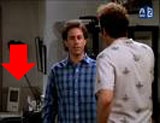 Yes, because if there’s one surefire way to convince everyone Vista is cool, cutting edge and not liable to get frazzled by life’s minor complications, it’s hiring a 1990s sitcom star and professional kvetcher! Who, um, very visibly