March 2009

Mac Fans Freak Out Over Microsoft’s “Lauren” Ad

by Joey deVilla on March 29, 2009

The best measure of the effectiveness of the new “Lauren” ad is that it’s driving some thin-skinned Apple fans nuts. In case you haven’t seen it yet, here’s the ad:

<a href="http://video.msn.com/?mkt=en-US&amp;playlist=videoByUuids:uuids:0bb6a07c-c829-4562-8375-49e6693810c7&amp;showPlaylist=true&amp;from=shared" target="_new" title="Laptop Hunters $1000 – Lauren Gets an HP Pavilion">Video: Laptop Hunters $1000 – Lauren Gets an HP Pavilion</a>

It’s one of the greatest strengths of the Esteemed Competition; as a long-time Mac and iPod user, I know first-hand the Apple experience is a very satisfying one that creates a lot of passionate users. This passion led to more than the usual number of pagehits and comments for my previous post on the “Lauren” ad (not to mention more than the usual amount of AdSense cash – thanks for the beer money, folks!) as well as a number of huffy articles including:

Some thoughts:

“Offensive?” Really? 

That’s the term Ed Oswald used in his article. My response: Oh, come on. Imagine the ridiculousness of someone complaining that Apple’s “I’m a Mac/I’m a PC” ads were offensive to Windows users. If all you had were those ads to go by, you’d think that Windows machines were completely non-functional (lies!) and its users were uniformly dull accountant-types (bigotry!). Chill, people – good natured-one-upmanship is part of advertising; heck, it’s part of day-to-day life. If this ad is offensive, I suggest you stay indoors, because you’re not going to like the outside world.

Bob Caswell put it best in this article:

That’s how commercials work, you see. By and large, Apple and Microsoft are playing the same game. A game that Apple started, I might add. And kudos to Apple for starting it; it seems to have worked well for them.

But now that a strong response is out by Microsoft (a separate tangential conversation is whether Microsoft should be throwing so much money at a “response” campaign; that’s debatable), the Apple fanboys are restless (this topic was at the top of Techmeme earlier today) and feel the need to point out the “offense,” “pointlessness,” and “inaccuracies.

Wow. Talk about a classic case of dishing out but not being able to take it.

“But Lauren’s an actress!”

It still doesn’t mean that she’s not someone that the ad agency found through Craigslist, nor does it affect the credibility of the story within the ad. I might as well say “But John Hodgman and Justin Long are actors! They aren’t really computers!”

As I’ve said before, Los Angeles is packed to the rafters with pretty women, whom when you ask them what they do will tell you that they do something that pays the rent and that they also act. Yes, Lauren’s an actress, but she pays the rent with an office manager job. It’s a career path that’s common enough that they make fridge magnets like this:

"Actress" fridge magnet, featuring a picture of a waitress

Contrast this with John “I’m a PC” Hodgman, who pays the bills with his paycheques from Apple, Battlestar Galactica and the Daily Show (there’s also his book deal, but making money off books is a tricky thing) and Justin “I’m a Mac” Long, who pays the bills with his paycheques from Apple, Live Free or Die Hard, Zack and Miri, Pineapple Express and both Alvin and the Chipmunks movies. Nobody with any sense dismisses them because they’re actors – they tell a compelling story well, and that’s the important thing.

Apple Doesn’t Need to Have a Monopoly on Good Ideas

That doesn’t mean that the Esteemed Competition doesn’t make excellent stuff – I know from having owned three Mac laptops and a couple of iPods over the past six years.

But Apple’s not the only manufacturer making great stuff and compelling ads, and that’s okay. Some people may not like the idea that the “Lauren” ad exists, just as some people don’t like the fact that a Microsoftie came up with the Coffee and Code idea – and to those people, I’ll remind them of what a smart guy once said:

“We have to let go of the notion that for Apple to win, Microsoft has to lose.”

The man who said that? Steve Jobs, back in 1997, when Microsoft made a $150 million investment in Apple.

It’s a big tech world, and there’s room at the table for a lot of people.

{ 4 comments }

FIRST Robotics Competition

by Joey deVilla on March 27, 2009

This article originally appeared in Canadian Developer Connection.

FIRST Robotics Competition

I’m going to be at the FIRST Robotics Greater Toronto Regional Competition tomorrow, where I’ll be watching robots built by high school students compete in “high intensity robo-sports”. The robots are six feet tall, weigh 120 pounds and were all built from scratch by the students in only six weeks. I’ll take notes and photos and post my report next week.

The competition started yesterday and runs through tomorrow at the Hershey Centre in Mississauga. If you can’t make it there in person, you can catch the live webcast.

{ 2 comments }

At Last, a Truly Impressive “I’m a PC” Ad

by Joey deVilla on March 27, 2009

First, there were the bewildering Gates/Seinfeld TV spots, “Shoes and Churros” and the extended-length “Living with an Ordinary Family”. Then came the “I’m a PC” spots, which were half-decent, but still not a good enough foil to Apple’s very effective ads. But in classic Microsoft style, the Empire’s ad agency, Crispin Porter + Bogusky, seems to have gotten it right with version 3.0. Take a look:

<a href="http://video.msn.com/?mkt=en-US&amp;playlist=videoByUuids:uuids:0bb6a07c-c829-4562-8375-49e6693810c7&amp;showPlaylist=true&amp;from=msnvideo" target="_new" title="Laptop Hunters $1000 – Lauren Gets an HP Pavilion">Video: Laptop Hunters $1000 – Lauren Gets an HP Pavilion</a>

It works. Instead of featuring famous comedians and techies-turned-philanthropists or framing the ad in terms of Apple’s ads, this one gets it right by featuring a story and a character that the audience can relate to.

In the ad, “Lauren”, a cute young woman, is driving around town, trying to get a 17” laptop that’s fast, has a comfortable keyboard and sells for under $1000. She first goes to the Mac store but finds the only $1000 model is the 13” MacBook. She’d have to double her budget to get a 17” model. There’s a great moment when she sarcastically remarks as she drives that “I’m just not cool enough to be a Mac person”.

(Cue howls of derision from Mac fanboy/pegboy Jon Gruber on Daring Fireball in 3…2…1…)

In the end, she goes to Best Buy and marvels at the selection of laptops that meet her criteria. She finds one and squeaks with delight. The camera zooms in on the cash register’s display, which shows the before-tax price of her laptop: $699.99. When asked how she’s going to pay for it, she looks at the camera and says this with great satisfaction: “Cash”. This is the sort of message that will really hit home for a lot of people, given the state of the economy.

Kudos to Crispin Porter + Bogusky for being clever in making these ads. They put ads on Craigslist and similar sites, offering people between USD$700 and USD$2000 to go buy a new computer. They were told that they could keep any money that was left over, which provided them an incentive to look for the best deals they could get. It’s good countermarketing: if Apple is using actors, go with real people.

(And Apple used real people in the “Switch” ad series – remember the series of ads which included “stoner chick” Ellen Feiss? Maybe Lauren is Microsoft’s Janie Porche.)

I’m interested to see what the other ads in this series – assuming it’s a series – look like.

{ 36 comments }

Sorry, No Toronto Coffee and Code This Friday

by Joey deVilla on March 26, 2009

This article originally appeared in the Coffee and Code blog.

Woman at desk overwhelmed by a pile of paper

I am swamped (and in one case, double-booked) with meetings either online or out at Microsoft’s Mississauga offices all day Friday, March 27th, so I’m sorry to report that I won’t be able to hold a Toronto Coffee and Code this week.

Watch this space; Coffee and Code will return next week!

{ 0 comments }

The Temptation to Loaf

by Joey deVilla on March 26, 2009

There’s a small TV set in my home office that I sometime turn on – usually to one of the cable news channels — as “background noise”, which I sometimes find helpful when I’m trying to get work done.

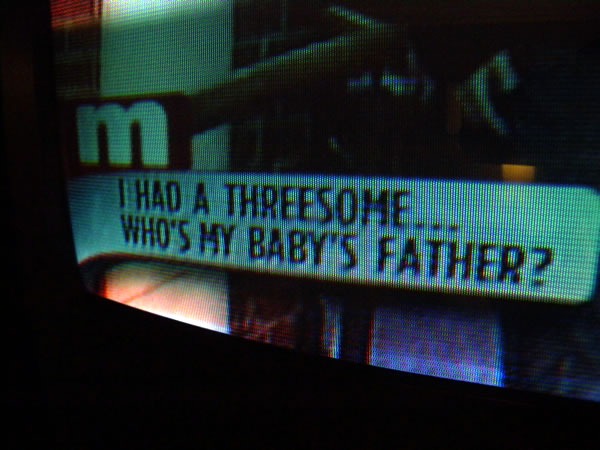
Today, I’m on the road in London, Ontario with Microsoft’s EnergizeIT tour. I’m hanging out in the hotel room with my coworker Rodney with the TV on as background noise and here’s what’s on right now:

Photo of "lower third" of the Maury Povich show: "I had a threesome...who's my baby's father?"

When I tell people that I often work from my home office, they ask if I ever get the temptation to plunk myself in front of the TV instead of getting work done. The answer is no, and part of the reason is that there’s nothing but this junk on during the day.

{ 1 comment }

An Ad for Dharma Initiative Computers

by Joey deVilla on March 25, 2009

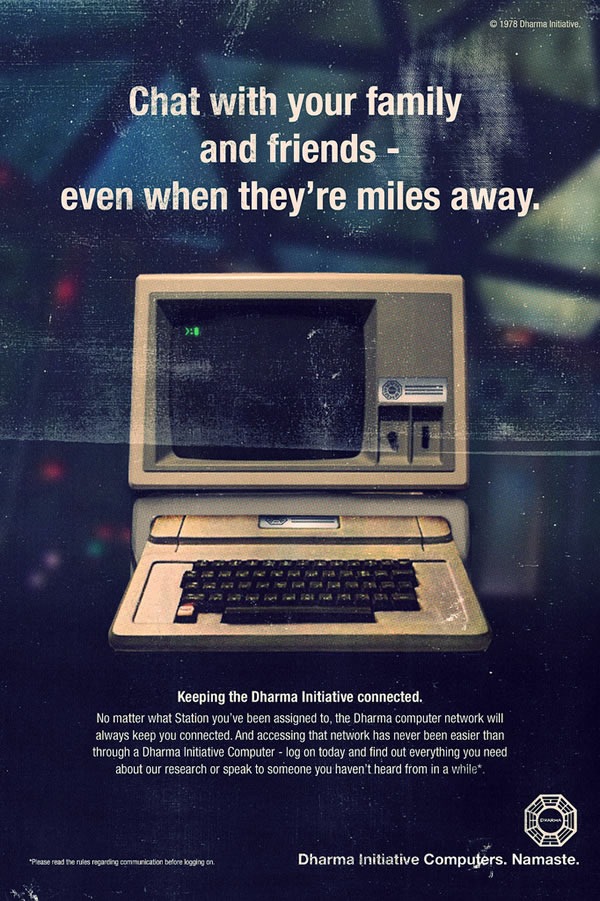
This ad won’t make any sense if you’re not a follower of the TV series Lost. However, if you are, you’ll find it amusing…

Ad for the Dharma Initiative's computers: "Chat with your family and friends -- even when they're miles away."
Click the ad to see the original on its Flickr page.

{ 1 comment }

Road Warrior Office of the Day: London, Ontario

by Joey deVilla on March 25, 2009

This article was originally published in Canadian Developer Connection.

I’m currently in London, Ontario at the Delta Armouries London hotel, where my coworkers Rodney Buike and Qixing Zheng will be doing a presentation for EnergizeIT later tonight. We’re spending the day polishing our presentations and getting the usual administrivial stuff done.

We didn’t want to spend our day cooped up in our hotel rooms, so we asked one of the hotel staff where the business center was. I didn’t relish the thought of hanging out in a business center all day; although they usually have more table space than your typical hotel room, they’re usually some small windowless cave.

We were told that the business center, which used to be located in the basement had since closed. “We got a lot of complaints from women who didn’t feel safe going to get some work done in a basement room late at night,” he said, “so we set up a computer with a printer in the lobby, and another one up in the lounge, where you can work.”

He pointed in the direction of lounge, where we saw this:

Entrance to the Cantata Lounge at the Delta Armouries London Hotel

Well, that’s several steps up from a business center!

(In case you wondering about the architecture of the hotel, it used to be an actual armoury where soldiers were trained during the two World Wars.)

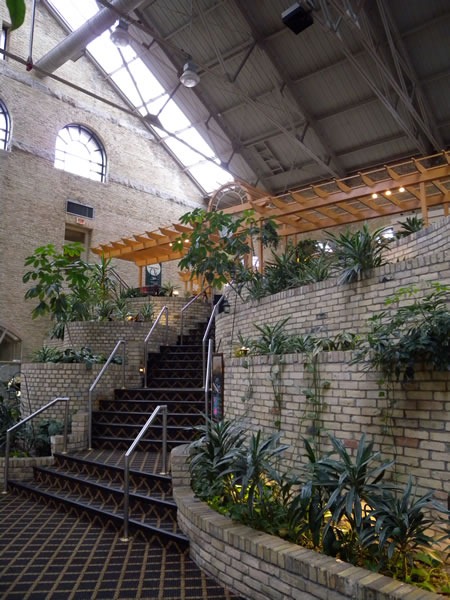
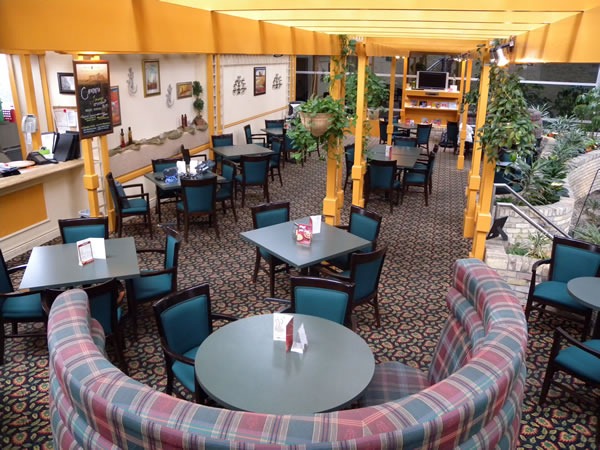
Here’s what the lounge looks like. There’s a bar in the corner, which isn’t open as I write this (around noon). Qixing and I are the only ones here at the moment; I suppose it gets a little busier in the late afternoon:

Canata Lounge, as seen from the far end

Canata Lounge, as seen from the bar

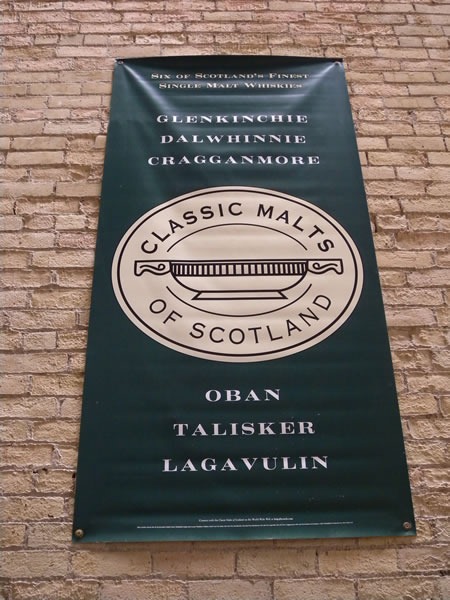
Here’s something most business centers don’t offer – but should! I may have to sample some of their wares later tonight. It’s business research, you know:

Banner on brick wall: "Classic Malts of Scotland: Glenkinchie, Dalwhinnie, Cragganmore, Oban, Talisker, Lagavulin"

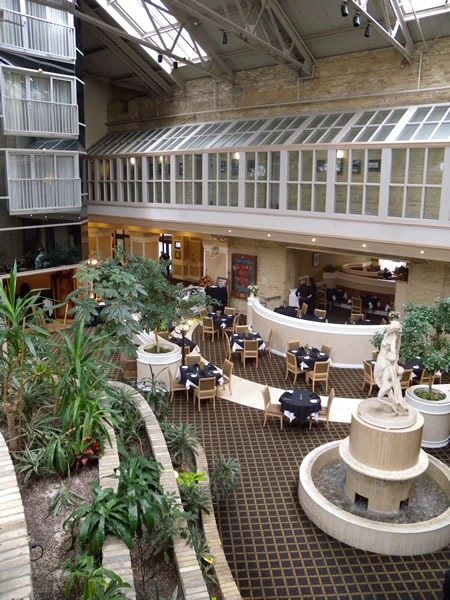
And instead of the windowless caves that most business centers are, we have this view:

The lobby as seen from the Cantata Lounge

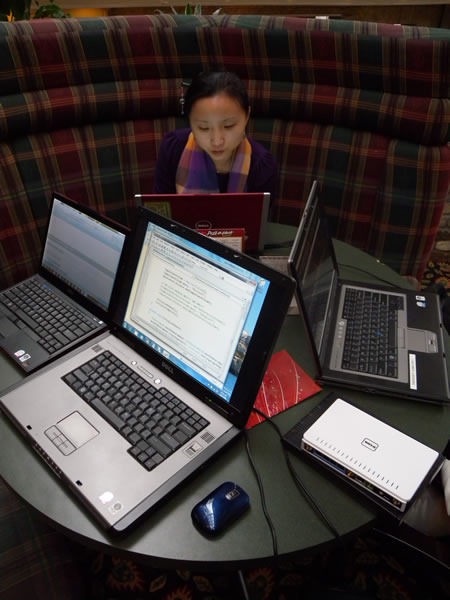
Qixing and I have set up office in one of the big round booths in the lounge. Here’s Qixing and our “road warrior” office setup:

Qixing and computers in one of the round booths at the Cantata Lounge

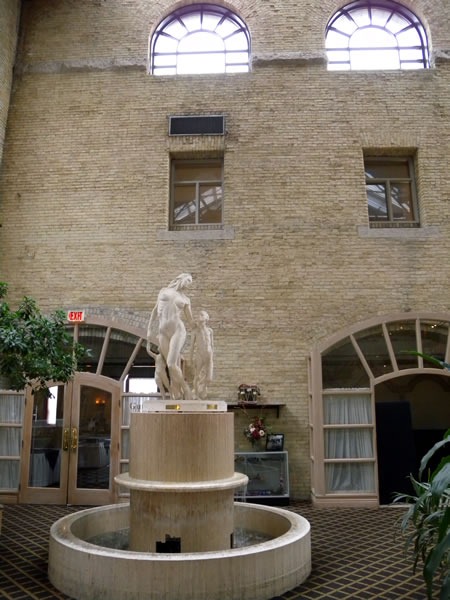
In case you’re wondering where the accordion is, it’s in my room. I’m bringing it out later tonight, when we’ll be speaking in the presentation room, whose entrance is pictured below:

Fountain in front of entrance to large ballroom at the Delta Armouries London

If you’re coming out to tonight’s EnergizeIT event in London (in the hotel’s ballroom named “The Gunnery”, it’s free and isn’t completely booked yet), we’ll see you there!

{ 0 comments }

It’s Ada Lovelace Day!

by Joey deVilla on March 23, 2009

ada_lovelace

It’s a special day in the blogosphere today: it’s Ada Lovelace Day, an international day of blogging to bring attention to women excelling in technology.

Whether you’re venturing into a career, a scene or even a room full of people, it’s always nice to find people like you. This is especially true if you’re in the minority; you wouldn’t believe the number of people who’ve walked up to me and said “You’re an accordion player too? I was beginning to think that I was the last one left!” It’s a reassuring feeling.

Recent research by psychologist Penelope Lockwood suggests that women need to see female role models more than men need to see male ones. This leads to a chicken-and-egg-style problem in the tech world: it’s perceived as a “sausage party” (that is, a gathering of mostly men), which in turn turns women away, which in turn keeps it a sausage party.

The solution is make sure that we’re recognizing the women in technology, which is why we have Ada Lovelace Day. Ada Lovelace was the daughter of Lord Byron and is widely considered to be the first programmer, having written a system of symbol-manipulating rules for Charles Babbage’s Analytical Engine. She is also crediting as having foreseen that computing devices would do far more than crunching numbers – while Babbage thought of his machine as a mechanical calculator, Lovelace suggested that “the engine might compose elaborate and scientific pieces of music of any degree of complexity or extent”.

To celebrate Ada Lovelace Day, I thought I’d give a shout out to some Accordion City (that is, Toronto) area women in technology whom I know and have seen in the past couple of months. Take a bow and be recognized!

  • Sandy Kemsley: A regular on the Toronto tech scene with a career spanning over 20 years, she has forgotten more about BPM than I will ever learn.
  • Leigh Honeywell: She might just have the most-booked calendar in Toronto, what with her co-founding HacklabTO, working at the local Symantec office and finishing her degree at U of T.
  • Sacha Chua: Toronto’s most energetic and enthusiastic technology evangelist.
  • Qixing Zheng: My coworker! She’s the User Experierience Developer Advisor (Microsoft Canada’s first, in fact) and one of the hardest-working people on the Developer and Platform Evangelism team. She blogs at the Canadian UX Blog.
  • Kate Gregory: Microsoft Regional Director for Toronto, has forgotten more programming languages than I will ever learn, and the first non-Microsoftie to welcome me to The Empire at the Professional Developers Conference back in October.
  • Amber Macarthur: Tech news videoblogger extraordinaire!
  • Leila Boujnane: Founder and CEO of Idee, who make the coolest visual search.
  • Estelle Havva: The reality check at DemoCamp (she was the one who always asked presenters the question: “What’s your business model?”, promoter of Canadian tech at the National Reasearch Council and can do more pushups than almost anyone at DemoCamp.
  • Kaitlyn McLachlan: Creator of AskItOnline, the best survey web application I’ve seen.
  • Juan Musleh: I met her at the excellent CUSEC conference, where she was the Sponsorship Director.
  • Linda Wang: I also met her at CUSEC, where she was the co-chair and did some great work.
  • Jaclyn Konzelmann: I met her recently in a meeting with the organizers of the CUTC conference (and I owe her a couple of email replies).

Happy Ada Lovelace Day!

{ 2 comments }

Inspirational poster: "Captain James T. Kirk: I'm sorry, I can't hear you over the sound of how awesome I am."

This Week’s Webcast

How to Become a Great Leader is the topic of this week’s Ignite Your Career, Microsoft Canada’s and CIPS’ webcast series aimed at helping you further develop your career with opinions and advice from experts in Canada’s tech industry. Here’s the abstract for the webcast:

Being a great manager does not by default also mean you are a great leader. For some people, being a leader comes intuitively, for others it is something that requires both self awareness and leading by example. This session will focus on what a panel of Managers/Leaders has done in order to further their development of leader qualities. Topics in this area are wide ranging and based on webcast participation will include such as goal setting, importance of goal alignment, motivation techniques, nurturing trust, developing listening skills and coaching team members. Be sure to listen in and join the conversation with this panel of experts for what should be a very interesting wrap up to the Manager series.

The panelists for this webcast are:

stuart_crawford Stuart Crawford shares his experiences and serves the Calgary Small Business community in his role as the Vice President of Business Development for Bulletproof InfoTech, a leading Microsoft Small Business Partner with offices in Red Deer and Calgary.

barry_gervin Barry Gervin is a founding Partner of ObjectSharp. As a Principal Consultant, Barry provides technical leadership to his valued clients, staff, and the development community. Barry currently serves as a Microsoft Regional Director in Southern Ontario and has received the Microsoft MVP Award for Solutions Architecture for the past 3 years.

dana_epp Dana Epp researches software security and focuses on strong authentication and identity assurance solutions at Scorpion Software Corp. As a computer security software architect, Dana has spent the last 15 years focusing on software development with a particular emphasis on security engineering.

greg_lane Greg Lane is the current Chair of the Canadian Council of Information Technology Professionals (CCITP) of the Canadian Information Processing Society (CIPS). Greg is currently employed with Avanade as the Director Business Development Public Service for Canada.

The webcast will take place this Tuesday, March 24th, from 12:00 noon (Eastern) to 1:00 p.m.. Ignite Your Career webcasts are free of charge – all you have to do is register to listen using your Windows Live ID (which is also free).

Ignite Your Career isn’t about any specific technology or vendor; it’s about maximizing your potential at work and helping you come up with a career plan. No matter what platform or tools you work with, we’re sure that you’ll find this webcast series informative and helpful.

Previous Webcasts

All Ignite Your Career webcasts are recorded and archived so you can listen to them on demand. As with the live webcasts, there’s no charge to listen to them; you just have to register with a Windows Live ID.

The webcasts we’ve had so far in this series are:

  • Industry Insights and Trends
    The nature of technology is one of continual change; a fact of life for professionals in the ICT industry. As a result, you need to be on top of what is happening in the industry in order to position yourself and your organization to benefit from these trends. This panel discussion will arm you with the information you need from experts in the ICT industry in order to stay on top of your game.
    Speakers: Joel Semeniuk, Jeff Kempiners, Jay Payette and Paul Swinwood.
  • Discovering Your Trusted Resources
    Building a set of information sources and connecting with the community at-large are critical to your success in the ICT industry. This session brings successful community, technology, and information leaders together to share their experiences in discovering these resources. Our experts will help you learn how to identify credible sources and find the right tools, links and techniques to keep you up to date in a world of constant change.
    Speakers: Michael J. Sikorsky, Richard Campbell, and John Bristowe.
  • How to Establish and Maintain a Healthy Work/Life Balance
    With mobile technologies and our always-on culture, it’s imperative to establish and maintain a balance between work and life. If your only time to manage change in your environment is after hours, how can you maintain a healthy balance without burning out? How do you manage change so that you can develop your career and spend time with loved ones? This panel discussion will connect you to individuals who strive to establish and maintain this balance.
    Speakers: Mack Male, Cameron McKay, Paul Gossen, Mark Blevis

{ 0 comments }

New Nerd Merit Badge: Homonyms

by Joey deVilla on March 21, 2009

homonyms_nerd_merit_badge

The folks behind the patches that clearly mark your nerdy prowess – Nerd Merit Badges – have released their latest merit badge, Homonyms (pictured on the right).

In case your grade school English classes are a distant memory, the most common use of the term homonym is for words that are pronounced the same way but are different in meaning and spelling. This is symbolized in the merit badge by the combination of three images: rain, the horse’s rein, and the crown, which symbolizes the reign of a monarch.

To earn this merit badge, you have to be able to correctly spell homonyms. As with the other merit badges, they’re relying on the honour system; that is, the fine Nerd Merit Badges people expect that you will order this badge if and only if you  know in your heart of hearts that you have truly earned it.

Some of you may complain that the badge should actually be called Homophones (from the Latin words for “same” and “sound”) because the term homonym (from the Latin words for “same” and “name”), when strictly used refers to words with the same pronunciation and spelling but different meaning. Examples include bear, which could refer to the animal or mean “to carry”, or stalk, which could refer to a plant part or refer to hunting. If you are one of these people, I will notify you when they make a Pedant Nerd Merit Badge.

This Nerd Merit Badge, like the previous two, is available at the Nerd Merit Badges site for USD$3.99; you can also buy a five-pack for USD$19.95.

I covered the previous two Nerd Merit Badges in earlier articles, which I’ve linked below:

{ 5 comments }

What the Internet is For

Before I begin, here’s a quick reminder of what the Internet is for…

and it seems to be true all over the world. Don’t take my word for it; here’s the Israeli production of Avenue Q saying the same thing, but in Hebrew:

Now that you’ve been told what the internet is for — by both an actual internet professional (that would be me) and a big Broadway stage production, no less – we can continue.

Silverlight and Playboy

If you ever get the chance, I highly recommend browsing through Playboy. Not the issues from this era or maybe even the past 20 or so years, but the Playboy of earlier times; the Playboy that dispensed the best advice on which hi-fi system to buy, provided good cocktail recipes, had great articles and interviews and featured the works of all sorts of writers, including John Updike, Stanley Elkin, Kurt Vonnegut, Saul Bellow, Joyce Carol Oates and Margaret Atwood.

You can do just that right now, thanks to the Playboy Archive, where 53 issues from Playboys past, spanning the time period from 1954 to 2005 are available for your reading pleasure, online and free of charge. The issues were scanned in at high resolution and placed into a Silverlight-powered browsing interface, as shown below:

Playboy archive home page

The Best Damn Use for Deep Zoom, Ever!

The Playboy Archive takes advantage of Silverlight’s Deep Zoom feature, which combines using images at different levels of magnification and smooth animation to allow for a “zoom in/zoom out” effects. Most demos of this feature cover something boring like maps or paintings by the Old Masters; I think Playboy’s application of Deep Zoom to look at ladies without pants is far more entertaining.

Let’s take a relatively-safe-for-work look, shall we? I’m going to show you the September 1962 issue, whose centerfold is so tame by today’s standards that the skin lotion ads on the Toronto subway are far racier in comparison.

Here’s a reduced version of the first zoom level of the issue, showing you about a dozen pages at a time:

Septmeber 1962 Playboy, "pages" view

If I were to click on a specific pair of pages, let’s say the centerfold, I’d get the level 2 zoom, a reduced version of which is shown below:

Septmeber 1962 Playboy centerfold, zoom level 2

Oh, the hayloft! How I love the hayloft! But I digress.

A subsequent click yields zoom level 3:

Septmeber 1962 Playboy centerfold, zoom level 3

And finally, because her brown eyes are very compelling, I think I’ll click once more to get zoom level 4.

Septmeber 1962 Playboy centerfold, zoom level 4

Remember, these screen captures were reduced to fit this blog’s format. The actual screen images are larger!

But What if You Read Playboy for the Articles?

“I read it for the articles!” used to be the classic justification for reading Playboy. It also was true, at least in part – Playboy often got interviews with people that more “mainstream” and “respectable” publications would never have a hope of or even think of getting. The Playboy Archive features an interview with Jawaharlal Nehru (India’s first Prime Minister, and you know, the jacket guy!) from the October 1963 issue:

Full-page view of Nehru interview in October 1963 Playboy

and as with the centerfolds or any other parts of the magazines featured in the Playboy Archive, the Nehru interview can be viewed in Deep Zoom:

Closeup of Nehru interview text from October 1963 Playboy

Think of it as a bonus treat if you can’t find your glasses or if you wanted to examine early 1960s typographic and kerning techniques.

What are just as fascinating as the articles – if not more fascinating sometimes – are the ads, especially the Mad Men-esque ones from the late 50s and early 60s, Like the creations of Sterling Cooper, they were quite reliant on the text to evoke images in the reader’s mind. Consider this ad for London Fog overcoats:

October 1963 Playboy "London Fog" ad, zoomed out

…and here’s a close-up look at the text, courtesy of Deep Zoom:

Close0up of the text from the "London Fog" ad in the October 1963 Playboy

It’s as if Don Draper himself wrote that copy!

But enough of this eruditon. Let’s get back to the porn, shall we?

Internet Explorer 8 and its Excellent “Porn Mode”

You may have heard that Internet Explorer 8, the latest version of Microsoft’s browser, was released this week. If you’re using Internet Explorer 7 or worse, Internet Explorer 6, ditch them now. Internet Explorer 8 is a much better, more compatible browser that shows signs of Microsoft’s increasing willingness to play well with others.

Internet Explorer 8 (which I’ll refer to as IE8) features what we in the industry like to refer to as “porn mode”. Porn mode, simply put, is a slightly different mode of operation in which the browser doesn’t keep any record of your browsing history. As long as you use it when browsing sites like YouPorn, your browser won’t keep showing “YouPorn” as a possible choice when someone else hops on your computer and tries to access YouTube.

Activating Porn Mode in IE8 is easy. From the Safety menu (located near the upper right-hand corner of the window), select InPrivate Browsing (that’s the socially acceptable name for Porn Mode), as shown below:

ie8_porn_mode_1

You’ll get a new browsing window with all sorts of anonymizing features, including not saving the names and locations of sites you visit in your browser’s history!

While IE8 isn’t the first browser to feature Porn Mode, it very clearly tells you when you’re in Porn Mode and when you’re not. Here’s what the address bar looks like in regular mode:

Internet Explorer 8 address bar in normal operation

And when in Porn Mode, it’s quite clear via both the title and the big blue “InPrivate” indicator in the address bar:

Internet Explorer 8 address bar showing InPrivate browsing mode active

Having these explicit cues telling you when the browser is and isn’t in Porn Mode is going to be a lifesaver, believe you me.

Combine Them!

If you combine the Playboy Archive’s excellent application of Silverlight with the cover-your-tracks feature of IE8’s Porn Mode…well, I think that’s an exercise that I’m going to leave to you, Gentle Reader. I hope you have fun out there on the ‘net, and never let it be said that The Empire didn’t do nuthin’ for ya!

How Do I Get This Wonderful Stuff?

You didn’t think I’d leave you high and dry and not tell you how to get Silverlight and Internet Explorer 8, did you?

{ 4 comments }

Help LinuxCaffe Sort Through Their Tech Stuff!

by Joey deVilla on March 20, 2009

Jawas carrying R2-D2 in "Star Wars Episode IV: A New Hope"

Tim Hildred of LinuxCaffe writes:

We have in our storage space a veritable heap of donated pre-loved electronics, some of which we hope to recycle and repurpose, some of which is probably junk. What we need as a small team of people who, in exchange for coffee and snacks, will help us sort it out.  There will probably be some spoils as well, as those who help should be able to help themselves to some things. So, bring your friends, help us make our heap into something workable, help the community to thrive, and help your blood-caffiene levels to remain stable. We’ll love you for ever.

The sorting will take place in two shifts:

  • Tomorrow, Saturday March 21st, from 12:00 noon-ish until 4:00 p.m.-ish
  • Wednesday, March 25th, from 5 p.m.-ish until 9:00 p.m.-ish.

If you’ve got a technical bent, some free time and community spirit, come on down to LinuxCaffe and give them a hand sorting through their donated electronics!

{ 1 comment }

The Battlestar Galactica “Frakmap”

by Joey deVilla on March 19, 2009

One of the best sci-fi series on television, the reimagined Battlestar Galactica, comes to an end this Friday night at 9 p.m. on Space here in Canada and the Sci-Fi channel in the States. With only one episode left, it would seem an appropriate time to point you to the Battlestar Galactica Frakmap, a little chart that tells you which characters have been intimate with each other and quick summary of their story.

The screenshot below shows only a part of the Frakmap, but it’s the part with the most promiscuous of the bunch: Kara “Starbuck” Thrace and Gaius “Horndog” Baltar. Click on the image to see the whole Frakmap:

Portion of the Battlestar Galactica "Frakmap"

{ 1 comment }

This article originally appeared in Canadian Developer Connection.

Microsoft Silverlight logo

Silverlight 3 Beta

Today at the MIX ‘09 conference, we rolled out the beta for Silverlight 3, the next iteration of our rich internet application platform. Version 3 adds a lot of new features including:

  • Out of Browser Capabilities. Silverlight 3 applications aren’t just confined to the browser. Users can install and run them from their desktops – either Windows or Mac OS – and without having to download any additional runtimes or plugins. Better still, these desktop Sliverlight apps can detect whether the machine is connected to the internet and can also auto-update.
  • Richer Graphics. There’s support for perspective 3-D graphics, pixel shader effects, a bitmap API, bitmap caching of vectors, text and controls, support for themed applications, new animation effects, enhanced control skinning and improved text rendering and font support.
  • HD Video and Audio. Support for H.264/AAC, 720p+ live and on-demand streaming, true HD playback in fullscreen mode and support for third-party codecs.
  • Better application features, including:
    • New GUI controls, including their source code
    • Support for “deep linking”: it’s now possible to bookmark a page contained within a Silverlight app
    • SEO tools: The content of your Silverlight apps can be mirrored into HTML so your app can be indexed by search engines
    • Enhanced data support
    • Improved performance

Expression Blend 3 Preview

Microsoft Expression Blend Also available is the preview version of Expression Blend 3, the “designer/developer workflow tool” for building interfaces for Silverlight and WPF projects. As with Silverlight 3, Expression Blend 3 adds a lot of new features including:

  • Sketchflow: a tool that lets you tool for quickly creating application prototypes, complete with interactivity.
  • Behaviors, which let you add interactivity to an application without having to write code
  • Photoshop and Illustrator file import
  • Improved design and development experience

An Important Note for People Currently Building Silverlight 2 Apps

Do not install Silverlight 3 development tools on a machine that you’re using to build Silverlight 2 apps! Visual Studio doesn’t support targeting multiple versions of Silverlight; if you install Silverlight 3 tools, you won’t be able to build Silverlight 2 apps anymore!

My recommendation is:

  • If you’re going to be working on Silverlight 2 projects, install Silverlight 3 tools on a machine that you’re not using for Silverlight 2 production.
  • If you’re like me and not doing any work on Silverlight apps at the moment and want to get started, go ahead and grab the beta.

Finding Out More About Silverlight 3 Beta and Expression Blend 3

You can find out more about both on the Silverlight 3 Beta page.

Getting Silverlight 3 Beta and Expression Blend 3 Preview

Both are available at the Silverlight 3 Beta download page. You can also follow the links below:

{ 0 comments }

This article originally appeared in the Coffee and Code blog.

Tigh and Adam from "Battlestar Galactica" drinking a toast: "Here's to Another Frakkin' Coffee and Code!"

I hereby declare a Toronto Coffee and Code for this Friday, March 20th from 11:00 a.m. to 6 p.m. at LinuxCaffe (326 Harbord Street, at the corner of Harbord and Grace, near Bickford Park; nearest subway station is Christie).

Map picture

For those of you not familiar with LinuxCaffe, it’s an independently-owned cafe that also acts as a gathering place for Toronto’s Free Software/Open Source Software communities. It might not be a place you’d expect for an event hosted by a Microsoft Evangelist, which is one of the reasons I picked it. Another reason is that it’s a great cafe with good coffee and food, and I’m more than happy to support a local cafe with techie appeal.

LinuxCaffe deserves a longer post, which I’ll write later – I just want to get the word out about this week’s Coffee and Code. Hope to see you there!

{ 0 comments }