October 2011

RAM: Still the Best Upgrade Bang for the Buck

by Joey deVilla on October 31, 2011

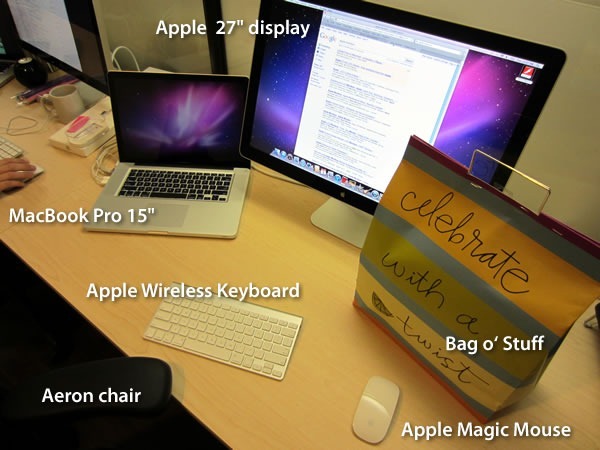
Standard issue Shopify gear: MacBook Pro 15", Apple 27" display, Apple wireless keyboard, Apple Magic Mouse, Aeron chair

One of the nice things about working at Shopify is the gear you get to work with. The standard issue machine for most employees – most of us are developers and designers – is a 15” MacBook Pro. Combined with the other goodies that Shopify developers get: Mac LCD display, Magic Mouse, keyboard and Aeron chair, it’s a great web development setup.

Until recently, most of the developers were working on machines with the stock 4GB RAM. While an out-of-the-box MacBook Pro is more than enough to support a lot of coding, development and testing are resource-hungry activities. With our developers taking on increasingly ambitious projects and the prices of 8GB SODIMMs falling, we saw fit to double the developers’ RAM. They seemed pretty happy about it.

As the Platform Evangelist, I don’t write any production code; any coding I do is for examples, demos and tutorials. The stock 4GB RAM is more than enough for those coding needs, but my other work uses resource-hungry software. Although I generally prefer Mac software, I have yet to find a tool  that can beat Windows Live Writer, which I run on Windows under Parallels.

Evenly sharing 4GB of RAM between MacOS 10.7 and Windows 7 yields a worst-of-both-worlds on both sides. I eventually went with assigning 3GB to MacOS and the remainder to Windows. While workable, it’s still pokey, especially on the Windows side.

This sluggishness, coupled with my starting work on videos, meant that it was time for an upgrade.

2 packs of Patriot RAM 4GB SODIMMs

At the time of this writing, the price of 16GB of laptop RAM is still pretty steep: most vendors are asking for $700 for a pair of 8GB SODIMMs on average. The less bleeding-edge configuration of half the size — two 4GB SODIMMs — is much, much cheaper: about one-tenth the price of 16GB.

For the early-2011 15” MacBook Pro, the RAM you want for 8GB is 2 204-pin 1333Mhz 4GB DDR3 SODIMMs. I picked up the two SODIMMs pictured above at a nearby Tiger Direct outlet for CDN$68.

Replacing the RAM on the current-model MacBook Pro is pretty easy. The only tool you need is a PH00-sized Phillips screwdriver to remove the 10 screws that hold the base of the MacBook Pro. Popping out the old SODIMMs and replacing them is pretty simple, as the video below shows:

After installing the RAM and replacing the bottom cover, I fired up the MacBook, which booted without a hitch. A quick check of “About This Mac…” under the Apple menu confirmed that the RAM upgrade went successfully:

"About this Mac" window displaying 8GB 1333MHz DDR RAM

Before I replaced the RAM, I ran the trial edition of Geekbench on my MacBook Pro and got this report:

Benchmark for MacBook before RAM upgrade: Geekbench score - 9885

Here are the Geekbench scores for the old configuration:

  • Total Geekbench score: 9885
    • Integer benchmark: 8314
    • Floating point benchmark: 15175
    • Memory benchmark: 5691
    • Stream benchmark: 5260

With the new RAM, Geekbench reported some slightly better scores:

"Benchmark for MacBook before RAM upgrade": Geekbench score 10014

  • Total Geekbench score: 10014
    • Integer benchmark: 8409
    • Floating point benchmark: 15225
    • Memory benchmark: 5926
    • Stream benchmark: 5576

On the MacOS side, things seem a little snappier, especially when switching apps. The difference in performance in Windows under Parallels with the extra RAM is like night and day. I changed the RAM allotment in Parallels so that Windows uses 4GB of RAM and ran the Windows Experience Index test. Here are the results:
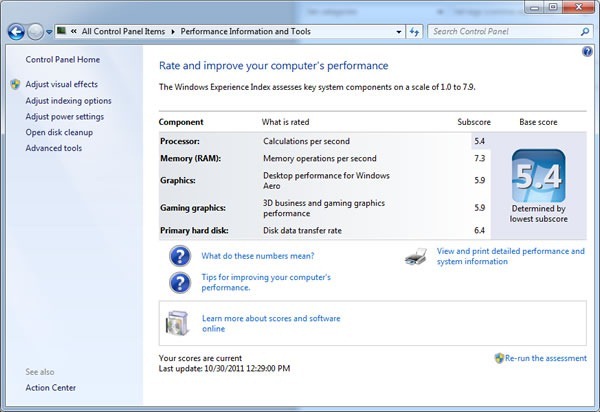
Screenshot of Windows Experience window for Windows under Parallels - Base score 5.4

  • Windows Experience Index base score: 5.4
    • Processor: 5.4
    • Memory: 7.3
    • Graphics: 5.9
    • Gaming graphics: 5.9
    • Primary hard disk: 6.4

Dell Latitude E6500 laptop

I decided to compare the performance of Windows 7 under Parallels to the same version and edition of Windows 7 running on my fastest PC, a Dell Latitude E6500 with 8GB RAM (a fabulous parting gift from my old employer). Here are its Windows Experience Index results:
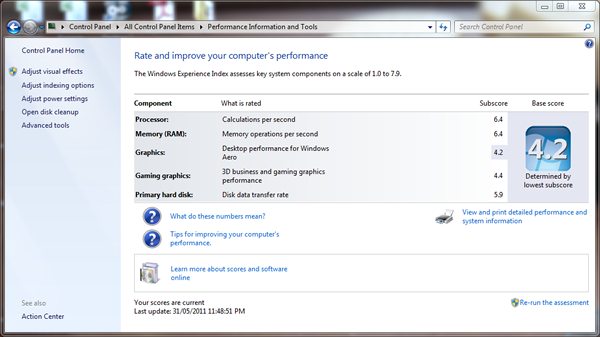
Screenshot of Windows Experience window for Windows on the Dell E6500 - Base score 4.2

  • Windows Experience Index base score: 4.2
    • Processor: 6.4
    • Memory: 6.4
    • Graphics: 4.2
    • Gaming graphics: 4.4
    • Primary hard disk: 5.9

With the new RAM, it’s like having a brand new machine. In fact, with Windows running snappily on the Mac – so much faster than it did before – it’s like having two brand new machines.

This article also appears in the Shopify Technology Blog.

{ 1 comment }

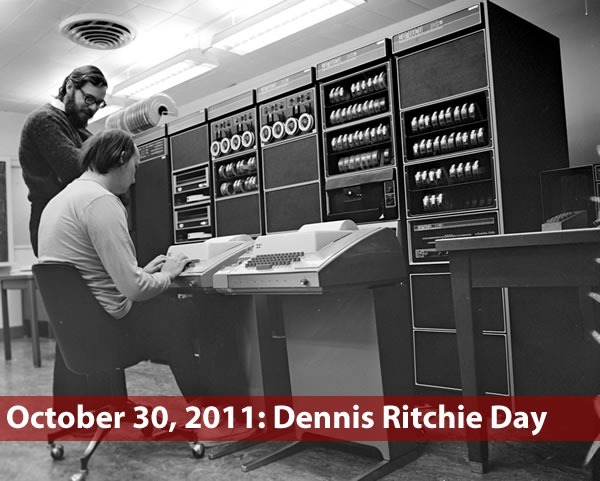
Dennis Ritchie Day

by Joey deVilla on October 30, 2011

"October 30, 2011: Dennis Ritchie Day": Old photo of Dennis Ritchie and Ken Thomson working on a DEC PDP computer

Inspired by California Governor Edmund Brown’s declaration that October 16th would be Steve Jobs day, Tim O’Reilly wrote in O’Reilly Radar:

I don’t have the convening power of a Governor Brown, but for those of us around the world who care, I hereby declare this Sunday, October 30 to be Dennis Ritchie Day! Let’s remember the contributions of this computing pioneer.

Photo of Dennis Ritchie

For C and Unix, as well as all the goodies that came forth from their creation – from the concept of platform-independent programming languages and operating systems to the internet to the platforms we use today at Shopify (we develop on the Mac, deploy to Linux and procrastinate on our iPhones, iPad and Androids) to “Hello, World!”, we’re taking this day to pay homage to Dennis Ritchie. As like to say: “Mr. Ritchie, I salute you with a filet mignon on a flaming sword!”

Cover of the O'Reilly book "Practical C Programming"

The folks at O’Reilly are also marking Ritchie’s passing with a half-price sale on sale on C, C++, Linux and Unix ebooks and videos for one day only. If you’ve been meaning to snag some C or Unix books, this is your chance to get a discount – but today only!

This article also appears in the Shopify Technology Blog.

{ 0 comments }

Future Visions

by Joey deVilla on October 28, 2011

Welcome Daring Fireball readers! In case you were wondering if I’ve prepared a response to the article titled The Types of Companies that Publish Future Concept Videos, take a look here.

Pictured above is Microsoft’s most recent technology concept video. Here’s their description:

Watch how future technology will help people make better use of their time, focus their attention, and strengthen relationships while getting things done at work, home, and on the go.

As you might expect, John “Daring Fireball” Gruber, who’s often been called Apple’s freelance PR guy, viewed it with a jaundiced eye:

This video encapsulates everything wrong with Microsoft. Their coolest products are imaginary futuristic bullshit. Guess what, we’ve all seen Minority Report already. Imagine if they instead spent the effort that went into this movie on making something, you know, real, that you could actually go out and buy and use today.

Of course, he’d never say such a thing about Apple’s classic Knowledge Navigator video, which at the time it was made – circa 1987, when the Macintosh II and SE, IBM PS/2 series and Amiga 500 and 2000 were brand new machines – was at least as pie-in-the-sky as this newest Microsoft video. It’s contained within one of the segments of the video below, which features videos by Apple:

Now I’ll agree with Gruber that by and large, Apple technology is generally more enjoyable to use and feels more like “the future”. I will also agree that my former employer, whom a former coworker recently referred to as “The Fail Ship Microsoft”, seems a shadow of its former self and far less likely to be the company to create future industry-defining products than Apple — or at least the incarnation of Apple with Steve Jobs as Chief Tastemaker. Today’s Microsoft doesn’t have a keeper of the vision: Bill Gates has left to focus his on saving the world, Ray Ozzie, the guy who took on the role of “chief visionary” at The Empire, resigned last year along with the Entertainment and Devices division’s last, best hopes, Robbie Bach and J Allard. The people who remain are extremely skilled techies, astute suits who can continue to drive sales and “keep their managers’ scorecards green” (that’s a common expression within the company) and an evangelism team that’s second to none and of which I was a proud member, but they’re all hamstrung by decision-makers with the sense of vision that God gave oysters. That’s one of the reasons I left the company: to be an evangelist, you have to believe, and I didn’t believe anymore.

I part ways with Gruber in his declaration that Microsoft should spend more effort making some cool stuff today and less on creating concept videos. Concept videos aren’t promises of products coming in the next one or two years, but act as a star by which people can navigate the future and an inspiration to invent it. Working with technology means dealing with overwhelming amounts of minutiae, and it’s all too easy to get lost in the technology for technology’s sake and forget about what it’s all for. I would argue that if Microsoft wants to rehabilitate its image and regain its relevance in the hearts and mind of both the alpha geeks and the public at large, they should probably make more of these videos, not only for the public, but for their own benefit as well. Without visions like concept videos to guide them, especially with the lack of someone in the visionary role, they may remain stuck on their current course: doing well but effectively coasting, content to make incremental improvements to already successful products or playing catch-up as with Internet Explorer, phones and tablets in efforts that are in danger of being too little, too late.

Some other concept videos worth watching include these old AT&T ads from that played all the time between shows in the early 1990s. Many of the predicted devices and services in these ads came to be, but AT&T had little to do with their creation:

Bruce “Tog” Tognazzini was a user interface guy at Apple from 1978 to 1992, after which he worked at Sun and created the Project Starfire concept video, a little drama that illustrates his vision of the office of the future. Just as Apple’s Knowledge Navigator has the 1980s all over it, this video has all the earmarks of early 1990s television, right down to the incidental synth music that’s straight out of the better, earlier seasons of Beverley Hills 90210.

Here’s part one:

The first thirty seconds of the video shows how risky it is to try and add little “realistic” touches to a story about the future. In the first thirty seconds, Princess Di is mentioned as having joined the British House of Lords; in real life, she died seven years prior to the story’s setting of 2004. Also sad is the fact that while Sun existed in 2004, it would be absorbed by Oracle six years later.

Here’s part two:

Compare the Starfire video with this “vision of the future” video that Microsoft debuted at the TechReady conference in early 2009. Popular Science said that "The 2019 Microsoft details with this video is almost identical to the 2004 predicted in this video produced by Sun Microsystems in 1992." I’ll leave it to you to make the call:

This article also appears in the Shopify Technology Blog.

{ 37 comments }

Ooooh Yeah!

by Joey deVilla on October 26, 2011

Grand Theft Auto V - Trailer 11.02.11

The first trailer for the upcoming installment in the Grand Theft Auto series of games, Grand Theft Auto V, comes out in a week. I’m looking forward to this one.

This article also appears in The Adventures of Accordion Guy in the 21st Century.

{ 1 comment }

Featured Shopify App: Address Labels

by Joey deVilla on October 20, 2011

"Featured App: Address Labels": Picture of shipping boxes

While having to put address labels on packages for your customers is a good problem to have – after all, it means you’ve made some sales – it’s still a problem. Luckily, there’s an app called Address Labels to solve this problem. We talked to Travis Haynes, the developer of Address Labels, and we shared we he told us; just read on to find out more.

The Shopify Fund: A cool million for cool apps

A quick aside before we talk about Address Labels: The Shopify Fund is a million-dollar fund that we set up to encourage developers to build apps on the Shopify platform to extend the capabilities of shops and make shopowners’ and customers’ experiences better. If you’re a developer with an app idea, take a look and see if we can fund your app!

What does your Address Labels do?

Address Labels does one thing, but it does it well: it simplifies the tedious task of printing labels for your shop’s orders.

What are Address Labels’ key features?

Screenshot of Address Labels app

Address Labels:

  • Supports the major manufacturers’ label templates, including Avery.
  • Pulls order data from your Shopify shop so you don’t have to export anything manually.
  • Reduces time spent printing labels for orders to just a matter of seconds.
  • Saves label batches for up to 7 days so you can reprint them if you need to.

There more features in the works that will be rolled out very soon,
including, but not limited to:

  • Keeping track of which orders have been printed.
  • Selecting from a list of fonts, or uploading your own fonts.
  • Customizing the layout of the labels.
  • Selecting which label to start printing from so that you can reuse partially printed label sheets.

Any additional feature requests are more than welcome!

Why should shopowners use Address Labels?

It can be very time consuming to copy and paste each individual order’s data into a word processor and format the text to make it look just the way you want. Address Labels makes this process as simple as selecting which orders you need to print the address labels for, tell it how many copies per order, and how many copies of return address labels you need, and then click "create labels". Your shop’s address is automatically used on the return address labels, so there’s no set up required to get going. Within about 15 seconds after signing up, you can print your first batch of labels.

Tell us a little about yourself.

I’m a freelance developer. If you asked me for a specific title, I would give you a look of frustration. I have no idea how I’m supposed to label the work I do other than "computer work," because of the enormous variety of jobs I’ve helped with over the years. I’ve done everything from setting up and
maintaining Linux servers and networks, to blogging, and SEO, and setting up eommerce solutions. All I can give you as far as a title goes is what I use on my tax forms, which states, quite vaugely: "IT Consultant."

Most of the work I do is behind the scenes, so I have very little web presence. I do have a Github account – github.com/travishaynes – and I suppose if you ever wanted to contact me, I would ask you to email me.

"Don't Panic" emblem from The Hitchhiker's Guide to the Galaxy

In my spare time I read Douglas Adams’ Hitchhiker’s Guide to the Galaxy, drink coffee, and compile Gentoo from scratch.

Where did you get the idea for Address Labels?

I got the idea from the Shopify forums. I saw it on the App Wishlist, and though to myself, "Hey, I could do that!" So I did.

How long did it take for you to build Address Labels?

I am actually building a whole suite of Shopify apps that will integrate seamlessly together as one big app. This was the one that took the least amount of time to finish. It’s been slow going, because I’ve been too busy with jobs that actually pay the bills, but this app took about two weeks to write, but I’ve been working on the other apps for about 6 months. So, stay tuned, because they are awesome apps!

Where can I find out more about Address Labels?

Address Labels icon

You can find out more about Address Labels on its page in the Shopify App Store.

This article also appears in the Shopify Blog.

{ 1 comment }

Alfred Hitchcock’s “The Angry Birds”

by Joey deVilla on October 18, 2011

Illustration of Alfred Hitchcock sitting on a park bench, surrounded by the birds from "Angry Birds"

Found at My Modern Met. Click to see the picture at full size.

This article also appears in The Adventures of Accordion Guy in the 21st Century.

{ 1 comment }

An Animated History of the iPhone

by Joey deVilla on October 18, 2011

Here’s a clever, just-under-four-minutes animated history of all the things leading up to the iPhone created by CNET UK. It includes:

  • Steve Jobs
  • The Motorola Dynatac, and later the ROKR
  • Sony portable tape players (which would lead to the Walkman)
  • ARPANET
  • Tim Berners-Lee and his NeXT cube
  • Apple’s Jony Ive and his spiritual predecessor, Braun’s Dieter Rams
  • NeXTSTEP

Found via Laughing Squid.

This article also appears in the Shopify Technology Blog.

{ 0 comments }

Chart: What a web developer needs to know (stack of books) and earns (small stack of money) / What an SEO "expert" needs to know (one SEO book) and earns (medium stack of money) / What a social media "expert" needs to know (Facebook password, Twitter password) and earns (big stack of money)

Found this floating about the internet. Usually, when someone tells me they’re a social media consultant, I have to fight the urge to say “Oh really? Which restaurant?”

{ 3 comments }

It’s Where the Magic Happens

by Joey deVilla on October 17, 2011

I’ve already been asked if it’s a little weird running something like the Shopify Fund. Of course…and I’m cool with that. I’m keeping this little Venn diagram in mind:

Venn diagram with two disjoint circles: a small one labelled "Your comfort zone" and a larger one labelled "Where the magic happens"

This article also appears in The Adventures of Accordion Guy in the 21st Century.

{ 1 comment }

The Shopify Fund

by Joey deVilla on October 17, 2011

"The Shopify Fund: A cool million for cool apps": Stacks on hundred-dollar bills arranged into an "S" shape

Shopify Gets Funding (Again)!

If you haven’t heard the announcement yet, let me tell you: Shopify has secured a second round of funding – 15 million dollars’ worth.

"$15 million in funding (the budget for the film Slumdog Millionaire)": "Who wants to be a millionaire" scene from "Slumdog Millionaire"

We’ve been profitable for a while now, so landing this money wasn’t about survival; it’s about ambition. We’re aiming to be the number one ecommerce platform, so we’re using the money to fuel our growth: more staff, more stuff, and more services.

As we like to say, “When the train comes in, everybody rides!” And by everybody, I’m including developers who build on the Shopify platform.

Screenshot of the Shopify Fund page

That’s why I’m very pleased to announce the Shopify Fund!

The Idea Behind the Shopify Fund

"Supporting indie app developers": Photo of a software developer's home office

The idea behind the Shopify Fund is very simple: we want to support developers who build apps for the Shopify platform by giving them money so that they can work full-time for a few weeks on those apps without having to worry about paying their bills.

Dr. Evil, pointing his pinky finger at the corner of his mouthAnd I’ve got a million dollars to make it happen! Say it with me: One. Meeeellion. Dollars.

Many of us at Shopify, myself included, have worked at small or one-person development shops, so we know what it’s like to have to pick and choose projects in order to stay afloat. We hope that the Shopify Fund will make that choice easier and make it possible for you to build apps for our great ecommerce platform and fill your wallet at the same time.

The Shopify API and App Store

(This section’s for developers who aren’t familiar with Shopify. Feel free to jump ahead if this is old news to you.)

Bob Marley: "One love, four verbs"

Those of you new to Shopify might not be aware that it’s not just a hosted ecommerce system, but also a platform that offers a RESTful API. This API gives you the capability to programmatically perform many of the actions that a shopowner can perform from his or her control panel. With the API, you can automate tasks to make shopowners’ and customers’ lives easier, provide shopowners with different views and insights into their shops’ data, integrate Shopify with a world of online services and generally expand that capabilities of Shopify shops.

(If you’d like to know more about Shopify’s API, check out our API documentation.)

Screenshot of Shopify's App Store

Shopify also provides a place for developers to sell their Shopify apps: the Shopify App Store. It’s a one-stop shop that:

  • Makes it easy for shopowners to browse, purchase and install apps for their Shopify shops
  • Makes it easy for developers to reach a market of over 15,000 active shopowners and make money (there’s an 80/20 revenue share; you get 80% of the sale price of your app, Shopify gets 20%)

In 2010, almost half of our active shopowners had installed at least one app.

How the Shopify Fund Works

"Got an App Idea?": lightbulb

If you’re a developer with an idea for a Shopify app, we’d like to hear from you! Drop us a line at fund@shopify.com and we’ll evaluate your idea. If we think it’s worth funding, we’ll provide an advance in the neighbourhood of $5,000 to $10,000 (and hey, maybe more if we think it’s going to be big) on future sales in the App Store.

If this sounds like a literary advance, that’s because that’s the model we’re using – but a little bit nicer. Here’s a quick description of how it works:

  1. If we think your app idea’s a good one and we fund it, we’ll give you half the advance up front.
  2. Once you finish the app, you get the other half of the advance.
  3. Your app goes in the store. Until the app’s sales reach the amount of the advance we gave you, the revenue share is 50% for Shopify, 50% for you. That’s right, you’ll still be making some money!
  4. One the app’s sales reach the amount of the advance we gave you, the revenue share goes back to the standard 20% for Shopify, 80% for you.

Gecko playing with an Xbox 360 controller: "Mad Skills: I has them"

If you have programming skills but can’t think of any Shopify app ideas, check out the App Wishlist in our wiki. It’s full of ideas, and one of them might be right up your alley.

If you still can’t think of any Shopify app ideas but have killer programming skills and would like to work on a Shopify app, we’d still like to hear from you. We might be able to assign you to a project of our choosing.

Once Again…

Screenshot of the Shopify Fund page

…be sure to check out the new Shopify Fund page and if you’re interested, drop us a line at fund@shopify.com to find out more or to propose an app that you’d like to have us fund!

Keep an eye on this blog as well: we’re going to be talking about building apps on the Shopify platform for the next little while.

This article also appears in the Shopify Technology Blog.

{ 4 comments }

Shopify Gets Funding (Again): $15 Million

by Joey deVilla on October 17, 2011

"Who wants to be a millionaire" scene from "Slumdog Millionaire": "$15 million in funding: the budget for the film Slumdog Millionaire"

Here’s the first paragraph of the press release that Shopify put out this morning:

OTTAWA, Ontario, Oct. 17, 2011 /PRNewswire via COMTEX/ — Shopify, a leading ecommerce platform used to create and power online stores, today announced that it closed a $15 million Series B growth investment from Bessemer Venture Partners, FirstMark Capital, Felicis Ventures, and Georgian Partners. This new investment adds to the $7 million of Series A funding received last year, providing a sizable balance to fund continued growth.

Tobi, our CEO, also made the announcement on the Shopify blog.

Here’s a quick run-down of Shopify for those of you who aren’t familiar with what we do:

Shopify logo

Shopify is a hosted ecommerce platform that makes it easy to create an online store and sell products online. It was created out of necessity — when Shopify CEO and co-founder Tobi Lutke and friends wanted to start an online store for snowboarding equipment, they couldn’t find any ecommerce platform they liked. Being software developers, they did what came naturally: they wrote their own. It then occurred to them that it wasn’t snowboards they should be selling, but shops. And thus Shopify was born.

Shopify by the Numbers

"Thousands of Shops": Panoramic view of large shopping center

Creative Commons photo by NeilsPhotography. Click the photo to see the original.

When we say “15,000+ shops run on Shopify”, we mean 15,000+ active shops. These shops aren’t free trials, but active paid accounts actually selling stuff. Among our customers are: Angry Birds, Beastie Boys, CrossFit, DODOcase, Evernote, Evisu, Foo Fighters, GitHub, LMFAO, Penny Arcade and Tesla Motors.

"2.7 million customers in 2010: That's as many people as in the city of Chicago": Photo of Millennium Park showing giant "bean"

In 2010, 2.7 million customers shopped at Shopify shops. To give you an idea of how many people that is, that’s the same number of people that lived within the city of Chicago that year (according to Wikipedia).

"1.6 million orders in 2010": Photo of lines of shopping carts

Creative Commons photo by Jay Reed. Click the photo to see the original.

Those 2.7 million customers placed a total of 1.6 million orders that year. That’s a lot of shopping carts.

"$124 million in sales in 2010: enough to fund one of the Deathly Hallows movies": Harry Potter Lego figures

Creative Commons photo by Mr. Spielbrick. Click the photo to see the original.

Those 1.6 million orders, put together, combine to form a sum of $124 million in sales for 2010. That’s about the budget of each one of the Harry Potter and the Deathly Hallows films.

Ecommerce by the Numbers

Let’s talk about Shopify’s field, ecommerce.

"Ecommerce is the tip of the retail iceberg: It's less than 5% of all retail sales, but growing twice as quickly)

According to the U.S. Census Bureau, ecommerce represents less than 5% of all retail sales in America, but growing at twice the rate.

Chart showing steady growth of ecommerce in the U.S. from 2002 to 2011

In the second quarter of this year – that’s just the months of April, May and June 2011 – the total retail sales in the U.S. was just over $1 trillion ($1.04 trillion, if you want to be a little more exact).

"$1 Trillion: Total retail sales in the US for 2Q 2011": Graphic showing how much $1 trillion is

(If you need an idea of how much $1 trillion is, PageTutor has a great graphic explanation.)

"$1 billion (10 standard shipping pallets stacked with $100 bills) times 48

Ecommerce was just a tiny slice of that $1 trillion in three months, but still respectable. In the second quarter of 2011, ecommerce sales in the U.S. were $48 billion.

"Ecommerce Growth: Twice Retail's": Big dog beside little dog

And wilder still: sales through ecommerce are growing at twice the rate of all retail. In the second quarter of 2011, total retail sales grew by 8.1%; ecommerce sales in the same period grew by 17.6%.

For more about ecommerce, check out the U.S. Census Bureau’s report on retail ecommerce for 2Q 2011 [PDF].

This article also appears in The Adventures of Accordion Guy in the 21st Century.

{ 0 comments }

Platform evangelism central: photo of Joey deVilla's home office

Readers of the Accordion Guy blog will know that I spent the summer doing my “immersion” at my new job as Shopify’s Platform Evangelist at the Shopify offices in Ottawa. When summer ended, so did the immersion, and I returned back home to Accordion City, where I’m doing a fair bit of work from my home office. To get a look at my home setup, go read my blog post titled Old Office, New Office.

Craig Miller

What you might not know is that Shopify recently picked up another employee based in the Greater Toronto Area: Craig Miller (pictured on the right), who used to be the head of product of the Canadian wing of Kijiji, whose parent company is none other than eBay. He’s now Shopify’s VP Marketing.

While my role allows me to be very flexible with where I work, Craig’s requires a more permanent space. After doing a little searching for some suitable digs for Shopify’s Toronto office, he picked a great spot run by some friends of mine: Camaraderie, located on the east side of downtown, a stone’s throw from the financial district.

Photo of Camaraderie's main common space

Camaraderie logoCamaraderie – from the French and meaning “a spirit of friendly good-fellowship – is a coworking space founded by Rachel Young and Wayne “Bunnyhero” Lee, two names that people who follow the Toronto tech and startup scene will recognize.

Photo of Wayne Lee and Rachel Young, sitting side by side at a desk with their laptops

Camaraderie occupies the second and third floors of the building at 102 Adelaide Street East. Like many coworking spaces, it offers a common working area with desks as well as a couple of private offices. There’s also a boardroom, a kitchen on each floor, a small lounge and tech amenities like wifi, printing and scanning. In addition to functioning as an office during business hours, Camaraderie has also opened its doors for events from parties and art shows to Crisis Camp workshops. Camaraderie is a vital part of Toronto’s tech and startup community, and I’m incredibly pleased that I’m adding it to my regular stomping grounds“

Photo of the Camaraderie building: "102 Adelaide St. East (between Church and Jarvis)"

Shopify takes possession of its private office within Camaraderie on Tuesday, November 1st. Craig will be doing his VP Marketing thing at Camaraderie full time. I’m planning on starting the day at the home office and then coming into the office for the afternoon, commuting there by bike as often as possible (the commute on bike takes only slightly longer than the commute by transit). I’m looking forward being a Camaraderie regular!

This article also appears in The Adventures of Accordion Guy in the 21st Century.

{ 1 comment }

Most Memory Leaks are Good

by Joey deVilla on October 15, 2011

most memory leaks are good

Creative Commons photo by Michael Vroegop. Click here to see the original.

Over at the Shopify Technology Blog, Shopify developer Jesse Storimer says that Most Memory Leaks are Good. Here’s the “tl; dr” summary of his article:

Catastrophe! Your app is leaking memory. When it runs in production it crashes and starts raising Errno::ENOMEM exceptions. So you babysit it and restart it consistently so that your app keeps responding.

As hard as you try you don’t see any memory leaks. You use the available tools, but you can’t find the leak. Understanding your full stack, knowing your tools, and good ol’ debugging will help you find that memory leak.

{ 0 comments }

Featured Shopify App: colorandsize

by Joey deVilla on October 14, 2011

Screenshot of Shopify App StoreThe Shopify platform has a lot of great features "out of the box", and it’s even better with apps — programs and utilities that extend Shopify by adding more capabilities to what’s already built in. If you haven’t done so yet, go and visit our App Store: the one-stop place for apps to enhance your shop in all sorts of ways, from boosting sales to improving the customer experience to simplifying the management of your shop. We’ve got apps aplenty, and more are being added all the time.

colorandsize Icon

Today’s featured app is colorandsize, an app that falls under the category of "simplifying the management of your shop". We asked Retail Technology, the creators of colorsize, some questions and posted their answers below.

What does colorsize do?

Retail Technology logocolorandsize makes managing your product variants a pleasure, saving you valuable time and money. If your shop carries products that come in many colors and sizes, you need colorandsize!

What are the key features of colorandsize?

colorandsize lets you…

  • Quickly create and edit products that come in multiple variants.
  • Manage variant sets such as size ranges that can be quickly re-used.
  • View your sales and stock figures in a clear and simple grid.
  • Quickly receive inventory.
  • Add additional variants to existing products in a few clicks.

Why should shopowners use your app?

Screenshot of colorandsize app

colorandsize will save you valuable time and much effort.

Creating a style available in four colors and six sizes in Shopify takes 2.5 minutes. Using colorandsize to do the same only takes sixty seconds. The time savings adds up: with colorandsize, creating your average seasonal collection can be reduced by a staggering two working days!

colorandsize also simplifies Shopify’s process of receiving inventory, cutting down the time it takes to seconds.

Changing a style’s price in colorandsize is a breeze! It vastly simplifies and speeds up your style editing.

colorandsize also makes it easy to track sales trends based on color and size. It provides a clear and simple overview of your sales and stock, organized by color and size, putting valuable information at your fingertips. This really helps you to manage your stock and to optimize your sales!

colorandsize: clear and simple!

Tell us a little about yourself.

Photo of the colorandsize team, holding champagne flutes

colorandsize is a concept borne from thirty years of first-hand experience in shoe and apparel retail operations. colorandsize is a spin-off brought to you by Retail Technology Limited who specialise in conventional point-of-sale and stock management systems. We service retailers throughout throughout the world.

colorandsize is dedicated to a first-class customer experience and its support team is there to help you every step of the way even if colorandsize really is easy to install and is very intuitive.

Where did you get the idea for the app?

colorandsize believes that the future of retail systems is in the cloud and wants to share its vast experience in the shoe and apparel vertical with other system providers. Further releases of colorandsize will support direct integration with Shopkeep and VendHQ.

Where can I learn more about Color and Size?

colorandsize icon on App Store shelf

You can learn more about colorandsize at the Shopify App Store, as well as through colorandsize, who can be reached in the following ways:

This article also appears in the Shopify Blog.

{ 0 comments }

iPhone 4S Pranks with Siri

by Joey deVilla on October 13, 2011

Comic - Guy 1: "I just bought the new iPhone 4S. Check it out...SIRI..." Guy 2: "...email folder titled PORNOGRAPHY to Mom." Siri: "Email sent. Anything else?" Guy 2: "Google search TOP 10 BESTIALITY SEX TOURS, forward results to BOSS then reset iPhone to default settings; confirm."

Comic by Jason Pultz. Click to see it at full size.

This article also appears in The Adventures of Accordion Guy in the 21st Century.

{ 1 comment }