 While following the exercises in the book Teach Yourself ASP.NET Ajax in 24 Hours – one of the few books I’ve been able to find on Ajax for ASP.NET 3.5 – I found an error in the “Hour 9” chapter in the example that covers client-side error-handling (it starts on page 137). I’ve reported this error to the publisher and with any luck, they’ll post a corrected version on their support web page for the book.
I’ve done some searching and haven’t found anything covering this error so I thought I’d cover it here. Better still, I’ll also cover the fix, which turns out to be quite simple. If you’ve been trying out the code in the book and wondering why it doesn’t work, relax: at least in this case, it’s not your fault.
In the course of covering the error and how to fix it, I’ll also talk about how ASP.NET handles exceptions raised by asynchronous postbacks and how you can make use of it to make better user interfaces. Even if you don’t have a copy of Teach Yourself ASP.NET Ajax in 24 Hours, you should find this article an interesting introduction to client-side error handling in ASP.NET Ajax.
Unhandled Exceptions and Asynchronous Postbacks
In ASP.NET Ajax, if an exception is raised during an asynchronous postback and isn’t handled on the server side – that is, in the code-behind – it gets passed along to the client side. What happens on the client side depends on which version of ASP.NET you’re using:
- In ASP.NET Ajax 1.0, the server-side exception object is serialized into JSON. The JSON is sent to the client, which displays the exception’s message property in an alert box.
- In ASP.NET Ajax for .NET 3.5, the server-side exception is still serialized into JSON and the JSON is still sent to the client. However, instead of displaying the exception’s message property in an alert box – a presumptuous design decision, if you want my opinion – the client throws the exception, which gives you the opportunity to handle it on the client side as you please.
(In this article, I’ll stick to covering ASP.NET Ajax for .NET 3.5.)
This is quite different from most other web application frameworks, where an exception raised as the result of an XMLHttpRequest call to the server results in some kind of “error” page from the server (or a blank page, if you’re suppressing error reporting).
To illustrate this, let’s put together a simple ASP.NET Ajax application. It’s a single page with a single button, that if clicked, throws an exception.
Here’s the code for the page layout. It’s pretty straightforward:
Listing 1: Default.aspx – Layout for the page of our simple ASP.NET Ajax application.
<%@ Page Language="C#" AutoEventWireup="true"
CodeBehind="Default.aspx.cs" Inherits="WebApplication1._Default" %>

<!DOCTYPE html PUBLIC "-//W3C//DTD XHTML 1.0 Transitional//EN"
"http://www.w3.org/TR/xhtml1/DTD/xhtml1-transitional.dtd">

<html xmlns="http://www.w3.org/1999/xhtml" >
<head runat="server">
    <title>Error Handling Demo 1</title>
</head>

<body>
    <form id="form1" runat="server">

        <div>
            <asp:ScriptManager ID="ScriptManager1" runat="server" />
            <asp:UpdatePanel runat="server" ID="UpdatePanel1">
                <ContentTemplate>
                    <asp:Button runat="server" ID="Button1"
                    Text="Click Me" OnClick="Button1_OnClick" />
                </ContentTemplate>
            </asp:UpdatePanel>
        </div>

    </form>
</body>

</html>
Some notes about the code:
- The
ScriptManager control at the top of the form enables Ajax by ensuring that the JavaScript needed to support ASP.NET Ajax on the client side is downloaded to the browser.
- The
UpdatePanel control determines the controls that trigger asynchronous postbacks and defines the region of the page that can be updated via Ajax.
Button1 is the button control that we want to throw an exception when clicked. We’ll set it to call the Button1_OnClick method, which will contain the exception-throwing code.
The code-behind is very simple. In it, we define a single method: the event handler Button1_OnClick, which is called in response when the user clicks Button1. All we want it to do is throw an exception that uniquely identifies itself:
Listing 2: Default.aspx.cs – Code-behind for the page of our very simple example app.
using System;
using System.Collections.Generic;
using System.Linq;
using System.Web;
using System.Web.UI;
using System.Web.UI.WebControls;

namespace WebApplication1
{
    public partial class _Default : System.Web.UI.Page
    {
        protected void Button1_OnClick(object sender, EventArgs e)
        {
            throw new Exception("Click!");
        }
    }
}
Running with Debugging vs. Running Without Debugging
Listing 1 and 2 give us enough to make our simple app work. It’s time to take it for a spin.
Here’s something that doesn’t get covered in Teach Yourself ASP.NET Ajax in 24 Hours: what happens when you try to run this app with debugging (starting it by hitting F5 in Visual Studio or “Start Debugging” under the “Debug” menu)?
Here’s a screenshot of what happened for me: 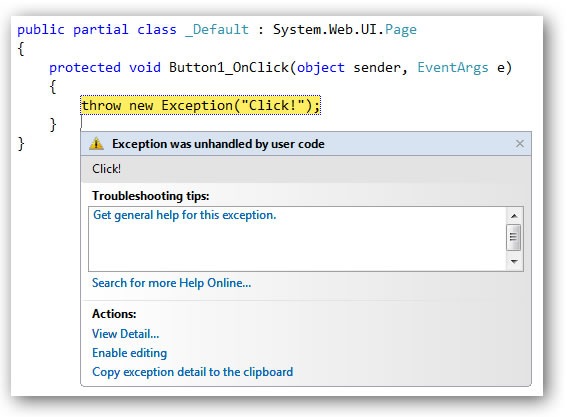
With debugging on, the unhandled exception thrown in Button1_OnClick is caught by the debugger. Normally, this sort of error-catching behaviour is welcome, but in this particular case, it gets in the way of what we’re trying to achieve: having an exception on the server side and passing it along to the user’s browser to handle.
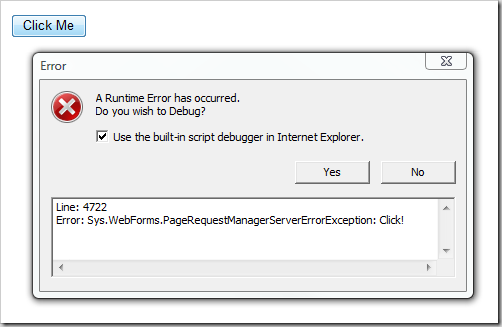
If we run the same app without debugging, we get the effect we want: the exception is raised on the server side, but the server-side part of the application doesn’t halt with an error message. Instead, the client shows the error message.
Here’s a screenshot. Note that the error message includes the string “Click!”, which is the argument in the throw statement the Button1_OnClick event handler. Thanks to this, we can be pretty certain that the error message is the result of our deliberately-thrown exception:
Now that we have the exception that we threw on the server side being handled on the client side, let’s do something with it.
Handling Exceptions Passed from the Server on the Client Side
Let’s do something simple – let’s catch the exception caused by the button click, and instead of having a JavaScript error box pop up, let’s make a couple of changes to the button:
- Change its text to “This button has been disabled for your safety.”
- Disable it.
To handle exceptions on the client side, we need to write some client-side JavaScript. Luckily, this is made simple by the number of handy utility classes defined in the scripts downloaded to the client by the ScriptManager component. In this case, we’re going to make use of the Sys.Webforms.PageRequestManager class to deal with the exception because it provides us with the following:
- The
endRequest event, which is raised after an asynchronous postback has completed and control is returned to the browser.
- The
add_endRequest method, which specifies a method to call when the endRequest event is raised.
Here’s the JavaScript, which we’ll put in a file called ErrorHandler.js:
Listing 3: ErrorHandler.js — Client-side error handler for our very simple example app.
Sys.WebForms.PageRequestManager.getInstance().add_endRequest(EndRequestHandler);

function EndRequestHandler(sender, args)
{
    if (args.get_error() != undefined) {
        $get('Button1').value = "This button has been disabled for your safety.";
        $get('Button1').disabled = true;
        args.set_errorHandled(true);
    }
}
The script performs the following:
- It registers the method
EndRequestHandler as the method to call whenever the endRequest event is raised.
- It defined the method
EndRequestHandler, which does the following:
- If an exception did occur during the asynchronous callback:"
- The button’s text is changed
- The button is disabled
- The error is reported as handled, which allows the application to continue
Now that we have this client-side code, we need to get it to the client. We do this by using the Scripts section of the ScriptManager to send this file to the client. The listing below shows the updated layout code for our simple application. I’ve highlighted the change in the listing below:
Listing 4: Revised Default.aspx – Layout for the page of our simple ASP.NET Ajax application.
<%@ Page Language="C#" AutoEventWireup="true" CodeBehind="Default.aspx.cs" Inherits="WebApplication1._Default" %>

<!DOCTYPE html PUBLIC "-//W3C//DTD XHTML 1.0 Transitional//EN" "http://www.w3.org/TR/xhtml1/DTD/xhtml1-transitional.dtd">

<html xmlns="http://www.w3.org/1999/xhtml" >
<head runat="server">
    <title>Error Handling Demo 1</title>
</head>

<body>
    <form id="form1" runat="server">

        <div>
            <asp:ScriptManager ID="ScriptManager1" runat="server">
                <Scripts>
                    <asp:ScriptReference Path="~/ErrorHandler.js" />
                </Scripts>
            </asp:ScriptManager>
            <asp:UpdatePanel runat="server" ID="UpdatePanel1">
                <ContentTemplate>
                    <asp:Button runat="server" ID="Button1"
                    Text="Click Me" OnClick="Button1_OnClick" />
                </ContentTemplate>
            </asp:UpdatePanel>
        </div>

    </form>
</body>

</html>
The Scripts section of the ScriptManager lets us specify scripts to be sent to the client along with the page, with each script specified in a ScriptReference tag.
When we run the app (remember, without debugging on) with these changes and click the button, here’s what we get:

In a later article, I’ll look at other ways of using client-side error handling in ASP.NET Ajax in .NET 3.5.
The Error in Teach Yourself ASP.NET Ajax in 24 Hours
Here’s the page layout code for the error-handling example in Teach Yourself ASP.NET Ajax in 24 Hours. The code-behind for the page and the client-side JavaScript are fine, it’s this code that has the error. See if you can spot what’s amiss:
Listing 5: Default.aspx — Page layout of client-side error-handling example in Hour 9 of Teach Yourself ASP.NET Ajax in 24 Hours.
<%@ Page Language="C#" AutoEventWireup="true" CodeBehind="Default.aspx.cs"
Inherits="WebApplication1._Default" %>

<!DOCTYPE html PUBLIC "-//W3C//DTD XHTML 1.0 Transitional//EN"
"http://www.w3.org/TR/xhtml1/DTD/xhtml1-transitional.dtd">

<html xmlns="http://www.w3.org/1999/xhtml" >
<head runat="server">
    <title></title>
</head>

<body>
    <form id="form1" runat="server">

        <div>
            <asp:ScriptManager ID="ScriptManager1" runat="server" />
            <asp:UpdatePanel runat="server" ID="UpdatePanel1">
                <ContentTemplate>
                    <asp:Button runat="server" ID="Button1"
                    Text="Click Me" OnClick="Button1_OnClick" />
                </ContentTemplate>
            </asp:UpdatePanel>
        </div>

        <br /><br />

        <div id="Message" style="visibility: hidden;">
            <asp:HyperLink ID="HyperLink1" runat="server"
                           Font-Bold="true"
                           Text="Error Occurred..."
                           Font-Italic="true"
                           ForeColor="red" >
            </asp:HyperLink>
        </div>

    </form>
</body>

</html>
Just for kicks, here’s what happens when you click on the button in the app using the code straight from Teach Yourself ASP.NET Ajax in 24 Hours:
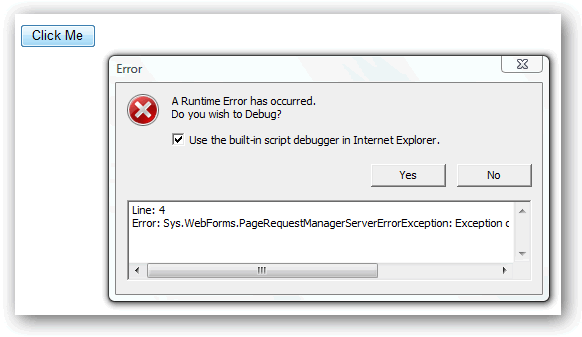
The mistake is simple: although there is some error-handling client-side JavaScript in the app, it’s not referenced in the ScriptManager tag, which means it’s not sent to the client. Without error-handling code on the client side, the exception is thrown, there’s nothing to catch it and the user is presented with the standard error dialog box.
The fix is equally simple: reference the script in the ScriptManager tag’s Scripts section:
<asp:ScriptManager ID="ScriptManager1" runat="server">
    <Scripts>
        <asp:ScriptReference Path="~/ErrorHandlingScript.js" />
    </Scripts>
</asp:ScriptManager>
Once that’s done, the program works as promised.