
Back in March, when the first platform preview of Internet Explorer 9 was released at the MIX10 conference, the IE9 team promised to release new previews of the browser about every eight weeks. Eight weeks after MIX10, they kept their promise and released Platform Preview 2. It featured improved JavaScript performance and better adherence to HTML5/CSS/JavaScript standards.

Eight weeks has passed since Platform Preview 2, and it’s time for another release. I’m pleased to announce the launch of Internet Explorer 9 Platform Preview 3! Go ahead, download it, and read on to find out what’s in this new Platform Preview.

Not so long ago, if you were using an application, chances are that it was a desktop native app running on top of your operating system. These days, the odds are that the apps you’re running are web apps, which run inside your browser, which in turn run on top of your OS. Even if you’re not factoring in network latency, that extra layer of abstraction slows things down. Hardware acceleration is one fix to this problem, and that’s a major focus of Platform Preview 3. IE9 takes advantage of your computer’s GPU to render HTML graphics and text with greater speed.

When we say “HTML5”, we’re talking about more than just HTML and the associated styling, but JavaScript as well. Luckily, we’re not only speeding up HTML rendering; we’re also cranking up the JavaScript engine, codenamed “Chakra”, which is even faster in this release.
All this work means that IE9’s performance has been improving steadily since it was first shown (but not released) to the audience at the PDC conference in November. Here are the results of the SunSpider JavaScript benchmark for a number of IE9 iterations (and a Firefox thrown in for good measure):

And here’s a “wider” version of that chart, showing more of the Esteemed Competition’s browsers:
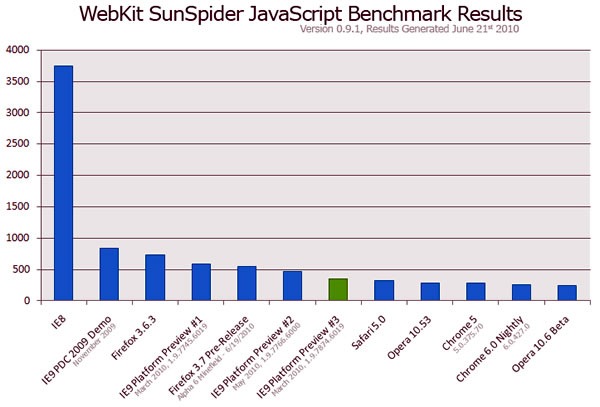
This puts IE9’s JavaScript performance within 50 milliseconds of the fastest browsers – that’s the time it takes sound to travel less than a couple dozen paces.
As the IE9 team will tell you, while JavaScript speed is important, many sites spend cycles in a browser’s subsystems that aren’t JavaScript. They’re always benchmarking against more than just the SunSpider test, but against some of the most popular sites on the net, a real-world test of a browser’s performance, and they’re not done optimizing yet.
By the bye, IE9’s JavaScript isn’t just fast, it adheres better to the ECMAScript standard and even implements new features in the 5th edition of the spec, known colloquially as ES5. They include new array and object methods, as well as other language enhancements for working with strings and dates, and the IE Test Drive site has some demos showing them in action.

Speed is just one dimension of browsing – standards is an important one, too! The support for the <audio> and <video> tags we talked about at MIX10 has been baked into Platform Preview 3.
There is one tag that was conspicuous in its absence, leaving a number of cynics, wags and conspiracy theorists to jump to the conclusion that it would never be included in IE9. Well, it’s here…

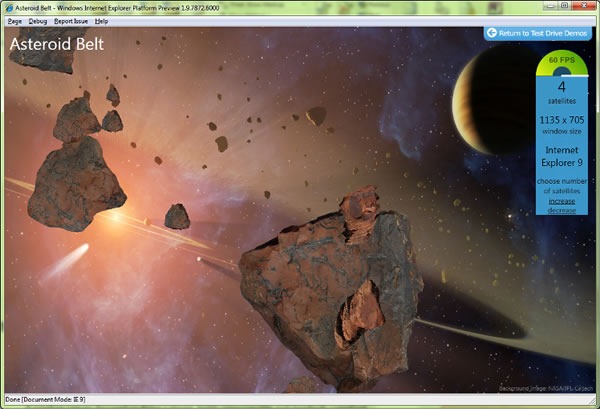
That’s right, Platform Preview 3 introduces the <canvas> tag to Internet Explorer. And it’s hardware-accelerated, too!
We’ve got a number of demos on the Test Drive IE site showing off hardware-accelerated <canvas>, including “Asteroid Belt”, shown below:
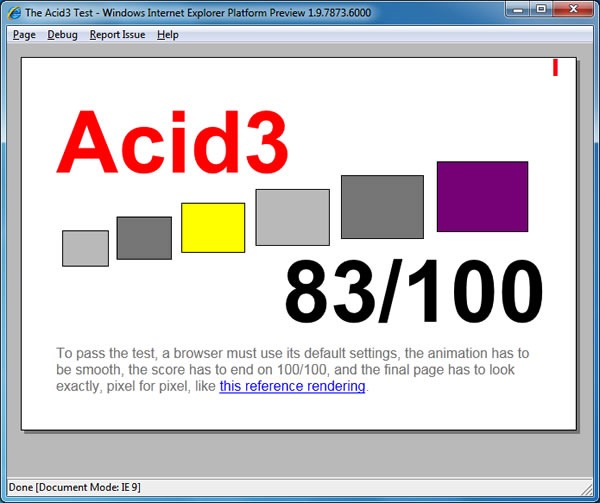
So how does Platform Preview 3 fare on the Acid3 test suite, the supposed bane of Internet Explorer’s existence? Not too shabby, jumping up to 83 out of a possible 100 (if you recall, Platform Preview 2’s score was 68):
There’s a lot more in Internet Explorer 9’s Platform Preview 3, but in the spirit of “Show, don’t tell”, I’m sending you to the IE Test Drive site to download it and take it for a spin, and please let us know what you think!

This article also appears in Canadian Developer Connection.


 In case you hadn’t read
  As a Developer Evangelist for Microsoft, one of the tools I use most often is Visual Studio, the integrated development environment that’s typically used for developing applications for Microsoft-based platforms, from the desktop to web applications hosted on Windows Server, to mobile apps for Windows Phone and Zune to console apps for the Xbox 360. I currently run both
  On the other hand,
  Take a look at the slides from