Are you interviewing for job that involves coding or requires coding skills? Then it’s very likely that you’ll be asked to undergo a coding test in the interview.
A long while back, I very badly embarrassed myself in an interview with Google. A Googler friend referred me (referrals are always better than applying yourself) and a handful of days later, I was in the interview, and I did everything wrong. I promised myself that I would never embarrass myself with such a pitiful coding performance at an interview again, and I’d also like to help ensure that it never happens to you either.
The trick, of course, is to practice. In this series, How to solve coding interview questions, I’ll walk you through the sort of questions that you might be asked in a coding interview. Many of the questions you’ll be asked will involve the sort of things that get covered in a “Algorithms and data structures” class and will be designed to test your general problem-solving ability. I’ll show you a solution, and where applicable, I’ll show you some alternate solutions and discuss the pros and cons of each.
You should try coming up with your own answers before looking at mine — after all, it’s the best way to learn!
The “first recurring character” function
This is a classic coding interview question that is often presented to junior developers.
The challenge
Write a Python function named first_recurring_character() or a JavaScript function named firstRecurringCharacter() that takes a string and returns either:
- The first recurring character in the given string, if one exists, or
- A null value like JavaScript’s or Kotlin’s
null, Python’sNone, or Swift’snil.
Here are some example inputs for first_recurring_character(), along with what their corresponding outputs should be:
| If you give the function this input… | …it will produce this output: |
'abcdeefg' | 'e' |
'abccddee' | 'c' |
'abcde' | null / None / nil |
One solution
See if you can code it yourself, then scroll down for my solution.
👇🏽
👇🏽
👇🏽
👇🏽
👇🏽
👇🏽
👇🏽
👇🏽
👇🏽
👇🏽
👇🏽
👇🏽
👇🏽
👇🏽
👇🏽
👇🏽
👇🏽
👇🏽
👇🏽
👇🏽
👇🏽
If you had to perform the function’s job yourself, you’d probably go through the given string character by character and use a piece of paper to jot down the keep track of the characters you’ve already seen.
Here’s a solution that takes this approach, in Python:
def first_recurring_character(text):
    previously_encountered_characters = []

    for character in text:
        if character in previously_encountered_characters:
            return character
        else:
            previously_encountered_characters.append(character)

    return None
Here’s the JavaScript version:
function firstRecurringCharacter(text) {
    let previouslyEncounteredCharacters = []

    for (const character of text) {
        if (previouslyEncounteredCharacters.includes(character)) {
            return character
        } else {
            previouslyEncounteredCharacters.push(character)
        }
    }

    return null
}
Both do the following:
- They use a built-in data structure to keep track of characters that they have previous encountered as they go through the given string character by character. In the Python version, the data structure is a list named
previously_encountered_characters; in the JavaScript version, it’s an array namedpreviouslyEncounteredCharacters. - The use a loop to go through the given string one character at a time.
- For each character in the given string, the program checks to see if the current character has been encountered before:
- If the current character has been encountered before, it’s the first repeated character. The function returns the current character.
- If the current character has not been encountered before, it is added to the data structure of previously encountered characters.
- If the function goes through the entire string without encountering a previously encountered character, it returns a null value (
Nonein Python,nullin JavaScript).
What’s the Big O?
If you’ve made it this far, you might be asked how you can improve the code. This is a different question in disguise: You’re actually being asked if you know the computational complexity or “The Big O” for your solution.
First, there’s the for loop. For a given string of length n, the worst-case scenario — either the string doesn’t have any recurring characters or the recurring character is at the very end — the loop will have to execute n times. That task’s complexity of O(n).
Next, let’s look inside the for loop. There’s a test to see if the current character is in the collection of previously encountered characters. In Python, this test is performed by the in operator; in JavaScript, it’s performed by the includes() method.
- Python’s TimeComplexity page says that using the in operator to find an item in a list is an O(n) operation on average.
- The spec for JavaScript’s
includes()method shows that it searches through an array one element at a time, which makes it an O(n) operation on average.
That’s because they both use the following algorithm to determine if a given item is in a list or array:
if we are not yet past the last item in the list/array:
    get the next item in the list/array
    if this item is the one we’re looking for:
       return true

if we are at this point and we have not found the item:
    return false
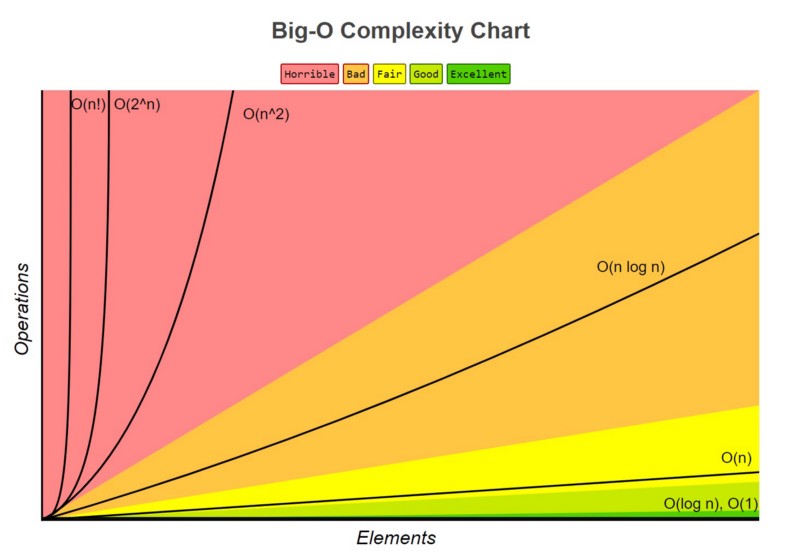
So the function is basically an O(n) operation performing an O(n) operation on average, effectively making it an O(n2) operation. As far as computational complexity goes, this is considered “horrible”:
Can you improve the code?
You’ve probably figured out that the way to improve the code is to try and reduce its time complexity.
You probably can’t reduce the time complexity of the for loop. The function has to find the first recurring character, which means that it needs to go through the characters in the given string in order, one at a time. This part of the function will be stuck at O(n).
But you might be able to reduce the time complexity of check to see if the current character in the loop has been encountered before. In the function’s current form, we’re using a Python list or JavaScript array to keep track of characters that we’ve encountered before. Looking up an item in in these structures is an O(n) operation on average.
The solution is to change the data structure that keeps track of previously encountered characters to one where looking for a specific item is faster than O(n). Luckily, both Python and JavaScript provide a data structure for sets, where the time to look up an item is generally O(1).
Let’s rewrite the function to use sets. Here’s the Python version:
def first_recurring_character(text):
    previously_encountered_characters = set()

    for character in text:
        if character in previously_encountered_characters:
            return character
        else:
            previously_encountered_characters.add(character)

    return None
The Python version doesn’t require much changing. We simply changed the initial definition of previously_encountered_characters from an empty array literal ([]) to a set constructor and call on set’s add() method instead of the append() method for arrays.
Here’s the JavaScript version:
function firstRecurringCharacter(text) {
    let previouslyEncounteredCharacters = new Set()

    for (const character of text) {
        if (previouslyEncounteredCharacters.has(character)) {
            return character
        } else {
            previouslyEncounteredCharacters.add(character)
        }
    }

    return null
}
The JavaScript version requires only a little more changing:
- The initial definition for
previouslyEncounteredCharacterswas changed to aSetconstructor. - We changed the array
includes()method to the sethas()function. - We also changed the array
push()method to the setadd()method.
Changing the data structure that stores the characters that we’ve encountered before reduces the complexity to O(n), which is much better.
Coming up next
In the next article in this series, we’ll tackle a slightly different problem: Can you write a function that returns the first non-recurring character in a string?