December 2010

Windows Phones in Canada

by Joey deVilla on December 28, 2010

Want to know what Windows Phone 7 devices are being offered by Canadian telcos? I’ve got the list below:

Telus
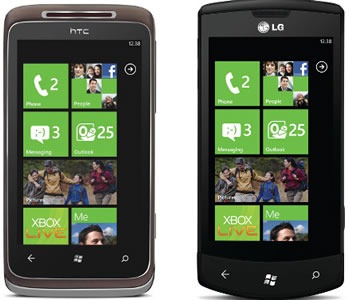
telus wp7 phones

Telus offers two Windows Phones:

  • HTC 7 Surround. This is the one with the slide-out Dolby Surround speakers and a little kickstand so you can use it as a mini video player. The speakers are surprisingly loud and clear and our coworker Anthony “The Mobile Situation” Bartolo used them to great effect at TechDays this year, annoying us with the Jersey Shore soundtrack.
  • LG Optimus 7. This one’s for people with DLNA-equipped TVs (or in a pinch, a TV with an Xbox hooked up to it) – you can use DLNA to send the pictures and videos on your phone to a nice large screen. It’s great for presentations, vacations slides or even movie-watching.

Bell

bell wp7 phone

There are a number of people who refuse to use on-screen virtual keyboards and like the reassuring feel of a button’s “throw”. If you’re one of these people, Bell’s LG Optimus Quantum is the Windows Phone for you, with a slide-out keyboard. I’ve taken it out for a test drive at the store and it feels pretty nice.

Rogers
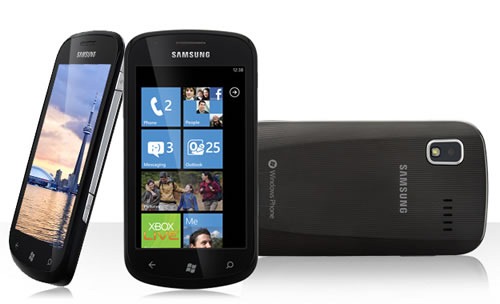
rogers wp7 phone

I’m on Rogers (as are all Microsoft employees in Ontario – the company pays for our phones and plans), and their Windows Phone is the Samsung Focus. It’s sexy, skinny, much lighter than you’d expect for a device with this kind of horsepower and it sports a bright, crisp 4” Super AMOLED screen, just like the one on the Galaxy S. I end up doing a lot of impromptu demos with this phone, and everyone walks away impressed.

Expansys
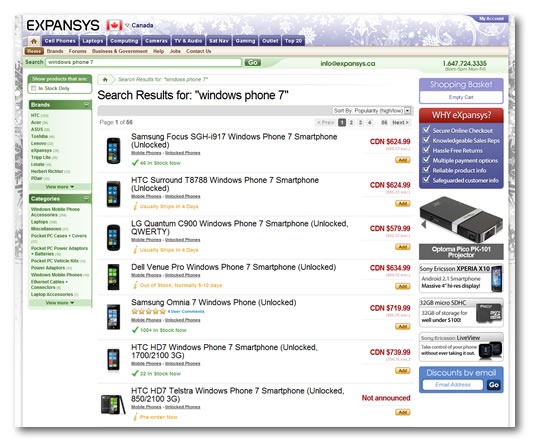
expansys site

If you’re in the market for an unlocked WP7 phone, or perhaps a WP7 phone that the Canadian telcos aren’t carrying, Expansys are the go-to people. If you’ve been to one of the big Microsoft conferences in the US – PDC, TechEd North America and so on – you’ve probably seen their booth. They’re the go-to guys for all sorts of mobile devices, including the hard-to-get ones.

They have a Canadian site, www.expansys.ca, and they’ve got a very extensive selection of Windows Phone 7 devices. Better still, their service is great. When I screwed up my last order and accidentally ordered the European version of a phone that wouldn’t be compatible with HSPA+ over here, a quick email to their service was all it took for them to fix the problem and let me know it was fixed. I salute them with a filet mignon on a flaming sword!

This article also appears in Canadian Developer Connection.

{ 0 comments }

Wishing You Some Nerdy Holidays

by Joey deVilla on December 24, 2010

happy holidays

I’d like to wish all my readers a safe and fun holiday season! Whether you celebrate Christmas, Chanukah, Festivus or anything else, have a fun one, enjoy the downtime, be safe, go work on your favourite side project (even if it’s doing nothing at all) and take a peek here every now and again — you never know what I might sneak in here over the break.

{ 0 comments }

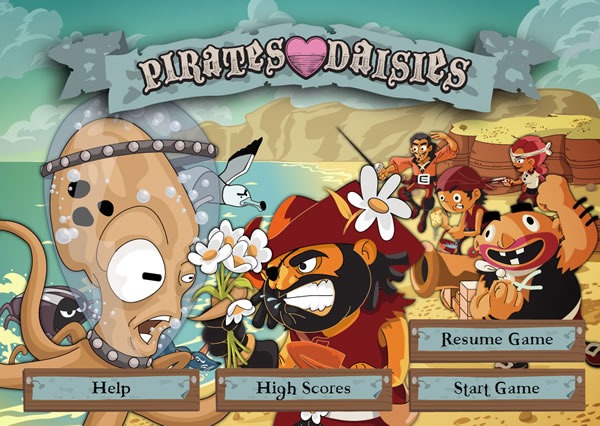
The "start" screen for "Pirates Love Daisies"

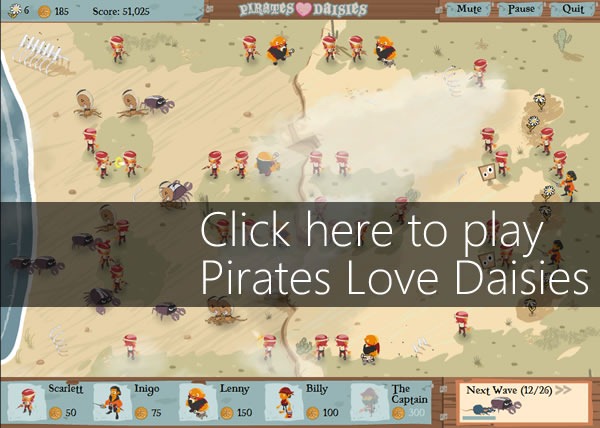
If things get a little too quiet and boring during the holiday downtime and you’re looking for a game, try Pirates Love Daisies. It’s a “tower defense” style game with cute graphics, great sound and very addictive gameplay, and you can play it in a browser that supports the HTML5/CSS/JavaScript troika (often just referred to as the catch-all “HTML5”), which includes the current beta of Internet Explorer 9. In the game, you set up pirates with different combat skills (pistols, swords, cannons and sponges) in strategic locations to defend your patch of daisies from rates, seagulls, crabs, octopi and their boss, the kraken.

Screen capture of checkbox that reads "Enable additional effectors for IE9 (What is this?)"

If you’re running Internet Explorer 9 or a very fast computer (like my assigned “Dellasaurus” Precision M6500 – a quad-core I7 machine with 16GB of RAM and a 1GB graphics card), try checking the Enable additional effects for IE9 checkbox – it’ll turn on some additional graphic effects in the game, such as clouds and shadows. They’re not necessary for gameplay, but they do spice it up, and you’re going to need a browser that makes use of the GPU (such as IE9) or serious hardware if you want these effects without bogging down the game.

Here’s Larry Larsen talking about Pirates Love Daisies on Channel 9:

Get Microsoft Silverlight

Can’t see the video? You can get Silverlight or download it in the following formats: high-quality WMV, high-quality MP4, regular-quality WMV, regular quality MP4 or MP3 (audio only).

Pirates Love Daisies was the first HTML5 project by Grant Skinner, a Flash developer, and was commissioned by Microsoft, who asked him to build a “best-of-breed” tower defense game using HTML5. He talks about his experience on his blog, which includes this opinion on IE9:

I never thought I’d say this, but Internet Explorer 9 actually looks to be a great browser. It has impressive performance, and seems to be very standards compliant. I would definitely recommend checking it out, you might be surprised.

Microsoft Tech Evangelist Giorgio Sardo also blogged about Pirates Love Daisies. In his post titled Pirates Love Daisies: Lessons Learned, he talks about performance and some things they learned about HTML5 game development along the way, including working with the canvas element, fonts, audio and IE9’s developer tools.

Easel JavaScript library logoPirates Love Daisies makes use of the Easel JavaScript library, which “provides a full, hierarchical display list, a core interaction model, and helper classes to make working with Canvas much easier.” Although it’s still in early alpha, it works well enough for Pirates Love Daisies, which uses it to manage and render the game screen.

And finally, where does Pirates Love Daisies live? In the cloud! It’s hosted on Windows Azure as proof that Azure’s not just for line-of-business-y, ecommerce-y web applications (although it works quite well for them).

Screen capture of the game: "Click here to play Pirates Love Daisies"

Download Internet Explorer 9 now!

This article also appears in Canadian Developer Connection.

{ 0 comments }

Comic Sans Criminal

by Joey deVilla on December 22, 2010

You're a Comic Sans Criminal but we're here to help you

Comic Sans is probably one of the most misused fonts out there. Originally intended for the comic book-style speech bubbles for “Clippy” and other assistants in Microsoft Office, it got used first for “fun”, “childlike” documents and signs, and then found its way into far less appropriate venues, including those shown in the photos below:

Defibrillator and sexual assault notice using Comic Sans

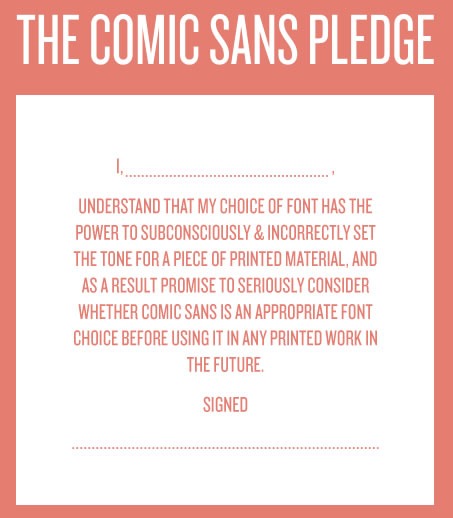
The Comic Sans Criminal site does a great job telling the story of Comic Sans, where people went terribly, terribly wrong with it, what the appropriate uses for Comic Sans are, and it ends with the Comic Sans Pledge:

The Comic Sans Pledge: "I, _____, understand that my choice of font has the power to subconsciously and incorrectly set the tone for a piece of printed material, and as a result promise to seriously consider whether Comic Sans is an appropriate font choice before using it in any printed work in the future. Signed, ____"

Check out Comic Sans Criminal! It’s a beautifully-designed site that makes use of some good HTML5 tricks to turn it into an entertaining and gorgeous slideshow, and if it stops you from using Comic Sans inappropriately (or even better, altogether), so much the better!

This article also appears in Canadian Developer Connection.

{ 0 comments }

New Book: Windows Phone 7 Game Development

by Joey deVilla on December 22, 2010

Cover of "Windows Phone 7 Game Development"

This book’s so new that I’m not sure the dead-tree version is available yet: it’s Windows Phone 7 Game Development, published by Apress and written by Adam Dawes. I’ve just purchased the ebook version (which you can download right away for USD$34.99), so I’ve only had a chance to do a quick skim.

According to Apress’ site, here’s what you’ll learn from Windows Phone 7 Game Development:

  • How to get started with Windows Phone 7 development, from setting up the IDE to debugging techniques.
  • Develop using the free or full versions of Visual Studio 2010.
  • Master high performance 2D and 3D graphics using the XNA development environment.
  • Build 2D games using Silverlight and also learn how to publish them to the web.
  • Find out the best ways to control your games, including using touch screens, keyboards and accelerometers.
  • Produce high quality music and sound effects from your games.
  • Masses of example code and working projects, including two example games, "Cosmic Rocks" and "Diamond Lines."
  • All you need to release your games to the world for fun or to sell.

It looks like a worthy partner to Beginning Windows Phone 7 Development.

This article also appears in Canadian Developer Connection.

{ 0 comments }

lost in the cloudCreative Commons photo by Christopher Sessums. Click to see the original.

There’s no time like holiday downtime to go noodle with technologies you’ve been meaning to try out. Sometimes it’s nice to have a break from all the parties, family gatherings and the madness and crowds of Boxing-Day-and-beyond shopping. At the same time, I’m not a fan of completely vegging out in front of the TV. My own downtime plans – asides from catching up on some reading (I’m currently digging the the Oishinbo series of cooking manga) and playing the new Assassin’s Creed and Call of Duty – include doing some noodling with Azure.

On the whole, Azure is pretty simple to use. As far as coding is concerned, there really aren’t too many differences between having your application run on Azure and having it run on a regular server. Naturally, setup and deployment are a little different, and the Azure team have worked hard on making it as simple as possible, and the latest Azure portal UI is the result. Still, it’s a new technology and new turf for a lot of people, and it’s easy to get lost.

If you’re working with Azure and find yourself “lost in the cloud”, we can help! Are you stuck at some point in the deployment process? Having trouble setting up a SQL Azure database? Don’t know where to start? We can help – email us at cdnazure@microsoft.com and we’ll help you get up and running!

This article also appears in Canadian Developer Connection.

{ 0 comments }

beginning windows phone 7 development

I’ve been flipping through Apress’ new book, Beginning Windows Phone 7 Development, and I’ve been impressed so far. As with most books on developing for any given platform, the first couple of chapters are introductory and have the mandatory “Get the Tools” and “Let’s Write a Hello World Program” sections, but the book veers from the standard trajectory in chapter 3 by diving right into the use of the cloud for data storage for your app.

That’s where we get into the serious stuff: the MVVM design pattern, setting up a SQL Azure account and database, creating a cloud service to access that cloud database, building a WCF service to access the data, and then building a Windows Phone app – a notepad application – that accesses that database. By the end of the chapter – and remember, this is chapter three and less than a hundred pages in – you’ve got a cloud-enabled phone app that you can use as the basis for your own. That’s no small feat, and it’s a testament to the tools and technologies available to Windows Phone 7 developers.

Update (Friday, Dec. 17, 2010): Author Henry Lee let us know in the comments that there’s an update to chapter 3 to cover recent changes to Azure’s UI.

I’m still working my way through Beginning Windows Phone 7 Development, but from what I’ve seen so far and from casual scans ahead, I would recommend it for the developer who’s comfortable with C# and .NET and is ready to pick up a lot of new things quickly.

If you’d like to get this book as quickly as possible, I’d recommend the ebook version. It’s also the cheapest, at USD$27.99. Better still, if you buy before midnight of December 31st, you can save 25% by using the promotional code APRESSHOLIDAY2010, knocking the price down to a mere USD$21 (which as of this writing, is a Rush-inspired CDN$21.12).

This article also appears in Canadian Developer Connection.

{ 0 comments }

Calgary Coffee and Code: Thursday, December 16

by Joey deVilla on December 15, 2010

calgary coffee and code

There’s a Coffee and Code in Calgary on Thursday, December 16th! We’ll be at the Second Cup at 607 8th Avenue SW from 11 a.m. to 4 p.m.:

Map picture

Join us and talk about Windows Phone 7, Windows Azure, the industry in general or anything else you like!

This article also appears in Canadian Developer Connection.

{ 0 comments }

humble indie bundle

The Humble Indie Bundle 2 is the second edition of a collection of indie games that run on Windows, Mac and Linux. Last year, the Humble Indie Bundle features World of Goo and other games; this year, the Humble Indie Bundle contains these DRM-free games:

Purchased separately, these games would sell for a total of USD$85, but for a limited time, you get to set the price and determine where the money goes! That’s right, you determine how much you spend, and how you divide the money among the developers of the games, the EFF and the Child’s Play charity. Great games for the holidays for great causes!

For more, check out the Humble Indie Bundle 2 trailer:

Get Humble Indie Bundle 2 and play some great indie games (and perhaps even get some inspiration for your own Windows Phone 7 games)!

This article also appears in Canadian Developer Connection.

{ 0 comments }

AzureFest Redux!

by Joey deVilla on December 14, 2010

AzureFest ReduxIn case you missed Saturday’s AzureFestObjectSharp’s Windows Azure deployment clinic held at Microsoft Canada HQ – you’re in luck. ObjectSharp’s Barry Gervin and Cory Fowler have put together a set of videos that go through what they covered on Saturday, so you too can have all that AzureFesty goodness in the comfort of your own office, home or café.

In the current set of videos, they cover:

  1. Signing up for the introductory Windows Azure Offer
  2. Deploying a web application package to Azure via the Azure Portal
  3. Cleaning up after yourself and tearing down an existing Azure web deployment

They’ll be posting a set of videos shortly covering:

  • Deploying a SQL database to Azure
  • Installing Azure Tools for Visual Studio and the SDK
  • Deploying ASP.NET applications to Azure from within Visual Studio

Do This Azure Deployment Exercise, Get $25 for Your Dev User Group!

Microsoft Canada is extending its special offer to members of user groups: deploy an app to Azure and send us a screenshot, and we’ll give $25 to the developer user group of your choice. There’s a set of step-by-step instructions on Barry’s blog.

This article also appears in Canadian Developer Connection.

{ 0 comments }

The New Yorker Profiles Shigeru Miyamoto

by Joey deVilla on December 14, 2010

Shigeru MiyamotoCreative Commons photo by Vincent Diamante. Click to see the original.

Worth reading: The New Yorker has a profile of Nintendo’s greatest asset, game creator and the man behind Mario, Shigeru Miyamoto.

An excerpt:

When Shigeru Miyamoto was a child, he didn’t really have any toys, so he made his own, out of wood and string. He put on performances with homemade puppets and made cartoon flip-books. He pretended that there were magical realms hidden behind the sliding shoji screens in his family’s little house. There was no television. His parents were of modest means but hardly poor. This was in the late nineteen-fifties and early nineteen-sixties, in the rural village of Sonobe, about thirty miles northwest of Kyoto, in a river valley surrounded by wooded mountains. As he got older, he wandered farther afield, on foot or by bike. He explored a bamboo forest behind the town’s ancient Shinto shrine and bushwhacked through the cedars and pines on a small mountain near the junior high school. One day, when he was seven or eight, he came across a hole in the ground. He peered inside and saw nothing but darkness. He came back the next day with a lantern and shimmied through the hole and found himself in a small cavern. He could see that passageways led to other chambers. Over the summer, he kept returning to the cave to marvel at the dance of the shadows on the walls.

Miyamoto has told variations on the cave story a few times over the years, in order to emphasize the extent to which he was surrounded by nature, as a child, and also to claim his youthful explorations as a source of his aptitude and enthusiasm for inventing and designing video games. The cave has become a misty but indispensable part of his legend, to Miyamoto what the cherry tree was to George Washington, or what LSD is to Steve Jobs. It is also a prototype, an analogue, and an apology—an illuminating and propitious way to consider his games, or, for that matter, anyone else’s. It flatters a vacant-eyed kid with a joystick (to say nothing of the grownups who have bought it for him or sold it to him) to think of himself, spiritually, as an intrepid spelunker. The cave, certainly, is an occasion for easy irony: the man who has perhaps done more than any other person to entice generations of children to spend their playtime indoors, in front of a video screen, happened to develop his peculiar talent while playing outdoors, at whatever amusements or mischief he could muster. Of course, no one in the first wave of video-game designers could have learned the craft by playing video games, since video games didn’t exist until people like Miyamoto invented them. Still, there may be no starker example of the conversion of primitive improvisations into structured, commodified, and stationary technological simulation than that of Miyamoto, the rural explorer turned ludic mastermind.

Read the rest of the article here.

This article also appears in The Adventures of Accordion Guy in the 21st Century.

{ 1 comment }

sharepoint and cloud

Yaroslav Pentsarskyy is a busy guy. He’s a Technical Specialist with Habanero, Systems Architect at Bluekarbon, SharePoint MVP, author, and a TechDays presenter. He’ll be doing the IE9 Turbo Talk on Tuesday and the Microsoft SharePoint Server 2010 for Developers of Microsoft ASP.NET presentation on Wednesday.

If you can’t catch him at TechDays Calgary (taking place this Tuesday and Wednesday), you’re in luck: Yaroslav will be doing a presentation on Tuesday night at Calspug – the Calgary SharePoint User Group. His presentation: Taking Your Existing SharePoint 2010 Solution to the Cloud. Here are the details:

Topic

Taking Your Existing SharePoint 2010 Solution to the Cloud

Audience

SharePoint application/solution developers and architects

Abstract

In the last year – there has been significant interest in hosting SharePoint solutions in the cloud. There are many vendors out there offering SharePoint 2010 hosting in the cloud. This session will focus on understanding key differences that affect solution development for the cloud. Developers will learn how they can leverage their existing tools to create basic and advanced solutions ready for the cloud.

Time, Place and Other Details

  • When: Tuesday, December 14, 6:00 – 7:30 p.m. (doors open at 5:30)
  • Where: Global Knowledge (formerly Nexient) 2nd Floor Training Centre
    144 – 4 Avenue SW, Suite 200
  • Cost: Free
  • Donations: Calspug is accepting non-perishable food item donation for the Calgary IF Food Bank. Bring something!
  • Food and beverages will be provided

Bonus Goodies

yaroslav book

Yaroslav will be giving away copies of his book, Top 60 Custom Solutions Built on Microsoft SharePoint Server 2010.

Registration

Registration for this event is free – just sign up on the registration page.

This article also appears in Canadian Developer Connection.

{ 0 comments }

In Calgary This Week

by Joey deVilla on December 12, 2010

Calgary Tower in the sunsetCreative Commons photo by Angela MacIsaac. Click to see the original.

Seven cities down, one to go. This year has been our biggest TechDays tour, spanning the cities of Vancouver, Edmonton, Toronto, Halifax, Ottawa, Montreal, Winnipeg and this week, Calgary. Among other things, it’s the city that Developer Evangelist John Bristowe calls home.

All of us are looking forward to seeing everyone there, especially Damir!

Damir gives a big thumbs-up

This article also appears in Canadian Developer Connection.

{ 0 comments }

Hacking for Good Causes

by Joey deVilla on December 12, 2010

A couple of weekends ago, I had the good fortune to being able to stop in and help out at not one but two “hackathons” – programming marathons – where the people taking part were writing software for the common good and which made use of open data. They took place on the same day and were still well-attended, a good sign that the geeks here in Toronto aren’t like the self-absorbed self-interested ones chronicled in Paulina Borsook’s Cyberselfish. These people gave their time and talent for a good cause and asked for nothing but to be fed – I salute them with a filet mignon on a flaming sword!

Open Data Hackathon

Four developers working on their laptops, gathered around a single table

On Saturday, December 4th, Microsoft’s open source initiative guy, Nik Garkusha, organized a hackathon at Microsoft Canada headquarters in Mississauga where developers would work on a project that would be based on Halton Region open data and would serve the public interest.

Two developers working on an open data problem, with a large project in the background

The event coincided with International Open Data Hackathon Day, an event shared among 63 cities in 25 countries whose goals were:

  1. To help raise the awareness of open data and why it matters
  2. To help foster communities of techies, active citizens and others who care about open data
  3. To have fun using the technology we love to create open data solutions that contribute to the public good

Nik Garkusha and three other developers, working on their open data solution

And of course, being a Microsoft event, we also set up an Xbox with Kinect so that participants could take a break, get away from the computer and move about“

Lydia Male plays "Dance Central" on the Xbox and Kinect

Random Hacks of Kindness

RHoK logo

Random Hacks of Kindness (RHoK, pronounced “rock”) also took place on Saturday, December 4th and stretched to the following day. Think of it as the intersection of developers and other assorted geeks meeting up with tech-savvy do-gooders to develop software to help people and make the world a better place. It’s a joint initiative among Microsoft, Google, Yahoo!, NASA and the World Bank, and the actual legwork is done by volunteers who gather to hold hackathons in cities all over the world.

Here’s the story of how RHoK got started, according to Wikipedia:

Random Hacks of Kindness grew out of an industry panel discussion at the first Crisis Camp Bar Camp in Washington DC in June 2009. Panel attendees included Patrick Svenburg of Microsoft, Phil Dixon of Google and Jeremy Johnstone of Yahoo!. They agreed to use their developer communities to create solutions that will have an impact on disaster response, risk reduction and recovery. The idea was for a "hackathon" with developers producing open source solutions. The World Bank’s Disaster Risk Reduction Unit and NASA’s Open Government team joined the partnership and these "founding partners" (Microsoft, Yahoo, Google, NASA and the World Bank) decided on the name "Random Hacks of Kindness" for their first event.

I attended as both a sponsor’s representative and judge for submissions at the Toronto RHoK, which was organized with the help of my former co-worker at Tucows, Heather Leson, who’s one of our local Crisis Commons representatives. Joining me on the panel of judges were:

The main RHoK room as seen from the front, packed with developers working at various tables

This was the first RHoK to take place in Canada and had 52 participants collaboration on eight projects. Our group gathered in rooms on the 4th floor of University of Toronto’s Ontario Institute for Studies in Education (OISE). Worldwide, about 1,000 participants in 20 cities joined in the RHoK project and worked on some kind of software for a good cause, and many of these events were linked together via streaming video.

The main RHoK room as seen from the back, packed with developers working at various tables

The RHoK participants had the weekend to come up with a software solution to a “good cause” problem, implement it and present it at the end of the final day. Many of the participants haven’t had much practice presenting, so while some people kept working on their applications, Will Pate gave a quick tutorial on making technical presentations, which I captured in the photo below:

Will Pate teaching the participants how to do a technical presentation

At the end of the second day, we all gathered in the main room to watch the teams present their applications. The session opened with Heather Leson providing the introductions:

Heather Leson addresses the gathering

…and the Melanie Gorka adding some details…

Melanie Gorka addresses the gathering, as seen close up

…and with Melanie done, it was time to start the presentations!

Melanie Gorka addressing the gathering, as seen from the back of the room

Person Finder

"Person Finder" developers making their presentation

This was the first presentation. At an RHoK event last year, a team had put together a web application that made it simple for people to submit requests for information about missing friends and relatives in a disaster. This team decided to extend its capability by creating a RESTful API for the application, enabling people to develop specialized client applications that would access the original as a service.

Payout to Mobile

"Payout to Mobile" developers making their presentation

In developing countries, farmers often buy cheaper, lower quality seed out a fear of being having their crops wiped out by drought or flood and not having any cash reserves to survive afterwards. If they had access to some kind of insurance for their crops, they could afford to buy better seed and potentially triple their yields.

Payout to Mobile is the technical portion of a solution that allows these farmers to get their crops insured. When a farmer goes to buy seed or fertilizer, the vendor uses SMS to get a set of insurance quotes – “kind of like Progessive” – for policies that get sold along with the farmer’s purchase. If a weather event specified in the policy occurs, the farmer gets a payout.

Population Centres

"Population Centres" developers making their presentation

This was a project that took online population data and turned it into visualizations that would allow disaster planners to better determine appropriate assistance based on population and population densities.

We Are Helping

"We are Helping" developers making their presentation

In a disaster, it’s easy for aid groups to coordinate outside agencies. However, local people who also have the skills to lend a hand (and oftentimes, a better “feel” for the local area and culture) can be left out. This is a classic “access to information” problem, and this application lets local responders self-organize. The people behind this project discussed the possibility of tying this in with other projects being developed at RHoK hackathons, including Tweak the Tweet and I’m Not OK.

Is This Bike Stolen?

"Is This Bike Stolen?" developers making their presentation

Here’s something that would appeal to anyone who’s been a victim of Igor Kenk, Toronto’s notorious bike superthief. This is a web application that lets you check the serial number of a bike you’re about to buy against the Toronto Police’s database of serial numbers of stolen items.

Where Not to Rent

"Where Not to Rent" developers making their presentation

This web application might come in handy if you’re looking for a place to rent in Toronto. It makes use of a Toronto Open Data store that track reports of rental property deficiencies, including the hot topic of the moment: bedbugs! By the time you read this, the app should be live at http://wherenottorent.refactory.ca/.

Tweak the Tweet

"Tweak the Tweet" developers making their presentation

This application combs through Twitter in search of actionable data for emergency reponse teams, making use of location tags.

City Budgets

"City Budgets" developers making their presentation

The Toronto city budget data is buried within a monolithic 600-page PDF report and some Toronto Open Data files. This application, inspired by what the British paper The Guardian has been doing with open data, takes all that information and turns them into more comprehensible interactive charts and graphs.


The audeince watches the presentations

We judges retired to our secret chambers and after some deliberation, declared these projects the winners:

  • Third place: Payout to Mobile
  • Second place: Tweak the Tweet
  • First place: Is This Bike Stolen?

We also declared participant Jon Pipitone as the “MVP” of the event for being a leader, participating in more than one project and mentoring people.

If you wanted to find out more about the Toronto RHoK event, check out these other articles:

This article also appears in Canadian Developer Connection.

{ 3 comments }

AzureFest

by Joey deVilla on December 12, 2010

AzureFest attendees in Microsoft Canada's MPR room watch Cory Fowler and Barry Gervin at the front of the room.

AzureFest, the get-together where developers and aspiring developers learn how to use and deploy applications and databases to Azure, took place at Microsoft Canada headquarters in Mississauga on Saturday.

Cory Fowler stands beside the big screen in Microsoft Canada's MPR room

The event was held by our partners ObjectSharp and led by Cory Fowler, an Azure MVP. There was a morning sessions and an afternoon session, and my rough estimation of both events put the attendance at around 130 in total.

The AzureFest attendees, working away at their computers.

Each three-hour session consisted of a quick overview of the Azure platform, the distribution of all the necessary developer tools, signing up for an Azure account and using the prototyping-and-wallet-friendly Introductory Special and deploying that old ASP.NET MVC standby app NerdDinner and its associated database to the cloud. The three-hour format covered more practical ground than the typical one-hour conference session and gave Cory and the ObjectSharpies a chance to make themselves available for one-on-one assistance.

Cory taking the AzureFest attendees through one more example

In Case You Missed AzureFest…

If you couldn’t make it down to Mississauga to participate in AzureFest, you can still benefit from the AzureFest session. The ObjectSharpies are recording a version of Cory’s Azure deployment walkthrough and making it available online. Watch this blog for more details.

Try Azure and Get Some Money for Your User Group!

If you’re the member of a Canadian Microsoft User Group, you can help them make a quick $25 which they can use to fund their activities. All you have to do is:

  • Open an Azure account: either the introductory special offer or using the Azure benefit that comes with your MSDN subscription
  • Deploy an application – any application, including pre-written ones like NerdDinner – to Azure
  • Send an email to cdnazure@microsoft.com with the following:
    • A screenshot of your application running on Azure
    • The name of the user group to which you’d like to get $25
    • Feedback about your experience with Azure

This article also appears in Canadian Developer Connection.

{ 0 comments }