September 2011

Featured Shopify App: Incentify by Points.com

by Joey deVilla on September 27, 2011

"Incentify by Points.com": View of an airplane's wing, sky, oceans and islands from the window seat

Loyalty

See the photo above? I took it from my seat on Sunday afternoon. Seat 31A, flying out of Tampa. Earned 1,097 miles on that leg alone, double that if you count the trip there. It was flying on business, but thanks to my loyalty program, that flight was doing double duty: getting me to the conference and customer meetings and getting me closer to a free flight for my vacation (which might include partaking in that big tomato food fight in Spain).

TV set showing "Star Trek"

Same deal goes for my TV. Bought it at an electronics shop which has a loyalty program, whose points I’m going to use to keep my collection of console games up to date (I’m thinking of getting this one when it comes out).

I’m sure I’m not the only one who keeps score of his loyalty points and who keeps coming back to get more. Chances are, you’re probably a member of at least a couple of loyalty programs. They’re a big deal these days, from those “buy so many coffees, get one free” cards at your local cafe to frequent flyer miles and hotel points.

Mark Johnson, CEO of the loyalty marketing association Loyalty 360 declared 2011 “the year of customer loyalty”, saying that creating engaged customers is more important than ever in today’s crowded marketplace. Loyalty’s more than just a program now: it’s a strategic business goal.

(To find out more about what Johnson thinks this year’s trends are, see the article 11 Key Customer Loyalty Trends for 2011.)

As a Shopify shop owner, you’re probably wondering how you can incorporate a loyalty program into your shop. And not just any loyalty program, but one that offers rewards that customers really want and will encourage them to keep coming back.

That’s where Incentify by Points.com comes in. It’s a Shopify app created by Points.com, the system that lets people get the most out of their loyalty programs, from frequent flyer miles to hotel points to credit card rewards and more. With Incentify, you can reward loyal customers with points for the many programs under Points.com’s umbrella and keep them coming back to your shop.

We talked with the folks from Incentify to explain how their app works and what it can do for you; their answers are below.

What does your app do?

Incentify app iconIncentify by Points.com drives online merchant sales by allowing them award their customers with the world’s largest loyalty programs, such as American Airlines® AAdvantage®, US Airways® Dividend Miles®, HawaiianMiles, Alaska Airlines Mileage Plan, Best Buy Reward Zone®, and Frontier Airlines EarlyReturns®. Incentify puts the choice in the hands of your customer allowing them to receive their loyalty miles or points in their favourite program.  Incentify increases customer loyalty, engagement and creates a differentiated value proposition.

What are the key features of your app?

  • Incentify lets you configure ‘loyalty campaigns’ that are aligned with your business goals and help drive sales. You can choose to reward customers based on how much they spend with you or manually distribute loyalty miles/points to support contests or special promotions.
  • Your customers are automatically provided a unique claim code they can use to redeem for the loyalty miles/points you awarded them in the loyalty program of their choice.  Incentify posts your customer’s loyalty miles/points directly in their chosen loyalty program.
  • You’ll have access to our ‘merchant resource center’ to grab banners and other marketing materials to promote your loyalty campaign featuring the world’s biggest loyalty brands such as American Airlines® AAdvantage®, US Airways® Dividend Miles®, HawaiianMiles, Alaska Airlines Mileage Plan, Best Buy Reward Zone®, and Frontier AirlinesEarlyReturns®.
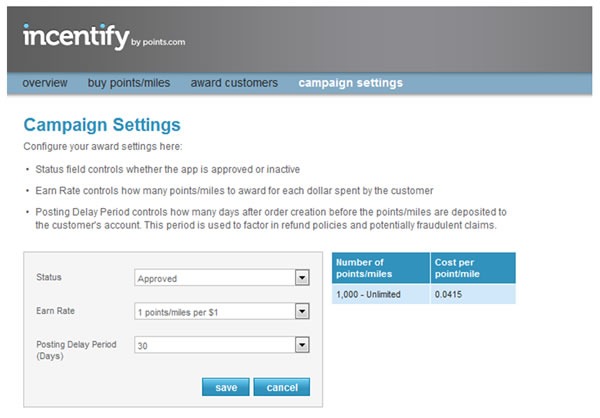
Screenshot of the "Campaign Settings" page of the Incentify App

Why should shop owners use your app?

Lots of reasons! You’ll be able to:

  • Reach a huge audience: There are over 2 billion loyalty program memberships in the US, and 120 million in Canada.
  • Increase revenue: Loyalty program members spend 13% more than non-loyalty program members.
  • Drive repeat visits: Offering loyalty rewards can increase repeat shopper annual visits by 15- 20%.
  • Increase conversion rates64% of loyalty program members report that having an online retailer offer points/miles as a purchase incentive would make them more likely to buy.
  • Give customers what they want: 73% of loyalty program members agree that when given a choice, they always pick a retailer that offers points or miles.
  • Points.com promotes your store: Shop owners who download and use Incentify can leverage Points.com social and email channels to our 3 million users and the over 100 million loyalty mile/point collectors.

"Win 50,000 loyalty points or miles!": Airplane wing as seen from window

  • Win 50000 miles or points! If you download the app before November 1st you’re automatically entered to win 50,000 points or miles in the participating loyalty program of your choice! Once you make a purchase we’ll also give you a 50% point/mile bonus until November 1st! (See the full contest details for more information.)

Tell us a little about yourself.

Screenshot of Points.com's site

A great development team at Points.com built the Incentify app.  We’re located in Toronto, Canada. Since 2000, Points International Ltd. has worked with dozens of the world’s leading loyalty programs to increase their flexibility and drive greater member engagement online.

Our team of 100+ people is headquartered in Toronto, with offices in London, Dallas and Chicago. Points.com is a public company traded on the Toronto Stock Exchange (TSX:PTS) and on the Nasdaq (PCOM).  Here are some of the loyalty programs we work with; we’ll be adding a bunch of those to the Incentify app soon.

Logos of 48 of Points.com's partners

In addition to Incentify we also operate Points.com, the world’s leading loyalty management platform and a series of commerce applications for loyalty point programs around the world.  Each year we process about $300 million worth of loyalty transactions!

Check us out at www.points.com or follow us on Twitter; we’re @PointsAdvisor.

Where did you get the idea for your app?
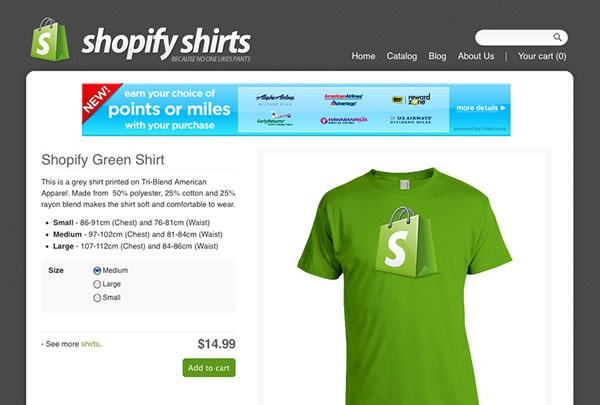
Example screenshot of a store incorporating Incentify; it shows a banner that says "Earn your choice of points or miles with this purchase" and logos of some of Points.com's partners

We work with the world’s biggest loyalty programs and they have been working with large merchants for years helping them drive loyalty and return visits to their stores. Until Incentify, small to medium sized online merchants have been underserved and really haven’t had great options for loyalty. Based on our work with these loyalty programs we know how great an impact offering loyalty points and miles has on sales and return visits, especially when those points come from programs such as AAdvantage, Best Buy Reward Zone, and USAirways Dividend Miles. We wanted to bridge the gap between these huge loyalty brands and the small to medium online merchant.

Where can I find out more about Incentify?
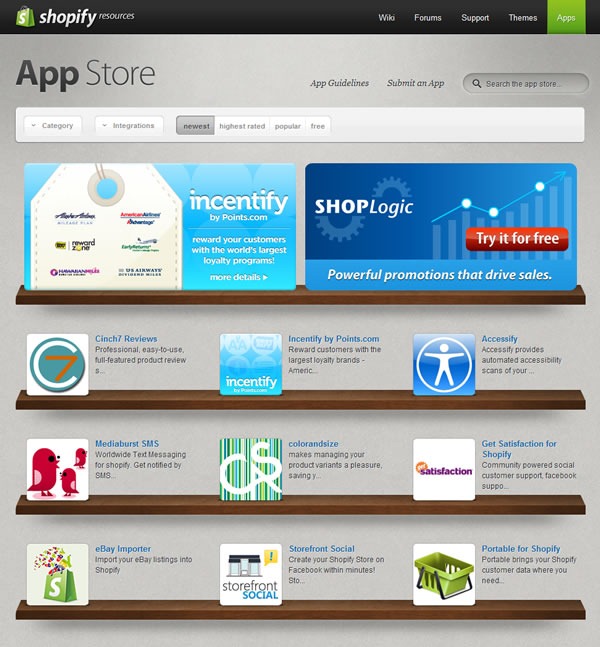
Shopify's App Store, with Incentify as a featured app

You can find out more about Incentify on its page in the Shopify App Store.

This article also appears in the Shopify Blog.

{ 0 comments }

Nicely Done, Microsoft!

by Joey deVilla on September 26, 2011

Old "Canadian Mobile Developer" banner, featuring Joey deVilla's and Frederic Harper's photos.

Well, that didn’t take long. Last week, I wrote about how Microsoft Canada’s blog for mobile developers still had my picture on the banner, even though it’s been about five months since I’d left the company. My true complaint was that the photo was two years and more importantly, twenty additional pounds out of date.

It seems that my gentle ribbing has resulted in some action being taken. If you were to go to the Canadian Mobile Developer blog right now, you’d see the updated banner, featuring my friend and former coworker and fellow Windows Phone Champ, Developer Evangelist Paul Laberge, in the spot I used to occupy:

New "Canadian Mobile Developer" banner, featuring Paul Laberge's and Frederic Harper's photos.

Remember, Microsoft Canada: any time you need an irritant to help you produce a pearl, you have but to call on my services!

This article also appears in The Adventures of Accordion Guy in the 21st Century.

{ 1 comment }

Facebook came on a little strong with all the changes to its interface, which left users feeling ike the abuela (grandmother) in the video above…minus the laughing. I think they also imagine the dog with Mark Zuckerberg’s face, screaming “GILF! GILF! GILF!

This article also appears in The Adventures of Accordion Guy in the 21st Century.

{ 0 comments }

Scenes from Today’s Toronto Techie Dim Sum

by Joey deVilla on September 21, 2011

Toronto techie dim sum 1

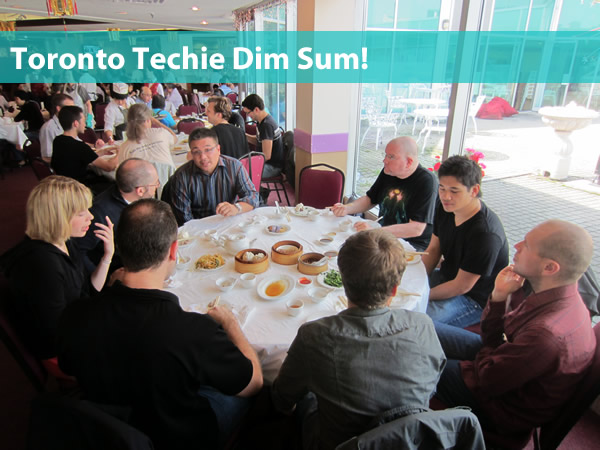
The return of the Toronto Techie Dim Sum lunch took place earlier today, and it went off even better than I’d hoped! It had been a while since we’ve had one of these events, so I wasn’t expecting a turnout larger than a single table at Sky Dragon (their larger tables will easily accommodate 8 or 9 people), but we ended up being sixteen people in total.

There were a number of dim sum “alumni” who showed up, including Andrew Burke, who wins the Phileas Fogg award for greatest distance travelled to attend — he’s visiting from Halifax. We also had some people who’d never been to one of these events before, including my cousin Saturn, making it an event with not only figurative, but literal family! As always, it was one of those wonderful things that happens when good people meet over good food and make good conversation. I bounced between tables, either meeting people for the first time or catching up with old friend. And it was pretty inexpensive too — it worked out to about eight bucks a person, and we all ate our fill.

Toronto techie dim sum 2

I plan to organize these on a monthly basis, typically in the middle of the week in the middle of the month. Sky Dragon are great people and are only too happy to have our business. They’ll even give us a room all to ourselves if we end up with three or more tables’ worth of people, which I’d love to see in October.

Thanks to everyone who came, and if you couldn’t make it today: see you next month!

This article also appears in The Adventures of Accordion Guy in the 21st Century.

{ 0 comments }

Dear Microsoft: Just Update My Photo and We’ll Be Cool

by Joey deVilla on September 21, 2011

If you were to go to Microsoft Canada’s blog for mobile developers as of this writing, you’d still see my photo in the banner:

canadian mobile developer banner

I really have no complaints about still having my face there, even though my last day at The Empire will be five months ago tomorrow. Being the Windows Phone guy was one of my favourite parts of my stint as a developer evangelist at Microsoft, and it’s always an honour to share a banner with Frederic Harper.

My real complaint is that the picture they’re using is from two years, and more importantly, twenty pounds ago (about the weight of a full-sized accordion).

Hey Microsoft: keep my picture up if you must, but could you at least use a newer, somewhat skinnier one? Perhaps one with me sporting my new, fashionable, I probably-paid-too-much glasses with Philippe Starck frames?

Self-portrait of Joey deVilla, taken in a mirror, showing off his new glasses

(By the bye, that’s my bathroom in the photo. I have a damn fine “re-bachelor” pad.)

If you’d much rather have a photo keeping with the mobile theme, may I suggest this one, where I’m posing with a phone and a wacky phone accessory? The pink says “Metro” – in every sense of the word!

"Moshi Moshi Metro!" Joey deVilla at Cafe Novo, holding Verna Kulish's pink iPhone connected to a pink Moshi Moshi handset.

That’s my friend and fellow ex-Microsoftie Verna Kulish’s Moshi Moshi Retro POP handset, which plugs into just about any smartphone. Feel free to Photoshop out Verna’s iPhone and replace it with an appropriate Windows Phone device – perhaps a Samsung Focus (my Windows Phone) or whatever Nokia’s releasing this fall.

Feel free to use either pic, Microsoft – as long as it’s current and skinnier, we’ll be cool.

This article also appears in The Adventures of Accordion Guy in the 21st Century.

{ 2 comments }

We’ll Know For Sure Next Year [Updated]

by Joey deVilla on September 21, 2011

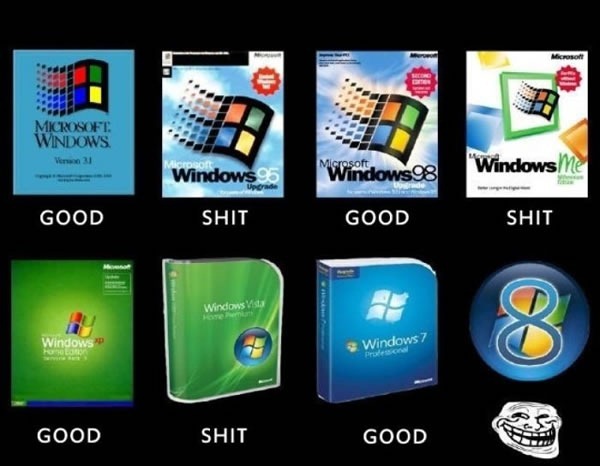
windows good and shit

This photo has been floating about the interwebs for the past couple of days. I’d have marked Windows 3.1 as “shit” and Windows 95 as “good” myself, but that would’ve ruined the pattern.

Update, September 21, 2011: My friend Hector Kearns points out that Windows 2000 is conveniently missing from the list, which would make two good versions in a row and breaks the good/shit pattern.

{ 8 comments }

Featured Shopify App: ShopLogic

by Joey deVilla on September 19, 2011

microphone

Welcome to another featured Shopify app article, where we put the spotlight on one of the many developers building apps for Shopify. We’ve approached the people who build Shopify apps and asked them a few questions about what their app does, what its features are and why shopowners should use their app.

The plan is to do this for every app in the Shopify app store, to make sure that shop owners know all about the apps that are available and how they can extend their shops’ capabilities. We also hope it’ll make rock stars out of the developers who build apps on the Shopify platform!

Today’s featured app is ShopLogic. It’s also the currently featured app on the App Store.

What does ShopLogic do?

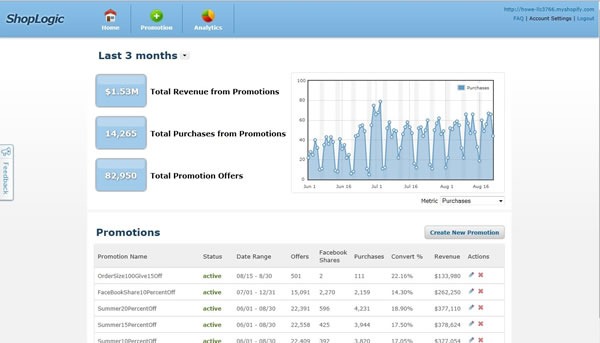
shoplogic screenshot

ShopLogic provides a powerful promotions platform that increases sales and social referrals for your ecommerce store. We make it easy to launch, manage, and optimize promotions.

Right now, during the beta period, the app is free. Get it now; you can be up and running in three minutes!

What are ShopLogic’s Key Features?

  • shoplogic iconShopLogic lets you target promotions to specific shopper profile segments, like “loyal/repeat” or “new visitor” shoppers. It makes sure that the most effective promotion is being offered to the right shopper. You can also choose to run a broad offer and target everyone.
  • ShopLogic supports social promotions, which incentivize shoppers to share with and refer friends through Facebook or Twitter. It’s a great way for shop owners to increase their social media presence while also increasing sales.
  • It’s simple. You can choose from our selection of pre-defined promotions or customize to suit your needs.

Why should shop owners use ShopLogic?

ShopLogic increases sales and conversion rate for shop owners’ stores. We enable them to offer the right promotion to convert browsing shoppers into paying customers. Also, we let shop owners encourage shoppers to share on Facebook and Twitter, thereby driving additional social referral traffic to the store.

Shop owners can get a free trial of the app and it’s easy! – they will be up and running with promotions in just 3 minutes.

Tell us a little bit about yourself.

shoplogic logo

ShopLogic is a venture-backed startup company based in San Francisco, California. Founded in 2011, they provide optimization technology for ecommerce sites to increase sales. The Shopify app is the first of other compelling products to come.

You can find us online in the following ways:

How long did it take for you to build ShopLogic?

We built an initial version of the app in about 2 months. There is a lot of sophisticated technology going on in the background that allows us to offer targeted promotions to specific shopper profiles in real-time and to provide the analytics about promotions’ effectiveness.

The Shopify API is quite robust with great documentation so overall we have had a very positive experience partnering with Shopify.

Where can I find out more about ShopLogic?

shoplogic icon

You can find out more about ShopLogic on its page in the Shopify App Store.

This article also appears in the Shopify Technology Blog.

{ 0 comments }

dim sum

Update, Tuesday September 20th: If you’d like to come to this event, please RSVP on the Facebook event page so I have an idea of the number of people and can make arrangements with the restaurant accordingly!

It’s a Toronto tradition that’s gone neglected for far too long: the monthly dim sum lunch at good ol’ Sky Dragon. It’s time to bring it back!

Although it’s short notice, I don’t want to delay its return any more, so I’m declaring one for THIS WEDNESDAY, SEPTEMBER 21st AT NOON at the usual location: Sky Dragon, the dim sum restaurant at the top floor of Dragon City Shopping Mall, located on the southwest corner of Dundas and Spadina.

This is not formal at all: no agenda, set topics or presentations: it’s just local people who build software and sites getting together to share a nice lunch. You don’t have to be a developer to attend; if you somehow take part in the activity of writing software, building web sites or just like hanging out with the very nice people who make up Toronto’s very active tech scene, please join us!

We all pitch in on the final bill, and for the past few dim sum lunches, it’s worked out to about $12 a person, tip included. It’s a pretty good price considering how much food you get.

This article also appears in The Adventures of Accordion Guy in the 21st Century.

{ 4 comments }

The BarCamp Tour Continues!

greetings from omaha nebraska

As I write this, I’m packing for my next trip on the BarCamp Tour. Next stop: Omaha, Nebraska!

barcamp tour logo

The BarCamp Tour is a group of five startups who actively participate in BarCamps taking place across North America, providing sponsorship and more! We help BarCamp organizers ensure that they’re holding the best possible events, we host a party for BarCamp attendees and we bring along some really nice swag. Shopify is a member of the tour, along with our startup friends Batchbook, Grasshopper, MailChimp and Wufoo. It’s a great way for us to get up from behind our workstations and get to meet our customers, whether they’re current or future ones, as well as to help build strong tech communities.

We’d Like to Meet You!

shopify meetup montreal

We’re taking advantage of all this travel by making sure we get to meet our customers wherever we go. If you’re a Shopify shopowner, developer or designer and we’ve got your contact info, we’ll be contacting you and letting you know we’re coming to town. We’d love to take you out for a bite or the beverage of your choice and pick your brains: find out where Shopify’s working for you, where it isn’t and how we can make things better. If we don’t have your contact info and you’d like to catch up with me while I’m in your city, drop me a line, either via email or Twitter!

Where We’ll Be

Here’s the travel itinerary…

barcamp

BarCamp Omaha: Friday, September 9th and Saturday, September 10th at Nomad Lounge. BarCamp proper takes place on Saturday, Friday evening is the pre-party.

barcamp tampa bay

BarCamp Tampa Bay: Friday, September 23rd and Saturday, September 24th at KForce Campus. BarCamp proper takes place on Saturday, Friday evening is the pre-party.

barcamp milwaukee

BarCamp Milwaukee: Saturday, October 1st and Sunday, October 2nd at Bucketworks.

barcamp philadelphia

Barcamp Philadelphia: Saturday, October 22nd at Huntsman Hall on the Wharton campus.

This article also appears in the Shopify Technology Blog.

{ 0 comments }

Happy 45th Birthday, Star Trek!

by Joey deVilla on September 8, 2011

kirk with stalactite dildo
Bow chicka wah-wah!

It had some of the sillier plots and ideas to come from popular sci-fi, full of bad acting and even worse special effects, mired in some (but not all) the norms of 1950s and 1960s television, but it still somehow managed to influence pop culture and a lot of technologies – from the “flip” design of earlier mobile phones to Uhura’s Bluetooth earpiece to the iPad, to name a couple — and find a place in many a geek’s heart, including this one’s. It was Star Trek, now known as Star Trek: The Original Series or TOS for short, and it made its debut on this day 45 years ago: September 8th, 1966.

There are a lot of ways to pay tribute to Star Trek and its spin-offs, but here’s a way a lot of people won’t point you to: some very well-made fan films that I’ve found rather enjoyable – in fact, in some cases, they’re a little better than the original series.

If there’s an ultimate Trek fan, I’d have to say it’s James Cawley, who used the money from his Elvis impersonator gig to fund his fan series titled Star Trek: Phase II. There are some pretty good episodes in this series: some interesting storytelling, some better acting, and far improved visuals. Here are the episodes…

In Harm’s Way: The Doomsday Machines have screwed up history, but Spock has a plan to fix it, with the assistance of the Guardian of Forever:

To Serve All My Days: Captain Kirk needs his best weapons officer on the bridge, but Lt. Chekov is incapacitated with a debilitating disease that is causing him to age rapidly… a disease for which Dr. McCoy can find no cure. This one has special guest star Walter Koenig, the Chekov from TOS and was written by D.C. Fontana, who wrote episodes for TOS:

World Enough and Time: A Romulan weapons test goes awry and snares the Enterprise in an inter-dimensional trap. Lt. Commander Sulu returns to find himself 30 years out of place and the key to saving the crew of the Enterprise as the precarious grasp on their own dimension begins to slip.This one has special guest star George “Just Say” Takei, the Sulu from TOS:

Blood and Fire, Parts 1 and 2: This one’s got it all – a two-parter, a big space battle, survival horror with Regulan bloodworms, gay ensigns and Denise Crosby from Star Trek: The Next Generation playing an interesting role.

Enemy: Starfleet: The USS Eagle, lost eight years before, is now in the clutches of a woman who bends starships and their captains to her will and has been reverse engineered into a fleet that is bent on domination and genocide.

Finally, there’s Of Gods and Men, a fan film featuring some of the New Voyages sets and cast and a whole mess of “real” Trek actors, including Nichelle Nichols (Uhura), Walter Koenig (Chekov), Alan Ruck (Captain John Harriman, from Start Trek: Generations), Tim Russ (Tuvok from Voyager), Ethan Phillips (Neelix from Voyager), Robert Walker Jr. (“Charlie” from the Charlie X TOS episode) and cameos by actors from other Star Trek series:

This article also appears in The Adventures of Accordion Guy in the 21st Century.

{ 1 comment }

Featured Shopify App: Back in Stock

by Joey deVilla on September 8, 2011

A "temporarily out of stock" sign on a store shelf

The shops that I’m most loyal to, whether they’re in the real world or online, tend to be smaller, boutique ones. I find that they tend to focus on the quality of their products, their staff is knowledgeable and the customer service is better. In particular, if something I want is out of stock, these small, boutique-y places will often go to the trouble to place an order for me and get my contact info so that they can call or email me as soon is they’ve got the item back in stock again. That’s the sort of service that our friend Gary Vaynerchuk talks about in his book The Thank You Economy (a worthwhile read that we recommend to anyone with a Shopify shop).

Wouldn’t it be nice if there were some automatic way to provide that same sort of service to the customers of your online shop –  to notify them when an item they want is back in stock?

That’s what Back in Stock is for. We asked its developer, Matthew Smith-Stubbs, a few questions; his answers are below.

What does Back in Stock do?

Back in Stock allows store owners to automatically notify customers of new inventory available to order.

With Back in Stock installed on your shop, when your customers visit one of your product pages with zero inventory, they’ll see a registration form. They can enter their email address on that form, and when you restock that product, they’ll be automatically sent an email informing them that the item they wanted is back in stock. It’s a simple but effective way to increase store sales.

What are the key features of Back in Stock?

  • Back In Stock is easy to install, and runs automatically in the background. Back in Stock icon
  • It provides you with information on what your customers want to buy, even when an item is not available, which is great for reordering.
  • It’s not useful not just for out of stock products, but also for evaluating customer demand when expanding your product range.
  • The email template and customer registration form can be customized, so it works great for shops in any language.

Why should shop owners use Back in Stock?

Shop owners work hard to attract visitors to their online shop, so it’s important to give those visitors every opportunity to become paying customers.

With Back In Stock installed on your store you reduce the number of customers going away empty handed. It’s a simple but effective way to increase your sales as well as monitor customer demand.

Tell us a little about yourself.

I’m an independent web developer living in London, UK. You can find me on Twitter at @msmithstubbs, and I have a blog for app announcements at http://blog.backinstock.info. And of course, my Shopify app Back In Stock lives at http://backinstock.info.

Where did you get the idea for Back in Stock?

The idea came from my own frustration trying to order an out of stock item online. A little while ago I was attempting to purchase a Gaggia Classic espresso machine. Unfortunately the store was out of stock, and had to check the website regularly to find out new inventory was available. At the same time I was investigating the Shopify API and decided it would be a useful feature for Shopify stores.

How long did it take for you to build Back in Stock?

It took a week for the initial build, plus two weeks of beta testing. I’m currently developing new features planned for release in the coming months.

Where can I find out more about Back in Stock?

Screenshot of Back in Stock's admin page

You can find out more about Back in Stock on its page in the Shopify App Store.
This article also appears in the Shopify Technology Blog.

{ 0 comments }

Mug of coffee and an Apple wireless keyboard

I’m holding “Open Office Hours” this afternoon at The Roastery at 401 Richmond (near the corner of Richmond and Spadina). I’ll be working all afternoon from there, and you’re invited to drop in and say hello. Whether you want to talk about Shopify, “the industry” or just catch up, you’ll be able to catch me there between 1 p.m. and 6 p.m.. Come on down!

This article also appears in The Adventures of Accordion Guy in the 21st Century.

{ 1 comment }

Featured Shopify App: Kwantify QR Campaign Manager

by Joey deVilla on September 6, 2011

Welcome to another Featured Shopify App article, where we put the spotlight on a Shopify app and ask its creators about what it does, what its features are and why shopowners should use it. We plan to do this for every app in our App Store, to make sure that shopowners know about all the goodies available to them and to make rock stars out of the developers who build apps on the Shopify platform!

Today’s featured app: Kwantify’s QR Campaign Manager.

What does Kwantify QR Campaign Manager do?

Kwantify’s QR Campaign Manager application is designed to take advantage of the explosive growth in popularity of QR codes as a tool to drive mobile users to online websites. With this application you can quickly and easily generate QR codes that link to any aspect of your Shopify storefront. These codes can be generated in any size and your choice of Black, Purple or Red and are easily downloaded to be printed in your offline marketing initiatives.

Sometime before the holiday season we will be launching version 2.0, a free upgrade for existing users that will bring enhanced features and more customizable elements including location aware reporting (and that’s all I’m going to say on that:).

What are the key features of your app?

The Key feature of Kwantify’s QR Campaign Manager is that it’s easy to use interface and Code image customization options. Shopify retailers can setup a campaign linking to any product, category, blog of custom page in just three easy steps.  QR codes can be generated in any size need and 3 different colours.

When scanned by a mobile QR code reader, the user is redirected to the specified page while prompting the user to share their location.  When shared, Kwantify logs the time and location of the scan resulting in a clear picture of the campaign success.

Why should shopowners use your app?

Any Shopify retailer that uses printed marketing material should use this app to create scannable codes to add to the offline marketing material.  QR Code readers are quickly becoming the “must have” application for the mobile device with more and more handset makers building them into their next generation mobile devices.

Tell us a little bit about yourself.

We started Kwantify in July of 2001 shortly after becoming Shopify and launching shop.charliefrancis.com, a digital content download store featuring the life’s work of world famous speed and strength coach, the late great Charlie Francis.  We started to tinker with Shopify’s API interface and were instantly hooked!  We quickly came up with a list of potential applications that would make our experience as a online retailer better so we decided to go for it.

Kwantify is dedicated to building sleek, easy to use application that we, as a Shopify retailer would use ourselves to grow our business and offer them to other likeminded Shopify retailer’s at a fair price and with great support.  We want to listen to our customers and help them achieve their online goals both easily and cost effectively.

Where did you get the idea for your app?

We got the idea for our app when we launched a business built on Shopify’s e-commerce platform of our own. We wanted to offer our customers an easy to use tool to take advantage of the explosive popularity of QR codes as a means to interact online with offline marketing campaigns.  The team at Kwantify is quickly getting addicted to snapping a scan of QR codes we see everyday living in Vancouver, BC Canada.  From ads in the newspaper to billboards and posters on the Skytrain, QR codes are popping up everywhere and it is clear the mobile public is eating it up! On our own Shopify website, Shop.charliefrancis.com we have utilized QR codes in all our printed marketing materials and the response is impressive!

Where can I find out more about Kwantify QR Campaign Manager?

You can find out more about Kwantify QR Campaign Manager on its page in the Shopify App Store.

Kwantify also have another app in the store: Kwantify Contact Manager, a contact management tool that captures and processes customer inquiries received from your Shopify storefront.

This article also appears in the Shopify Technology Blog.

{ 0 comments }

Old Office, New Office

by Joey deVilla on September 6, 2011

Summer Sojourn’s End

Joey's car (Black Honda CR-V), packed to the gills, with a red bike in the rear-mounted bike rack.

My summer immersion term at Shopify ended on Friday. I’d found my niche within the company, gotten to know the team and was ready to continue working remotely. It was time to return to Accordion City.

I moved out of the furnished apartment they provided me for the summer – affectionately dubbed the “Swank Tank” – a day early because I had a business trip to Montreal and packed everything I’d brought with me and picked up over the summer into my car. I tucked my car into Edward’s driveway for the couple of days I was away, far enough out of sight of the kind of people who break into cars to help themselves to the loot inside.

Between not knowing how much kitchen stuff would be provided by the Swank Tank’s proprietors, wanting to have a good chunk of my home office material handy over the summer and just being be ready for anything, I overpacked when I left for Ottawa in May. I’d also picked up a couple of large items over the summer, including a new monitor and bike. Looking at my car, you’d think that I’d made a permanent move and not just gone somewhere else for the summer.

I decided to wait out the Labour Day Friday cottager traffic and make the five-hour road trip from Ottawa to Toronto in the evening. I had dinner at the Smoque Shack with my coworkers Liz, Julie, Nick and Brian, picked up my car at Edward’s and went into the Shopify office one more time to get the last of my stuff.

Old Office

Here’s the entrance stairway to the current office. This won’t be our current office for too much longer; we’re moving into a newer, larger space a couple of blocks down the street later this fall:

The entry stairway to the Shopify offices

Here’s the reception area and lobby, as it appeared at 9:30-ish on Friday night:

The reception desk and lobby at Shopify

Offices take on an eerie, haunted sort of vibe late at night, so I decided to snap a couple of pictures. Here’s the “Fishtank”, the glass-enclosed room where Shopify’s design team works:

The empty desks of Shopify's design team room

The Fishtank has a big glass wall that looks out onto the main “bullpen”:

The big glass wall in the Shopify Fishtank looking out onto the main office

Right across the hall from the Fishtank is the boardroom, which you may remember from the Epic Meal Time video that was shot at our offices; this is where the final tasting scene was shot:

Shopify's boardroom, with cardboard animal "trophies" hanging on the far wall

By some strange coincidence, whenever I get an assigned space at an office – something that hasn’t happened since I left Tucows in late 2007 –- I usually get the “Keanu Reeves Location”: a desk situated in the dead centre of the mass of desks (just like his character in The Matrix had). I had that spot in the Shopify office:

Two rows of empty desks in the centre aisle of Shopify's main office

Here’s my old desk, all clear and ready for the next person to occupy it. I took the Shopify standard-issue 15” MacBook Pro, Magic Mouse and wireless keyboard with me, but left the Cinema Display and Aeron chair behind. It would’ve been nice to take both back to the home office with me, if I’d had the room in the car:

A desk that is empty except for an Apple monitor

New Office

This year’s been a bit of a weird one. Between being in the hospital, several trips (two of which lasted nearly two weeks each) and being in Ottawa for the summer, home wasn’t where I lived; it had become a nice place to visit. The (not so) recent change in the domestic situation also meant a few changes in the layout of my apartment, including a chance to reclaim the home office. I got the basics done before I left and did some serious setup over the Labour Day weekend. The results are shown below.

Here’s what you see as you enter the new home office:

Carpeted apartment bedroom converted into a home office, showing a long desk with computers and a window looking out onto treetops

Here’s a closer look at the desk. I bought it at Cooper’s old Queen Street location back in 1997 for what seemed like a lot of money back then, and it’s served me well over the years. It was originally L-shaped, but over the years, I’ve reconfigured it in all sorts of ways: L-shaped, split into two desks and finally, as a single long workstation:

Joey's workstation, as seen from the left

Here’s the desk from the other side:

Joey's workstation, as seen from the right

Opposite the desk: a set of matching shelves and a lot of organizers I’ve picked up over the years. I used to have more programming books – they used to eat up shelves – but in the age of PDFs and the iPad (plus the fact that the half-life of a tech book seems to be nine months these days), most of my tech library is in electronic form now:

Bookshelves packed with books, plus photo boxes of files and many plastic bins full of wiring and other tech equipment

Here’s another view of the whole office. The window looks west out onto the courtyard behind my building, and beyond that, the tree-lined Gothic Avenue:

Joey's home office as seen from the desks, showing a windows overlooking treetops and the bookshelves and organizers

The left side is the Windows half of the desk. My main Windows machine is the Dell 15” laptop I got as one of my fabulous parting gifts from Microsoft. The monitor is one I bought as a present to myself shortly after joining The Empire just before my birthday in 1998. And hey, who wouldn’t want to have an Xbox in their office?

The left side of Joey's workstation, with a Dell 15" laptop, 25" Samsung monitor, Wacom drawing tablet, Xbox and wireless controller and office chair

On the right side of the desk: the Mac side. That’s a 15” MacBook Pro driving a 24” LED Cinema Display that I bought from my coworker Nick just before heading back home. Note the Avenue Q “The Internet is for Porn” mousepad just to the left of the keyboard.

The right side of Joey's workstation, showing a 15" Mackbook Pro, 24" Apple monitor, several organizing containers and a "The Internet is for Porn" mousepad

The New Old Routine

Today’s my first day back at my old routine as a mobile worker. I’ll get a fair bit of work done at the home office, but I’ll also be mixing it up by being on the road, plus working at some alternate locations because I don’t like being a shut-in.

The view from the front of Cafe Novo, a cafe that opens out onto Bloor Street

I’m a member of the Hacklab, which gives me 24/7 access to their Kensington Market space; it’s often empty during the day. There are also a number of work-friendly wifi-equipped cafes where I hang out, both close to home in High Park (I’ll write about them soon) as well as closer downtown. And finally, I’ve got a fair bit of travel in my future – so much that I’m getting my Nexus card next month – which means I’ll be working from hotels, cafes, airport lounges, BarCamps, other people’s offices and so on.

It’s going to be an interesting fall.

This article also appears in The Adventures of Accordion Guy in the 21st Century.

{ 1 comment }