Apple

Update: Newsy have put together a piece summarizing the tech news’ reaction to the Samsung Galaxy Note ad. It’s at the end of this article – check it out!

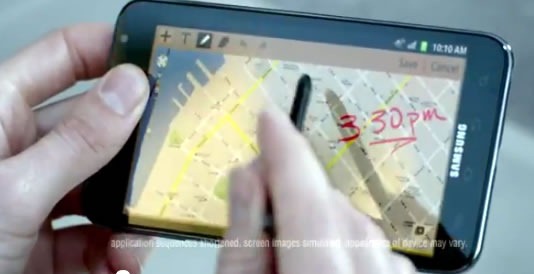
i believe in a thing called loveEven if you missed the big game, you can still catch the Superbowl ad for the Samsung Galaxy Note. Directed by Bobby Farrelly (one of the Farrelly Brothers, creators of high-larious films like Dumb and Dumber, There’s Something About Mary, and unfortunately, the upcoming Three Stooges Movie), it’s a continuation of the series of ads that poke fun at Apple fandom. It opens with a scenes from lineups outside Apple stores. The bored Apple fanatics are tethered to their white earbuds and awaiting their next gift from the gods when one of them sees a passer-by with a Samsung Galaxy Note.

“Whoa, whoa, whoa – what is that?” he asks.

“Here,” says the passer-by, walking towards soon-to-be-ex-Apple-worshipper. “It’s the new Samsung Galaxy Note.”

samsung galaxy note

Then comes the kicker: “It’s got a pen?” That’s right: it’s bringing back the stylus, the very thing that iOS devices put out of style.

After that, the Apple fans break free of their self-imposed imprisonment in line – a line that Samsung probably wishes they had – and partying, powered by The Darkness’ hit I Believe in a Thing Called Love – ensues.

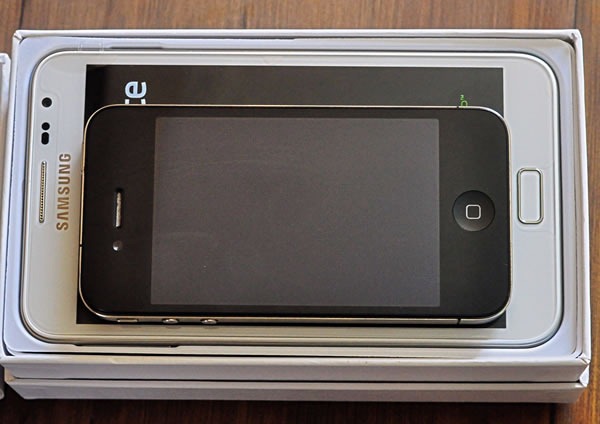
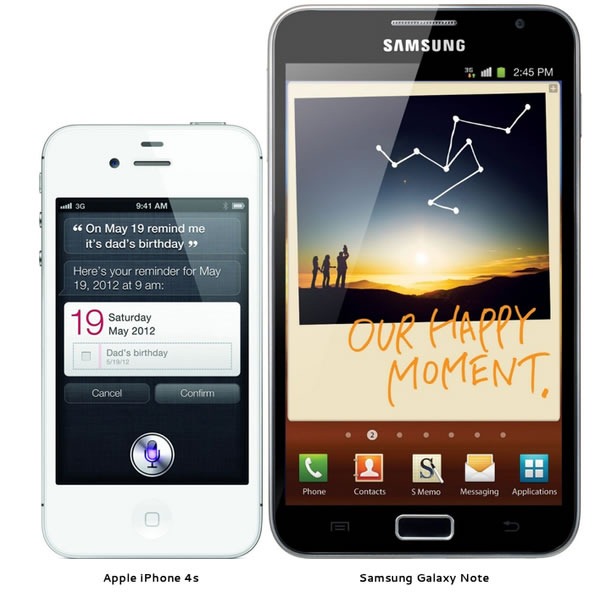
It’s a little hard to tell from the ad, but the Galaxy Note is bigger than your standard phone; in fact, it’s bigger than even the biggest of the notoriously oversized Samsung phones. Size-wise, it’s in Newton territory: smaller than a tablet, a tad too big to fit into most pockets. Perhaps they’re also trying to bring cargo pants back:

samsung galaxy note vs iphone 4 size comparisonPhoto from TechInferno.

I’m reminded of this promotional photo, where Sony tried to convince you of how portable their smallest VAIO was:

pocket-vaio

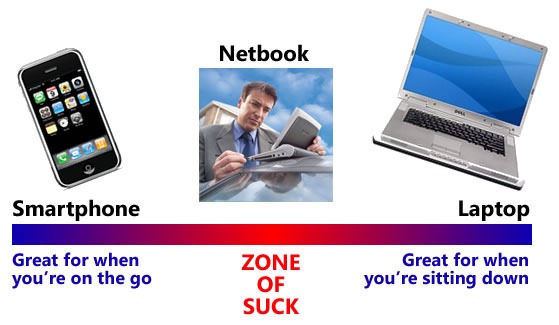
It sits somewhere in the “Zone of Suck” from my 2009 article, Fast Food Apple Pies and Why Netbooks Suck (I’m going to have to revise the graphic to include tablets as well as the Galaxy Note):

As for what it’s like to use the device, consider this review in TechInferno. The reviewer loves the Galaxy Note and says he’s never going back to an iOS device, but he damns it with his faint praise:

  • “Is the Galaxy Note as smooth as an iOS device? Not really, it still has the android signature stuttering when you scroll and the occasional semi-freeze here and there.”
  • “Is the Galaxy Note built as good as the latest iPhone? No, it is not, I think that a fair comparison would be to equal it to the build quality of the 3G/3Gs versions of the iPhone.”
  • Sure you can expect some hiccups here and there, not everything is so custom tailored to the device and to bring it to full functionality you need to invest some effort but in my personal opinion this phone is worth it.”
  • “Who I would NOT recommend this device to:
      • People expect the device to “just work”
      • Women or men with small hands
      • People who like to operate the phone with one hand only.

Samsung-Galaxy-Note3You know what they say about guys with big phones…
  • “Build quality is very good and the device feels solid in the hand although iPhone 4 build feels better.
  • “Out of the box with all options at their defaults the device will eat through the 2500mA/h battery in less than 10 hours of normal usage.”
  • The stylus needs a fair amount of pressure to operate, otherwise it doesn’t work.”
  • I still haven’t found a keyboard that matches the precision of the iPhone, i can’t type as fast but maybe it’s a matter of getting used to it?”
  • “I keep accidentally pushing the Back or the Menu buttons especially in landscape mode when trying to type/interact with the screen – a big design flaw.”
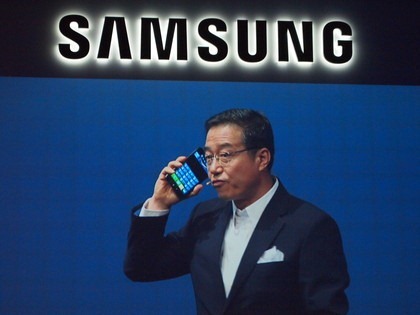
  • “Expect surprised looks from people around when you put it to your ear to talk. It really does look a bit ridiculous, almost like holding an iPad to your ear.

iPhone 4s Samsung Galaxy Note side by side

  • “The text to speech compared to Siri is awful.”
  • Keep in mind that Ice Cream Sandwich update for the Note is around the corner and is expected to fix a lot of issues listed here and introduce lots of neat features.” That, and the Lord Jesus Christ is due back any day now, so look busy!

I think I’ll be sticking with my iPhone 4S and iPad 2 a little while longer, thanks.

Update

Newsy’s got a good piece summarizing the tech press’ and pundits’ reaction to the Galaxy Note ad. Check it out!

{ 3 comments }

Future Visions

by Joey deVilla on October 28, 2011

Welcome Daring Fireball readers! In case you were wondering if I’ve prepared a response to the article titled The Types of Companies that Publish Future Concept Videos, take a look here.

Pictured above is Microsoft’s most recent technology concept video. Here’s their description:

Watch how future technology will help people make better use of their time, focus their attention, and strengthen relationships while getting things done at work, home, and on the go.

As you might expect, John “Daring Fireball” Gruber, who’s often been called Apple’s freelance PR guy, viewed it with a jaundiced eye:

This video encapsulates everything wrong with Microsoft. Their coolest products are imaginary futuristic bullshit. Guess what, we’ve all seen Minority Report already. Imagine if they instead spent the effort that went into this movie on making something, you know, real, that you could actually go out and buy and use today.

Of course, he’d never say such a thing about Apple’s classic Knowledge Navigator video, which at the time it was made – circa 1987, when the Macintosh II and SE, IBM PS/2 series and Amiga 500 and 2000 were brand new machines – was at least as pie-in-the-sky as this newest Microsoft video. It’s contained within one of the segments of the video below, which features videos by Apple:

Now I’ll agree with Gruber that by and large, Apple technology is generally more enjoyable to use and feels more like “the future”. I will also agree that my former employer, whom a former coworker recently referred to as “The Fail Ship Microsoft”, seems a shadow of its former self and far less likely to be the company to create future industry-defining products than Apple — or at least the incarnation of Apple with Steve Jobs as Chief Tastemaker. Today’s Microsoft doesn’t have a keeper of the vision: Bill Gates has left to focus his on saving the world, Ray Ozzie, the guy who took on the role of “chief visionary” at The Empire, resigned last year along with the Entertainment and Devices division’s last, best hopes, Robbie Bach and J Allard. The people who remain are extremely skilled techies, astute suits who can continue to drive sales and “keep their managers’ scorecards green” (that’s a common expression within the company) and an evangelism team that’s second to none and of which I was a proud member, but they’re all hamstrung by decision-makers with the sense of vision that God gave oysters. That’s one of the reasons I left the company: to be an evangelist, you have to believe, and I didn’t believe anymore.

I part ways with Gruber in his declaration that Microsoft should spend more effort making some cool stuff today and less on creating concept videos. Concept videos aren’t promises of products coming in the next one or two years, but act as a star by which people can navigate the future and an inspiration to invent it. Working with technology means dealing with overwhelming amounts of minutiae, and it’s all too easy to get lost in the technology for technology’s sake and forget about what it’s all for. I would argue that if Microsoft wants to rehabilitate its image and regain its relevance in the hearts and mind of both the alpha geeks and the public at large, they should probably make more of these videos, not only for the public, but for their own benefit as well. Without visions like concept videos to guide them, especially with the lack of someone in the visionary role, they may remain stuck on their current course: doing well but effectively coasting, content to make incremental improvements to already successful products or playing catch-up as with Internet Explorer, phones and tablets in efforts that are in danger of being too little, too late.

Some other concept videos worth watching include these old AT&T ads from that played all the time between shows in the early 1990s. Many of the predicted devices and services in these ads came to be, but AT&T had little to do with their creation:

Bruce “Tog” Tognazzini was a user interface guy at Apple from 1978 to 1992, after which he worked at Sun and created the Project Starfire concept video, a little drama that illustrates his vision of the office of the future. Just as Apple’s Knowledge Navigator has the 1980s all over it, this video has all the earmarks of early 1990s television, right down to the incidental synth music that’s straight out of the better, earlier seasons of Beverley Hills 90210.

Here’s part one:

The first thirty seconds of the video shows how risky it is to try and add little “realistic” touches to a story about the future. In the first thirty seconds, Princess Di is mentioned as having joined the British House of Lords; in real life, she died seven years prior to the story’s setting of 2004. Also sad is the fact that while Sun existed in 2004, it would be absorbed by Oracle six years later.

Here’s part two:

Compare the Starfire video with this “vision of the future” video that Microsoft debuted at the TechReady conference in early 2009. Popular Science said that "The 2019 Microsoft details with this video is almost identical to the 2004 predicted in this video produced by Sun Microsystems in 1992." I’ll leave it to you to make the call:

This article also appears in the Shopify Technology Blog.

{ 37 comments }

Steve Jobs: King of All Tech Media

by Joey deVilla on August 25, 2011

Here’s a testament to Steve Jobs’ influence on the industry: a snapshot of the tech news aggregator site Techmeme, with the stories about Steve Jobs, his resignation and Apple highlighted. As I wrote this post, the answer to the question on everyone’s mind, the “Tim Cook: Apple is Not Going to Change” story, became the headliner.

Steve jobs on techmeme

Also notable: at the bottom of the story pile: a story about Microsoft. The Techmeme page used to be peppered with them, but they’ve become increasingly rare over the past couple of years. If it weren’t for the sponsored BizSpark articles in the right-hand-side column, there’d be times throughout the day when there were no Microsoft-related stories at all. In the meantime, I can’t recall ever checking into Techmeme and not finding an Apple-related story.

Keep in mind that this is all based on casual observation and not from carefully logging the contents of Techmeme over the past few years. However, I’m there fairly often as a practitioner of the Global Nerdy technique for using Techmeme to drive more people to your blog.

{ 0 comments }

Shopify Perquisites

by Joey deVilla on May 11, 2011

I don’t think the word perquisite gets used enough. You probably know the shortened form of the word: “perk”, as in bonus, privilege, advantage or “extra”. Here are the perquisites that come with a job at Shopify:

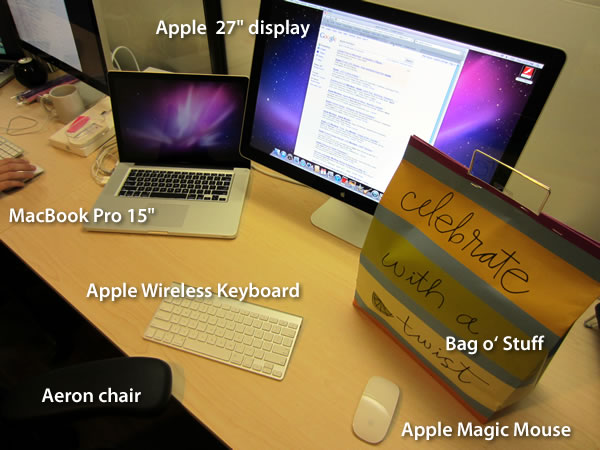
Shopify gear 1

Sweet gear! Working at Shopify means a return to the Mac and startup worlds with the following equipment, which is standard issue for all new employees:

  • 15″ MacBook Pro. The current spec for this machine is 2.2 GHz quad-core i7 processor, 4 GB RAM, 1GB VRAM, 750 GB hard drive. And at last, the trackpad knows what a right-click is!
  • 27″ LED Cinema Display. Gorgeous. Just gorgeous.
  • Apple Wireless Keyboard. Compact, connects via Bluetooth.
  • Apple Magic Mouse. The first Apple mouse I’ve liked in a really long time. Feels nice, knows the difference between a left- and right-click, 4-way touch sensitive scrolling that feels much better than Microsoft’s Arc Touch mouse. (I love the Arc Mouse, but don’t like the Arc Touch.)
  • Herman Miller Aeron Chair. Yes, it’s the classic symbol of the dot-com bubble, but it’s a very, very comfortable chair. The only thing that loves your butt more is that guy from Deliverance.
  • The bag o’ stuff. I’ll cover what’s in it below.

Shopify gear 2

What’s in the bag o’ stuff? Extra goodies to make you feel welcome:

  • Shopify hoodie. Light grey with the Shopify logo on the left. Very warm and fuzzy on the inside.
  • T-shirts. One light grey sporting a grey monochrome Shopify logo, one dark grey with the green Shopify logo. Both are American Apparel, which means they’re extra-soft.
  • Moleskine notebook. Because sometimes ink and paper is the best way to take something down.
  • Neat pen.Sacchi ballpoint pen, to be precise.
  • Godiva chocolates. It’s a nice touch.
  • $50 Apple Store gift card. An even nicer touch. The Apple Store in Ottawa is in the Rideau Centre, a short walk away from the office.
  • $100 gift card for Play and Beckta restaurants. Still even nicer. Both are great restaurants – Harley took me out to Play for lunch on my first day. Now to find someone to take out to dinner.
  • The Shopify Handbook (not pictured), which I’ll cover in the next blog entry.

All in all, very, very nice.

This article also appears in The Adventures of Accordion Guy in the 21st Century.

{ 2 comments }

Gizmodo’s Vendetta

by Joey deVilla on June 15, 2010

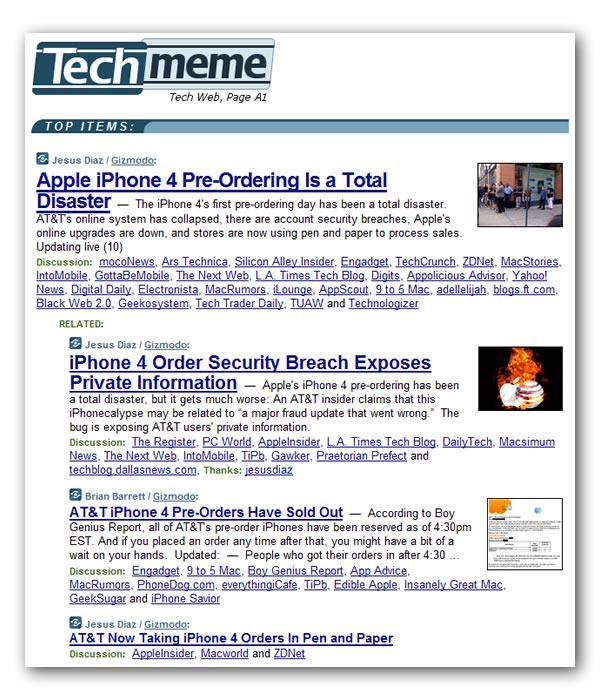
Techmeme screenshot featuring 4 Gizmodo stories: "Apple iPhone 4 Pre-Ordering is a Total Disaster", iPhone 4 Order Security Breach Exposes Private Information", "AT&T iPhone Pre-Orders Have Sold Out", "AT&T Now Taking iPhone Orders in Pen and Paper"

In case you were wondering if Gizmodo’s fight with Apple over that ill-gotten iPhone prototype might be affecting their reporting, consult this screenshot from Techmeme, taken at 8:45 p.m. EDT, above.

{ 1 comment }

Replica Spanish galleon on fire

Sometimes, you have to do more than just start from scratch. Sometimes, you have to burn the boats.

“Burning the boats” is an expression that comes from a story – some say legend — about Cortes, the Spanish Conquistador (and yes, the subject of Neil Young’s Cortez the Killer). Wishing to guarantee that his men would stay in Veracruz (which he’d just taken over from the Governor of Cuba) and only move forward into terra incognita without retreat, he ordered them to burn the ships that brought them to the New World. It was an extreme measure, but without the distraction of a way home, they committed themselves completely to business of exploring and conquering.

The Original Mac: No Arrow Keys

Bruce “Tog” Tognazzini, former user interface guy at Apple and the company formerly known as Sun, and now member of the Nielsen/Norman Group, wrote about how Apple burned the boats back when they released the original Macintosh in his 1992 book Tog on Interface and more recently in an article on his blog, AskTog.

Original IBM PC and Apple // computers

In 1984, the Macintosh represented a break from the dominant paradigm at the time: the command-line interface. Back then, you’d issue commands to a program these ways:

  • Typing them in
  • Using control-key combinations
  • Using function keys
  • Using the arrow keys to navigate

Software developers at the time had little experience developing for GUIs, which meant that there would be great temptation for them to simply develop apps for the Mac the way they did for other platforms. The software they’d end up writing would be a command-line app that just happened to run on the Mac.

Steve Jobs and Apple’s Macintosh team, an unconventional bunch who were said to have nary a classical computer science degree among them, thought that existing software sucked. I was 16 at the time, and I’d have to agree. In order to prevent straight ports of existing software to the Mac, they decided to “burn the boats” and make it difficult for developers to “go home” and simply rely on the UI techniques from the Old World. The first Mac keyboards didn’t just omit the function keys, they also left out the arrow keys:

Original 128K Macintosh. "See? No arrow, function or control keys."

Tog writes:

That was a big deal. Almost every application then in existence depended on the arrow keys (then called cursor keys) for navigation. With that one stroke, Steve reduced the number of apps that could be easily ported to the Mac from tens of thousands to zero, ensuring that this new computer would have a long and painful childhood.

It’s counterintuitive to want to have your creation go through a long and painful childhood, but there was a method to their madness. In “burning the boats” by getting rid of the function and arrow keys on which developers relied and taking away their “way home”, they forced developers to redesign and rewrite their applications to fit a mouse-driven graphical interface rather than a keyboard-driven command-line interface.

They eventually brought back the arrow keys about a year and a half later. By that point, developers had grown used to developing GUI apps that took advantage of the UI controls and mouse that we’ve come to know and love. The return of the arrow keys at that point would now be a welcome addition and convenience, rather than a dangerous temptation to return to “the old ways”.

It was a bold move, but when you’re making radical changes to the way things are done, bold moves are often required.

Windows Phone 7: No Copy and Paste

Copy and Paste icons

There’s been some talk about Windows Phone 7’s lack of copy and paste. It’s similar to the hue and cry about the original iPhone’s lack of copy and paste, and having been reminded by Tog’s article about the design decisions made for the original Mac, I can see the method to Microsoft’s madness.

“Copy and paste already exists in Windows,” people have said, “why not Windows Phone 7?”

The answer is simple: because Windows Phone 7 apps aren’t supposed to be like Windows apps. For non-enterprise, non-industrial use, the “Windows, but scaled down” approach of previous versions of Windows for phones, which goes under the name Windows Mobile, didn’t catch on (Windows Mobile still rules the roost for compact devices used in enterprises and industries, and will be supported for years to come). Hence Albert Shum’s completely different-from-the-desktop, and even different-from-other-phones Windows Phone 7 interface, which went by the codename “Metro”.

Windows Phone 7 hubs: music+video, people, pictures, office, games

The use of copy and paste implies a keyboard-centric user interface, which isn’t what Windows Phone 7 is about. People often use their smartphones one-handed, with only their thumb to access the touchscreen. Windows Phone 7’s interface takes this usage into account, which is why it’s sensor-centric, and applications, should get their information from touch, gestures, accelerometers, location and other sensors where possible. By not including copy and paste in the first release, the Windows Phone team is “burning the boats” and asking developers “How do you write apps so that they don’t need intricate more-suited-to-the-desktop operations like copy and paste?”

(And yes, copy and paste will eventually find its way into Windows Phone 7, just as the arrow keys, function keys and even right-clicking found their way into the Mac.)

The same could be said for many other things that were purposely excluded from Windows Phone 7, such as the compact edition of SQL Server that was part of Windows Mobile. If you think about it, this design decision forces you to build apps so they store and retrieve data from the network, which makes sense, since phones are devices that network with both cellular and wifi.

Windows Phone 7 represents a radical shift in the way Microsoft stuff works, from a very minimalistic look to its task-centric organization. In order to make sure that people built apps that fit it, the Windows Phone 7 team had to burn the boats. It’s a bold move, but it’s the right one.

{ 19 comments }

Lessons from the Other Side

by Joey deVilla on February 3, 2010

Sheep Canada and Other Perspectives

Cover of "Sheep Canada" magazine

Every now and again, I make it a point to pick up some reading material on a field or industry that’s completely unrelated to my own. I find that it both satisfies my curiosity and helps me see things from a completely different perspective. In one particular case, when I found a copy of Sheep Canada lying abandoned on a subway seat, I enjoyed the puzzled and concerned looks from the other passengers as I read the magazine. Not only did I get a little entertainment, but I learned a little bit about what goes into making the lamb chops and sweaters I love.

I also like asking people questions about their work, especially if it’s in field different from my own. It probably stems from the fact that everyone in my immediate family is in medicine; I’m the “black sheep” who went into computer programming. I often chat with my wife and her co-workers at the University of Toronto’s Mark S. Bonham Centre for Sexual Diversity Studies (a fascinating line of work, by the bye), my father-in-law about that branch of the insurance industry that concerns itself with executive benefits, friends who work in the television and movie industries, and so on. I love hearing their stories and find that seeing their perspectives broadens my own.

I’ve even taken on little non-developer side jobs just to get a different perspective. I’ve moved an entire warehouse of high-end dresses, had a fair bit of success as a street musician, gotten ink-stained at an old school print shop and even had a stint as an accordion-playing go-go dancer at a Toronto nightclub.

You Go Hither and I’ll Go Thither

It’s this “wanderlust of the mind” that probably led me, a guy who was actually quite happy in the “develop on the Mac, deploy on Linux” world, to becoming a Developer Evangelist with Microsoft. Each world has its own history, culture, customer base and approach to technology, and each offers lessons to the other. As I’ve said before, technology is a great big smorgasbord, where there are enough seats and dishes for everyone and every taste. Wouldn’t it be a waste if you stuck only with the dishes you knew?

I’ve spent the last year getting reacquainted with the Microsoft development world, and it’s different in many ways. There’s the obvious stuff such as operating systems, programming languages and tools. There’s also the more subtle stuff: conference demographics and what people do in the hallways at conference, the sort of apps that get written, what people do in their spare time and so on.

Don Dodge

Don Dodge is experiencing the same thing…just in reverse. Just as I’ve gone from being a Mac guy to running Windows 7 as my primary operating system, he’s crossed over from Windows to the Mac OS and writing about his experiences with the transition in an article titled From MSFT Evangelist to Mac Enthusiast – The Other Side of the Road.

There are some lessons to be learned from Don’s observations, a fact that wasn’t lost on Todd Bishop. In his article on Don’s “switching” experience, he writes:

This sentence, in particular, caught my attention: "After years of defending Microsoft against the Apple fanatics I decided to go to the other side of the road to see for myself," Dodge writes.

Good for him, but the fact that he hadn’t seen the other side of the road as a Microsoft employee is a symptom of a larger problem at the Redmond company. Loyalty to and appreciation for your own products is nice, to a point, but after interacting with people at Microsoft for the better part of the past decade, I’ve never quite understood, logically, why it’s taboo for its employees to use competing products.

…think what would happen if Microsoft employees experienced and saw around them, every day, a true reflection of the competitive landscape — including Microsoft products and rival technologies. My hunch is that they’d come away with a better understanding of what motivates specific consumer actions, and how they might be able to get consumers to pick Microsoft products instead.

Todd, you took the words right out of my mouth. It’s right along the lines of my own philosophy, which I wrote about in the article Evangelist, Immigrant and Shaman:

What Microsoft needs badly is a shaman. They need somebody who is situated physically within their culture, but outside it spiritually. This isn’t a person who hates Microsoft, but it’s a person who can actually see it. I can do this for you. Give me a hut in your parking lot. I will eat mushrooms, roll around in your cafeteria, and tell you the Goddamned truth.

Awkward family photo featuring family in the Sunday best with one boy in biker leather.

It’s the style in which I do my work. Yes, I devote a lot of time and effort to Microsoft’s tools and technologies, but I make sure that they’re not the only things I look at. I try to keep abreast of things like the IDE conventions in XCode, what’s happening in the worlds of the iPhone and Android, non-Microsoft languages and frameworks such as PHP, Python and Django, Ruby and Rails, templating systems like HAML and Sass and the NoSQL movement. Each has lessons (the Microsoft term is “learnings”, which I refuse to use, since I consider it a non-word) that can be incorporated into the Microsoft world, just as I’m sure that we too have lessons to offer to these other worlds. And in the end, we’ll all get better tools and technologies for our work, life and play.

It’s something you should try as well. Try using some tool or technology that you wouldn’t normally use. Hang out with developers from “the other side”. Pick up a copy of Sheep Canada. Broaden your perspective and see what you’ll learn!

This article also appears in Canadian Developer Connection.

{ 5 comments }