
For the next little while, I’m going to share stories about my current coding projects. This first one is about a quick evening project I did the other night that features a Raspberry Pi, a dollar-store USB power pack, Python, and a little vibe coding.
The inspiration

My fictional engineer hero is Mark Watney, the protagonist of Andy Weir’s self-published sci-fi novel turned big hit, The Martian. A good chunk of the story is about how Watney, an astronaut stranded on Mars, would overcome problems by cobbling together some tool or device, using only the gear available at the Mars habitat, his technical know-how, and creative thinking. My love for the way Watney does things is so strong that I play the audiobook version as “background noise” whenever I’m working on a problem that seems intractable.

While the movie version adds a line that captures what Watney does throughout The Martian — “I’m gonna have to science the shit out of this” — it condenses a lot of what he has to do, and covers only a small fraction of the clever guerilla engineering that he does in the novel on which it was based.
The book version has Watney narrating the problems he faces, and how he uses the available equipment and material to overcome them, which often involved adapting gear for purposes they weren’t made for, such as attaching solar cells meant for the habitat to the Mars Rover to extend its driving range.
The idea

I’d been meaning to do some projects where I’d attach sensors to my old Raspberry Pi 3B and set it up somewhere outside. Of course, you can’t count on having an electrical outlet nearby in the great outdoors. However, the Raspberry Pi 3 series takes its power via a USB micro port.
This led to a couple of questions:
- Could I power it with a one of those USB power packs that are typically used to recharge phones while on the go?
- If so, how long could a USB power pack keep my Raspberry Pi running?
It was time to ask some questions and get the answer empirically!
Question 1: Can you run a Raspberry Pi from a USB power pack?
The short answer: yes. I plugged my least-powerful power pack, one those cheap ones that you’d expect to find at Dollar General or Five Below:

I don’t recall buying it. It’s probably something that a friend or family member gave me. People often give me their electronics cast-offs, and I either find a use for them or recycle them.
Fortunately, no matter how cheap these units are, they usually have their specs printed somewhere on their body:

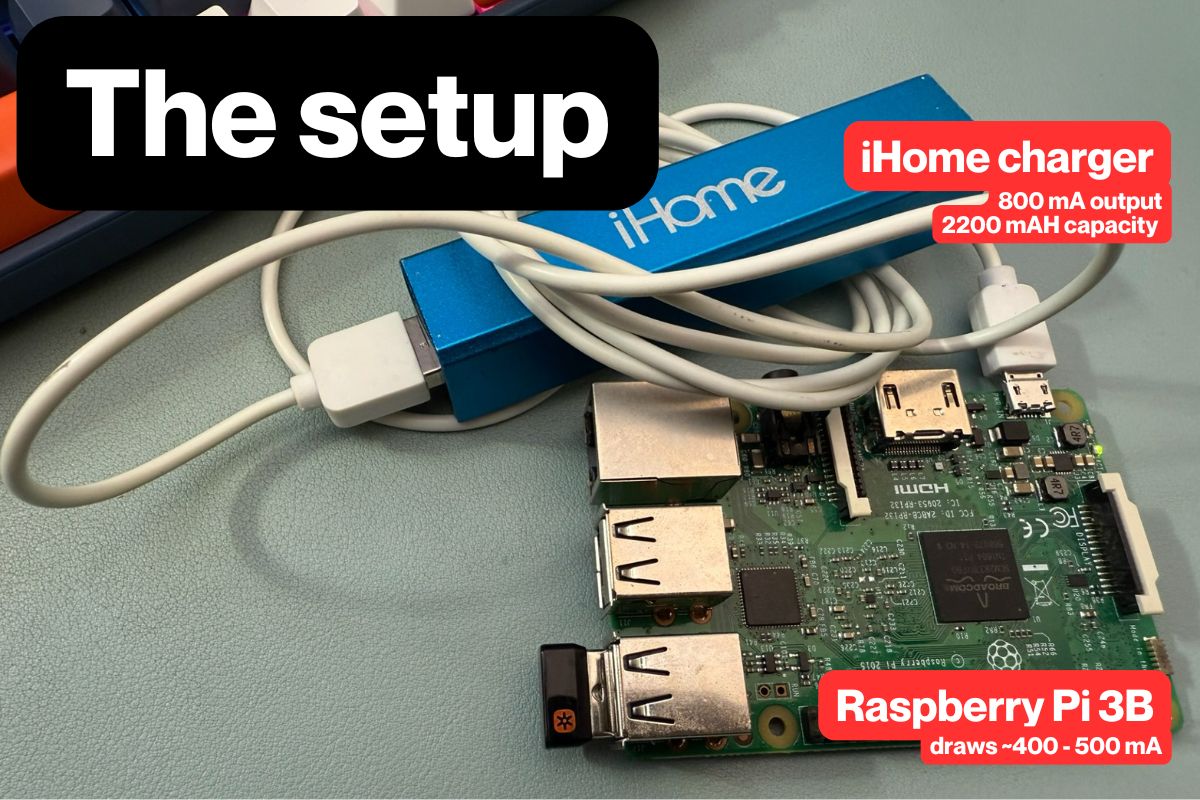
The power pack outputs 800 milliamps (mA), which is enough to run a Raspberry Pi 3B, especially if I remove any USB devices and don’t connect it to a monitor. The Pi draws about 250 mA when idle, which I figured would give me plenty of “headroom” for when the Pi would be running my little program.
According to the specs printed on the power pack, its battery capacity is 2200 milliamp-hours (mAH). That means it should be able to run a device that consumes 2200 milliamps for an hour, or a device that consumes 1100 milliamps for two hours, or a device that consumes 550 milliamps for four hours.
Of course, this was an old power pack of unknown provenance that had been through an unknown number of power cycles. Its capacity was probably far less than advertised.
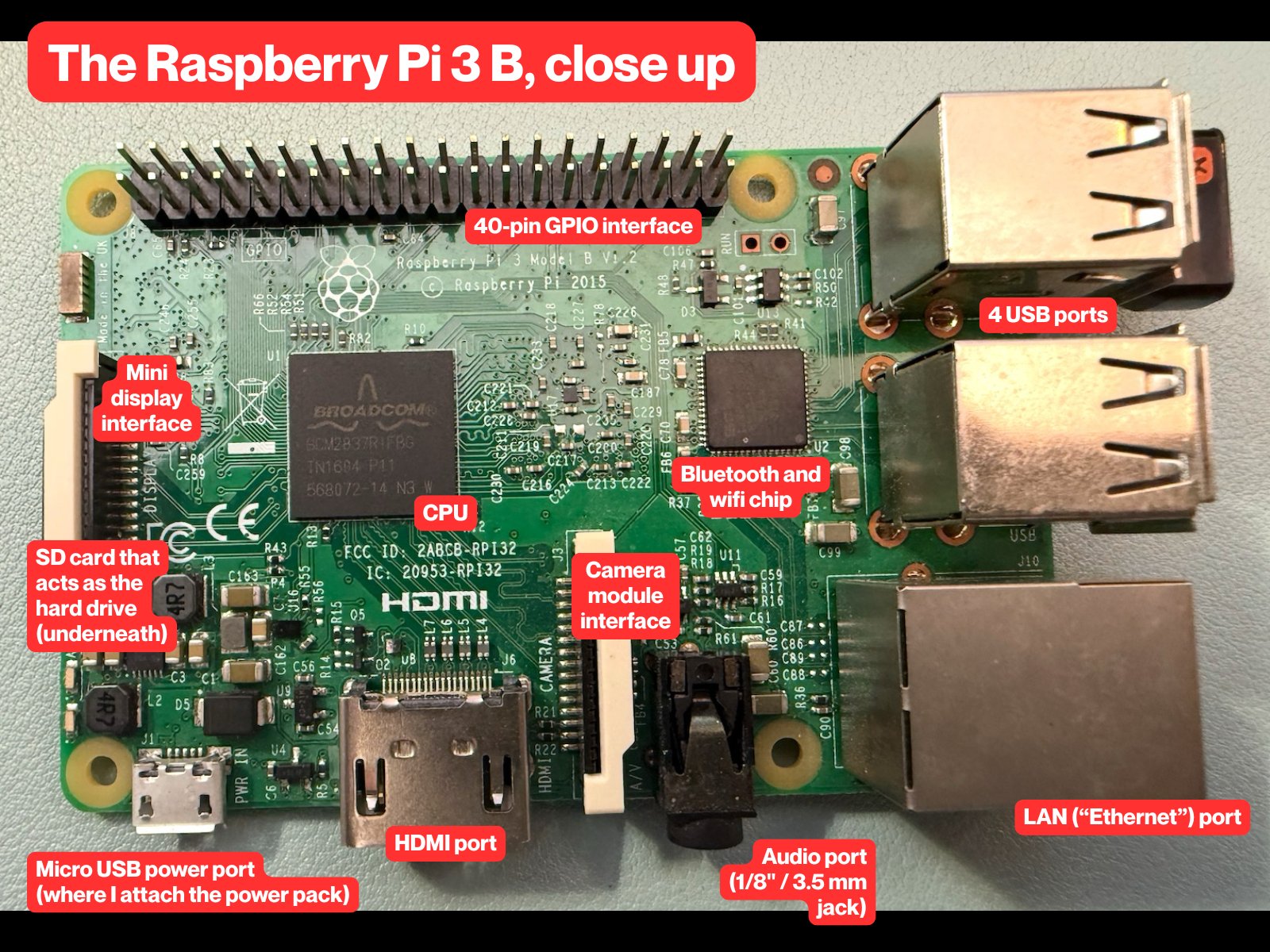
Here’s the Raspberry Pi, with some parts labeled:
I plugged the power pack into Raspberry Pi, and it booted. The OS displayed a “low voltage warning” message on the desktop as soon as it had completed booted…
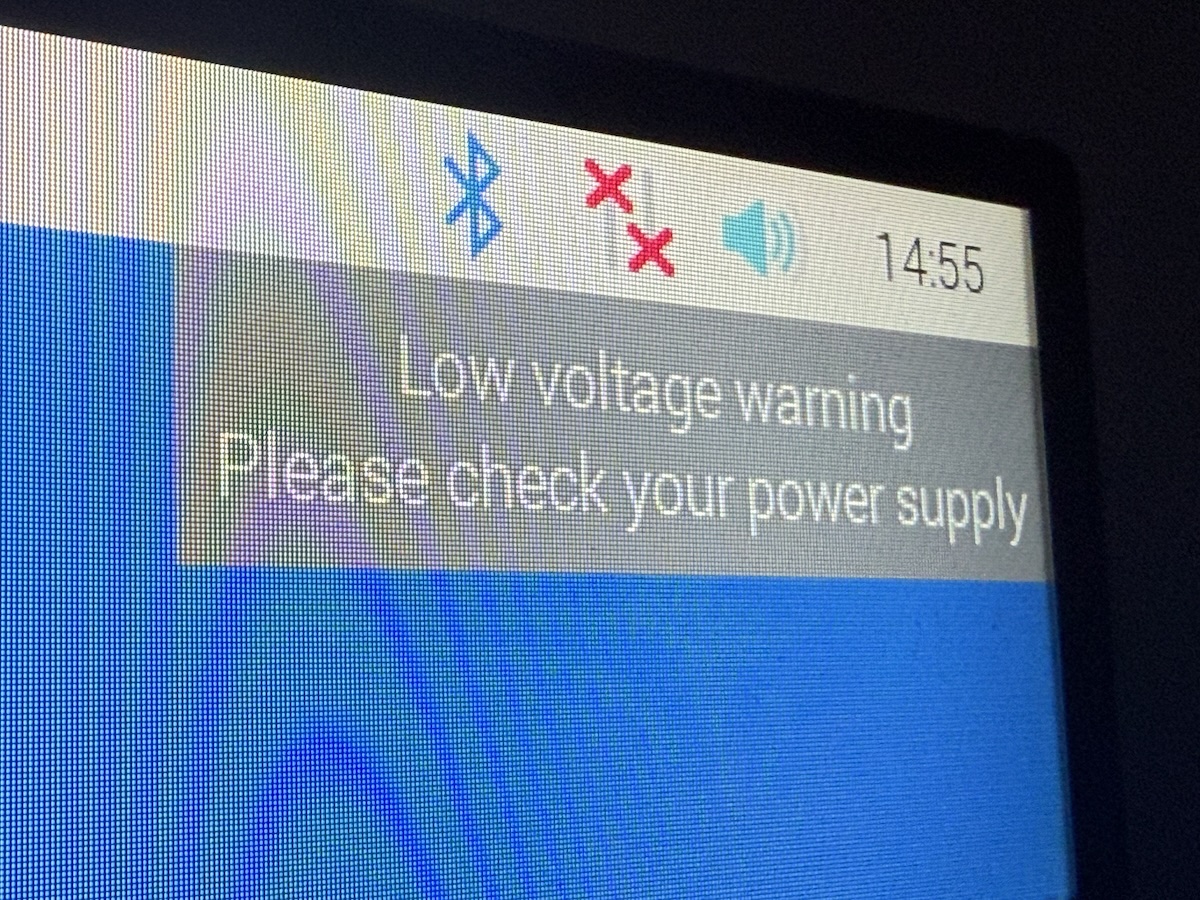
…but it worked!
Question 2: How long will the Raspberry Pi run on this power pack, and how do you find out?
Before I give you my answer to the second question, give it some thought. How would you test how long a programmable device can run on a power pack?

I wrote this Python script:
// uptime.py

import time

with open("uptime.txt", "a") as f:
    while True:
        time.sleep(5)
        display_time = time.ctime(time.time())
        f.write(f"{display_time}\n")
        print(display_time)
Here’s what the script does:
- It opens a file named
uptime.txtif one exists. If there is no such file, it creates that file. - It starts an infinite loop that appends the current time to the file every five seconds.
Note that the code appends the current time to the file, resulting in a file full of timestamps that looks like this…
Wed May 28 14:16:28 2025
Wed May 28 14:16:33 2025
Wed May 28 14:16:38 2025
…instead of a file containing the most recent timestamp.
There’s a reason for this: if I simply had the application write to the file so that it contained only the most recent timestamp, there’s a chance that the power might go out in the middle of writing to the file, which means there’s a chance that the program would fail to write the current time, and I’d end up with a blank file.
By adding the latest timestamp to the end of a file full of timestamps every 5 seconds, I get around the problem of the power going out in the middle of the file operation. At worst, I’ll have a timestamp from 5 seconds before the Raspberry Pi lost power.
The test
I fired up the Raspberry Pi while it was connected to its regular power adapter, entered the script and saved it, powered it down, and then connected it to the power pack:
I then turned it on, hooked it up to a keyboard and monitor just long enough to start the script, then disconnected the keyboard and monitor. I then left the Raspberry Pi alone until its power light went out, which indicated that it had run the battery dry.
I ran this test a couple of times, and on average got 57 minutes of uptime.
Question 3: Would I get more uptime if I wrote the program in C instead of Python?
CPUs are really large collections of transistors:
 In the case of the Raspberry Pi 3 B’s ARM Cortex A53 CPU, there are about 260 million of these transistors, each one being a tiny switch that uses a tiny bit of electricity. The harder you work them, the more power they use. Some of that power is released as heat, which is why your computer gets warm, especially if you’ve got it doing something that requires a lot of computation (such as videogames, mining cryptocurrency, or training and running artificial intelligence models).
You’ve probably seen this chart that’s been floating around the internet since its publication in the 2017 paper Energy Efficiency across Programming Languages. It shows how much energy, time, and memory a number of programming languages use to perform roughly the same tasks, and it appears that Python does poorly for energy efficiency:
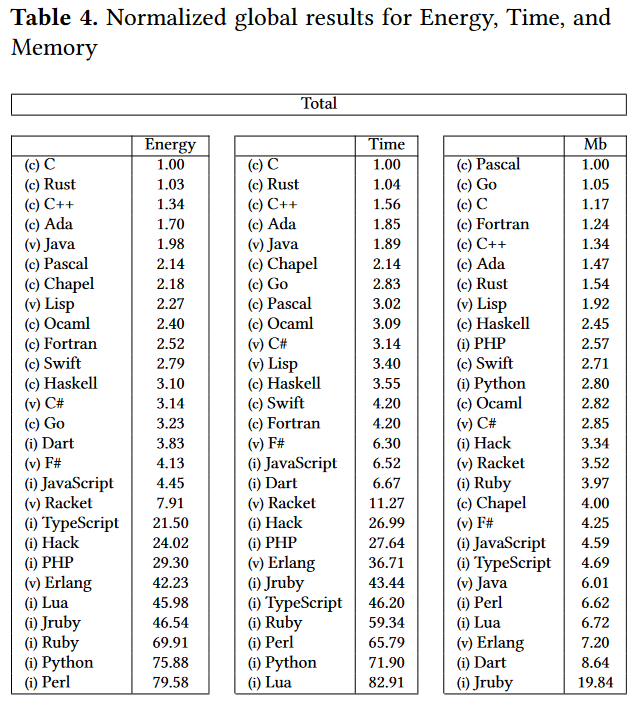
In order to be an easier language to read and program in, with more expressiveness and flexibility than C Python makes it easier on programmer by putting more of the work on the processor. That’s why it’s a power hog. On the other hand, C, which is almost assembly language, is at the top of the power efficiency list.
So my thought was: what if I wrote the uptime program in C and ran it — would I get more uptime?
The C program, version 1
I was about to start coding in C when it occurred to me that while I knew how to write to a file in it, I couldn’t remember how to get the time.
I was about to look it up, when I thought: why not have Claude do it?
So I opened a browser to Claude and entered:
I need some C code that will append the current date and time to a file named “uptime.txt” every 5 seconds.
It provided me with the following code:
// uptime.c

#include <stdio.h>
#include <time.h>
#include <unistd.h>
#include <signal.h>
#include <stdlib.h>

volatile int running = 1;

void signal_handler(int sig) {
    running = 0;
    printf("\nReceived signal %d, shutting down gracefully...\n", sig);
}

int main() {
    FILE *file;
    time_t raw_time;
    struct tm *time_info;
    char time_string[100];

    // Set up signal handler for graceful shutdown
    signal(SIGINT, signal_handler);
    signal(SIGTERM, signal_handler);

    printf("Starting uptime logger. Writing to uptime.txt every 5 seconds.\n");
    printf("Press Ctrl+C to stop.\n\n");

    while (running) {
        // Get current time
        time(&raw_time);
        time_info = localtime(&raw_time);

        // Format time string
        strftime(time_string, sizeof(time_string), "%Y-%m-%d %H:%M:%S", time_info);

        // Open file in append mode
        file = fopen("uptime.txt", "a");
        if (file == NULL) {
            perror("Error opening file");
            return 1;
        }

        // Write timestamp to file
        fprintf(file, "%s\n", time_string);
        fclose(file);

        printf("Logged: %s\n", time_string);

        // Wait 5 seconds
        sleep(5);
    }

    printf("Uptime logger stopped.\n");
    return 0;
}
The C program, version 2
After looking over the code, I noticed something and decided to ask Claude about it:
Claude’s response:
Good catch! Looking at the code,
stdlib.his only needed for theexit()function, but I’m not actually usingexit()anywhere in the program.The
returnstatements use the standard return mechanism, and the signal handler just sets therunningflag to 0 rather than callingexit(). Sostdlib.hcan be removed from the includes.
Let this be a lesson: always double-check the code an AI gives you.
It then provided this code:
#include <stdio.h>
#include <time.h>
#include <unistd.h>
#include <signal.h>

volatile int running = 1;

void signal_handler(int sig) {
    running = 0;
    printf("\nReceived signal %d, shutting down gracefully...\n", sig);
}

int main() {
    FILE *file;
    time_t raw_time;
    struct tm *time_info;
    char time_string[100];

    // Set up signal handler for graceful shutdown
    signal(SIGINT, signal_handler);
    signal(SIGTERM, signal_handler);

    printf("Starting uptime logger. Writing to uptime.txt every 5 seconds.\n");
    printf("Press Ctrl+C to stop.\n\n");

    while (running) {
        // Get current time
        time(&raw_time);
        time_info = localtime(&raw_time);

        // Format time string
        strftime(time_string, sizeof(time_string), "%Y-%m-%d %H:%M:%S", time_info);

        // Open file in append mode
        file = fopen("uptime.txt", "a");
        if (file == NULL) {
            perror("Error opening file");
            return 1;
        }

        // Write timestamp to file
        fprintf(file, "%s\n", time_string);
        fclose(file);

        printf("Logged: %s\n", time_string);

        // Wait 5 seconds
        sleep(5);
    }

    printf("Uptime logger stopped.\n");
    return 0;
}
The C program, version 3
This was an improvement, but there was still a little too much “gold plating” for my needs. I entered the following into Claude:
I don’t need the graceful exit, because this program is expected to run until the computer runs out of power.
Here’s the code it provided in its response:
#include <stdio.h>
#include <time.h>
#include <unistd.h>

int main() {
    FILE *file;
    time_t raw_time;
    struct tm *time_info;
    char time_string[100];

    printf("Starting uptime logger. Writing to uptime.txt every 5 seconds.\n\n");

    while (1) {
        // Get current time
        time(&raw_time);
        time_info = localtime(&raw_time);

        // Format time string
        strftime(time_string, sizeof(time_string), "%Y-%m-%d %H:%M:%S", time_info);

        // Open file in append mode
        file = fopen("uptime.txt", "a");
        if (file == NULL) {
            perror("Error opening file");
            return 1;
        }

        // Write timestamp to file
        fprintf(file, "%s\n", time_string);
        fclose(file);

        printf("Logged: %s\n", time_string);

        // Wait 5 seconds
        sleep(5);
    }

    return 0;
}
Much better.
Once I got past this regularly recurring feeling…

…I compiled the program by entering this line in the terminal…
gcc -o uptime uptime.c
./uptime
…to compile and run it.
I ran this experiment a couple of times, and on average got 89 minutes of uptime. So yes, writing — or better yet, vibe coding — the “uptime” program in C got me more power efficiency and uptime!
Question 4: Did Claude “know” what I was trying to do?
I figured there was more than enough context for Claude to “know” what the “uptime” program was for, so I asked it:
Based on the information I’ve provided in this conversation, what do you think this program is for?
Here’s its complete reply:
Based on the context clues, this appears to be a simple system uptime monitor or power outage detector.
The key indicators are:
- You mentioned it’s “expected to run until the computer runs out of power”
- It logs timestamps every 5 seconds to track when the system is running
- You don’t want graceful exit handling since power loss would be abrupt
- The file is named “uptime.txt”
This suggests you want to track how long your system stays powered on, possibly to:
- Monitor power reliability/outages in your area
- Track system uptime for reliability analysis
- Have a record of when power failures occur (gaps in the timestamps would indicate outages)
- Monitor an unattended system or server
When power is restored and the system boots back up, you could restart this program and it would continue appending to the same file, giving you a complete timeline of system availability with clear gaps showing when outages occurred.
Not bad! In fact, the use case in that final paragraph was one I hadn’t thought of, which is a primary reason why I like using AIs for my work, which is:
No matter how smart, inventive, or creative you are (or think you are), you will never be able to write a list of ideas that you would never think of.
Lessons learned
- Yes, you can power a Raspberry Pi — at least a Raspberry Pi 3 — with a USB power pack, even a cheap one. I knew that you could power smaller boards this way, but you have to remember that a Raspberry Pi 3 is on par with a baseline 2010-era laptop, and those had much bigger batteries.
- Claude’s C code generation is pretty good, but you still need to be a programmer to correct it, and while it will show you how to compile and run a C program, it’s a good idea to know how to do so.
- Claude can figure out what a program is for, given enough context.
Watch this space — I’ll be posting more articles like this!
 (If you don’t get the joke,