Categories
Uncategorized

Want to test an iPhone/iPad game?

Wine Crush is a simple “Candy Crush”-like game that I’m developing for my friends at Aspirations Winery in the nearby city of Clearwater. It’s the first of a few apps that I hope to publish to the App Store this year. If you’ve got an hour or so to spare and are the sort of person who always has ideas on how apps could be improved, this opportunity’s the one you’ve been waiting for!

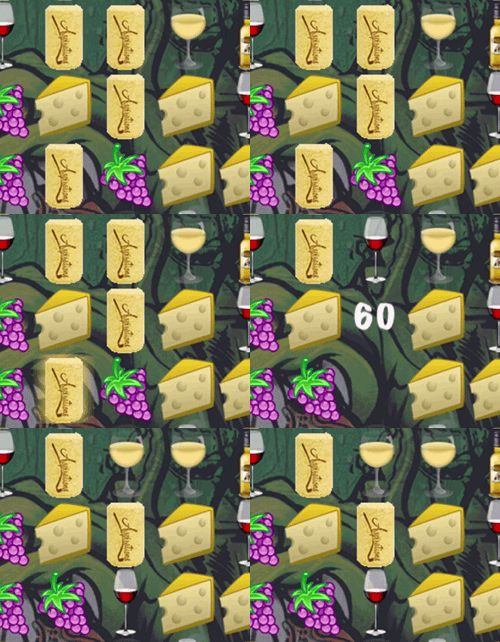
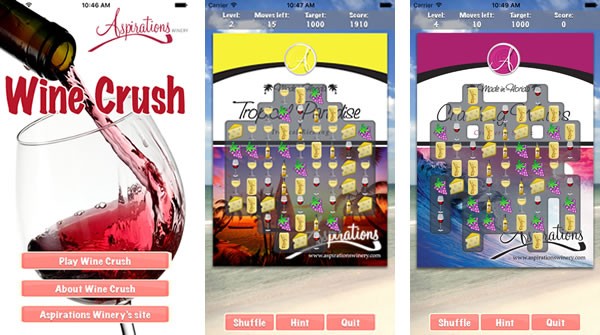
Wine Crush is a pretty straightforward game. You play by creating matching groups of wine-related images — glasses of wine, bottles, corks, grapes and cheese — in groups of three or more. You can create horizontal matching groups…

Animation showing how players form a horizontal match in Wine Crush.

…or vertical matching groups:

Animation showing how players form a vertical match in Wine Crush.

You score points for creating matching groups, and the goal for each level of the game is to score a target number of points within a given number of moves. If you meet the goal, you get to proceed to the next level. If you don’t, it’s GAME OVER.

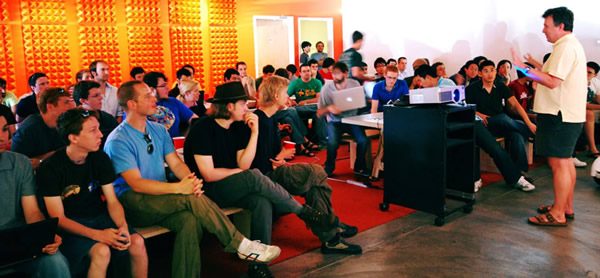
Anitra Pavka (3rd from left) and Joey deVilla (4th from right) at 'Wine-O Bingo' at Aspirations Winery, Clearwater, Florida.

“Wine-O Bingo” at Aspirations Winery, summer 2014. My wife Anitra’s third from the left, and I’m the smiling guy across the table from her, fourth from the right.

Wine Crush is designed as a promotional tool for Aspirations Winery, which is run by Bill and Robin Linville. My wife Anitra has been buying their wines for years. She took me to one of their regular “Wine-O Bingo” events in 2014 (pictured above), and made friends with them after entertaining their guests with a couple of their accordion numbers. Soon after, I approached them with a proposition: Would you like to have an iPhone game for your winery?

They said yes, and I got to work. Starting with the “How to make a game link Candy Crush” tutorials from RayWenderlich.com as a basis, I put together a game with wine-related imagery and Aspirations’ branding, using artwork that Robin provided. The backgrounds for the games’ levels are various labels for Aspirations’ wines, and there are a couple of buttons on the main screen that you can click to find out more about the winery.

For Aspirations, it’s a cute little way to get their name out their in a way that sets them apart from most other small family-owned wineries. As for me, this app is a way for me to help out some friends, sharpen my programming skills, build a portfolio, and gain some valuable experience with the App Store. Aside from a fair bit of free wine (for which I’m very grateful), I’m not getting paid for this project.

The title screen and two game screens from Wine Crush.

Wine Crush needs to be tested before I put it on the App Store. As the developer, I’m a little too close to the project to spot all the bugs and places where it could be improved. That’s where you come in. I’m looking for a small group of people who like trying out new apps to take a pre-release version of Wine Crush for a spin, point out problems and crashes, and give me some feedback. I will also ask you to test some other interesting iPhone/iPad/Apple TV projects I’m working on. It won’t be an all-consuming process; all I’m asking for is a little bit of your downtime and your opinions.

Does the opportunity to test and give feedback on soon-to-be-released iPhone/iPad/Apple TV apps sound interesting to you? If it does and you’d like to join the test group, drop me a line at joey@joeydevilla.com.

This article also appears in The Adventures of Accordion Guy in the 21st Century.

Categories
Uncategorized

Tonight at the Tampa Bay UX Meetup: Apple TV UX with Anitra Pavka!

apple tv fun facts

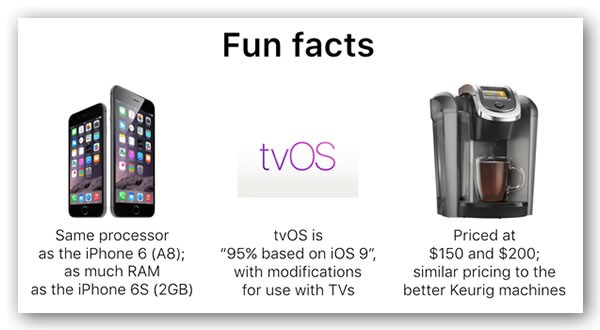
A slide from tonight’s presentation.

tampa bay user experienceI was scheduled to speak tonight at the Tampa Bay UX Meetup and talk about Apple TV UX with my wife Anitra, but as luck would have it, work commitments this evening with GSG’s biggest client have conspired to keep me away.

The show must go on, and it’s in very good hand. Anitra’s forgotten more about user experience than I will ever learn, what with her work as a user experience and web accessibility consultant. She also wrote the accessibility chapter in O’Reilly’s HTML5 Cookbook and was a technical editor for O’Reilly’s Universal Design for Web Applications book. She’ll apply her knowledge to the fourth-generation Apple TV user experience, and walk you through it. There’ll be a presentation, followed by live demos of Apple TV apps and interface. She’ll also point you to resources that you can use to help you design and even build tvOS apps.

It all happens tonight at 6:00 p.m. at the offices of 352 Inc., located at 5100 West Kennedy Boulevard, Suite 352 in Tampa. You can sign up and find out more on the Tampa Bay UX Meetup page. My thanks to organizer Krissy Scoufis for all her help!

Categories
Uncategorized

Developer news roundup: Android, iOS/Swift, and regrets and mistakes

Android

new android emulator

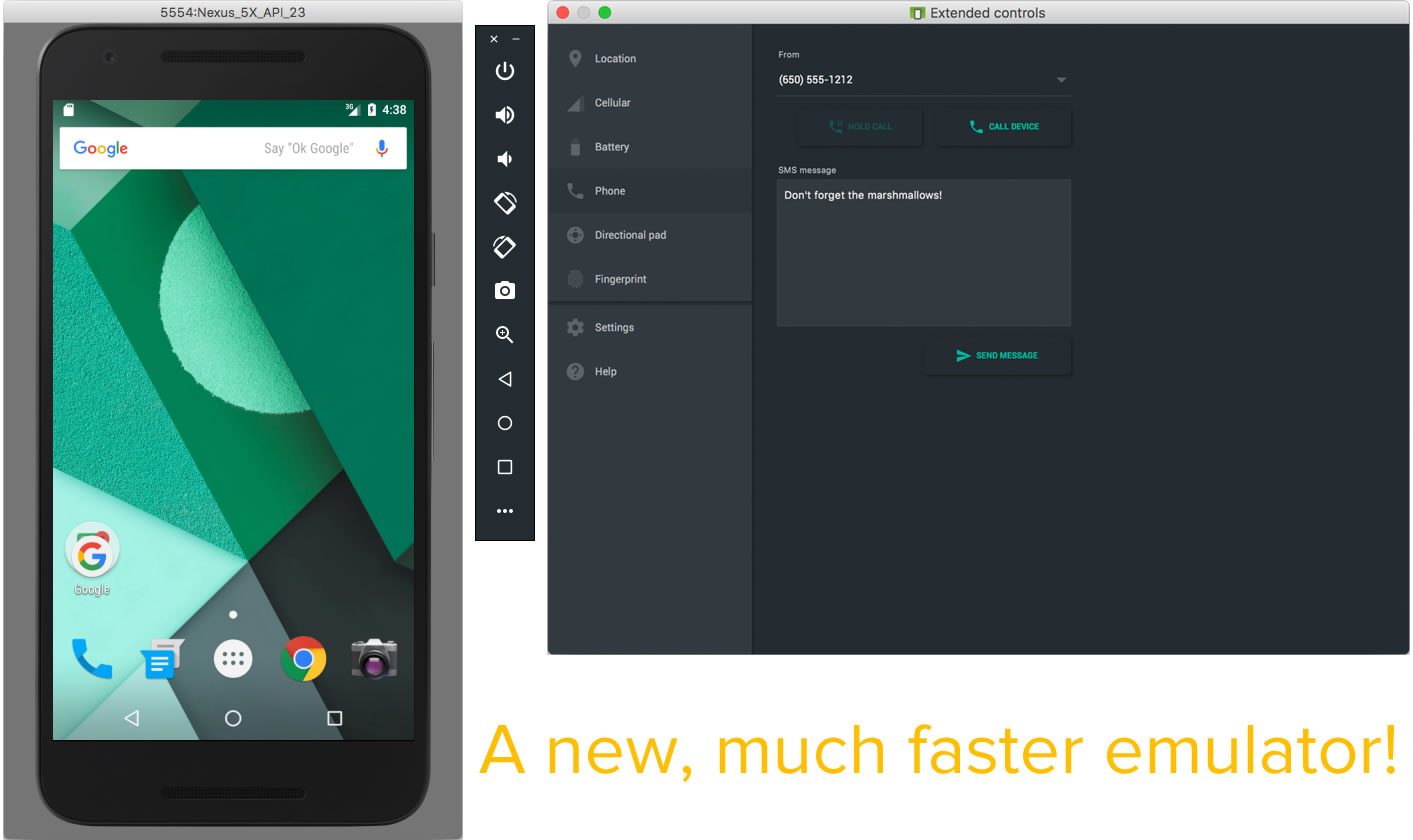
Click the screenshot to see it at full size.

Regrets and mistakes, part one

nuclear explosion

This question appeared on Server Fault on Sunday:

I run a small hosting provider with more or less 1535 customers and I use Ansible to automate some operations to be run on all servers. Last night I accidentally ran, on all servers, a Bash script with a rm -rf {foo}/{bar} with those variables undefined due to a bug in the code above this line.

All servers got deleted and the offsite backups too because the remote storage was mounted just before by the same script (that is a backup maintenance script).

How I can recover from a rm -rf / now in a timely manner?

Most of the answers were along the lines of: “If you’ve got backups, you’ll be fine. If you don’t, you’re about to go out of business.”

iOS and Swift

swift adjectives

Regrets and mistakes, part two

sad man at computer

From My Biggest Regret as a Programmer:

I could go on and on but the key is that you can’t make changes in how people do things in a technical sense unless you have the ability, the authority and the opportunity. Once you make that call and assuming you find the right places to grow, the sky is really the limit.

When I was on TV (Computer Chronicles) in early 1987 showing our product Trapeze the other presenter was Mike Slade who was product manager of Excel. At the time young me thought him some random marketing weenie (young people can be pretty stupid). Yet he started all these companies later including ESPN, worked for Apple in various leadership roles, was a good friend of Steve Jobs and started his own VC firm.

And today I am still just a programmer. Who’s the weenie now? I doubt I will ever be able to really retire. Thankfully I am still good at delivery (I was recruited into my present job by a former manager who needed what he knew I can do) but still all I will be until I croak is what I am now.

Categories
Uncategorized

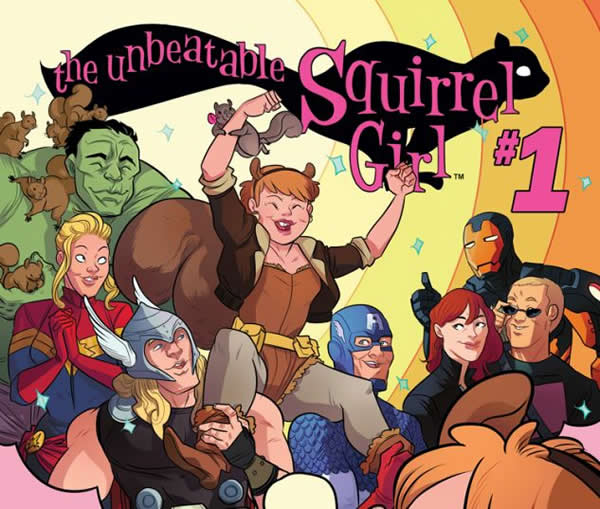
“The Unbeatable Squirrel Girl”: The comic book that tips its hat to computer science

the unbeatable squirrel girl cover

Marvel Comics are doing some interesting things with characters that aren’t that well-known outside comic book fandom, not just with the Guardians of the Galaxy, a (very radically altered) Big Hero 6, and Ant-Man on the big screen and Jessica Jones, Peggy Carter, and various agents of S.H.I.E.L.D. on smaller ones, but even in their comic books, with Ms. Marvel and, more recently, the incredibly cute and unbeatable (it says right so in the title) Squirrel Girl.

Conceived as a throw-away character in the early ’90s when most comic book series were trying to be like The Dark Knight Returns, the 1982 Wolverine solo series, or the X-Men, Squirrel Girl has become important enough to merit her own book, The Unbeatable Squirrel Girl, written by Ryan North of Dinosaur Comics fame.

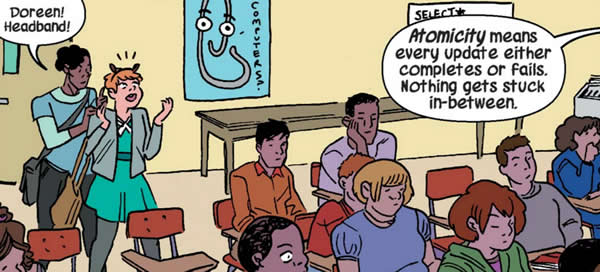
Ryan North has a computer science background, with a bachelor’s degree from Ottawa’s Carleton University and a master’s from the University of Toronto (that’s right, he’s Canadian). That background is what drives some of Squirrel Girl’s story; when she’s not fighting criminals and supervillains, she’s Doreen Green, first-year student (that’s a Canadianism; most Americans would say freshman) of computer science at Empire State University.

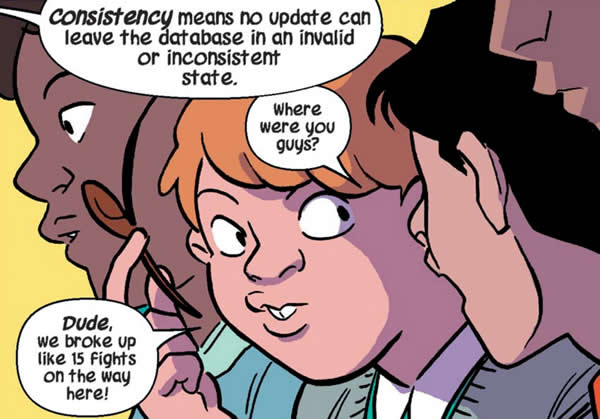
Sometimes her computer science studies are the backdrop, as in this scene, where she shows up a little bit late for her class on databases…

squirrel girl database class 1

squirrel girl database class 2

squirrel girl database class 3

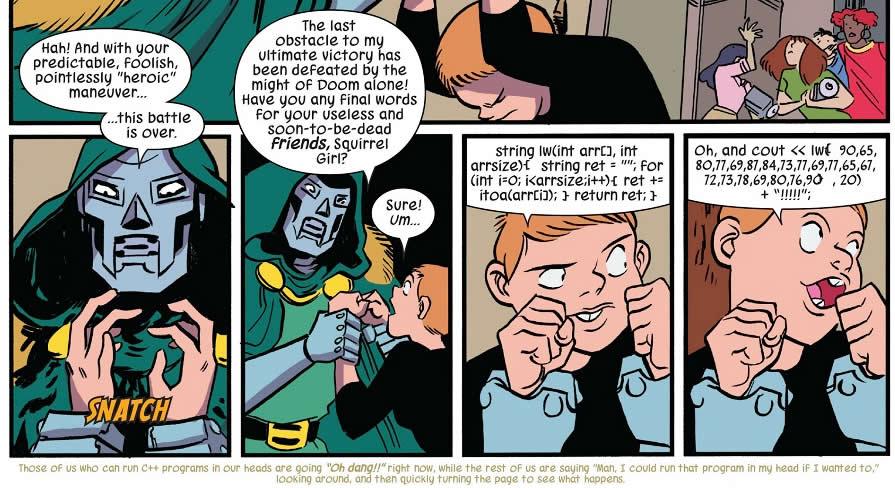
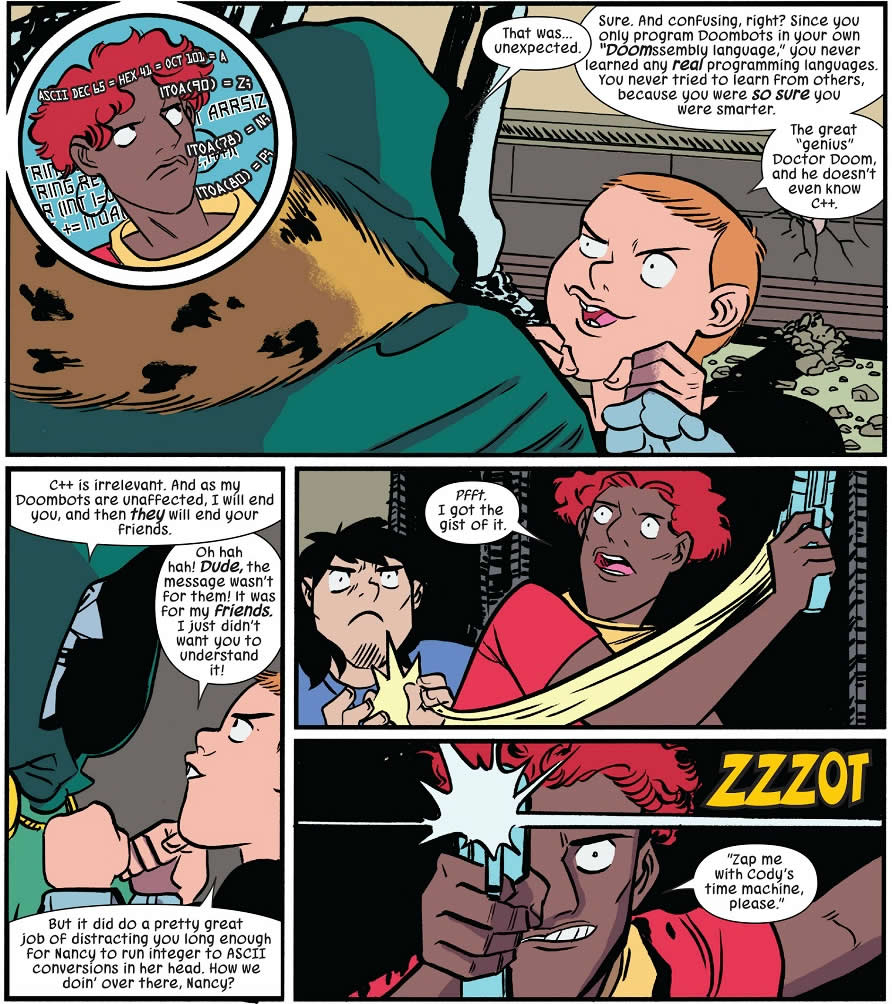
…and other times, it plays a key role in defeating A-list supervillains like Victor von Doom. Doom’s primary flaw is that he’s a supreme egomaniac. Although he’s a science and engineering genius, he’s too proud to have learned programming languages that weren’t of his own design.

So when Squirrel Girl sends a message in C++ to her friends backing her up…

squirrel girl programming 1

Click the comic to see it at full size.

(By the bye, here’s the code that she called out…)

string lw(int arr[], int arrsize) {
  string ret = "";
  for (int i = 0; i < arrsize; i++) {
    ret += itoa(arr[i]);
    return ret;
  }
}

lw({90, 65, 80, 77, 69, 87, 84, 73, 77, 
69, 77, 65, 67, 72, 73, 78, 69, 80, 76, 
90}, 20) + "!!!!!";

…Doom doesn’t understand what she’s saying, since he only programs robots in his own “Doomsembly language” and never learned any real programming languages because it would mean learning from others…

squirrel girl programming 2

Click the comic to see it at full size.

Before you go spoiling the fun by saying “there’s no way you can formulate and yell out that code in that little time, and then have a friend do ASCII conversions in her head that quickly”, remember that all this is happening in a confrontation between a villain in a mechanical suit powered by both super-science and sorcery and a young woman with squirrel powers.

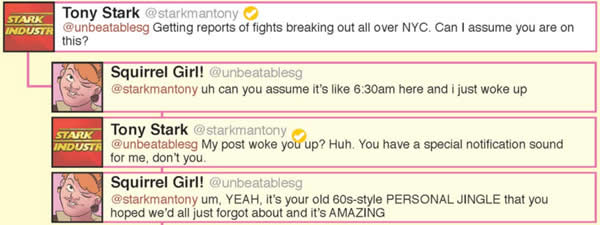
Also amusing: how the comic book often starts with Twitter conversations:

squirrel girl twitter

In case you’re wondering, the jingle she’s referring to is from the 1960’s Iron Man cartoon…

…and it gets referenced in the first Iron Man movie as his mobile phone ringtone…

The Unbeatable Squirrel Girl is a fun read, and the computer science bits just make it even more fun for a former computer science major like myself.

Categories
Uncategorized

Mobile news roundup: Procurement fraud, Mobile ate the world, US mobile network performance, and mobile electronic flight bags for pilots

Keeping an eye out for mobile device procurement fraud


mobile phone fraud

In the CFO.com article, Cell Phone Fraud: Who’s Watching IT?, corporate forensics specialists Jesse Daves and Celyna Frost talk about the very profitable business of mobile device procurement fraud. With aftermarket prices for a new iPhone 6S ranging from $1,000 in the U.S. to as much as $3,000 in China, it’s often tempting for people in IT departments to use their authority and access to procure mobile devices on their company’s behalf using company funds, make them disappear from the books and resell them at a completely cost-free profit.

Without the internal controls and systems to provide visibility into its inventory and procurement process, it’s much simpler for internal fraud. The article lists a number of “red flags” that indicate the potential for procurement fraud, including:

  • IT’s resistance to sharing access to the mobile provider’s billing web portal
  • When accounts payable receives only a summary of the mobile bill
  • Blanket charges that are simply summarized as “international data charges” or “roaming fees” without any substantiation
  • An unusual number of suspended or frozen accounts
  • Unusually large orders of devices
  • Recurring shipments to unknown parties

Suggestions for reducing the likeliness of mobile procurement fraud include:

  • Separating responsibilities so that employees with the authority to order equipment are not the same ones as those who receive them upon delivery
  • Controlling the process for payment approval and cost allocations (one fraud trick is to allocate costs for improperly-purchased goods to another business unit)
  • Maintaining comprehensive and complete records so that every item on every bill can be traced back to a device, circuit, or service in the company’s telecom inventory
  • Performing regular audits to ensure that all telecom charges can be connected to valid employees.

In the end, clear visibility into your telecom environment is your best defense against internal fraud.

Mobile Ate the World: A presentation by Andreesen Horowitz

Benedict Evans of $4 billion venture capital firm Andreesen Horowitz gave a presentation at The Guardian’s Changing Media Summit titled Mobile Ate the World, a play on his firm’s motto, “Software is eating the world”.

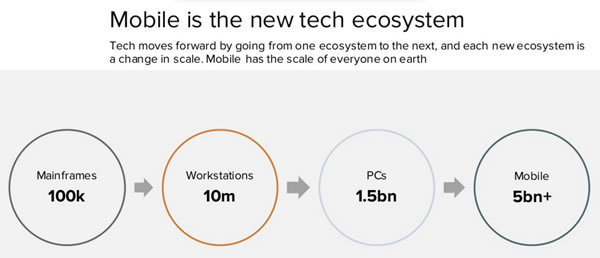
In it, he talks about how mobile is now the universal technology, scaling up to everyone on earth…

mobile is the new tech ecosystem

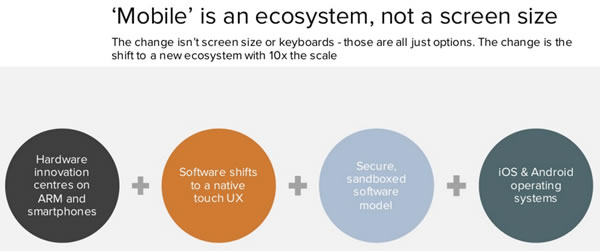
…how mobile isn’t just a screen size, but an ecosystem…

mobile is not a screen size


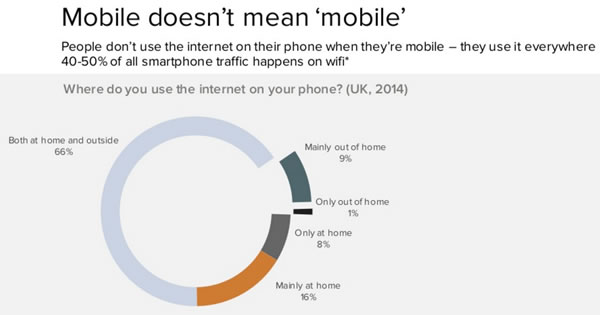
…and how mobile doesn’t just mean “mobile” — a lot of mobile use happens at home, and nearly 50% of smartphone traffic happens on wifi:

mobile doesnt mean just mobile

If you’re as interested in the future of mobile as we are, it’s worth reading Mobile Ate the World.

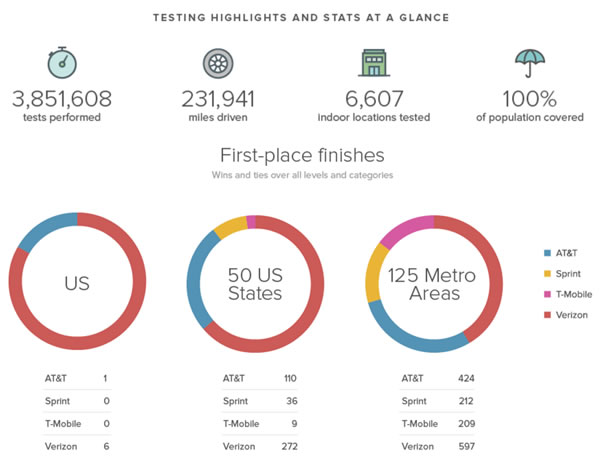
RootMetrics’ Mobile Network Performance in the US report

rootmetrics charts

The cellular carriers are in hot competition and expanding the reach of their LTE networks and grow their network capacities — how are they doing, and who’s offering the fastest and most reliable mobile experiences? The cellular analytics firm RootMetrics published regular reports on this topic, and their latest one looks at the service offered by AT&T, Sprint, T-Mobile, and Verizon in the second half of 2015.

ExpressJet replaces 50-pound flight bags with Surface tablets running Windows 10

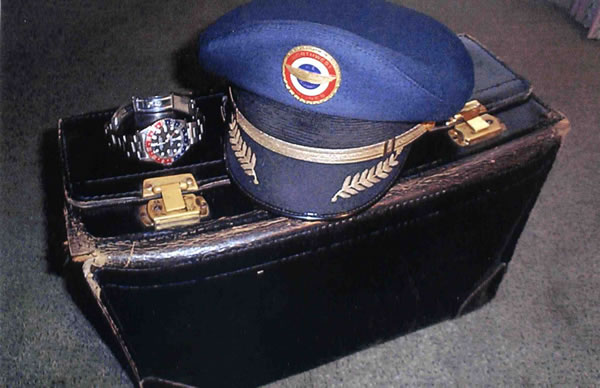
pilot's flight bag

If you fly often, you’ve probably seen pilots walking to or from their flights lugging large bags like one pictured above (perhaps not as well-worn). These flight bags have traditionally carried a lot of paper documentation in binders: operating manuals, navigation charts, reference handbooks, flight checklists, logbooks and weather information, and together, they can weigh anywhere from 30 to 50 pounds. This documentation is updated regularly, so often before each flight, pilots have to collect updated documentation, remove the outdated material from their binders and insert the new pages. It’s a lot of paperwork to lug around and sort through; now imaging trying to find a key piece of information while you’re trying to fly a plane at the same time.

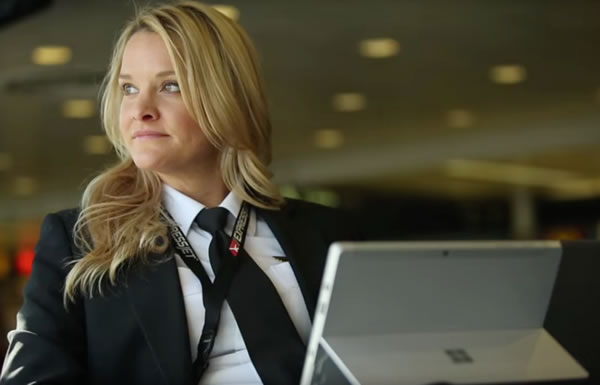
expressjet pilot and surface 3

As far back as 2011 — a mere year after the introduction of the iPad — airlines have been replacing all this paper documentation with “EFBs” (Electronic Flight Bags), which are tablets running apps specifically designed for pilots. United Airlines committed to deploying 11,000 iPads running Jeppesen’s FliteDeck app to pilots as their EFBs in the late summer of 2011, and more recently, ExpressJet got FAA approval to hand out Surface 3s running Windows 10 to their pilots to replace all that paper that went into their flight bags.

Here’s a video by Microsoft with ExpressJet pilot Renee Devereux talking about her new Surface 3 EFB:

The electronic flight bag is a good example of mobile devices playing to their strengths in the workplace:

  • As electronic replacements for large volumes of often-updated paper documents
  • Providing quick access to crucial data in routine and (literally!) mission-critical scenarios
  • Portable computing devices with significantly greater battery life than traditional laptops
  • An employee perk (as shown in the video, ExpressJet pilots are allowed to use their tablets to stay in touch with their families while on the “road”)

this article also appears in the GSG blog

Categories
Uncategorized

Mobile developer news roundup: Making money (or not) with your apps

smartphone money

This roundup of mobile developer news has a theme: making money with your apps, with both practical advice and tutorials, as well as bigger-picture discussions of the topic.

under the radar

Under the Radar is David Smith and Marco Arment’s podcast on indie iOS app development. They make sure that none of their podcasts runs longer than half an hour. Their latest podcast, the 21st in the series, is titled App Store Rejection, in which they provide suggestions on how to avoid rejections from Apple’s App Store review staff, and what to do when your app gets rejected.

Their two previous podcasts also cover the App Store: Improving the App Store, Part 1 and Improving the App Store, Part 2.

angry birds

I had no idea that mobile games were a bigger business than PC and console gaming. Here are the sizes of the game markets, according to App Annie and IDC:

  • Mobile games are a $34.8 billion market worldwide,
  • PC/Mac games are a $29 billion market,
  • Console games are an $18.5 billion market, and
  • Games for handheld game devices are a $3 billion market.

At the time of writing,”Application Category Distribution” section of PocketGamer.biz’s App Store metrics page showed the following breakdown of apps:

  1. Games (527,017 active)
  2. Business (234,930 active)
  3. Education (210,991 active)
  4. Lifestyle (198,844 active)
  5. Entertainment (144,613 active)

They also report these numbers for app pricing:

  • Current Average App Price: $1.12
  • Current Average Game Price: $0.54
  • Current Average Overall Price: $0.99

android apps for sale

Ray Wenderlich’s site may have started out as iOS-specific, but they’ve expanded their coverage to include Android and Unity development. Their latest Android article is titled Android App Distribution Tutorial: From Zero to Google Play Store, and it shows you how to get your newly-created Android app into Google Play’s store.

google play and app store

App Annie, the mobile app analytics service, published their inaugural app economy forecast a couple of months ago, where they make the following predictions:

  • This year, the global app market is expected to grow 24% and hit $51 billion in gross revenues across all app stores
  • The global app market will exceed $100 billion is gross revenues by 2020
  • China surpassed the US in mobile app downloads last year, and is expected to surpass them in app spending this year.

in-app purchase

In-app purchases can help you generate more money with your apps, and this article can help you with setting them up on iOS apps: In-App Purchase Tutorial: Getting Started.

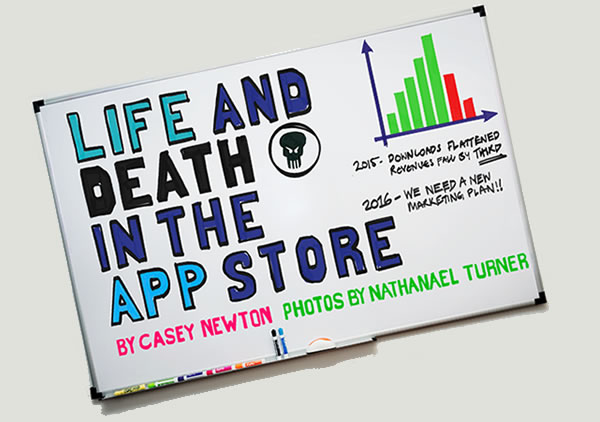
life and death in the app store

In case you missed it, The Verge recently published Life and Death in the App Store, an article which on one level is the story of Pixite, a mobile development shop that had some early successes and is now treading water, and on another level is the story of the changes in the app market between its inception less than a decade ago and the present day, and what that means for developers who plan to make a living off it.

Categories
Uncategorized

How to write your own TSA security line randomizer app (and maybe make sweet government contract money)

tsa randomizer

About 150 airports in the U.S. have TSA PreCheck, an expedited security line for pre-screened travellers. If you fly often, you’ll find it very convenient as the line’s usually short, and you can forego having to remove your shoes, jacket, and belt, as well as having to separate your laptop and “3-1-1 liquids” from the rest of your carry-on luggage. There is a price to be paid for this — a registration fee, along with providing the U.S. Customs and Border Protection agency enough info to do a background check on you, and there’s an interview as well. If you’re an American or Canadian with a NEXUS card, you’re already in the TSA PreCheck program.

Even the pre-screened people going through TSA PreCheck get some additional random screening every now and again. The TSA PreCheck line often has two lanes, one on the left, one on the right, and they pick people for additional security screenings from one of them. In order to keep people from trying to guess which line that is, the TSA commissioned the development of a “randomizer”, which is an iPad app that randomly determines which line you should use.

The video below shows the randomizer in action:

The app would make a good “iPad programming 101” assignment; a newbie developer should be able to complete it in a day, and someone with even a couple of months’ of experience should be able to complete it in an hour.

Developer Kevin Burke wondered how much the TSA paid to have the app developed. As a government agency, they’d have put out an RFP to companies that do contracts for government work, and none of them come cheap. He filed a Freedom of Information Act request, and mirabile dictu, he got some answers in the form of two documents:

Here’s the most eye-catching part of the contract:

total award amount

Burke posted his findings online, and Pratheek Rabala, who does interactive graphics for TIME, pointed out that not only the information was readily available to the public, but that the payment shown above was just one in a series of payments totalling $1.4 million.

It turns out that the $1.4 million dollars covers the cost of a larger project, which includes other mobile applications, software to support an “enhanced staffing model” for the TSA, and all the project management that such an undertaking requires.

The TSA, when asked, pointed out that the “development costs for the TSA Randomizer Application were $47,400 in total.”

With that in mind, it’s time to fire up Xcode and start on the path to that sweet, sweet government contract money. Why should IBM have all the fun?

If you’re new to iOS programming or even programming in general, the TSA Randomizer app is a good starter project. You might want to try writing it on your own before following the steps below. Here’s a hint that should help — you’ll need to know how to do these things in order to write the app:

  • How to generate a random number
  • How to display an image on the screen
  • How to change the contents of an image on the screen
  • How to know when the user has tapped on the screen

How to write the app

xcode icon

Open up Xcode and do the FileNewProject… dance. As you may have already suspected, you’re going to specify that this is a Single View Application:

tsa 01

Give the project a name (I called mine TSARandomizer), and select iPad from the Devices drop-down menu:

tsa 02

Once you’ve chosen a place to save the project and it’s been written to disk, you’ll be taken to the General page for your project. Under Device Orientation, make sure that Portrait is checked and that all other orientations are unchecked:

tsa 04

Click the screenshot to see it at full size.

Edit ViewController.swift and change its contents to the following:

import UIKit

class ViewController: UIViewController {
  
  @IBOutlet weak var arrowImageView: UIImageView!
  
  let leftArrowImage = UIImage(named: "arrow-left")!
  let rightArrowImage = UIImage(named: "arrow-right")!

  override func viewDidLoad() {
    super.viewDidLoad()

    let tapGestureRecognizer = UITapGestureRecognizer(target:self, action:#selector(arrowImageViewTapped))
    arrowImageView.userInteractionEnabled = true
    arrowImageView.addGestureRecognizer(tapGestureRecognizer)
    
    displayRandomizedArrow()
  }

  override func didReceiveMemoryWarning() {
    super.didReceiveMemoryWarning()
    // Dispose of any resources that can be recreated.
  }
  
  func arrowImageViewTapped() {
    displayRandomizedArrow()
  }
  
  func displayRandomizedArrow() {
    if arc4random_uniform(10) < 5 {
      arrowImageView.image = leftArrowImage
    }
    else {
      arrowImageView.image = rightArrowImage
    }
  }

}

This is all the logic needed to make the app work. The displayRandomizedArrow method is currently set so that 50% of the time, the left arrow is selected, and the other 50% of the time, the right arrow appears. You can adjust this to taste.

Time to build what little user interface there is. Open Main.storyboard and put an Image View control on the view. This will contain the arrows. We want it to fill up the screen, so set its constraints so that all its sides are 20 pixels from the view:

tsa 05

Click the screenshot to see it at full size.

In our code, we have an outlet variable named arrowImageView. We need to connect it to the image view we just added. Select the view and open the Connections Inspector. Drag from the circle to the right of New Referencing Outlet to the View Controller icon above the view, as shown in the screenshot below.

tsa 06

Click the screenshot to see it at full size.

Select arrowImageView from the pop-up menu that appears.

tsa 07

Click the screenshot to see it at full size.

Finally, we need to add the arrow images to our app: arrow-left.png and arrow-right.png. Open Assets.xcassets and drag the left-arrow and right-arrow images into it.

tsa 08

Click the screenshot to see it at full size.

Fire it up in the simulator or deploy it to your iPad, and start bidding on some TSA RFP’s — you’ve got a functioning TSA randomizer app!

xcode download

I’ve zipped up my project and made it available for download (it’s a mere 300KB zipped). Enjoy!