Categories
Uncategorized

Taking up Xamarin

How I decided to take up Xamarin development


six years ago

enlightened lazinessSix years ago, I was a newly-minted developer evangelist with Microsoft Canada, and mere days into the job, I’d been sent to the Professional Developers Conference in Los Angeles. As part of my initiation into the fold, my fellow evangelist John Bristowe was assigned to me as a mentoring “buddy” to help me learn the ropes.

As part of my training, he had me conduct a number of video interviews with the .NET community’s bright lights, one of whom was Miguel de Icaza, then-leader of the Mono Project. The project’s goal was to create an ECMA standards-compliant set of .NET framework-compatible C# compiler, CLR, and other tools to other operating systems. I got a chance to hang out with Miguel and a bunch of guys from the Mono team over the next few days, during which they showed me all sorts of interesting stuff, including a rough 3D jet fighter game written using Mono and running on the then still-pretty-new iPhone.

Over the years, Miguel’s work has been one of those things that I’d been meaning to check out. I kept an eye on Mono’s ups and downs, and expected the project to disappear forever when Novell laid off the entire Mono team three years ago. Miguel quickly put together a new company, Xamarin, which I didn’t expect to live very long. I was pleasantly surprised to see it not just survive, but even thrive mere months after it got started. Even after that, Mono, now Xamarin, remained one of those things that I’d get around to eventually.

Then, a few things changed…
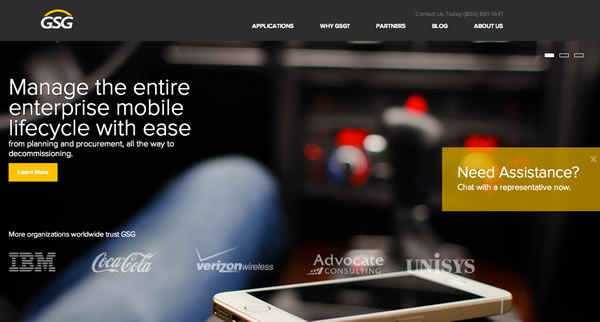
gsg site

For starters, I joined GSG, a company that makes an enterprise mobility management / mobility managed services platform. That’s industry jargon for “helping medium- to large-sized companies stay on top of their wireline and mobile telecom stuff”. I’m their Platform Evangelist, and one of my roles is to make sure that GSG’s sales team, partners, and customers know all there is to know about our platform, which means that I’m responsible for a lot of the promo and educational material.

Some of that material is in the form of smartphone and tablet apps. These all come down to me, and while I can put together a half-decent iOS app, I’m still an Android newbie, and I’m just one guy. And wow, do I dislike Java, especially after working with C# for some time. I needed something that would let me write apps for both iOS and Android without doubling the work I’d have to do.
xamarin 3 interface

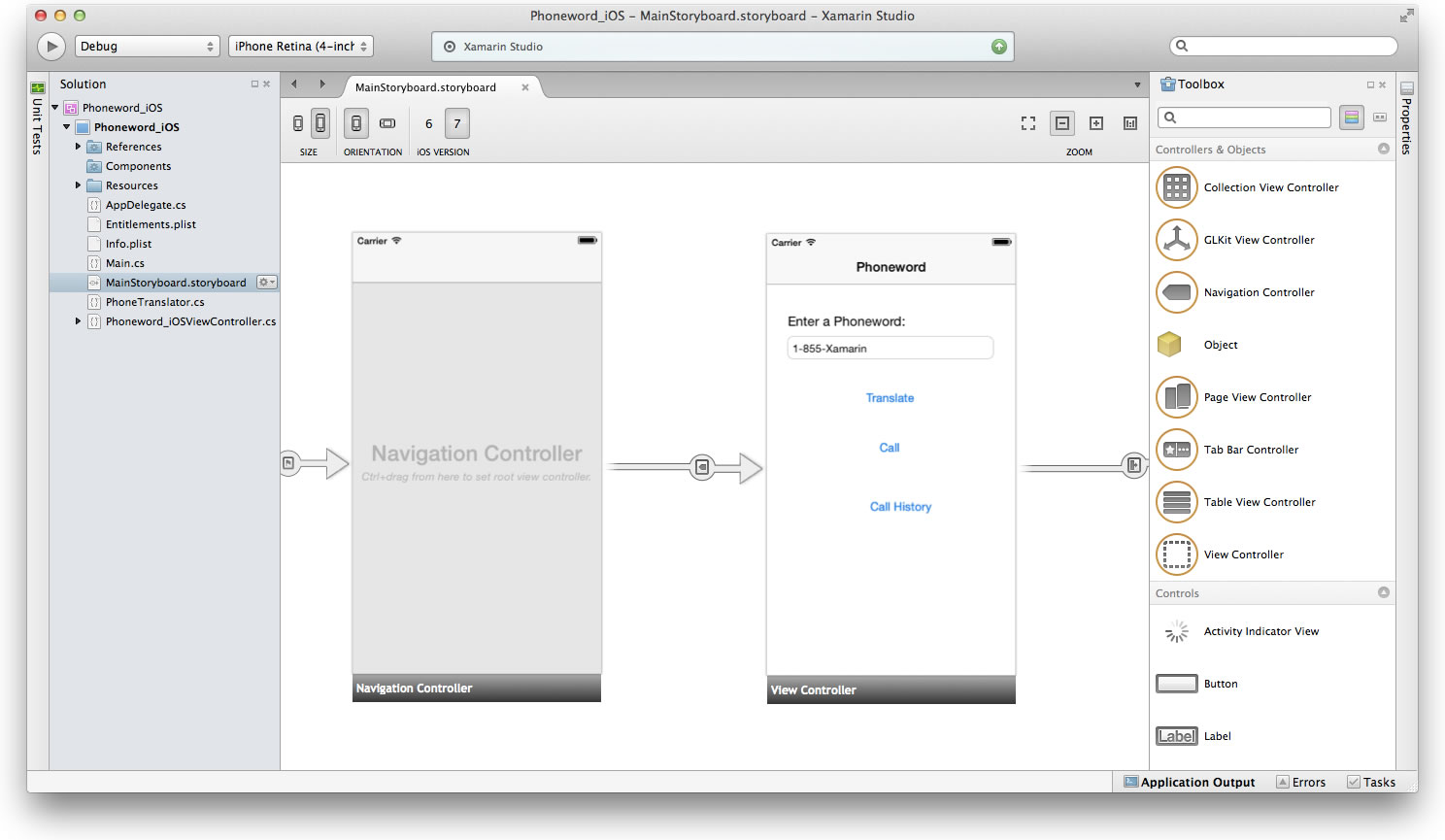
Since I’m new to the Tampa area, I’ve been attending some meetups to get to know local techies. One of these meetups was the Xamarin one, and it got me interested enough to download the latest version of the Xamarin development tools, which have come a long way. It’s actually quite pleasant to use, and I found myself having fun coding in C# — which I’ve used in an on-again, off-again fashion since 2001 — and seeing the output run on iOS and Android. I also found Xamarin.Forms, which I’ll talk about a little later in this article.

hanx writer

I’ve heard a number of developers talk about how they’ve switched to Xamarin, and a number of apps created in Xamarin, such as Rdio and Tom Hanks’ vanity app, Hanx Writer (which merges Notepad with a beautiful old-school mechanical typewriter’s interface) have come to my attention.

russ fustino

The last Tampa Bay Xamarin User Group meetup had a session led by Russ Fustino, who announced that he’d become a Xamarin evangelist and led us through what he’d learned at the Xamarin University online course series. What I saw was quite impressive, and it led me to set some time aside and take Xamarin out for a proper spin.

At the post-meetup gathering at a nearby bar, I ended up chatting with Russ and his brother, who told me how they’d used Xamarin to build an apps for classic rock band Jethro Tull that ran on Android, iOS, and Windows Phone.

cat with money

And finally, there’s the $54 million Series C round they recently raised. You might think that such a thing wouldn’t matter to a developer, but it does for an important reason: if I’m going to invest my time in a tool in a quick-moving field like mobile, I’d like some reassurance that the toolmaker has the resources to stick around for a while and to keep up with all the changes in devices, operating systems, and services.

Together with the fact that I got pretty decent at coding in C# from my days at Microsoft, the factors above have led me to revise my “Mobile Dev Tools Skills Portfolio” to the following:

  • Xamarin/C# for cross-platform development
  • XCode/Swift for straight-up iOS development

And yes, that means that there’ll be both Swift and Xamarin development articles on this blog, and they’ll be coming increasingly often as I’m ramping up my development work.

Xamarin Indie: $25/month/platform, but only until the end of August

indie-25The version that best suits my needs is Xamarin Indie, which is for independent developers with fewer than five employees. It’s normally $300/year/platform (which means it’s $600/year if you want to develop both Android and iOS apps), but for the month of August 2014, Xamarin’s experimenting with charging monthly ($25/month/platform, or $50/month if you want to develop for both Android and iOS). This approach will be less painful for developers short on cash, and if you find that Xamarin’s not for you, you can cancel the subscription and pay only for the months during which you subscribed.

Xamarin.Forms
ios android windows phone

One of the key features of Xamarin Indie, which is a step up from the free version, is that it lets you use a new development model: Xamarin.Forms.

Until now, the way to write a cross-platform app with Xamarin was to write two different categories of code:

  • The common code used across all the platform versions, typically be the back-end or “business logic” of the app.
  • The platform-specific code, typically code that accesses platform-specific features and UI

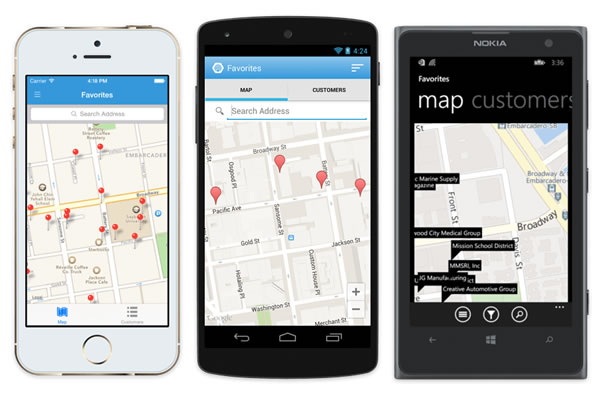
With Xamarin.Forms, you’re coding to a single “platform” and API that abstracts away the differences among Android, iOS, and Windows Phone. The compiler does a of the work that you’d have to do to address each platform’s different approaches. For me, this is a very valuable feature — valuable enough that I’m willing to give it a try even though it’s still 1.0.

Building a quick and dirty “Magic 8-Ball” app with Xamarin.Forms
eightballforms screenshots

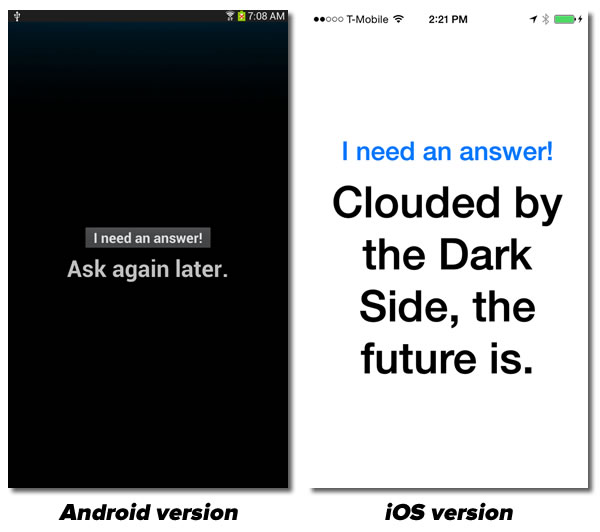
In order to show Xamarin — and Xamarin.Forms in particular — in action, let me walk you through the process of building a quick and dirty “Magic 8-Ball” app. In order to follow this exercise, you’ll need a Xamarin with an Indie or higher account for at least one of the supported platforms. Unfortunately, Xamarin.Forms isn’t available with the free version of Xamarin.

Start a new solution with FileNewSolution…:

screen 0

Click the screenshot to see it at full size.

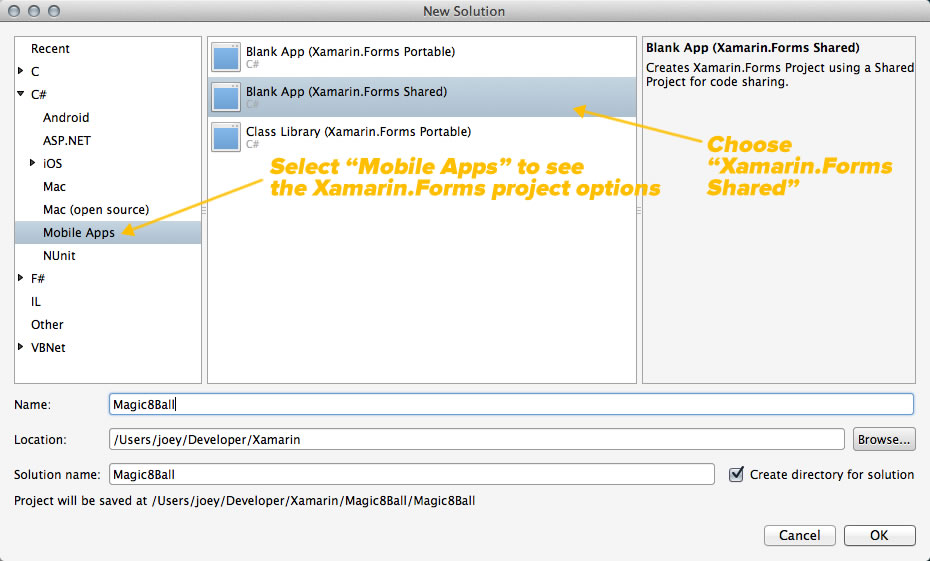
The menu in the left pane lists the various solution categories. Note that Xamarin supports development not just for a number of platforms, but in a number of languages as well. The two languages you can use for developing mobile apps are C# and F# (an ML-like functional programming language). Choosing a category from the left pane menu gives you a list of solution types.

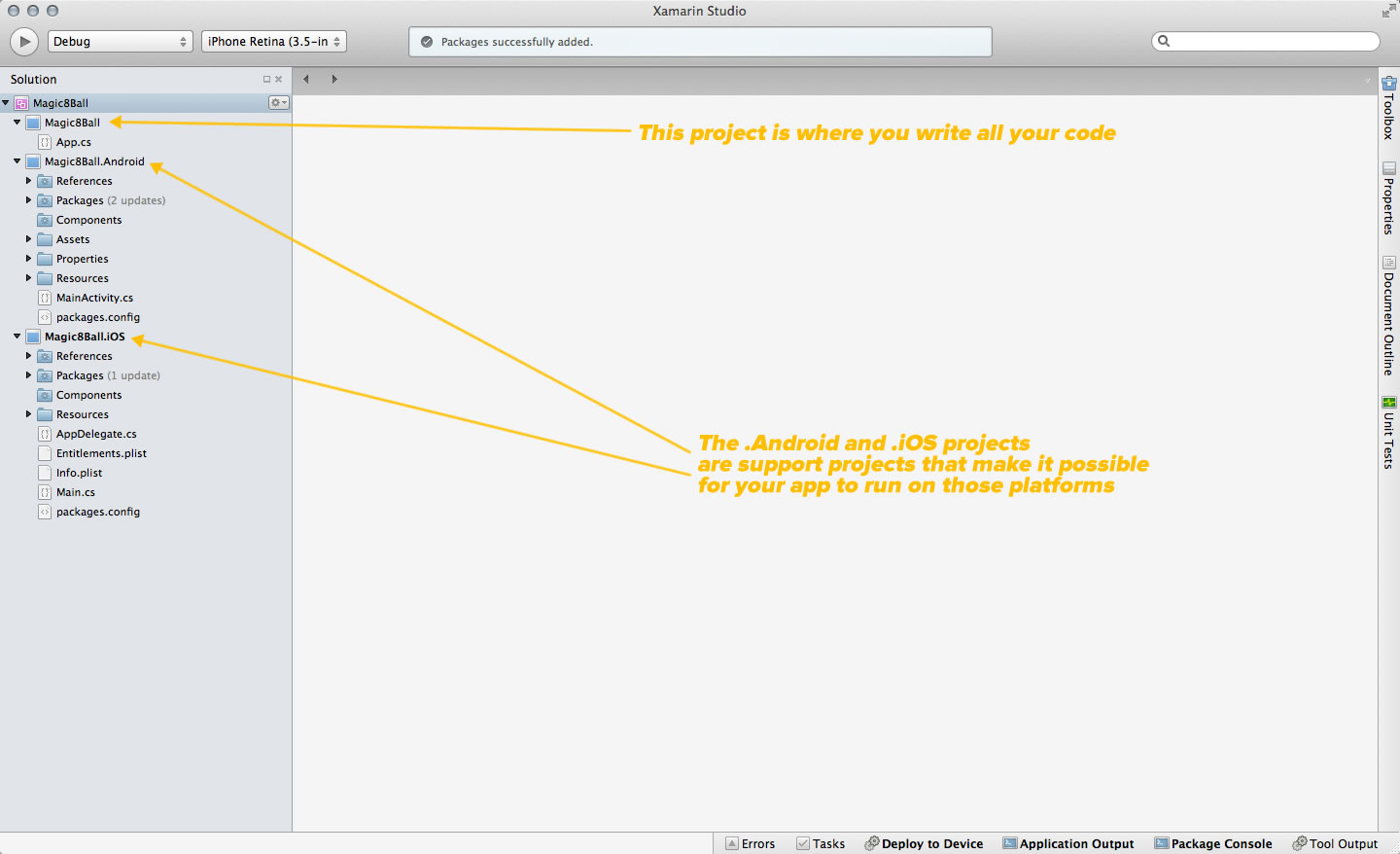
Expand the C# item in the left pane menu and select Mobile Apps. This gives you a list of Xamarin.Forms solutions you can create. Choose Blank App (Xamarin.Forms Shared), and give your solution a name. I named mine “Magic8Ball”. Click OK, and Xamarin will create the solution:
screen 1

Click the screenshot to see it at full size.

Expand the Magic8Ball folder to reveal App.cs, and then double-click App.cs to see its contents:
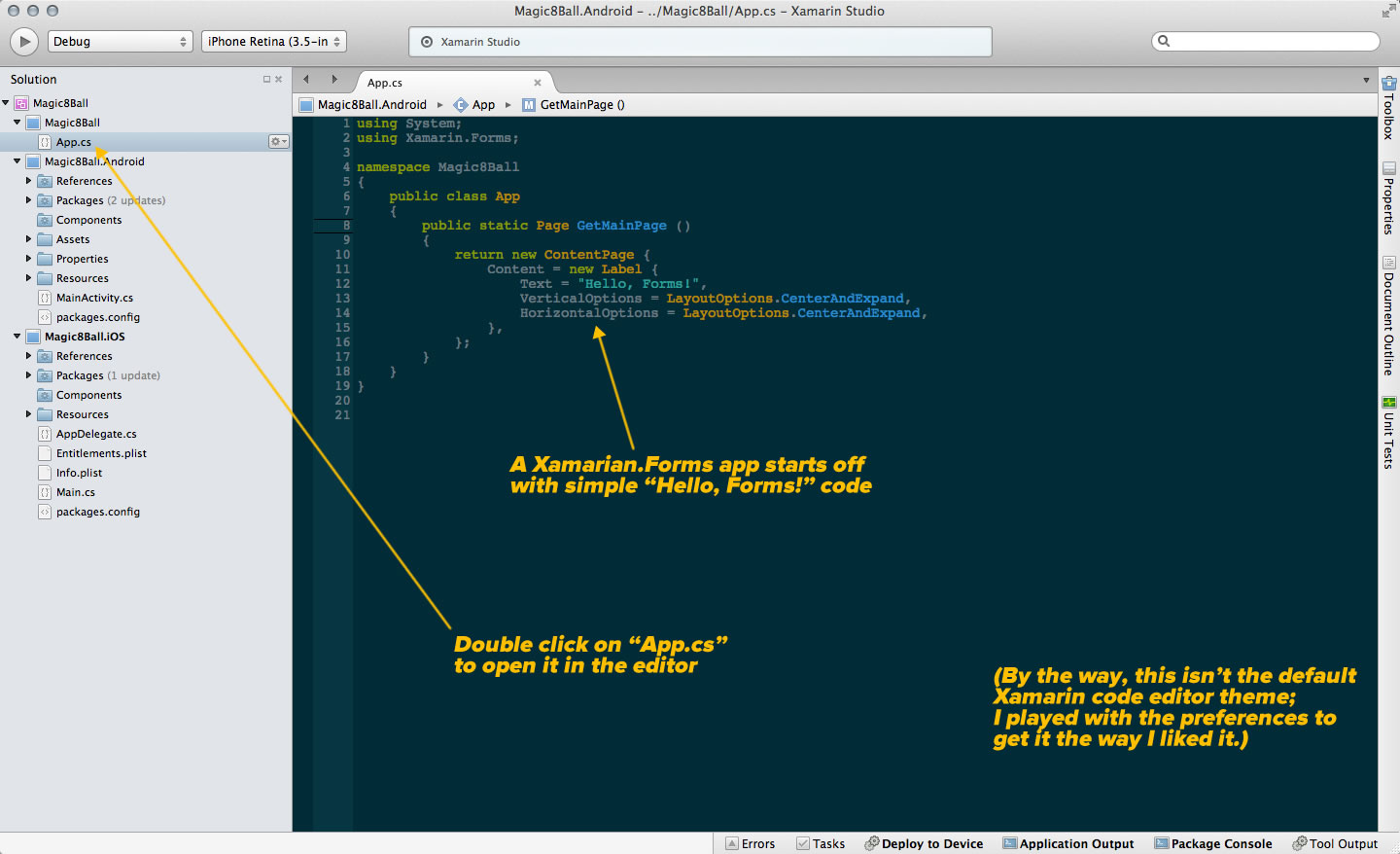
screen 2

Click the screenshot to see it at full size.

Let’s run the app as it is on iOS. Right-click on the Magic8Ball.iOS project and select Set as Startup Project from the contextual menu that appears. Then, near the upper left-hand corner of the Xamarin window, select the way you want to run the app — either on the simulator or on an iPhone connected to your computer:
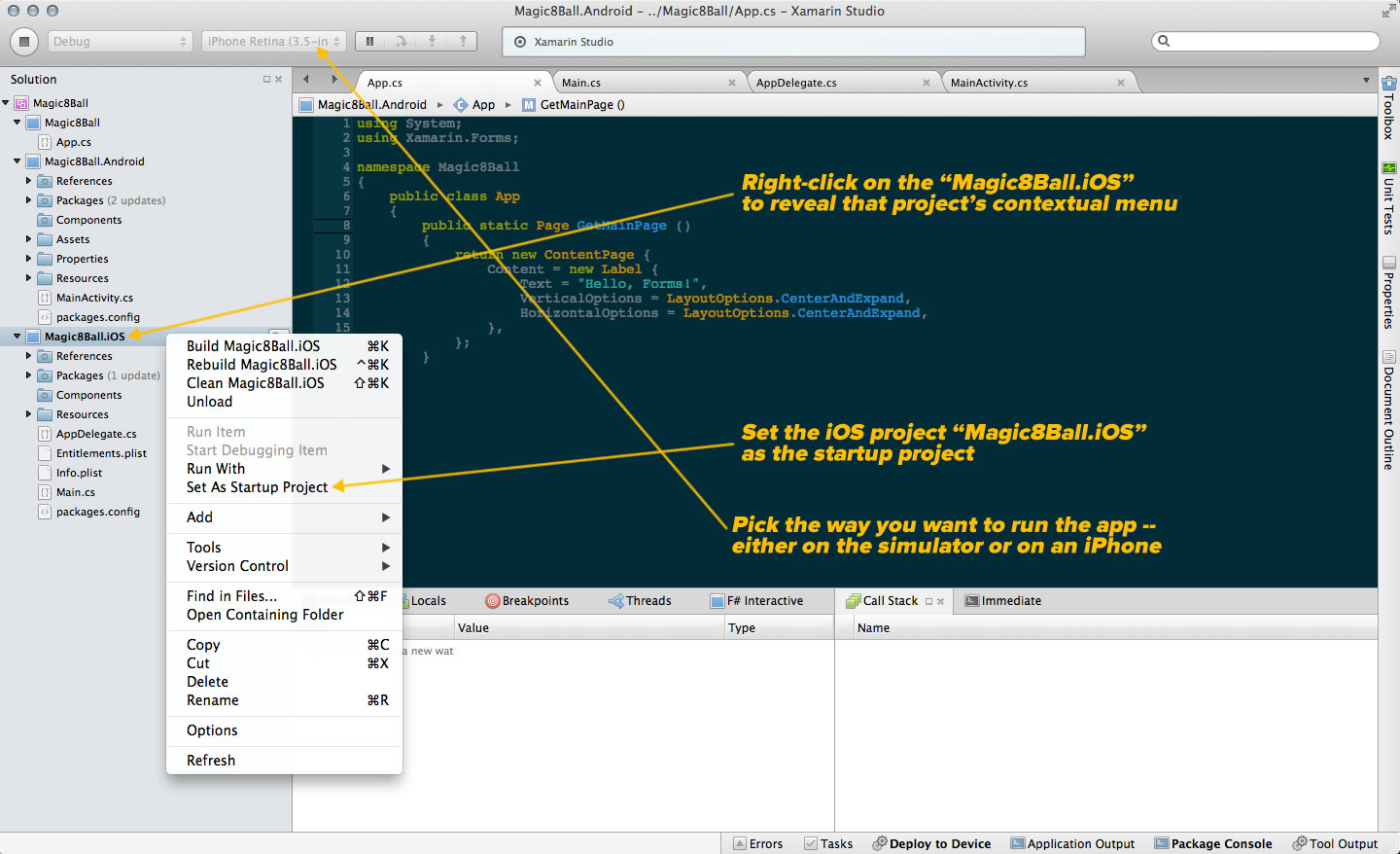
screen 3

Click the screenshot to see it at full size.

Click the Run button near the upper left-hand corner of the Xamarin window to run the app. Once the compilation and transfer process is done, you should see something like this:
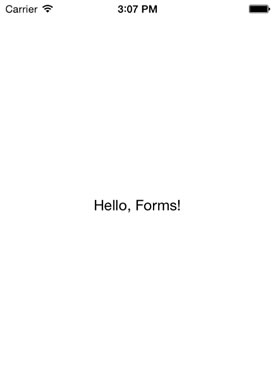
screen 4

Stop the app, and replace the contents of App.cs with the following:

using System;
using Xamarin.Forms;
using System.Collections.Generic;

namespace Magic8Ball
{
	public class App
	{
		public static Page GetMainPage ()
		{	
			var answers = new List<string> {
				"Yes.",
				"Sure thing.",
				"But of course!",
				"I'd bet on it.",
				"AWWW YISSS!",
				"No.",
				"Nuh-uh.",
				"Absolutely not!",
				"I wouldn't bet on it",
				"HELL NO.",
				"Maybe",
				"Possibly...",
				"Ask again later.",
				"I can't be certain.",
				"Clouded by the Dark Side, the future is."
			};

			var randomAnswerSelector = new Random ();

			var layout = new StackLayout {
				Padding = 20,
				VerticalOptions = LayoutOptions.Center
			};

			var answerButton = new Button {
				Text = "I need an answer!",
				Font = Font.BoldSystemFontOfSize (30),
				HorizontalOptions = LayoutOptions.CenterAndExpand
			};

			var answerLabel = new Label {
				Text = "",
				Font = Font.BoldSystemFontOfSize (50),
				HorizontalOptions = LayoutOptions.CenterAndExpand,
				XAlign = TextAlignment.Center
			};

			answerButton.Clicked += (object sender, EventArgs e) => {
				answerLabel.Text = answers[randomAnswerSelector.Next (answers.Count)];
			};

			layout.Children.Add (answerButton);
			layout.Children.Add (answerLabel); 

			return new ContentPage { 
				Content = layout
			};
		}
			
	}
}

Run the app again, and now you’ll see something like this:

screen 5

Try it for Android — right click on the Magic8Ball.Android project and select Set as Startup Project from the contextual menu that appears. Then, near the upper left-hand corner of the Xamarin window, select the way you want to run the app — either on an emulator or on an Android device connected to your computer:
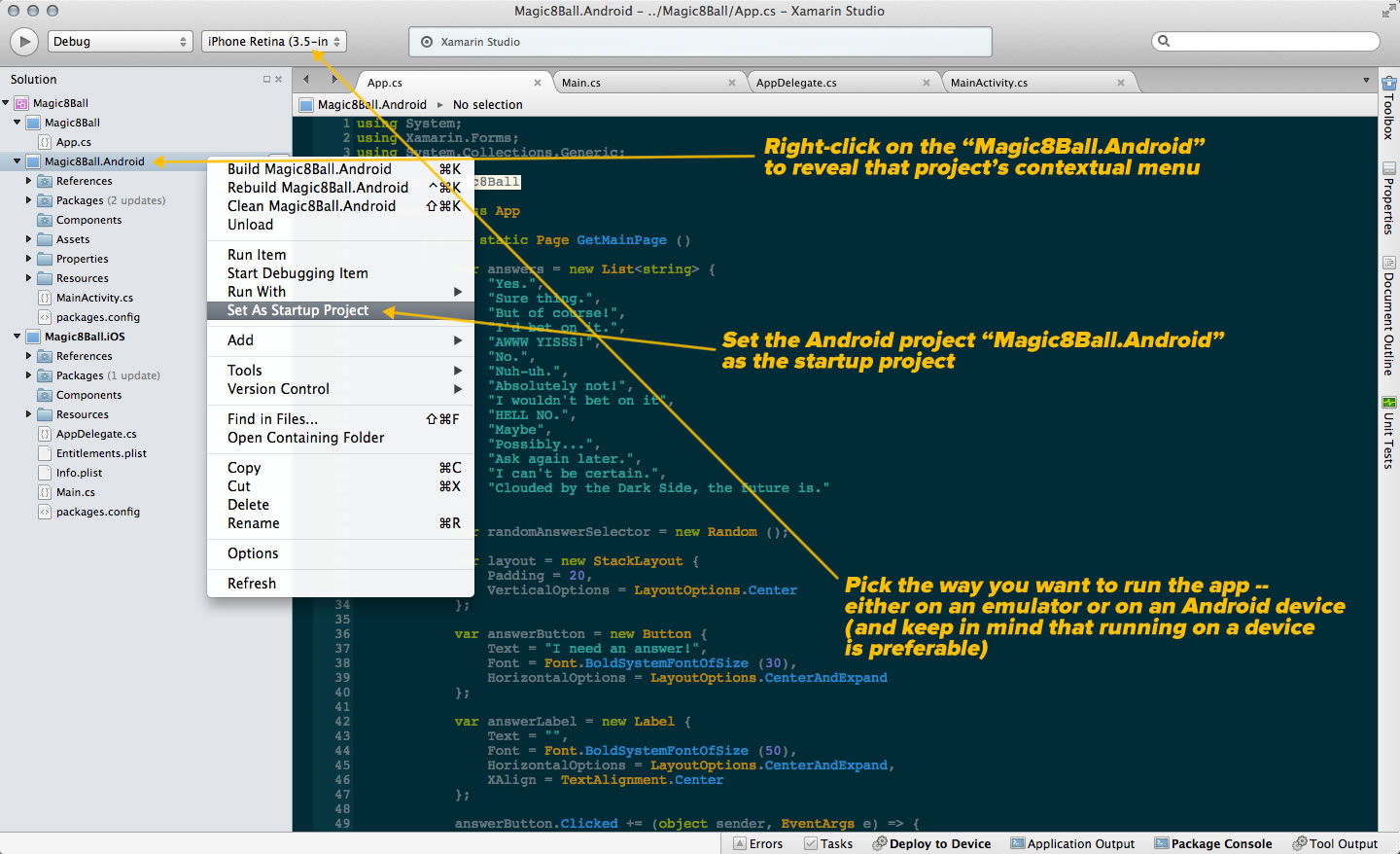
screen 6

Run the app once more, and you’ll see something along these lines:

screen 7

I’ll cover the app in a little more detail in my next article.

Categories
Uncategorized

California’s “Kill Switch” bill is now a law

jerry brown - killswitch bill

California Governor Jerry Brown signed a “Kill Switch” bill into law, making his the first state to require that anti-theft features for smartphones sold there to be enabled by default. The feature allows smartphone owners to remotely lock down their phones if stolen, rendering them inoperable and useless to and unsellable by thieves.

Minnesota has a similar law, but it’s an “opt-in” one: it simply required that smartphones sold there need to present users the chance to enable the kill switch feature during the initial setup process.

Smartphones (not tablets or other mobile devices) sold in California after July 1, 2015 will be required to have an enabled kill switch feature. Anyone who sells a non-compliant smartphone will face a penalty ranging from $500 to $2500.

more than 3 million

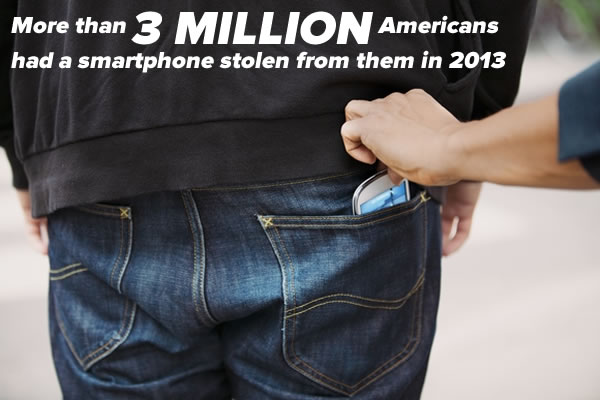
The law is meant to combat increasing smartphone theft. In the US, one in 10 smartphone owners has had one stolen, and in 2013, more than 3 million Americans — double the number in 2012 — has lost a smartphone to theft. The problem is a particularly big one in California; mobile device theft accounted for 65% of robberies in San Francisco and 75% in nearby Oakland.

samsung galaxy s5 iphone 5s

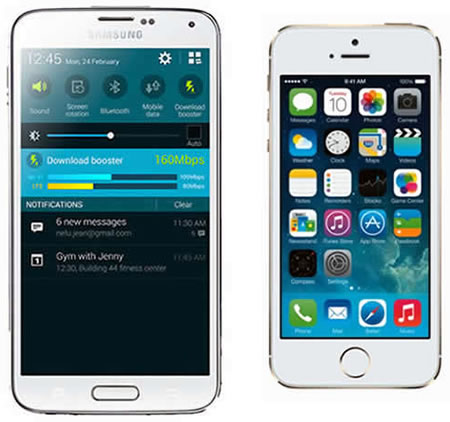
The two biggest smartphone vendors in the world, Samsung and Apple, already have kill switch features built into their devices:

  • Samsung has Reactivation Lock, which when activated by the phone’s owner, makes the phone unusable, even after a factory reset.
  • Apple has Activation Lock, which requires the user’s Apple ID/password credentials in order to disable location tracking or reactivate a locked phone.

Google and Microsoft have announced that they’ll build in kill switch features into upcoming revisions of their mobile operating systems.

this article also appears in the GSG blog

Categories
Uncategorized

How US mobile rates compare with other parts of the world

US mobile rates vs UK mobile rates

mobile bills in us and uk

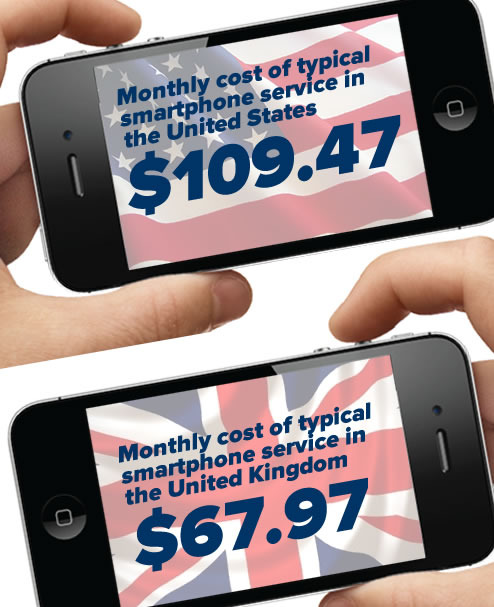
The New York Times has a comparison of the prices for similar mobile plans in the US and the UK. Here’s how they compare:

Feature US Carrier UK Carrier
Phone provided iPhone 5S with 16GB storage iPhone 5S with 16GB storage
Voice Minutes Unlimited Unlimited
Text Messages Unlimited Unlimited
Data 2GB / month
(with additional gigabyte during introductory period)
Unlimited
Commitment 2 years 2 years
Cost $90 / month, not including taxes,
plus $99.99 upfront fee.
Spread over 24 months and adding an average tax of 17%, this comes to
$109.47 / month.
 £41 / month, which includes 20% tax
($67.97 / month based on exchange rate at time of writing)

Data from the New York Times.

Not only is the UK plan cheaper by $41.50 per month (or just shy of $1000 cheaper over the two-year commitment), but it provides unlimited data. The 2GB limit has been described as being enough to stream 15 minutes of music and 10 minutes of video daily (although at least one carrier doesn’t count data from a number of music services).

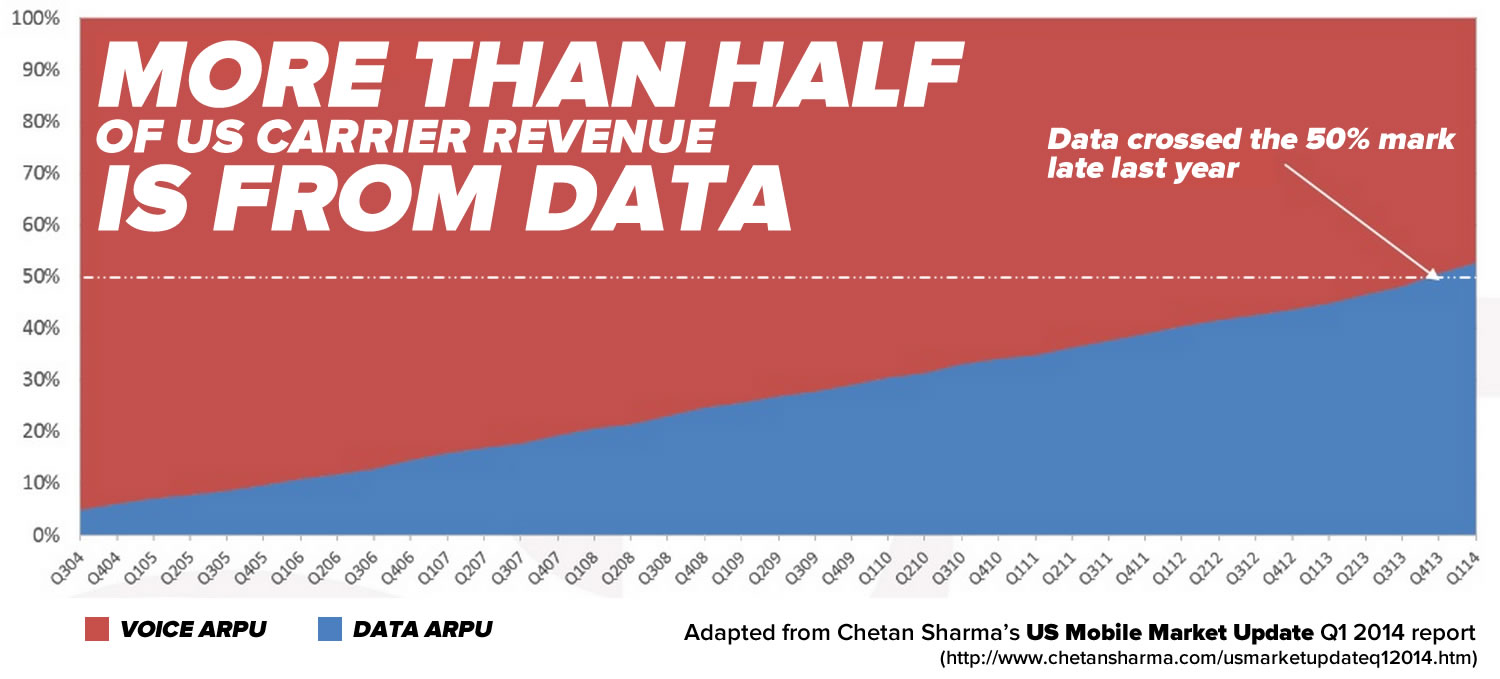
Many plans feature unlimited voice and text, because that’s not where the money is these days. Regular readers of this blog already know that:

more than half is from data

We posted this graph in an earlier article, as well as in this video.
Click the graph to see it at full size.

One of the factors cited in explaining the difference is regulatory policy. In the UK, companies are legally required to lease their networks to the competition at cost; this is not the case here in the US. Without this requirement, US carriers are protected from competitors, but they’re also spared from having to compete on price. The result, according to the Open Technology Institute’s Sascha Meinrath, is that “U.S. consumers may overpay by over a quarter of a trillion dollars for worse levels of service than customers in other countries receive” over the next decade.

US/UK mobile rates vs. Australia, China, Germany, and Japan

global mobile

A couple of weeks prior to the New York Times article, TechHive posted an article titled No, U.S. smartphone costs aren’t highest in the world.

According to the article, our costs are somewhere in the middle:

Country Device Charge Monthly Fees Cost of Ownership Over 2 Years
UK $45.95 $62.79  $1553
Germany $41.06 $92.13  $2252
Japan $522.28 $73.62  $2301
China $0 $96  $2304
US (two-year contract) $200 $97  $2520
US (month-to-month) $27 – $32 / month
($648 – $768 over 2 years)
$60 – $90  $2528
Australia $0 $116  $2784

The article points out a couple of interesting things to keep in mind when comparing US rates with those in other countries:

  • The quoted cost for the UK doesn’t include roaming or international calls.
  • In Europe, you’re more likely to call another country, and will have to pay extra to cover those costs.
  • Plans in Australia factor the cost of the device into monthly fees, so you pay nothing up front for a new phone, but your monthly bill will be higher. Over 24 months, the costs of ownership in the US and Down Under are close.
  • Phones are often cheaper in the US, thanks to carrier subsidizing them.
  • “Unlimited” plans like the ones from Japan’s Au Kddi are unlimited only when calling other people on the same carrier, otherwise charges apply. Many other countries’ carriers’ plans have similar hitches.

It also points to some trends which may indicate things to come:

  • Expect to see “innovations” in the way mobile devices are financed: bundling into monthly costs, financing for prepaid devices, and options to lease or rent devices from carriers.
  • With the rate at which people trade in old phones for new ones, carriers are setting up buyback programs, which give customers some money towards their next purchase, and carriers the chance to use the devices for parts or resale.
  • Carriers have been getting creative and flexible with the plans they’ve been offering, from freeing users from contracts, to other incentives to attract new customers away from the competition.

this article also appears in the GSG blog

Categories
Uncategorized

Huawei, the #3 mobile phone manufacturer in the world

huawei logo

Here in North America, a good number of people have never heard of Huawei. Many people don’t even know how to pronounce their name:

In case you were wondering, Huawei is pronounced “wah-way”.

“Huawei” is the transliteration of the Chinese name 华为, which can be interpreted as “achievement for China” or “action for China”. No matter which interpretation you prefer, both are fitting, as they’re the number three mobile phone vendor in the world in terms of market share, after Samsung and Apple:

Vendor

2Q14 Shipment Volume
(millions)

2Q14 Market Share

2Q13 Shipment Volume
(millions)

2Q13 Market Share

2Q14/2Q13 Growth

Samsung (Android)

74.3

25.2%

77.3

32.3%

-3.9%

Apple (iOS)

35.1

11.9%

31.2

13.0%

12.4%

Huawei (Android)

20.3

6.9%

10.4

4.3%

95.1%

Lenovo (Android)

15.8

5.4%

11.4

4.7%

38.7%

LG (Android)

14.5

4.9%

12.1

5.0%

19.8%

Others

135.3

45.8%

97.5

40.6

38.7%

Data from IDC’s 2Q14 Quarterly Mobile Phone Tracker.
See this article for details.

Founded in 1987 and headquartered in Shenzhen, Huawei has grown to become the world’s largest maker of telecom equipment, surpassing the former leader Ericsson in 2012. They count most telecom carriers worldwide as their customers, and the next market they plan to conquer is mobile devices.

The plan seems to be working; Huawei nearly doubled their shipments from 2Q13 to 2Q14, and analysts says that Samsung should be eyeing their rear-view mirrors very carefully. They’re more of a threat to Samsung than Apple, as they’re in the same business: selling Android devices at various price points to a price-sensitive clientele.

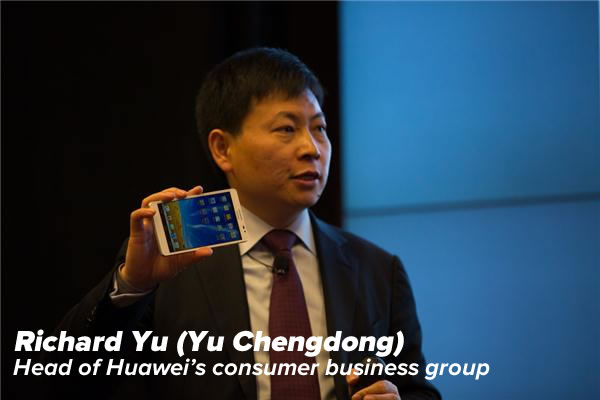
richard yu (yu chengdong)
The Wall Street Journal recently posted an interview with Richard Yu (Yu Chengdong), the head of Huawei’s consumer business group, in which he talked about Huawei’s foray into consumer devices, the advantages they have as a result of being a telecom equipment manufacturer, and their plans for using various operating systems in their smartphones: Android (yes), Windows Phone (on hold), and Tizen (“We feel Tizen has no chance to be successful”).

this article also appears in the GSG blog

Categories
Uncategorized

Carrier news roundup: How today’s carriers came to be, and the current state of carrier competition

Infographic: How today’s carriers came to be (and how one didn’t)

This recent infographic created by the folks at GigaOm shows the origins of the “Big Four” carriers, the sizes of their subscriber bases, and what might have been if Sprint and T-Mobile had merged (they would’ve been second-largest in subscribers, behind AT&T, but ahead of Verizon).

twisted tangled web of wireless

Click the infographic to see it at full size.

And the competing continues…

big 4 carriers

After months of pursuing a merger with T-Mobile, saying that they needed to team up in order to compete effectively against the giants AT&T and Verizon, they merger called off, Sprint and its parent company SoftBank called it off and are going it alone. Now that the marriage is off, the smaller half of the “Big Four” carriers are back to poaching each other’s customers.

Not only did Sprint get a new CEO, they got a new, more aggressive approach to pricing. They’ve recently introduced plans that give customers more data for the same price as similarly-priced plans offered by the competition and have even borrowed a page from T-Mobile’s book of tricks: reimbursing customers who switch for their early termination fees. Sprint have also announced a new plan featuring unlimited talk, text, and data that “$20 cheaper than T-Mobile”.

In response, T-Mobile have promised more “offers and Uncarrier moves” this week, and CEO John Legere retorted with this spicy tweet:

Here’s Bloomberg Newsweek’s take on the Sprint/T-Mobile fight:

While AT&T and Verizon may be in the more comfortable position of being content to let Sprint and T-Mobile battle it out with price cutting, they’re not completely insulated from the battle. AT&T, through their subsidiary Cricket Wireless, are taking the fight to the pre-paid market by offering a $100 credit to users who switch from T-Mobile and its pre-paid subsidiary MetroPCS to Cricket.

this article also appears in the GSG blog

Categories
Uncategorized

The best USB cable organizers that you might not realize you have

lego minifig usb cable holders

It’s something that the Sugru community (apparently, there is one) has discovered:

this article also appears in the GSG blog

Categories
Uncategorized

California court ruling: Employers need to provide some reimbursement for work-related use of personal mobile phones

the california ruling

In the case of Cochran v. Schwan’s Home Service, Colin Cochran filed a class action suit against his employer, the largest direct-to-home food delivery service in the U.S., on behalf of customer service managers who weren’t being reimbursed for work-related use of personal mobile phones. Cochran won, and the ruling is expected to have a significant impact on the way companies do BYOD, and in some cases, may even “bring it down”, if the somewhat alarmist title of this CIO article covering the case’s outcome is to be believed.

2nd court of appeal

The Second District Appellate Court of California.

The case was first taken to the Los Angeles Superior Court, and then the Second District Appellate Court, where the ruling was made on Tuesday, August 12th. Judge Teresa Sanchez-Gordon had said that a class action was not the best way to resolve the issue, noting that examination was required to resolve the question of whether Cochran or his live-in girlfriend paid his mobile bill. In the end, the court ruled that even if a family member or friend pays the costs of using a personal mobile device, if that device is used for work-related purposes, the employer is still required to provide reasonable reimbursement for the employee.

“If an employee is required to make work-related calls on a personal cell phone, then he or she is incurring an expense for purposes of labor law,” Judge Judith Ashmann-Gerst wrote for the court. “It does not matter whether the phone bill is paid for by a third person, or at all. In other words, it is no concern to the employer that the employee may pass on the expense to a family member or friend, or to a carrier that has to then write off a loss. It is irrelevant whether the employee changed plans to accommodate work-related cell phone usage. Also, the details of the employee’s cell phone plan do not factor into the liability analysis. Not only does our interpretation prevent employers from passing on operating expenses, it also prevents them from digging into the private lives of their employees to unearth how they handle their finances vis-a-vis family, friends and creditors. To show liability under the labor code, an employee need only show that he or she was required to use a personal cell phone to make work-related calls, and he or she was not reimbursed. Damages, of course, raise issues that are more complicated.”

smartphones
It wasn’t all that long ago that there were predictions that BYOD stipends would eventually go away and that BYOD for work would be like business clothes: something for which employees would cover the costs and not expect any reimbursement. It was expected in some circles that BYOD stipends would disappear just like reimbursements for telecommuters who used at-home wifi did. The ruling will likely not only render those predictions wrong, it may even lead to the return of reimbursement for wifi for work done at home.

Hyoun Park, Principal Consultant at DataHive Consulting who’s been following the case, says that there are some technical wrinkles in the ruling that need to be worked out. “The court didn’t care about whether you bought 100 megabytes or an unlimited plan. They’re just saying that the company should pay for a portion of the bill. So there’s going to be an argument there.”

california flag

In the end, organizations in California with BYOD programs or who require their employees to use their own mobile phones for work will need to review how mobile devices are used in their day-to-day business, and if necessary, make adjustments. They’ll need to review their mobile device use policies and decide if they want to continue requiring employees to provide their own mobile devices for work use. If they decide to rely on individual-liable devices, they’ll need to make certain they know which employee-owned mobile assets are being used for work purposes, implement a stipend or reimbursement policy, and have some kind of mobile management platform to stay on top of these measures.

On the other hand, if a California business decides to simply disallow the use of personal mobile devices for work, they’ll need to come up with an alternative for employees who require mobile devices. This arrangement will also require management of all sorts, from a corporate-liable device policy to manage the inventory, and once again, some kind of mobile management platform to watch over these incredibly portable company assets.

While the ruling won’t take effect until 30 days after it was made and applies only in the state of California, there’s a good chance that it’ll soon affect personal mobiles used for business outside The Golden State. We’ll keep you up-to-date on these developments.

this article also appears in the GSG blog