I’m sitting in the airport lounge in Vancouver, waiting to board my flight back to Toronto. Some quick updates:
TechDays Vancouver went very well. Over 800 attendees catching over 60 technical sessions on Microsoft’s platforms, tools and technologies, all taking place in the beautiful West Building of the Vancouver Convention Centre. Thanks to the presenters, staff, and especially the attendees!
Successful community events. Rather than have the TechDays venue lie fallow in the evenings, we put it to good use by opening it up for free community events. On Monday, we hosted CloudCamp, a gathering for people interested in cloud computing, and on Tuesday, we held a mini-conference called GoDevMental, which was aimed at students. We’re holding these events in all TechDays cities, so if you live close by, come and see us!
Internet Explorer 9 goes beta! Standards-compliant. Hardware accelerated. Clean, minimalist UI. Nifty Windows 7 integration. We’re back in the browser game, people, and we’re playing for keeps. Download the IE9 beta now!
Windows Phone 7 Developer Tools go RTM! What happens when you pair a phone with bold new UI and the awesomesauce of Visual Studio? Windows Phone 7, and the developer tools – which include Visual Studio Express for Phone and Expression Blend – have been finalized and are ready for download for free. Download the WP7 Developer tools now!
I’ll be at FITC Mobile in Toronto on Friday and Saturday. I’ll be minding the booth at the FITC Mobile conference in Toronto this Friday and Saturday. Come say hi, see the dev tools in action, play with a real Windows Phone and find out what we have in store!
This article also appears in Canadian Developer Connection.
Channel 9 has posted some videos on this newest version of IE9, and I thought I’d share them here:
A Look at the New IE Test Drive Samples
This video (2 minutes, 43 seconds in length) shows off some of the new demo apps on the IE Test Drive page that show off the benefits of IE9’s hardware acceleration. Rob Mauceri, Group Program Manager for Internet Explorer, narrates.
SVG is short for "Scalable Vector Graphics", whose specification is an open standard and supported by all major modern web browsers, including IE9. This video (4 minutes, 36 seconds in length) shows how you can take advantage of SVG and the fact that it’s hardware-accelerated in IE9. Patrick Dengler, Senior Program Manager for Internet Explorer, does the presentation.
IE Beatz is a drum machine app written JavaScript, SVG and HTML 5 audio to demonstrate the combined power of HTML 5 and IE9. This video (6 minutes, 4 seconds) features IE Beatz’ creator, Josh Rose of the IE9 team, explaining his creation and showing some of the underlying code.
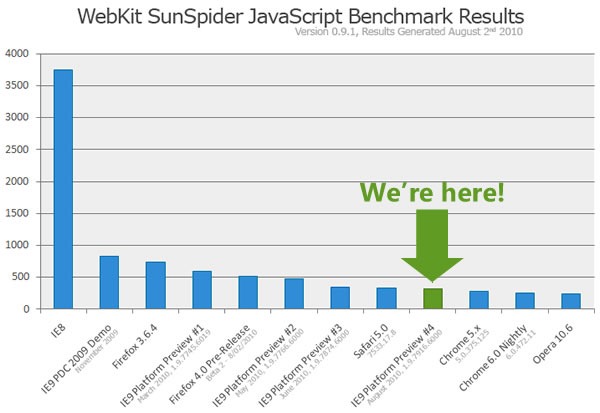
…plus how IE9 PP4 stacks up against its previous incarnations and browsers built by the Esteemed Competition, according to the WebKit SunSpider JavaScript Benchmark test…
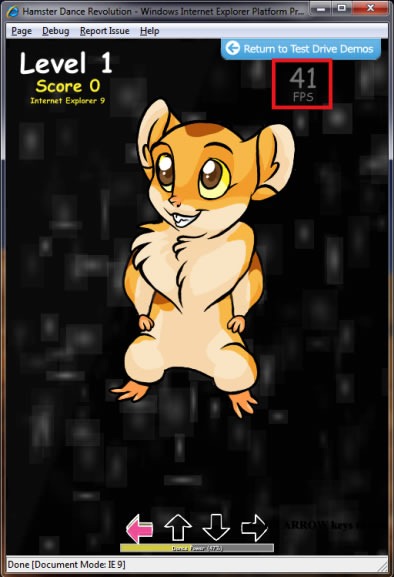
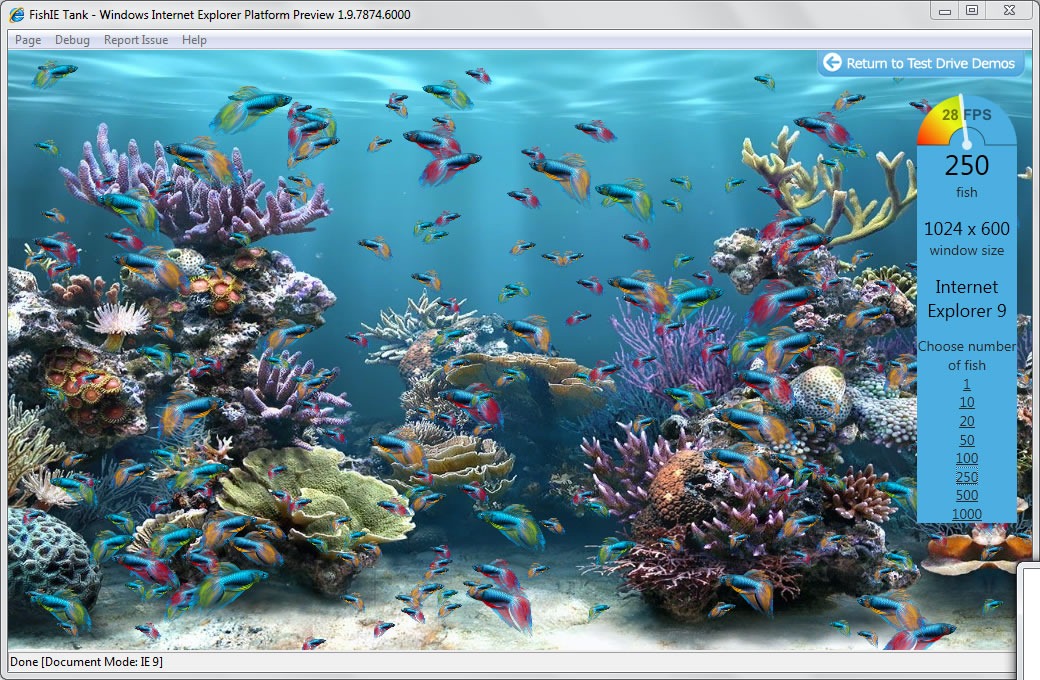
…and that there are a new batch of demos showing HTML5 compliance, hardware graphics acceleration, JavaScript speed and the really wacky things you can do with IE9 if you use a little imagination, such as a game that melds “Hamster Dance” with Dance Dance Revolution:
Go Get IE9 Platform Preview 4, Get Ready for the Beta
As you take this version for IE9 for a spin, you might want to start thinking about getting your sites, whether they’re already up or in the works, ready for the next big leap: IE9’s transition from “Platform Preview” to “Beta”. That’s coming soon.
Test your site in IE9 Standards Mode. This mode provides the best performance and interoperability and will offer additional benefits in the IE9 Beta. We suggest using the HTML5 doctype. More details here and here.
We recommend sending IE9 the same standards-based markup your site sends other browsers. More details here and here. From the feedback so far, and our experience with sites, the best way to get your site working in IE9 Standards Mode is to start from the same markup other browsers receive rather than IE6, IE7, or IE8 markup.
Use featuredetection, not browser detection to handle any cross browser differences in behavior or feature support. This keeps your site working even as browsers change.
Please continue to report issues on Connect if your site doesn’t look or work right, and you’re giving it the same code as you’re giving to other modern browsers. With IE9 Platform Preview 4, we’ve fixed over 100 community-reported issues. We will fix even more between now and the IE9 beta and want your feedback.
Consider the experience for IE9 Beta users if you find that sending the same markup creates more issues than you can resolve in your production site. It is possible that running your site in Compatibility View is better for your users.
Take advantage of HTML5, CSS3, SVG, DOM, ES5, and more… all described here in the developer guide. We’re excited to run the amazing experiences you bring to the web using these new capabilities, taking advantage of hardware through IE9.
In the past few days I’ve been revising the CSS compatibility table with information about the latest crop of browsers. There’s no doubt about it: this is IE9’s show. It just supports nearly everything. No hassle, no buts.
…
Microsoft has finally taken the big leap forward we’ve been waiting for ever since they announced their decision to restart IE development back in 2005.
IE9 promises to be an excellent browser. Its CSS support is now at par with that of the other browsers — although each browser still has its specific areas where it performs less. But we cannot in good faith say that IE is behind the others any more.
In the article, he does a run-down of CSS selectors and finds that the upcoming IE9 does an excellent job of supporting them.
Before there were Microsoft blogs (such as Canadian Developer Connection), there was Channel 9, Microsoft’s community site run by Microsoft employees. Like Microsoft blogs, Channel 9 gives you unfiltered access to the people building stuff at The Empire, all outside the control of the marketing and PR departments. Channel 9 features a lot of videos – there are times when they post several videos in a day – featuring developer news and training, training kits and courses, discussion forums and wikis for various Microsoft tools and technologies. If you’re a .NET developer or just curious about what’s going on the in the .NET world, you should check out Channel 9 and see what’s happening.
Channel 9 posted a number of videos covering the new features in the third Platform Preview of Internet Explorer 9. I’ve gathered them all into this blog article – enjoy!
The IE9 team showed a preview of support for the <video> tag, and with Platform Preview 3, you can try it out for yourself. In this video, you see how it’s used to build the IMDb Video Panorama demo.
There are lots of boring ways to show of ECMAScript 5’s new array methods in action, but why not show them off with a fun game? In addition to the new JavaScript goodies, the ECMAScript 5 Game demo also shows off:
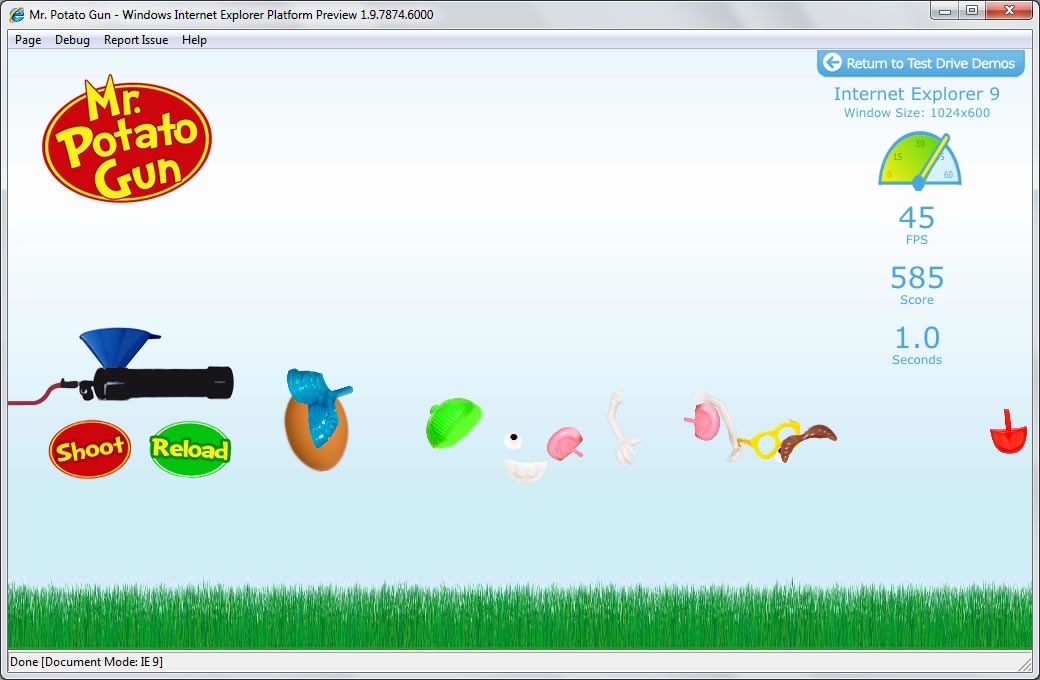
The Mr. Potato Gun canvas test is amusing. You load a reasonable facsimile of a popular toy into a potato gun, pull the trigger and watch the hapless tuber’s components fly all over the screen:
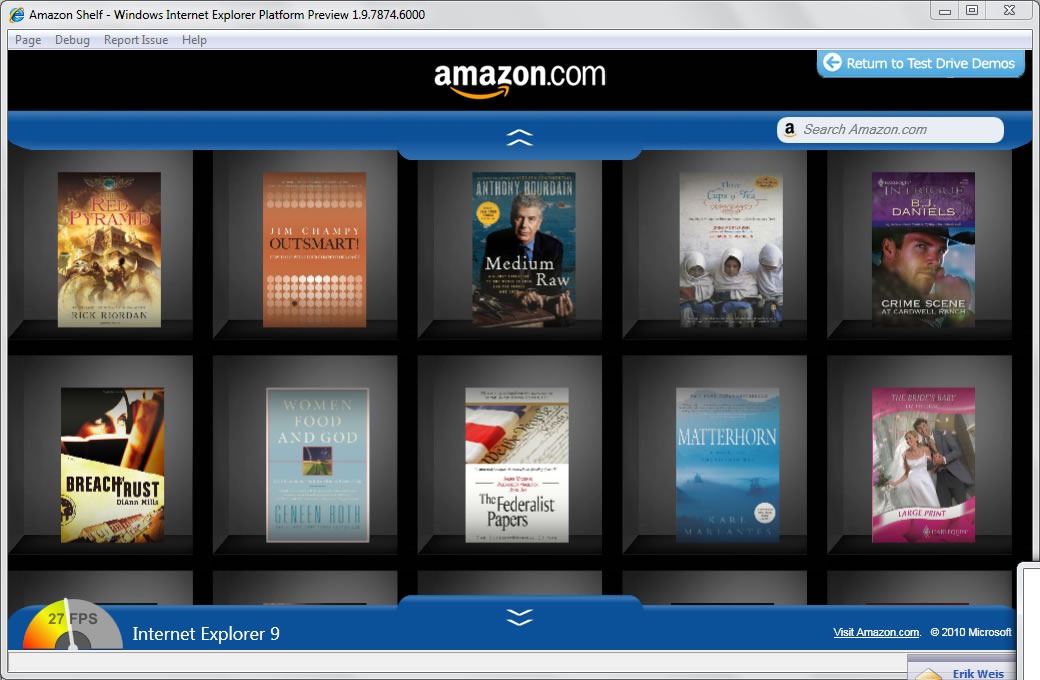
Here’s a demo featuring a more practical use of canvas: Amazon Shelf, which presents a bookshelf of some of Amazon.com’s current bestsellers:
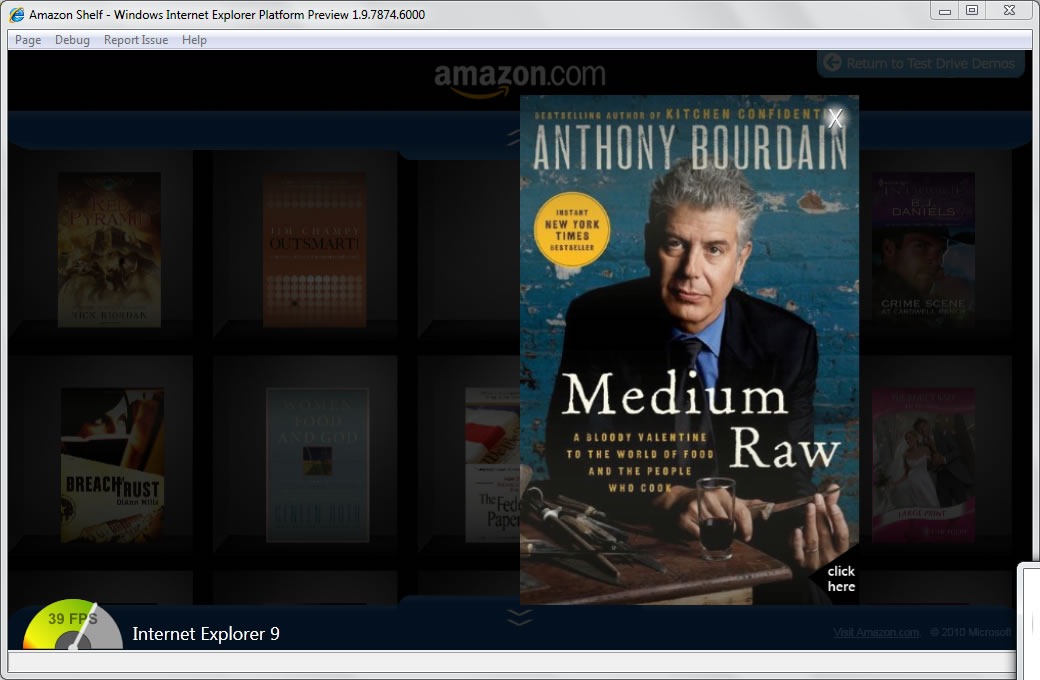
Click on a book in Amazon Shelf to get a better look at its cover:
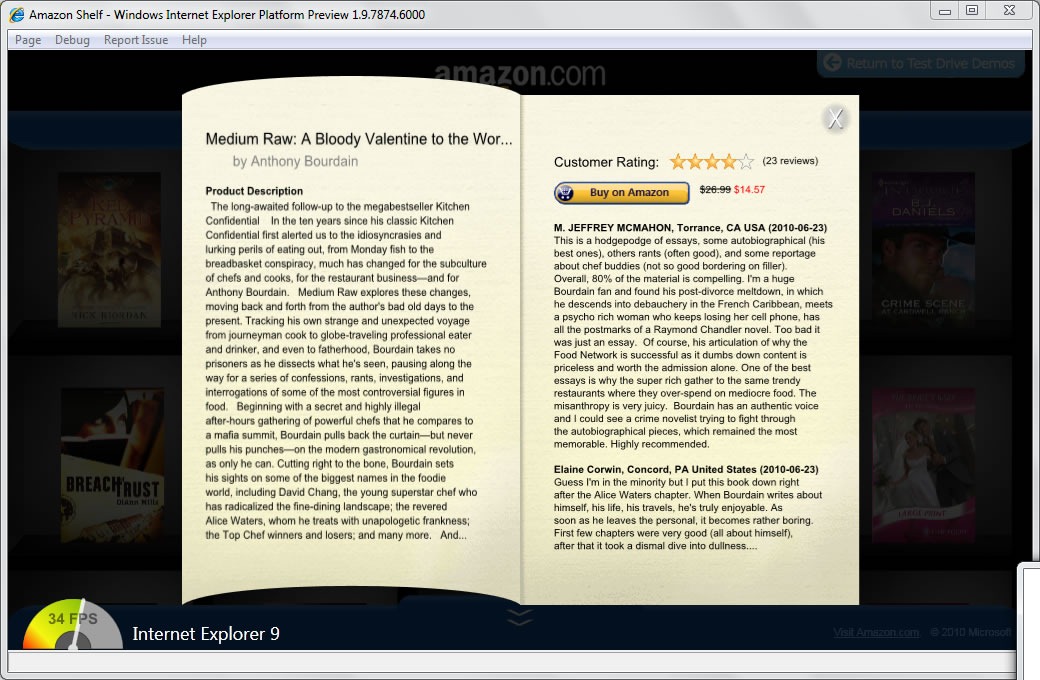
Click on that cover and get the publisher’s blurb and customer ratings:
Take IE9 out for a spin! Visit the IE9 Test Drive site, download IE9 Platform Preview 3 and hit some canvas-enabled sites.
Back in March, when the first platform preview of Internet Explorer 9 was released at the MIX10 conference, the IE9 team promised to release new previews of the browser about every eight weeks. Eight weeks after MIX10, they kept their promise and released Platform Preview 2. It featured improved JavaScript performance and better adherence to HTML5/CSS/JavaScript standards.

Not so long ago, if you were using an application, chances are that it was a desktop native app running on top of your operating system. These days, the odds are that the apps you’re running are web apps, which run inside your browser, which in turn run on top of your OS. Even if you’re not factoring in network latency, that extra layer of abstraction slows things down. Hardware acceleration is one fix to this problem, and that’s a major focus of Platform Preview 3. IE9 takes advantage of your computer’s GPU to render HTML graphics and text with greater speed.

When we say “HTML5”, we’re talking about more than just HTML and the associated styling, but JavaScript as well. Luckily, we’re not only speeding up HTML rendering; we’re also cranking up the JavaScript engine, codenamed “Chakra”, which is even faster in this release.
All this work means that IE9’s performance has been improving steadily since it was first shown (but not released) to the audience at the PDC conference in November. Here are the results of the SunSpider JavaScript benchmark for a number of IE9 iterations (and a Firefox thrown in for good measure):
And here’s a “wider” version of that chart, showing more of the Esteemed Competition’s browsers:
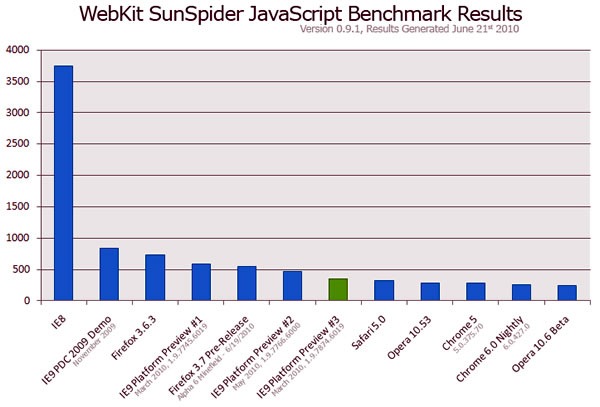
This puts IE9’s JavaScript performance within 50 milliseconds of the fastest browsers – that’s the time it takes sound to travel less than a couple dozen paces.
As the IE9 team will tell you, while JavaScript speed is important, many sites spend cycles in a browser’s subsystems that aren’t JavaScript. They’re always benchmarking against more than just the SunSpider test, but against some of the most popular sites on the net, a real-world test of a browser’s performance, and they’re not done optimizing yet.
By the bye, IE9’s JavaScript isn’t just fast, it adheres better to the ECMAScript standard and even implements new features in the 5th edition of the spec, known colloquially as ES5. They include new array and object methods, as well as other language enhancements for working with strings and dates, and the IE Test Drive site has some demos showing them in action.

Speed is just one dimension of browsing – standards is an important one, too! The support for the <audio> and <video> tags we talked about at MIX10 has been baked into Platform Preview 3.
There is one tag that was conspicuous in its absence, leaving a number of cynics, wags and conspiracy theorists to jump to the conclusion that it would never be included in IE9. Well, it’s here…

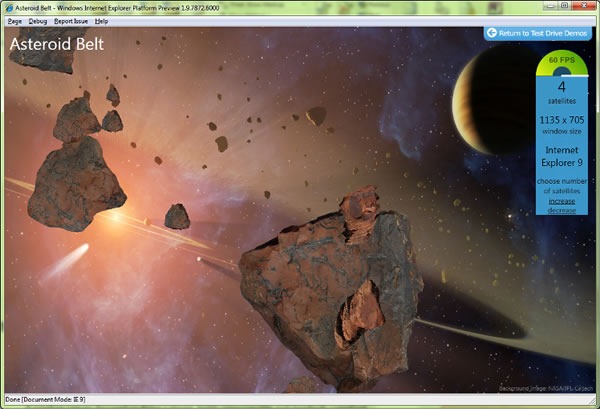
That’s right, Platform Preview 3 introduces the <canvas> tag to Internet Explorer. And it’s hardware-accelerated, too!
We’ve got a number of demos on the Test Drive IE site showing off hardware-accelerated <canvas>, including “Asteroid Belt”, shown below:
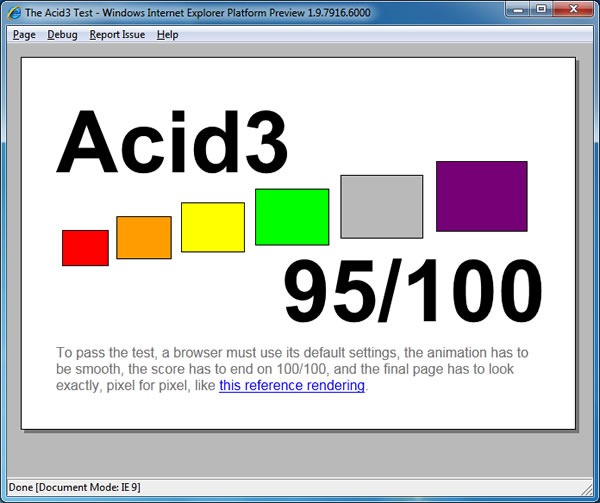
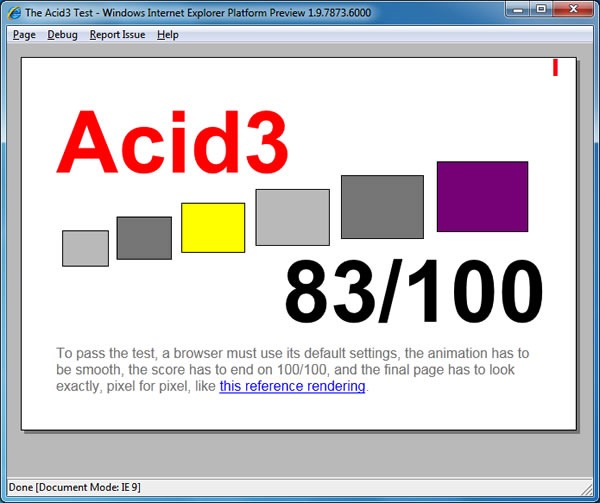
So how does Platform Preview 3 fare on the Acid3 test suite, the supposed bane of Internet Explorer’s existence? Not too shabby, jumping up to 83 out of a possible 100 (if you recall, Platform Preview 2’s score was 68):
It wasn’t that long ago that an early version of Internet Explorer 9 – we called it Platform Preview 1 – was announced at MIX10 Conference back in mid-March. If you missed it, here’s MIX10’s Day 2 keynote session, in which the Internet Explorer team’s supreme Kahuna, Dean Hachamovitch, made the announcement (it’s the first part of the keynote, so you don’t have to watch or scan through the entire two hours):
The chart above shows the results of various browsers, including IE9 Platform Preview 2, under WebKit’s Sunspider JavaScript benchmark, version 0.9.1 on a 3.0GHz Dell Optiplex with an Intel Core 2 Duo processor, 4GB RAM and Intel Integrated Video running Windows 7. As you can see, JavaScript performance on Platform Preview 2 is a mere eye-blink away from that of the Esteemed Competition.
The goal for the final release of IE9 is full HTML5 compliance and “Same Markup” – that is, rendering the same HTML, CSS and JavaScript the same way. The idea is that you, the web developer, shouldn’t have to come up with workaround or hacks to get the same page to display the same way across browsers.
Part of that approach is technical: a standards-compliant IE9, and the first platform preview was a step in that direction. Platform Preview 2 add more fixes to HTML, SVG, CSS3 and JavaScript implementations as well as features like CSS3 media queries, DOMContentLoaded, DOM traversal and range, getElementsByClassName, createDOcument and so on.
While the Acid3 test isn’t the holy grail – some of its tests don’t mesh with the HTML5 standard as it is right now, others are still “under construction” – more compliance with HTML5 typically means a higher Acid3 score. IE9 Platform Preview 2 currently scores 68 out of a possible 100, which is an improvement over Platform Preview 1’s score of 55, and leaps and bounds ahead of IE8’s scores for 20.
People Issue #1: Standards
Another part of the “Same Markup” approach is working within the various standards groups defining the web experience. Among other things, we’ve been doing things like:
From looking at the crowd – and yes, talking with them, too – it’s quite clear that there’s a lot of hunger for information, tutorials, guidance and general knowledge of HTML5, CSS3 and JavaScript and how to build modern web applications using them.
That’s where I can help, and in all sorts of ways. For starters, there will be a number of HTML5, CSS3 and JavaScript articles, tutorials and pointers on this blog. I’ll also be participating in a number of presentations, workshops and TechDays events to cover HTML5, CSS3 and JavaScript. Keep watching this space for more.
Take IE9 Platform Preview 2 for a Spin!
You can download Internet Explorer 9 Platform Preview 2 right now. As with Platform Preview 1, it coexists with Internet Explorer 8, and it’s a very thin wrapper around the engine, meaning that it’s really for developer and designer testing rather than general browsing. The UI elements you’d expect in a browser, such as the address bar (you open sites using File –> Open…), nor are the security features such as Protected Mode, SmartScreen filter and XSS scripting filter.
Platform Preview 2 installs right over Platform Preview 1; you don’t have to uninstall Platform Preview 1 before installing Platform Preview 2.
Ever since joining The Empire a year and a half ago, I’ve been asking all over within its ranks to anyone who’d listen: “When are we going to put out a better browser? IE8 is a step in the right direction, but it’s just a step.”
Over at the design-oriented Smashing Magazine site, you’ll find Brad Colbow’s comic, The Life and Times of Internet Explorer 6. It’s the browser we all love to hate, including we who collect a nice fortnightly deposit from Microsoft into our bank accounts. I got a great laugh at DemoCamp Toronto 21 when I said “If you got a cat when IE6 came out, it’s dead now.”
It wasn’t always this way, as the first section of the comic shows (you can click it to read the whole thing):
There’s a fair bit of history covered in the middle section of the comic, but I feel that the most important sections are the first (shown above), and the end, shown below:
That is the real question: “Can we stop supporting IE6 yet?”, followed by a real answer: You have to look at your audience. If you can drop IE6 support without ruining the experience for the majority your audience (you have to make the call on what constitutes a majority), then by all means, go for it.
Expecting people outside our industry to have as much interest in browser technology is about as fair as my insurance agent expecting me to have as much interest in the ins and outs of insurance as he does. I only care about the amount of coverage, the deductible, the slip of paper that goes into my glove compartment, and how much I have to pay a year. Everything else is just yappity-yap from some suit who’s interrupting my work day, trying to show me pages of boring legalese. That’s how we look to most end users.
My philosophy is that Microsoft should focus less on “compete” and more on delighting the users. Or, as I’ve said before, “the best tech advocacy is to make tech that helps people rock.”
One important path to building tech that helps people rock is interoperability. In today’s networked, heterogeneous world, no tech is an island (my apologies to John Donne). It’s best for Microsoft – and everyone else – if the company plays well with others, adopts open standards and the open web and actively participates with standards-making bodies. I see things like The Empire’s participation at W3C’s Technical Plenary and Advisory Committee Meeting in November, Microsoft’s being a Gold Sponsor at the upcoming ConFoo conference and the work being done by the Open Source Teams in both Redmond and Toronto as signs of what I call the company’s “Sea Change”.
Patrick Dengler, Senior Program Manager for the Internet Explorer Team, writes:
We recognize that vector graphics are an important component of the next generation Web platform. As evidenced by our ongoing involvement in W3C working groups, we are committed to participating in the standards process to help ensure a healthy future for the Web. Our involvement with the SVG working group builds on that commitment.
To date, I have had several interactions with the SVG working group, and their clear dedication to creating a great technology for end users and developers alike stands out. I personally look forward to future and more direct involvement with this great set of folks.
It’s not a formal announcement that SVG support’s going into future versions of IE, but I certainly hope that this is the first step towards that.
Yes, I know that cats live longer, but I think the quip I made at DemoCamp 21 still makes a good point:
Let’s upgrade to compliant up-to-date browsers, shall we? IE8, or even that hippie browser, if you must.
Credit where credit is due: The “cat’s dead now” line is my remix of a line from a review of the Guns ‘N’ Roses concert that took place here in Toronto a couple of years back. The original line went something like “If you got a cat when Appetite for Destruction came out, it’s dead now.”
Now that you’ve been told what the internet is for — by both an actual internet professional(that would be me) and a big Broadway stage production, no less – we can continue.
Silverlight and Playboy
If you ever get the chance, I highly recommend browsing through Playboy. Not the issues from this era or maybe even the past 20 or so years, but the Playboy of earlier times; the Playboy that dispensed the best advice on which hi-fi system to buy, provided good cocktail recipes, had great articles and interviews and featured the works of all sorts of writers, including John Updike, Stanley Elkin, Kurt Vonnegut, Saul Bellow, Joyce Carol Oates and Margaret Atwood.
You can do just that right now, thanks to the Playboy Archive, where 53 issues from Playboys past, spanning the time period from 1954 to 2005 are available for your reading pleasure, online and free of charge. The issues were scanned in at high resolution and placed into a Silverlight-powered browsing interface, as shown below:
The Best Damn Use for Deep Zoom, Ever!
The Playboy Archive takes advantage of Silverlight’s Deep Zoom feature, which combines using images at different levels of magnification and smooth animation to allow for a “zoom in/zoom out” effects. Most demos of this feature cover something boring like maps or paintings by the Old Masters; I think Playboy’s application of Deep Zoom to look at ladies without pants is far more entertaining.
Let’s take a relatively-safe-for-work look, shall we? I’m going to show you the September 1962 issue, whose centerfold is so tame by today’s standards that the skin lotion ads on the Toronto subway are far racier in comparison.
Here’s a reduced version of the first zoom level of the issue, showing you about a dozen pages at a time:
If I were to click on a specific pair of pages, let’s say the centerfold, I’d get the level 2 zoom, a reduced version of which is shown below:
Oh, the hayloft! How I love the hayloft! But I digress.
A subsequent click yields zoom level 3:
And finally, because her brown eyes are very compelling, I think I’ll click once more to get zoom level 4.
Remember, these screen captures were reduced to fit this blog’s format. The actual screen images are larger!
But What if You Read Playboy for the Articles?
“I read it for the articles!” used to be the classic justification for reading Playboy. It also was true, at least in part – Playboy often got interviews with people that more “mainstream” and “respectable” publications would never have a hope of or even think of getting. The Playboy Archive features an interview with Jawaharlal Nehru (India’s first Prime Minister, and you know, the jacket guy!) from the October 1963 issue:
and as with the centerfolds or any other parts of the magazines featured in the Playboy Archive, the Nehru interview can be viewed in Deep Zoom:
Think of it as a bonus treat if you can’t find your glasses or if you wanted to examine early 1960s typographic and kerning techniques.
What are just as fascinating as the articles – if not more fascinating sometimes – are the ads, especially the Mad Men-esque ones from the late 50s and early 60s, Like the creations of Sterling Cooper, they were quite reliant on the text to evoke images in the reader’s mind. Consider this ad for London Fog overcoats:
…and here’s a close-up look at the text, courtesy of Deep Zoom:
But enough of this eruditon. Let’s get back to the porn, shall we?
Internet Explorer 8 and its Excellent “Porn Mode”
You may have heard that Internet Explorer 8, the latest version of Microsoft’s browser, was released this week. If you’re using Internet Explorer 7 or worse, Internet Explorer 6, ditch them now. Internet Explorer 8 is a much better, more compatible browser that shows signs of Microsoft’s increasing willingness to play well with others.
Internet Explorer 8 (which I’ll refer to as IE8) features what we in the industry like to refer to as “porn mode”. Porn mode, simply put, is a slightly different mode of operation in which the browser doesn’t keep any record of your browsing history. As long as you use it when browsing sites like YouPorn, your browser won’t keep showing “YouPorn” as a possible choice when someone else hops on your computer and tries to access YouTube.
Activating Porn Mode in IE8 is easy. From the Safety menu (located near the upper right-hand corner of the window), select InPrivate Browsing (that’s the socially acceptable name for Porn Mode), as shown below:
You’ll get a new browsing window with all sorts of anonymizing features, including not saving the names and locations of sites you visit in your browser’s history!
While IE8 isn’t the first browser to feature Porn Mode, it very clearly tells you when you’re in Porn Mode and when you’re not. Here’s what the address bar looks like in regular mode:
And when in Porn Mode, it’s quite clear via both the title and the big blue “InPrivate” indicator in the address bar:
Having these explicit cues telling you when the browser is and isn’t in Porn Mode is going to be a lifesaver, believe you me.
Combine Them!
If you combine the Playboy Archive’s excellent application of Silverlight with the cover-your-tracks feature of IE8’s Porn Mode…well, I think that’s an exercise that I’m going to leave to you, Gentle Reader. I hope you have fun out there on the ‘net, and never let it be said that The Empire didn’t do nuthin’ for ya!
How Do I Get This Wonderful Stuff?
You didn’t think I’d leave you high and dry and not tell you how to get Silverlight and Internet Explorer 8, did you?
Last night, I attended a special sneak preview for Internet Explorer 8 Beta 2 organized by the folks at High Road Communications, who do the PR for Microsoft here in Toronto. Pete LePage, Product Manager of Internet Explorer Developer Division, did the presentation, and also present were Elliot Katz, Senior Product Manager for Microsoft Canada, Daniel Shapiro, Microsoft Canada’s Audience Manager, and my friend and fellow DemoCamp steward David Crow, Tech Evangelist for Microsoft Canada.
Let me get the disclosure part out of the way. Attending this event got me:
Free drinks and snacks during the presentation and a free dinner afterwards,
One Internet Explorer 8 gym water bottle with a tag inside it saying “BPA Free”,
and one 1GB USB key containing installers for IE8 (pictured in my laptop above) and the IE8 Evaluators’ Guide (a Word document that walks you through IE8′s features).
I’ve been to a couple of these Microsoft events before. The one about their “Windows Live” sites didn’t interest me at all, and the Vista one I attended was largely for people who did IT at companies with 1000 or more employees, which really isn’t my area of interest either (and the Vista preview installer they gave me resultedindisaster). This one was a considerably more interesting, as Pete put on a good presentation and it appears that Microsoft is making an effort to match the competing browsers.
Over the next little while, I’ll post articles covering my experiences as I take IE8 for a spin. In this article, I’ll mostly be talking about InPrivate Browsing, which is colloquially known as “Porn Mode”.
“Porn Mode”, a.k.a. “InPrivate Browsing”
The implementation of a browser session in which history, cache and other “trails of breadcrumbs” are deleted as soon as the session is over isn’t new: Apple’s Safari has a “Private Browsing” feature and there’s a Firefox extension that provides the same utility. However, for those not using Macs and especially those who aren’t the type to download and install Firefox and then install a plugin — and there are lots of these people out there — IE8 may be their first opportunity to try out such a feature.
Banking, Not Wanking
In his presentation, Pete was careful to take the “Banking, not wanking” approach when covering InPrivate Browsing, suggesting all sorts of non-saucy uses for the feature, including doing online banking, shopping for surprise presents for your spouse, surfing from a public terminal and so on. The Microsoft people present took my constant referring to it as “Porn Mode” in great stride, and I thank them for having a sense of humor about it.
The Problem
Convenience features like history, cache, automatic username and password field-filling are handy, but they sometimes have unintended consequences. For instance, suppose you, as a healthy, open-minded adult, like to look at videos featuring ladies without pants sitting on cakes at YouPorn.com. Let’s also suppose that a friend asks to borrow your computer for a moment to see a funny cat video at YouTube.com. As your friend types in the letters for “YouTube.com” in the address bar, this happens:
This sort of browser-assisted embarrassment takes place more often than you might think. I’ve seen it happen firsthand, and it’s done everything from causing a little red-facedness to actually thwarting romantic possibilities. And you thought computers were supposed to make our lives easier!
The IE8 solution, InPrivate Browsing, is accessible through the Safety menu (shown below) or through the control-shift-P key combo:
This opens up a new, separate browser window for InPrivate Browsing, which does not keep “breadcrumbs” like history, cache data, cookies and so on. The address bar for InPrivate Browsing windows has the InPrivate logo as a visual cue that this particular session won’t leave a trail that will embarrass you or give away your secrets:
Maybe it’s me, but I think the “InPrivate” graphic in the address bar is a bit too subtle. Then again, a more obvious visual indicator (say, giving the InPrivate browser window a different color) might be an invitation to shoulder-surf.
Hey man, I had to see if it works, right?
I swear, I had to poke about the site a little bit in order to test if my History was being saved. It’s all in the name of application testing!
After a little “research”, I closed not just the InPrivate Browsing window, but the whole browser, then started it up again. Then I proceeded to type “You” into the address bar. Under normal circumstances, my YouPorn.com history would be there for all to see. But it wasn’t!
For those of you who need to clear the cache, cookies, history or other data for any reason, there’s also the Delete Browsing History item in the Safety menu:
And it provides a number of deletion options:
And there you have it: a quick tour of IE8′s much-snickered-about “Porn Mode”.
Keep watching the blog for more posts about IE8 as I use it more and cover its features. Perhaps I’ll cover the development tools next.