Posts tagged as:

.NET

Visual Studio 2010/.NET Framework 4.0 Beta 2 and Final

by Joey deVilla on October 19, 2009

Microsoft Visual Studio new banner

The Beta: Available Now!

The newest beta, Beta 2 of Visual Studio 2010 and .NET Framework 4.0 is out! MSDN subscribers can download it right away, while everyone else can get their hands on it on Wednesday, October 21st (and don’t worry, I’ll remind you if you on Wednesday if you have to wait until then).

This new beta features a number of performance improvements and is your last chance to evaluate a pre-release version before we unleash the final version, so download it, take it out for a spin and give us your feedback!

Beta 2 also features the “Go Live” provision for developers who like living on the edge. What this means is that you’re licensed to download the beta and use it to build production software. If you do so, please drop me a line and let me know!

The Final: Available March 22, 2010!

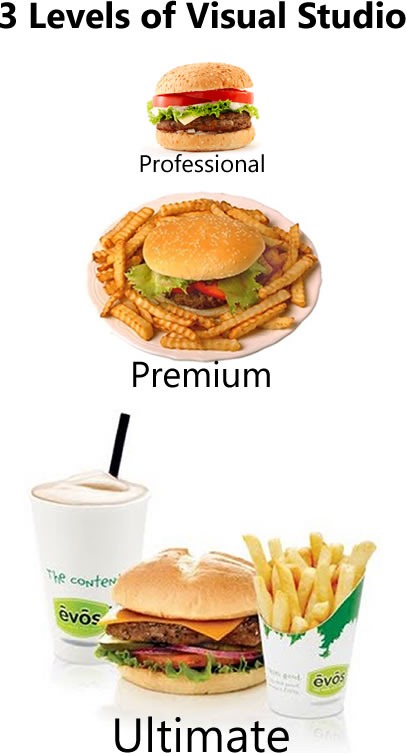
The final version of Visual Studio 2010 and .NET Framework 4.0 will be available on March 22, 2010. Among the many new features in the final version is the fact that choosing which Visual Studio is right for you will be so much simpler. Instead of the confusing array of Visual Studio versions (I’ve joked about there being so many version that I wouldn’t be surprised if there was a “Visual Studio Tartar Control” or “Visual Studio for LOLcats”), the line has been pared down to three levels: Professional, Premium and Ultimate: 

3 levels of Visual Studio: Professional (with picture of burger), Premium (with picture of burger and fries) and Ultimate (with picture of burger, fries and shake)

Visual Studio can be bought bundled with an MSDN subscription. I recommend getting the subscription , as it gives you first crack at a lot of tools, access to E-Learning and the Special Offers portal for discounts from Microsoft partners, and – most importantly, as far as I’m concerned – a lot of compute time on the Azure cloud platform.

There’s a goodie called the “Ultimate Offer” that’s available for a limited time: buy or renew your MSDN subscription now, and you’ll get the next-level-up version of Visual Studio when we hit the final release date. For example, if you get an MSDN subscription and you have a version of Visual Studio 2008 eligible for upgrade to Visual Studio 2010 Professional, you’ll get Visual Studio 2010 Premium in March (and if you’re eligible for upgrade to Premium, you’ll get Ultimate).

What’s in .NET 4?

A lot. To borrow a line from Scott Hanselman, this isn’t “.NET 3.6”, and it’s not just a bunch of features piled onto the current .NET 3.5. This is a .NET that’s been revised based on your feedback. To quote Hanselman again, it’s about “making the Legos the right size”, “about tightening screws as it is about adding new features.”

Some of the goodies in .NET 4, once again courtesy of Hanselman, include:

  • Quicker to Install – A smaller Client Profile with a much smaller initial download (down to 0.8 megs from 2.8) for bootstrapping .NET client apps faster than ever)
  • Side by Side – .NET 4 is a side-by-side release that doesn’t auto-promote, meaning you won’t break existing apps and you can have .NET 2.0, 3.5 and 4 apps on the same machine, happily.
    • Side-by-side CLR support for managed add-ins inside of apps like Explorer or Outlook. Again, new and existing apps in the same process, chillin’.
    • For more details on Application Compatibilty, check out the AppCompat Walkthrough for .NET 4 on MSDN.
  • Dynamic Language Support – The DLR (Dynamic language runtime) ships built-in with .NET 4 so you can mix-and-match your solutions and pick the best language (or languages) amongst C# and VB.NET as well as F#, IronPython and IronRuby. This includes better support for COM (yes, COM! People do use COM and it’s even easier with the new dynamic keyword in C# these days.)
  • More Web Standards Support – Better support for WS-* and REST making interop easier.
  • Plugins Galore – Visual Studio 2010 uses MEF and WPF to enable a whole new world of clean managed extensions as well as an Online Gallery (there’s an extension for that!)
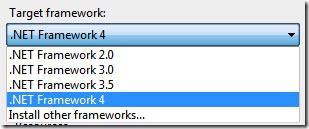
  • Multi-Framework Multi-targeting - You can’t really overestimate how useful this is, but a picture is worth a thousand words. You can code all your apps in all your organization’s frameworks with the same IDE:
    Drop-down menu showing the .NET Frameworks that Visual Studio 2010 can target

    New Look, New Feel for MSDN

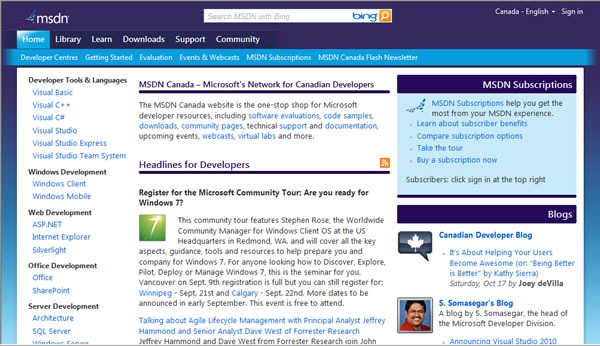
    And finally, both Visual Studio and MSDN got a new look. Here’s the new look for MSDN Canada:

    Screenshot of the "new look" MSDN Canada
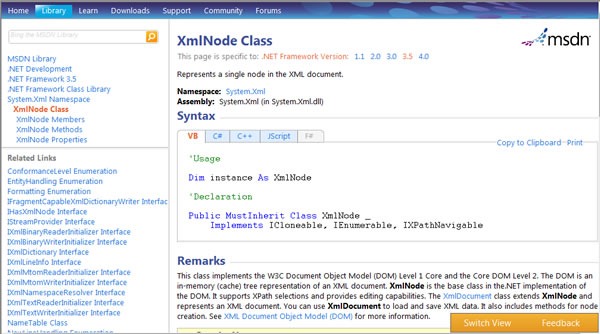
    The changes are more than skin-deep. MSDN was redesigned to make it easier for you to find what you need, whether it’s tools, downloads, resources, documentation or people. The MSDN library will also get much faster at loading and easier to read, because the “lightweight” look is going to be the standard look:

    Screen shot of the "new look" MSDN Library

    Keep an eye on this blog – I’m going to start covering development with Visual Studio 2010 and the .NET Framework 4.0 in the coming weeks!

    This article also appears in Canadian Developer Connection.
  • { 0 comments }

    Who’s Got .NET Framework 3.5?

    by Joey deVilla on October 13, 2009

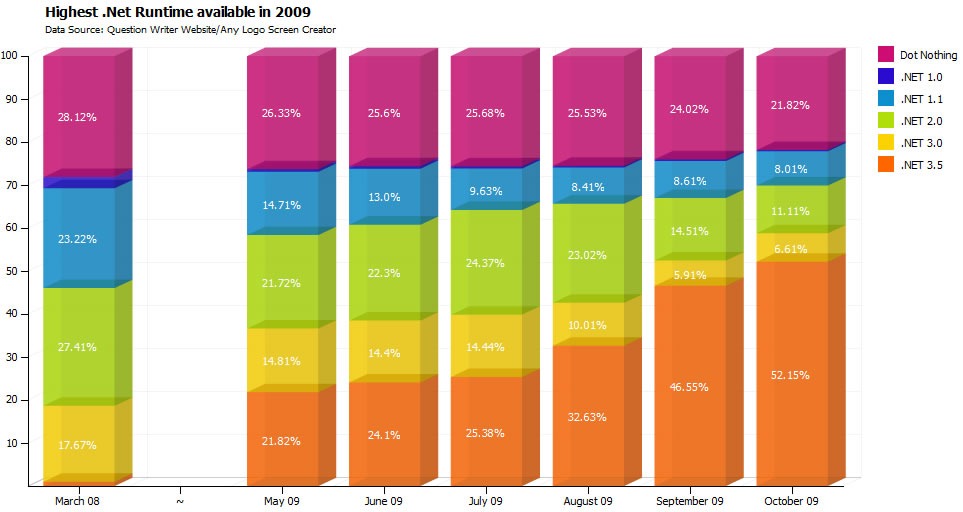
    Alexander McCabe wanted to know the adoption rates of the various .NET runtimes, from .NET 1.0 up to the current .NET 3.5. He took the data from the logs for the website for his quiz-building software, Question Writer, augmented it by including figures published in Joel Spolsky’s Business of Software forum in March 2008, and turned it into the chart below (click on it to see it at full size):

    Chart showing .NET Runtime Versions Used by Visitors to the Question Writer Site, March 2008 and May 2009 - October 2009

    According to the chart, usage of .NET 3.5 among visitors to the Question Writer site has been growing in leaps and bounds since the spring, from just under 22% in May of this year to the current 52%.

    Naturally, this data comes with all sorts of caveats:

    • The October 2009 data is based on the first 12 days of October.
    • Only Internet Explorer reliably reports .NET version information in the user-agent string.
    • McCabe has a couple of contradictory explanations:
      • IE users may be more likely to have .NET installed because they use Microsoft software.
      • IE users may be less likely to have .NET installed because they may be less likely to install software and therefore might be less likely to have .NET installed.
    • Question Writer uses the .NET runtime and its site’s visitors may have .NET installed.
    • There were a few users using .NET 4.0; McCabe counted them as .NET 3.5 users.

    I should try the same exercise using the logs for Global Nerdy, which has a rather mixed audience of open source, Mac and Microsoft types. I wonder how different the results would be.

    This article also appears in Canadian Developer Connection.

    { 0 comments }

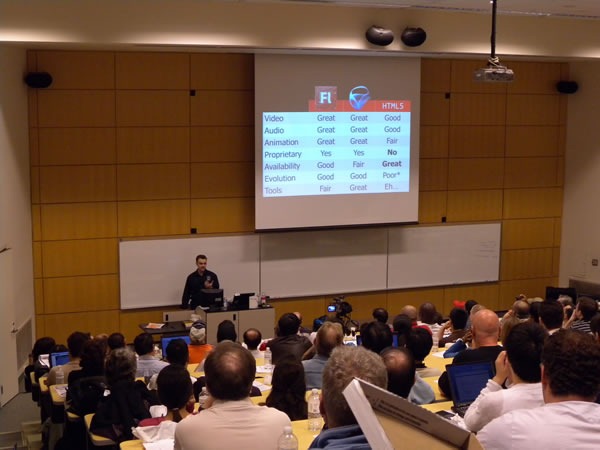
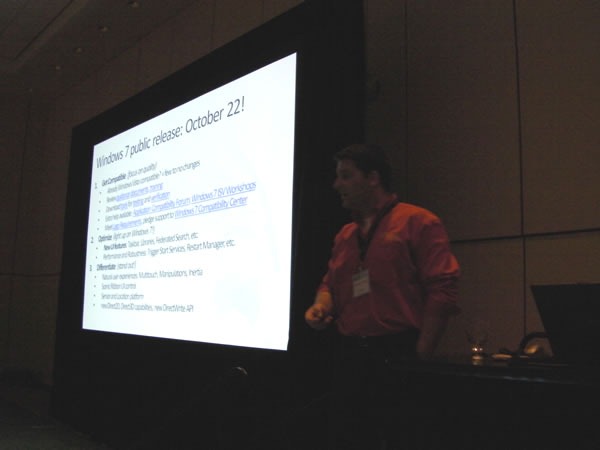
    Anthony Vranic doing his presentation at TechDays

    My photos from Anthony Vranic’s session at TechDays, Optimizing Your Application for the Windows 7 User Experience, are a bit dark because I used a different camera; my main camera was on video recording duty. I’m including them anyway, because I’m trying to keep a complete record of TechDays.

    Anthony Vranic doing his presentation at TechDays

    The original version of this presentation from TechEd North America is somewhat different – its target audience was C++ developers, and TechDays is more of a managed code audience. Since the original TechEd presentation, Microsoft released the Windows API Code Pack for the .NET Framework, and Anthony added it to his presentation.

    The Windows API Code Pack for .NET gives managed code access to a lot of features, including some new ones introduced in Windows 7, such as:

    • Windows 7 Taskbar Jump Lists, Icon Overlay, Progress Bar, Tabbed Thumbnails, and Thumbnail Toolbars
    • Windows 7 Libraries, Known Folders, non-file system containers
    • Windows Shell Search API support, a hierarchy of Shell Namespace entities, and Drag and Drop functionality for Shell Objects
    • Explorer Browser Control
    • Shell property system
    • Windows Vista and Windows 7 Common File Dialogs, including custom controls
    • Windows Vista and Windows 7 Task Dialogs
    • Direct3D 11.0, Direct3D 10.1/10.0, DXGI 1.0/1.1, Direct2D 1.0, DirectWrite, Windows Imaging Component (WIC) APIs — (DirectWrite and WIC have partial support)
    • Sensor Platform APIs
    • Extended Linguistic Services APIs
    • Power Management APIs
    • Application Restart and Recovery APIs
    • Network List Manager APIs
    • Command Link control and System defined Shell icons
    • Shell Search API support
    • Drag and Drop functionality for Shell objects
    • Support for Direct3D and Direct2D interoperability
    • Support for Typography and Font enumeration DirectWrite APIs

    Anthony Vranic doing his presentation at TechDays

    Watch this blog – I’ll posting some example code for the Windows API Code Pack for .NET in the coming weeks!

    This article also appears in Canadian Developer Connection.

    { 0 comments }

    Windows API Code Pack for .NET Framework Released

    by Joey deVilla on August 12, 2009

    Windows 7 logo and Microsoft .NET logoUntil now, taking advantage of the UI improvements in Windows 7 (and even some features in Vista) took a fair bit of work – there was a lot of stuff that wasn’t available through the .NET Framework. You’d have to either switch to C++ or resort to hacks in order to access these goodies.

    That’s all changed with the newly-released Windows API Code Pack for Microsoft .NET Framework. Written in C# – with some DirectX stuff written in C++ – this library acts as a wrapper that gives managed code access to features including:

    • Windows 7 Taskbar Jump Lists, Icon Overlay, Progress Bar, Tabbed Thumbnails, and Thumbnail Toolbars.
    • Windows 7 Libraries, Known Folders, non-file system containers.
    • Windows Shell Search API support, a hierarchy of Shell Namespace entities, and Drag and Drop functionality for Shell Objects.
    • Explorer Browser Control.
    • Shell property system.
    • Windows Vista and Windows 7 Common File Dialogs, including custom controls.
    • Windows Vista and Windows 7 Task Dialogs.
    • Direct3D 11.0, Direct3D 10.1/10.0, DXGI 1.0/1.1, Direct2D 1.0, DirectWrite, Windows Imaging Component (WIC) APIs. (DirectWrite and WIC have partial support)
    • Sensor Platform APIs
    • Extended Linguistic Services APIs
    • Power Management APIs
    • Application Restart and Recovery APIs
    • Network List Manager APIs
    • Command Link control and System defined Shell icons
    • Shell search API support
    • Drag and drop functionality for Shell objects
    • Support for Direct2D/Direct3D interoperability
    • Support for typography and font enumeration DirectWrite APIs

    The system requirements are:

    We’ll cover the Windows API Code Pack for Microsoft .NET Framework over the next little while in a couple of places – certainly on this blog, as well as at the TechDays 2009 cross-Canada conference in the Optimizing Your Apps for the Windows 7 Experience session.

    Down arrow

    Download Windows API Code Pack for Microsoft .NET Framework (v1.0)


    This article also appears in Canadian Developer Connection.

    { 0 comments }

    Edmonton Code Camp 2009: September 26th!

    by Joey deVilla on June 23, 2009

    Edmonton skyline, with North Saskatchewan River in foreground.

    Edmonton is holding a Code Camp on September 26th, 2009! It’s going to take place at Grant MacEwan College’s downtown campus. There’s a call for speakers – if you’ve got a topic that you’d like to present, now’s the time to let them know. You can find out more at the Edmonton Code Camp site and the YEGCodeCamp Twitter account.

    { 0 comments }

    “Make Web Not War” in Toronto This Wednesday!

    June 8, 2009

    About Make Web Not War
    If you’re interested in web design and development, you should attend Wednesday’s Make Web Not War conference. It’s being presented by Microsoft Canada and is about the how open source tools like PHP and Microsoft technologies like IIS and SQL Server 2008 can be used together to make great web [...]

    Read the full article →

    The “Make Web Not War” Accordion Video

    June 3, 2009

    This article also appears in Canadian Developer Connection.
    The Make Web Not War event in Toronto takes place in exactly one week! We’ve been spreading the word about the event and I thought I’d do my part by helping out with a video, accordion-style:
    MAKE WEB NOT WAR – VIDEO FOUR – TORONTO [...]

    Read the full article →

    The “FTW!” Ultimate PHP App Throwdown

    April 19, 2009

    This article also appears in Canadian Developer Connection.
    Wait a Minute…Microsoft and PHP?
    You probably wouldn’t be surprised that Microsoft is holding a development contest that pits professional developers against student developers. You might be surprised that Microsoft is holding a development contest where the challenge is to build a PHP application.
    You read that right: PHP. Microsoft’s [...]

    Read the full article →

    Colin Bowern at the Metro Toronto .NET User Group: Authentication Alternatives for ASP.NET

    April 12, 2009

    This article also appears in Canadian Developer Connection.
    Click the photo to see it at full size. (And yes, he’s using the word “pants” in the British English sense, as in “underpants”.)
    On Thursday evening, I caught Colin Bowern’s presentation, Authentication Alternatives for ASP.NET at the monthly gathering of the Metro Toronto [...]

    Read the full article →

    Toronto Code Camp: Saturday, April 25th

    April 10, 2009

    Whether you’re an old hand at developing for Microsoft’s platforms or completely new to The Ways of The Empire, you’ll find the upcoming Toronto Code Camp to be a great way to get some deep information on .NET development as well as a way to meet some of the most active and engaged members of [...]

    Read the full article →

    Tired: DateTime. Wired: DateTimeOffset!

    April 3, 2009

    You’d think that with 10,000 years of date- and time-keeping under our belts, it would be easy to keep track of dates and times in a modern-day database. It’s a little trickier than you might think, according to The Death of DateTime?, an article in Bart Duncan’s SQL Weblog.
    The gist of the article is pretty [...]

    Read the full article →

    Default and Named Parameters in C# 4.0 / Sith Lord in Training

    March 12, 2009

    Round Trip
    Back when I was working for OpenCola (from January 2000 through January 2002), the start-up cofounded by Cory Doctorow, I was doing a lot of work using beta versions of C# to build prototype peer-to-peer applications that got demoed to some large companies, including Microsoft, who were kind enough to provide us with [...]

    Read the full article →