June 2010

Dive Into HTML 5

by Joey deVilla on June 30, 2010

dive into html 5

If you’ve decided to learn HTML 5 and are looking for a good introduction, I can’t think of a better starting point than Mark Pilgrim’s Dive Into HTML 5. If Mark’s name rings a bell, it’s probably because you’ve heard of his books Dive Into Python and Dive Into Accessibility. As you can see, he’s taken a theme and he’s running with it.

Dive Into HTML 5 covers a number of topics, including:

Mark has a knack for explaining things, so I’m always happy to point people to his books. I consider Dive Into HTML 5 to be pretty comprehensive; you could create a course based solely on the material in this book, and thanks to the licensing, you can!

Dive Into HTML 5 is available for free online and is a work in progress. It seems to be largely complete with only a couple of missing chapters, and when it’s done, it’ll be available in a couple of forms:

  • For free, online
  • For money, in the form of an O’Reilly book

As with Dive Into Python and Dive Into Accessibility, Dive Into HTML 5 is published under a Creative Commons “By” 3.0 license. You can freely share the contents of the book and even take it and adapt it any way you please: into your presentations, into a lecture or blog article series, or even your own book on HTML 5 – as long as you give Mark credit for creating the original work.

This article also appears in Canadian Developer Connection.

{ 1 comment }

IE’s Big Leap Forward

by Joey deVilla on June 28, 2010

"nine" spelled using the IE logo for the "e"Peter-Paul “ppk” Koch writes in his blog, QuirksBlog (which lives on his site, QuirksMode):

In the past few days I’ve been revising the CSS compatibility table with information about the latest crop of browsers. There’s no doubt about it: this is IE9’s show. It just supports nearly everything. No hassle, no buts.

Microsoft has finally taken the big leap forward we’ve been waiting for ever since they announced their decision to restart IE development back in 2005.

IE9 promises to be an excellent browser. Its CSS support is now at par with that of the other browsers — although each browser still has its specific areas where it performs less. But we cannot in good faith say that IE is behind the others any more.

In the article, he does a run-down of CSS selectors and finds that the upcoming IE9 does an excellent job of supporting them.

Go take IE9 for a spin – download Platform Preview 3 and try it out – and make sure to try your hand at CSS 3 as well!

Download IE9 Platform Preview 3 now!

This article also appears in Canadian Developer Connection.

{ 0 comments }

Conflict Minerals and Blood Tech

by Joey deVilla on June 27, 2010

conflict minerals

Say the word “silicon” and chances are, you’ll think of technology. After all, silicon’s relationship to tech – it’s part of what makes transistors and chips – has been part of popular culture for decades, from the “Silicon chip inside her head” opening line from the Boomtown Rats’ song I Don’t Like Mondays to “Silicon Valley” as the nickname for the suburban expanse between San Francisco and San Jose.

Silicon is only part of the equation, however. The chips that drive our computers, mobile phones and assorted electronica are actually a “layer cake” consisting not only of silicon, but also oxide and metal.

There’s also the matter of key non-chip components like capacitors, which momentarily store an electrical charge. They’re made of thin layers of conductive metal separated by a thin layer of insulator. We use their “buffering” capabilities to smooth out “spiky” electrical currents, filter through signal interference, pick out a specific frequency from a spectrum of them and other “cleaning up” operations.

One of the metals used in the manufacture of capacitors is tantalum, which you can extract from a metal ore called coltan, whose name is short for “columbite-tantalite”. About 20% of the world’s supply of tantalum comes from Congo, and proceeds of from the sale of coltan are how their warlords – the scum driving the world’s most vicious conflict, and who’ve turned the country into the rape capital of the world – are bankrolled.

Nichloas Kristof of the New York Times wrote about metals like tantalum purchased from Congo – conflict metals – in an op-ed yesterday:

I’ve never reported on a war more barbaric than Congo’s, and it haunts me. In Congo, I’ve seen women who have been mutilated, children who have been forced to eat their parents’ flesh, girls who have been subjected to rapes that destroyed their insides. Warlords finance their predations in part through the sale of mineral ore containing tantalum, tungsten, tin and gold. For example, tantalum from Congo is used to make electrical capacitors that go into phones, computers and gaming devices.

Electronics manufacturers have tried to hush all this up. They want you to look at a gadget and think “sleek,” not “blood.”

Yet now there’s a grass-roots movement pressuring companies to keep these “conflict minerals” out of high-tech supply chains. Using Facebook and YouTube, activists are harassing companies like Apple, Intel and Research in Motion (which makes the BlackBerry) to get them to lean on their suppliers and ensure the use of, say, Australian tantalum rather than tantalum peddled by a Congolese militia.

He also points to the Enough Project’s latest video, which used humour and a reference to the “I’m a Mac / I’m a PC” TV commercials to draw the public’s attention to conflict metals and to encourage them to contact electronics manufacturers and ask them to be more vigilant when sourcing components:

The Enough Project says that auditing component supply chains at the smelters to see whether the metal was sources from “clean” places like Australia or Canada instead of lining the pockets of Congolese warlords would add about one cent to the price of a cellphone, and that this figure originates from within the industry. I’d happily pay a thousand times that for each of my devices – a mere ten bucks – to ensure that I wasn’t bankrolling rape and murder.

I’ll close this post with the closing paragraph from Kristof’s op-ed:

We may be able to undercut some of the world’s most brutal militias simply by making it clear to electronics manufacturers that we don’t want our beloved gadgets to enrich sadistic gunmen. No phone or tablet computer can be considered “cool” if it may be helping perpetuate one of the most brutal wars on the planet.

This article also appears in The Adventures of Accordion Guy in the 21st Century.

{ 3 comments }

Internet Explorer 9 Videos on Channel 9

by Joey deVilla on June 27, 2010

nine on 9By now, you’ve probably seen my article covering the new, faster, even more standards-compliant Platform Preview 3 of Internet Explorer 9. From hardware acceleration to a speed-boosted JavaScript engine with support for new ECMAScript 5 language features to support for SVG, <audio>, <video> and <canvas> tags, IE9 is shaping up to be a great browser for an open web.

Before there were Microsoft blogs (such as Canadian Developer Connection), there was Channel 9, Microsoft’s community site run by Microsoft employees. Like Microsoft blogs, Channel 9 gives you unfiltered access to the people building stuff at The Empire, all outside the control of the marketing and PR departments. Channel 9 features a lot of videos – there are times when they post several videos in a day – featuring developer news and training, training kits and courses, discussion forums and wikis for various Microsoft tools and technologies. If you’re a .NET developer or just curious about what’s going on the in the .NET world, you should check out Channel 9 and see what’s happening.

Channel 9 posted a number of videos covering the new features in the third Platform Preview of Internet Explorer 9. I’ve gathered them all into this blog article – enjoy!

A Look at the New IE9 Demos

Get Microsoft Silverlight

Can’t see the video? You can download and install Silverlight or download the video in MP4, MP3, WMA, WMV, WMV (High) or Zune formats.

This video shows some of the sample apps living on the IE Test Drive site in action. It covers the following demos:

<canvas> and FishIE Tank

Get Microsoft Silverlight

Can’t see the video? You can download and install Silverlight or download the video in MP4, MP3, WMA, WMV, WMV (High) or Zune formats.

Here’s a closer look at the FishIE Tank demo and how it makes use of <canvas> to draw up to thousands of animated, moving, scaling fish sprites.

<canvas> and Amazon.com

Get Microsoft Silverlight

Can’t see the video? You can download and install Silverlight or download the video in MP4, MP3, WMA, WMV, WMV (High) or Zune formats.

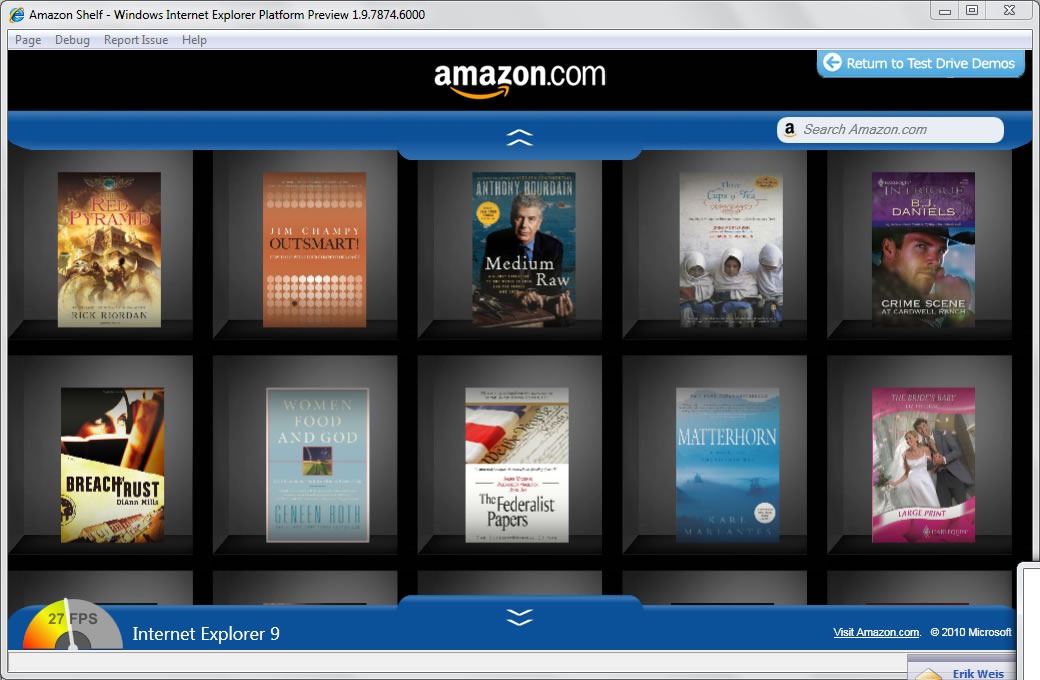
Another <canvas> demo: Amazon Shelf. This one ties into Amazon’s data to create a virtual bookshelf that lets you browse Amazon’s catalogue of books.

<video> and IMDb Video Panorama

Get Microsoft Silverlight

Can’t see the video? You can download and install Silverlight or download the video in MP4, MP3, WMA, WMV, WMV (High) or Zune formats.

The IE9 team showed a preview of support for the <video> tag, and with Platform Preview 3, you can try it out for yourself. In this video, you see how it’s used to build the IMDb Video Panorama demo.

ECMAScript 5 and the Tile Game

Get Microsoft Silverlight

Can’t see the video? You can download and install Silverlight or download the video in MP4, MP3, WMA, WMV, WMV (High) or Zune formats.

There are lots of boring ways to show of ECMAScript 5’s new array methods in action, but why not show them off with a fun game? In addition to the new JavaScript goodies, the ECMAScript 5 Game demo also shows off:

  • HTML5 <video> and <audio>
  • CSS3 multiple backgrounds
  • HTML5 local storage (first made available in IE8)
  • DOM Level 3 events
  • <window.getComputedStyle()>

Download IE9 Platofmr Preview 3 now!

This article also appears in Canadian Developer Connection.

{ 1 comment }

.NET Rocks’ Live Weekend

by Joey deVilla on June 26, 2010

dot net rocks live weekend

If you’re developing (or thinking of developing) on the .NET platform, you should make the .NET Rocks! show part of your regular podcast listening. Hosted by Carl Franklin and Richard Campbell, .NET Rocks! has nearly 600 episodes going all the way back to 2002 covering all sorts of .NET development topics for all sorts of developers, from newbie to grizzled veteran.

This week, .NET Rocks! is doing something special – they’re holding a Live Weekend filled with three days’ worth of live conversations with people from inside and outside the .NET world. It’s not just all geek talk, either: during breaks, they’ll play music produced at Pwop studios and on Monday night from 9:30 to midnight, Carl’s band, Solvo, will play.

You can call in! The “inside the US” toll-free number is 877-492-6751 and the “outside the US” number is 860-447-8832 (you can try the “inside the US” number in Canada and see if it works). If you’d rather write in, send an email to dotnetrocks@franklins.net or tweet using the #dnrlive hashtag.

Click here to listen to .NET rocks live weekend

The Schedule

Saturday, June 26th

Time What’s On
8 – 9 a.m. Patrick Hynds
9 – 10 a.m. Michele Leroux Bustamante
10 – 11 a.m. Rob Howard
11 a.m. – 12 noon Stephen Toub
12 noon – 1 p.m. Music and Comedy
1 – 2 p.m. James Kovacs
2 – 3 p.m. Don Demsak
3 – 4 p.m. Daniel Egan
4 – 5 p.m. Brian Randell
5 – 6 p.m. Tim Huckaby
6 – 7 p.m. Chris Sells
7 – 8 p.m. Music and Comedy
8 – 9 p.m. Daniel Simmons
9 – 10 p.m. Brian Noyes
10 – 11 p.m. Patrick Hynds (repeat)
11 – 12 midnight Michele Leroux Bustamante (repeat)


Sunday, June 27th

Time What’s On
12 midnight – 1 a.m. Rob Howard (repeat)
1 – 2 a.m. Stephen Toub (repeat)
2 – 3 a.m. James Kovacs (repeat)
3 – 4 a.m. Don Demsak (repeat)
4 – 5 a.m. Daniel Egan (repeat)
5 – 6 a.m. Brian Randell (repeat)
6 – 7 a.m. Tim Huckaby (repeat)
7 – 8 a.m. Chris Sells (repeat)
8 – 9 a.m. Carl and Richard
9 – 10 a.m. Charles Petzold
10 – 11 a.m. Sahil Malik
11 a.m. – 12 noon Mark Dunn
12 noon – 1 p.m. Music and Comedy
1 – 2 p.m. Andrew Brust
2 – 3 p.m. Glenn Block
3 – 4 p.m. Ethan Winer
4 – 5 p.m. Mary Jo Foley
5 – 6 p.m. Kent Alstad
6 – 7 p.m. Keith Elder
7 – 8 p.m. Music and Comedy
8 – 9 p.m. Mark Miller
9 – 10 p.m. John Bristowe
10 – 11 p.m. Daniel Simmons (repeat)
11 – 12 midnight Brian Noyes (repeat)


Monday, June 28th

Time What’s On
12 midnight – 1 a.m. Carl and Richard (repeat)
1 – 2 a.m. Charles Petzold (repeat)
2 – 3 a.m. Sahil Malik (repeat)
3 – 4 a.m. Mark Dunn (repeat)
4 – 5 a.m. Andrew Brust (repeat)
5 – 6 a.m. Glenn Block (repeat)
6 – 7 a.m. Ethan Winer (repeat)
7 – 8 a.m. Mary Jo Foley (repeat)
8 – 9 a.m. Kent Alstad (repeat)
9 – 10 a.m. Jonathan Zuck
10 – 11 a.m. Jeffrey Palermo
11 a.m. – 12 noon Steve Evans
12 noon – 1 p.m. Music and Comedy
1 – 2 p.m. Scott Stanfield
2 – 3 p.m. Ted Neward
3 – 4 p.m. Tim Heuer
4 – 5 p.m. Miguel Castro
5 – 6 p.m. Les Pinter
6 – 7 p.m. Billy Hollis
7 – 8 p.m. Music and Comedy
8 – 9 p.m. Rocky Lhotka
9:30 p.m. – 12 midnight Solvo (Carl’s Band) Live!


Tuesday, June 29th

Time What’s On
12 midnight – 1 a.m. Keith Elder (repeat)
1 – 2 a.m. Mark Miller (repeat)
2 – 3 a.m. John Bristowe (repeat)
3 – 4 a.m. Jonathan Zuck (repeat)
4 – 5 a.m. Jeffrey Palermo (repeat)
5 – 6 a.m. Steve Evans (repeat)
6 – 7 a.m. Scott Stanfield (repeat)
7 – 8 a.m. Ted Neward (repeat)
8 – 9 a.m. Tim Heuer (repeat)
4 – 5 p.m. Miguel Castro (repeat)
5 – 6 p.m. Les Pinter (repeat)
6 – 7 p.m. Billy Hollis (repeat)
8 – 9 p.m. Rocky Lhotka (repeat)
3 – 6 p.m. Solvo (Carl’s Band) Live!


This article also appears in Canadian Developer Connection.

{ 0 comments }

windows phone 7 bootcamp

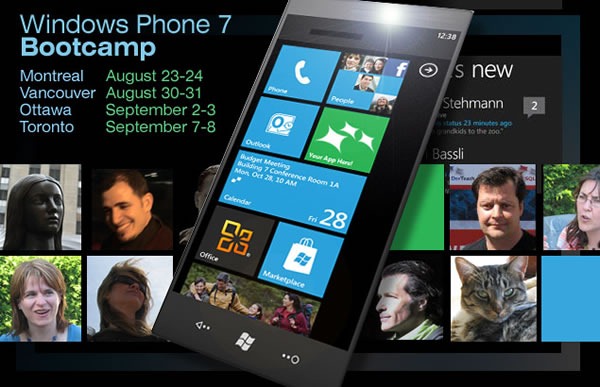
Want some hardcore training from a developer who’s been doing Windows Phone 7 development since the tools were released in March? Then you’ll want to check out DevTeach’s Windows Phone 7 Bootcamp, taking place late this summer in Montreal, Vancouver, Ottawa and Toronto.

The Windows Phone 7 Bootcamp is an intense two-day training session run by indie training conference organizers DevTeach and will be hosted by Colin Melia, principal architect for DreamDigital. Colin’s knows a lot about Silverlight and cloud technologies and will share this knowledge at the Bootcamp, showing you how to make great mobile user interfaces as well as how to write phone apps that harness the power of networked-based services such as notification and location services as well as data access and isolated storage.

save 100 with WP&BOOTCAMP codeWhat You’ll Need to Know

Colin’s going to dive right into the nitty-gritty of developing apps for Windows Phone 7, and there’s quite a bit of material to cover, so you should at least be familiar with the following to get the most out of the Bootcamp:

  • Visual Studio 2008 or 2010
    (You can familiarize yourself with these by downloading the free Visual C# 2010 Express or Visual Studio 2010 Express for Windows Phone)
  • The C# programming language, or something similar
    (If you’re a Java developer you should find the transition pretty easy; developers using other object-oriented programming languages shouldn’t have too much difficulty following C#)
  • The .NET programming framework
    (Actually, pretty easy to grasp, especially with the assistance of Visual Studio)
  • XML
    (A basic understanding will do)

What You Won’t Need to Know

You won’t need to have any experience with Silverlight or phone development – the Bootcamp’s covering that!

What You’ll Need to Bring

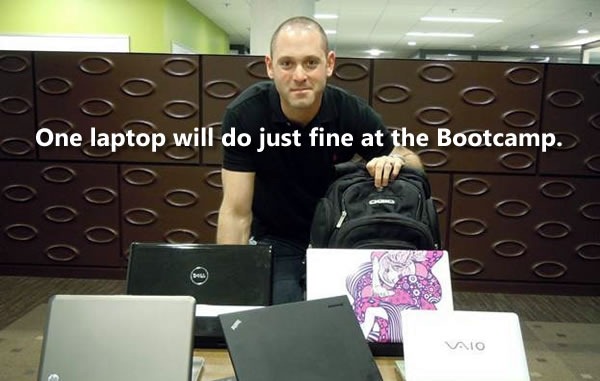
one laptop will do

You’ll need to bring your own laptop running Windows 7 or Vista SP2 with “an appropriate up-to-date set of tools installed and functioning”. That means Visual Studio 2010 or at least Visual Studio 2010 Express for Windows Phone.

When and Where?

The Windows Phone 7 Bootcamps will be limited to 25 seats in order for you to be able to interact better with Colin, so register as soon as you can! They’ll be taking place in these cities:

  • Montreal: Monday, August 23 and Tuesday, August 24 at the Hyatt Regency Hotel
  • Vancouver: Monday, August 30 and Tuesday, August 31 at the Sutton Place Hotel
  • Ottawa: Thursday, September 2 and Friday, September 3 at a location to be announced
  • Toronto: Tuesday, September 7 and Wednesday, September 8 at a location to be announced

The registration fee is CAD$999 for the two-day training session, and you can save $100 by providing the discount code WP7BOOTCAMP when you register.

For More Information

If you’d like to know more about the Windows Phone 7 Bootcamp, visit DevTeach’s site, and particularly their special page devoted to the Bootcamp.

This article also appears in Canadian Developer Connection.

{ 0 comments }

IE9’s Hardware-Accelerated Canvas in Action

by Joey deVilla on June 24, 2010

As announced in yesterday’s posting, Platform Preview 3 of Internet Explorer 9 is out, and it’s faster than snakes on ice. Some of the credit goes to “Chakra”, the new JavaScript engine, and some of it goes to IE9’s hardware acceleration, which bypasses the layers of abstraction between your web app and the “metal” (namely, your browser, and then the underlying OS).

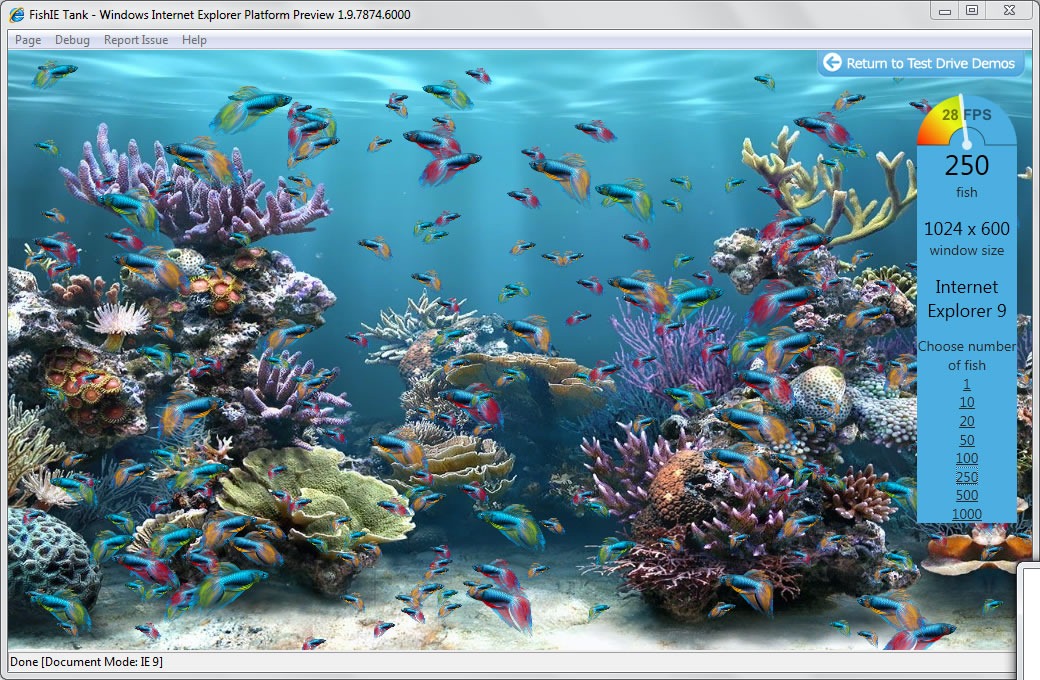
Download Squad have posted a video showing IE9 Platform Preview 3 blazing past Chrome 6 in side-by-side sessions of the “FishIE Tank” canvas demo. Even on my “medium performance” machine – a Dell Latitude XT2 tablet whose graphics card gets a 3.2 on the Windows Experience Index – I have to push the fish count to 250 before the frame rate drops below 30 fps. Here’s a screenshot taken from that laptop running FishIE Tank, rendering 250 constantly moving and scaling fish sprites between 22 and 29 fps:

fishIE tanks screen shot

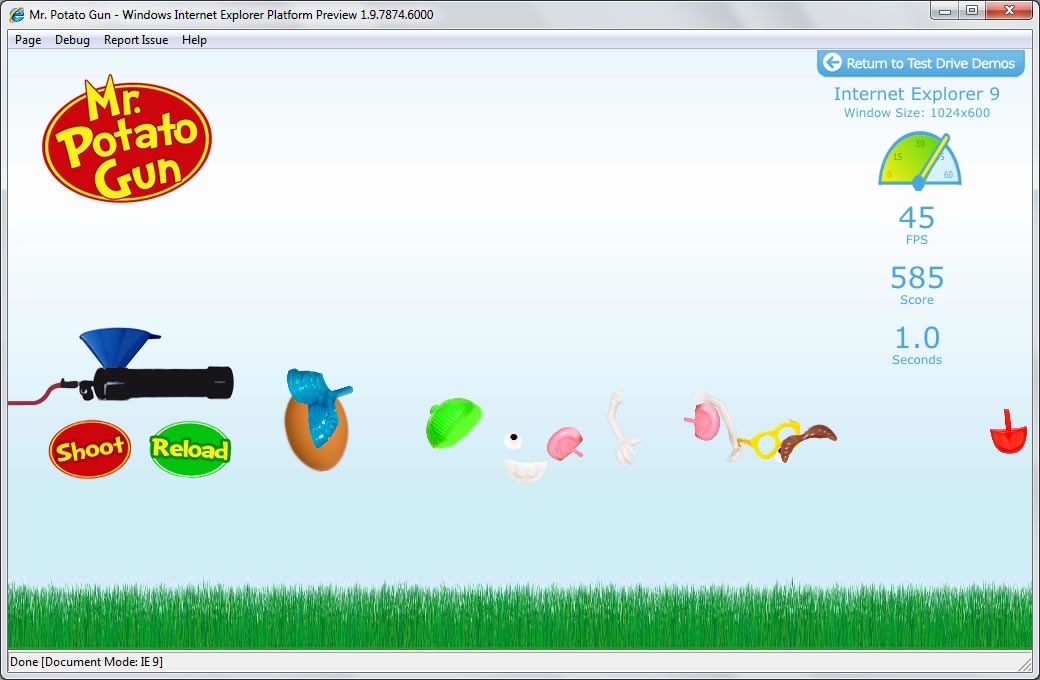
The Mr. Potato Gun canvas test is amusing. You load a reasonable facsimile of a popular toy into a potato gun, pull the trigger and watch the hapless tuber’s components fly all over the screen:

mr potato gun

Here’s a demo featuring a more practical use of canvas: Amazon Shelf, which presents a bookshelf of some of Amazon.com’s current bestsellers:

amazon shelf 1

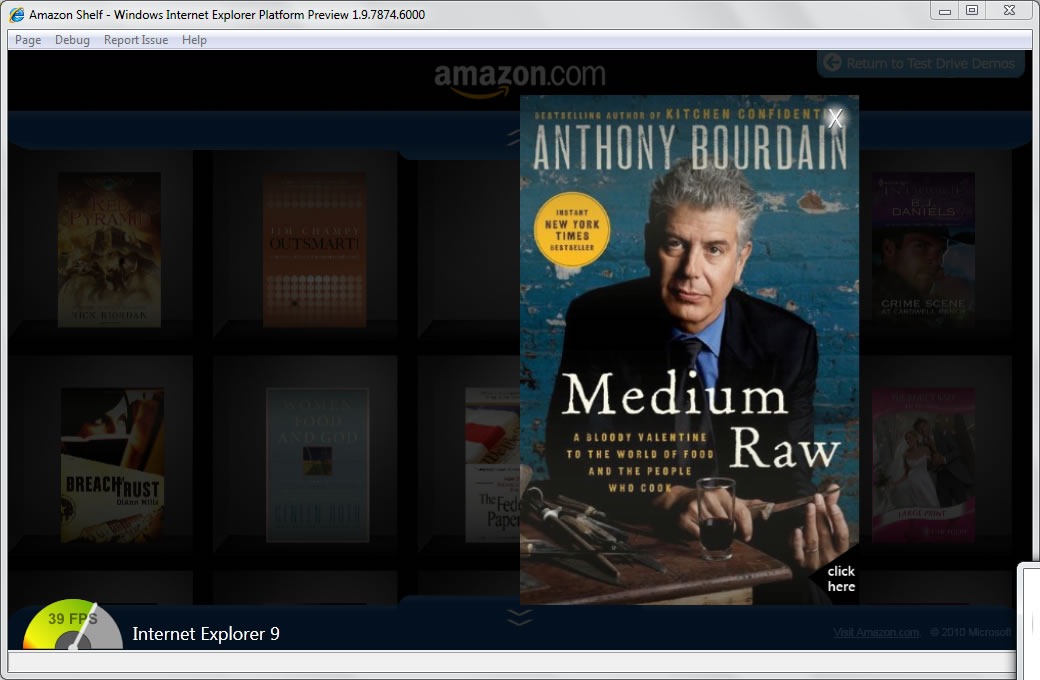
Click on a book in Amazon Shelf to get a better look at its cover:

amazon shelf 2

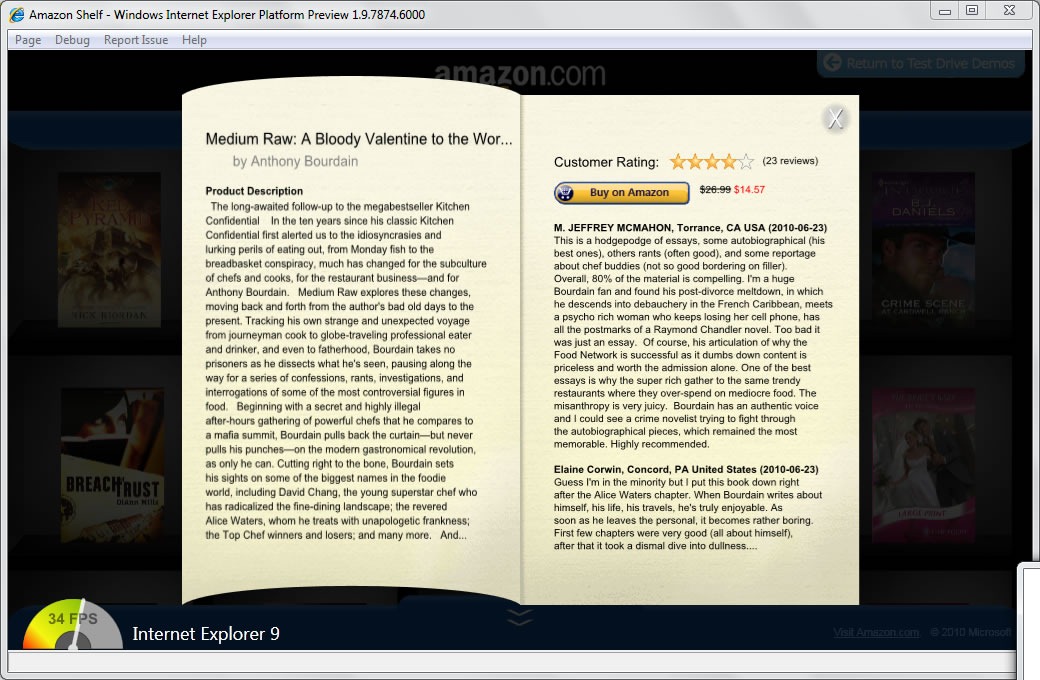
Click on that cover and get the publisher’s blurb and customer ratings:

amazon shelf 3

Take IE9 out for a spin! Visit the IE9 Test Drive site, download IE9 Platform Preview 3 and hit some canvas-enabled sites.

download

This article also appears in Canadian Developer Connection.

{ 0 comments }

"nine" spelled using the IE logo for the "e"

Back in March, when the first platform preview of Internet Explorer 9 was released at the MIX10 conference, the IE9 team promised to release new previews of the browser about every eight weeks. Eight weeks after MIX10, they kept their promise and released Platform Preview 2. It featured improved JavaScript performance and better adherence to HTML5/CSS/JavaScript standards.

A red, green and blue "Pokeball", each with the IE logo on it

Eight weeks has passed since Platform Preview 2, and it’s time for another release. I’m pleased to announce the launch of Internet Explorer 9 Platform Preview 3! Go ahead, download it, and read on to find out what’s in this new Platform Preview.

V8 engine: "Hardware acceleration"

Not so long ago, if you were using an application, chances are that it was a desktop native app running on top of your operating system. These days, the odds are that the apps you’re running are web apps, which run inside your browser, which in turn run on top of your OS. Even if you’re not factoring in network latency, that extra layer of abstraction slows things down. Hardware acceleration is one fix to this problem, and that’s a major focus of Platform Preview 3. IE9 takes advantage of your computer’s GPU to render HTML graphics and text with greater speed.

Rocket-powered 18-wheeler truck: "JavaScript Performance"

When we say “HTML5”, we’re talking about more than just HTML and the associated styling, but JavaScript as well. Luckily, we’re not only speeding up HTML rendering; we’re also cranking up the JavaScript engine, codenamed “Chakra”, which is even faster in this release.

All this work means that IE9’s performance has been improving steadily since it was first shown (but not released) to the audience at the PDC conference in November. Here are the results of the SunSpider JavaScript benchmark for a number of IE9 iterations (and a Firefox thrown in for good measure):

Graph showing the performance of various version of IE9 previews

And here’s a “wider” version of that chart, showing more of the Esteemed Competition’s browsers:

WebKit SunSpider JavaScript Benchmark results, showing IE9 Platform preview 3 placing nicely

This puts IE9’s JavaScript performance within 50 milliseconds of the fastest browsers – that’s the time it takes sound to travel less than a couple dozen paces.

As the IE9 team will tell you, while JavaScript speed is important, many sites spend cycles in a browser’s subsystems that aren’t JavaScript. They’re always benchmarking against more than just the SunSpider test, but against some of the most popular sites on the net, a real-world test of a browser’s performance, and they’re not done optimizing yet.

By the bye, IE9’s JavaScript isn’t just fast, it adheres better to the ECMAScript standard and even implements new features in the 5th edition of the spec, known colloquially as ES5. They include new array and object methods, as well as other language enhancements for working with strings and dates, and the IE Test Drive site has some demos showing them in action.

"Three Keyboard Cats" pardoy of the "Three Wolf Shirt": "Audio and Video"

Speed is just one dimension of browsing – standards is an important one, too! The support for the <audio> and <video> tags we talked about at MIX10 has been baked into Platform Preview 3.

There is one tag that was conspicuous in its absence, leaving a number of cynics, wags and conspiracy theorists to jump to the conclusion that it would never be included in IE9. Well, it’s here…

Vincent Van Gogh: "Canvas!"

That’s right, Platform Preview 3 introduces the <canvas> tag to Internet Explorer. And it’s hardware-accelerated, too!

We’ve got a number of demos on the Test Drive IE site showing off hardware-accelerated <canvas>, including “Asteroid Belt”, shown below:

Screenshot of the IE9 "Asteroid Belt" demo

So how does Platform Preview 3 fare on the Acid3 test suite, the supposed bane of Internet Explorer’s existence? Not too shabby, jumping up to 83 out of a possible 100 (if you recall, Platform Preview 2’s score was 68):

Acid3 test result screen for IE9 Platform Preview 3: 83/100

There’s a lot more in Internet Explorer 9’s Platform Preview 3, but in the spirit of “Show, don’t tell”, I’m sending you to the IE Test Drive site to download it and take it for a spin, and please let us know what you think!

Download IE9 Platform Preview 3 now!

This article also appears in Canadian Developer Connection.

{ 3 comments }

Turning Up Where Least Expected

by Joey deVilla on June 21, 2010

ip3 forumA conference devoted to devices that run iOS might be the last place you’d think you’d see a Microsoft developer evangelist, but here I am!

I’m at iP3 Forum, “a one-day event that will explore the changing mobile landscape and the business opportunities associated with Apple’s Touch Platform (iPhone, iPad and iPod touch), as business models adapt to a market where people are always connected.” It’s organized by Interactive Ontario, a group whose mandate is to promote the development of interactive media in Ontario.

iP3 Forum has two tracks: business and technical, with some sessions common to both; if you’re curious about its sessions, take a look at the schedule.

So what am I doing here? Learning. There’s a lot to learn from the mobile app cultures of the Esteemed Competition, and I want to take those lessons (I refuse to use the Microsoft term “learnings”) back to Windows Phone developers. At the same time, I’m also reaching out to iPhone developers to convince them to add Windows Phone 7 to their mobile OS roll, and I need to know about their world. I’m even doing a little noodling with iPhone and iPad development in order to learn more. As they say, travel broadens the mind, and that holds true even for “travel” to different operating systems.

My time at iP3 Forum has been peppered with interruptions – it’s the end of Microsoft’s fiscal year, which means meetings, meetings, meetings – but I’m taking notes for those sessions I’m able to catch and I’ll post them soon.

This article also appears in Canadian Developer Connection.

{ 0 comments }

checklist manifesto

Checklists

To put it into programmer-speak, checklists are unit tests for everyday life. Like unit tests, checklists appear to be additional make-work that take valuable time away from performing the task at hand. However, when done right, checklists save time by helping ensure you’re doing everything you need to do and can even function as a sort of specification for the task (in fact, like unit tests, checklists often end up being the “real” specification for all intents and purposes).

Checklists may seem to the be province of by-the-book, obey-all-rules-and-regulations slaves to procedure, but I think it’s one thing those Poindexters got right. I would argue that the structure and order that they provide free us to spend our energy on those less controllable, more chaotic parts of our lives, work and play. As I like to say, “preparedness enables spontaneity”.

I could go on about the power of checklists and how even a pretty random goofball such as Yours Truly has benefited from them (at least when I use them), but I’d serve you better by pointing you to Atul Gawande’s book, The Checklist Manifesto: How to Get Things Right. In it, Gawande writes about how checklists have improved the outcomes in his own surgical practice, as well as in other fields such as piloting, where bad outcomes are really bad.

Launchlist

01 launchlist logoIn spite of repeated threats from your client, the odds are that no one will get injured or die if something’s wrong with the web site or application that you’re working on. I hope that you still have enough pride in your work and your profession that you want to get things right. If you do – and I hope that’s why you’re reading this blog; you’re the sort of reader I’m going after – you’ll want to use tools like unit tests and checklists to ensure you’re getting things done properly.

One such tool is Launchlist, a simple-but-useful web application that acts as a checklist for web developers and designers. Built by Jay Hollywood (coincidentally my stage name should this computer fad blow over and I need to become an “exotic dancer” to pay the rent) and Lee Karolczak, it is:

…intended to help and encourage web designers and developers to check their work before exposing it to the world at large.

The product was born out of frustration. For too long we had been using archaic methods to conduct pre-launch testing and the web was an obvious choice to do it better.

Launchlist features a set of questions about the site you’re working on, based on Hollywood’s and Karolczak’s own experiences building sites. You should be able to answer “yes” to all of them before you unleash your site upon the world:

03 list

Launchlist could’ve been a simple site using checkboxes and bog-standard form elements, but in the age of modern web apps and increased appreciation of design that’s both functional and beautiful, I’m glad to see that they went the extra mile and worked some CSS magic. The “yes/no” toggle switches are beautiful, yet function quite well as checkboxes, and even the “Product Details” section, which would’ve functioned quite adequately as a bunch of ho-hum text fields, is pleasing to the eye:

02 project details

Here’s a set of items on Launchlist’s checklist that shows what “checked” and “unchecked” items look like:

04 checked and unchecked items

Launchlist’s creators came up with a set of questions that should apply to most web sites. However, if some of them don’t apply to your site, you can simply mark them as “not applicable”:

05 not applicable

You can even add a comment to an item in Launchlists’s checklist, in case a simple “yes/no” answer isn’t sufficient:

06 comment

And knowing that you might have checklist items that are unique to your projects, they gave Launchlist the ability to house up to 10 custom ones, like the one I created, shown below:

07 custom item

The status report is at the bottom of the list, which is also where you can add your own custom items to the checklist. If any of the applicable items in the checklist remain unchecked, the status report will read “Launch not advisable” and report the number of unchecked items:

08 launch not advisable

If you checked all the applicable items in the checklist, Launchlist declares that your site is ready for launch:

09 go for launch

Once you’re done checking and unchecking items, you click the “Submit report” button at the bottom, after which you’ll see this:

10 report sent

…and as the text in the “Your report has been sent” message says, you and the intended recipient of the status report are emailed. Here’s the text of the report that Launchlist sent to me:

Launchlist Submission Report for Test (http://joeydevilla.com):

Status: Launch not advisable – 5 items are still outstanding.
We recommend you resolve these items before launching your website.

ITEMS OUTSTANDING (NOT CHECKED)
—————————————————————————-

- Required fields have been tested?
- Forms send to correct recipient?
- Web Statistics package installed and operational?
- 404 page exists and informative?
-

APPROVED ITEMS (CHECKED)
—————————————————————————-

- All text free from spelling errors?
- Page & Content formatting has been tested?
- Print stylesheet exists and tested?
- Meta data has been included and is appropriate?
- Page titles are descriptive and SEO friendly?
- Images have appropriate alt tags?
- Title tags are appropriate and SEO friendly?
- Favicon has been created and displays correctly?
- Footer includes copyright and link to site creator?
- HTML has passed validation?
- CSS has passed validation?
  Comment – Todd says he’ll have it fixed by Friday.

- There are no broken links?
- JavaScript is error free?
- Displays & functions correctly in ie7?
- Displays & functions correctly in ie8?
- Displays & functions correctly in Firefox (Mac & PC)?
- Displays & functions correctly in Chrome (Mac & PC)?
- Displays & functions correctly in Safari (Mac & PC)?
- Displays & functions correctly in Opera (Mac & PC)?
- Tested at 1024 x 768 resolution?
- Tested at larger resolutions?
- Forms have been tested and processed correctly?
- Picture of Sean Connery in "Zardoz" outfit on every page?

—————————————————————————-

This report has been crafted and delivered via Launchlist http://www.launchlist.net

Follow Launchlist on twitter – http://twitter.com/launchlistapp

Lessons from Launchlist

Here’s a quick run-down of what I think can be learned from Launchlist. I’m sure that I’ll think of more after I’ve published this article…

  • Design matters. Launchlist could’ve been built without all the stack we like to call "HTML5” (it’s really HTML5, CSS and JavaScript working together) and the gorgeous design, but without it, you wouldn’t be compelled to use it. And the design goes beyond its good looks; there’s also a great deal of usability and user experience design in Launchlist, from its clean layout to the controls that pop up only when they’re needed.
  • You can do HTML5 in Internet Explorer. Launchlist works just fine with Internet Explorer 8 (the screenshots I took for this article were taken from a Launchlist session in IE8) – a quick “View Source” reveals that they used the HTML5 Shim for IE. And of course, there’s IE9, which the Internet Explorer team is working furiously on.
  • Do one thing, and do it very, very well. I think that this is a good app philosophy, and I believe it applies doubly to those of you planning to build apps for mobile devices, whether they’re phones or tablets.
  • “Freemium” (or: Apps can be ads). Launchlist’s creators say that the version of Launchlist at Launchlist.net will always be free, but that they’re working on a paid subscription version with more features. I think this is a good approach – there’s no marketing like a “starter” version, especially when what you’re making is so nice.

This article also appears in Canadian Developer Connection.

{ 1 comment }

Crunch Time for Windows Phone

by Joey deVilla on June 17, 2010

Behind the Scenes: Windows Phone 7

windows phone testingMicrosoft Vice President Terry Myerson gets a look at a prototype Windows Phone circuit board that Qualcomm built with an all-new chip that had just started rolling off the manufacturing line.
Photo by Ina Fried.

In her article Behind the Scenes: Windows Phone 7, Ina Fried pays a visit to Microsoft headquarters in Redmond to see what the Windows Phone team is up to. With the phone due to hit the streets in time for the holiday season and the months that wireless carriers need to test out new devices before they sell them, the Windows Phone team was in crunch mode in late May, racing to finish their work on it. Ina was given a rare opportunity to hang out with the Windows Phone team, interview both executives and developers, sit in on “shiproom” meetings and generally observe the Herculean task of building a brand new phone operating system.

The article doesn’t pull any punches. Ina writes that a “reboot” like the one Microsoft is doing with its phone is going to be a challenge, and the people she interviewed are all too aware of it. “In the meetings and subsequent interviews, executives and developers who were surprisingly candid about both the mistakes Microsoft has made in the mobile market and the importance of their current work.”

Go check out the article – it’s fascinating, and it’s the first in a series of occasionally-published articles by Ina that will provide a behind-the-scenes look at the people building the phone.

Mobile Development News for All

windows phone 7 accordion

The Redmond team aren’t the only people working hard on Windows Phone 7 – Microsoft Canada’s Developer and Platform Evangelism team (of which I’m part) is doing the same, but from a different angle. We’re gearing up to talk about developing apps for Windows Phone 7: the tools, the technologies, the programming frameworks and languages, and the techniques – and we’ll be talking to more than just Microsoft developers, but developers of all stripes, even if they build apps for the Esteemed Competition’s phones, whether they’re Android, BlackBerry or iPhone.

We’ll also be talking about more than just Windows Phone development, but mobile development in general, on all sorts of topics that affect mobile development, from the importance of good design to the business of mobile apps to architecture and development techniques. We hope that no matter what mobile platform you’ll build for, you’ll check out our blogs and events because they’ll be chock-full of useful information (and we think we’ll surprise you).

Windows Phone Workshops in the Toronto and Vancouver Areas

windows phone workshops

Whether you’re a long-time Microsoft developer looking to get into mobile or an Android, BlackBerry or iPhone wondering what Windows Phone 7 is all about, and you’re in the Toronto or Vancouver areas, you might want to check out our free Windows Phone Workshops next week:

  • One in the Toronto area on Wednesday the 23rd at Microsoft Canada HQ in Mississauga
  • One in the Vancouver area on Friday the 25th at Microsoft’s Development Centre in Richmond

I’ll be there, as will my co-workers Paul Laberge and Jamie Wakeam and some special guest speakers and we’ll be talking about Windows Phone 7’s interface, architecture, developing apps in Silverlight and XNA, the Marketplace (where you sell your apps) and then we’ll have a codefest where teams can compete to build the best Windows Phone app in an afternoon.

If you’d like to know more about the workshops, see this earlier article, which covers the Windows Phone Workshops in more detail.

This article also appears in Canadian Developer Connection.

{ 1 comment }

Gizmodo’s Vendetta

by Joey deVilla on June 15, 2010

Techmeme screenshot featuring 4 Gizmodo stories: "Apple iPhone 4 Pre-Ordering is a Total Disaster", iPhone 4 Order Security Breach Exposes Private Information", "AT&T iPhone Pre-Orders Have Sold Out", "AT&T Now Taking iPhone Orders in Pen and Paper"

In case you were wondering if Gizmodo’s fight with Apple over that ill-gotten iPhone prototype might be affecting their reporting, consult this screenshot from Techmeme, taken at 8:45 p.m. EDT, above.

{ 1 comment }

“I’m Comic Sans, Asshole!”

by Joey deVilla on June 15, 2010

"I'm Comic Sans, Asshole" -- John Marston from Red Dead Redemption pointing a gun

That most hated of typefaces, Comic Sans, gets anthropomorphized and bad-assified in Mike Lacher’s piece for McSweeney’s titled, (in)appropriately enough, I’m Comic Sans, Asshole.

This article also appears in The Adventures of Accordion Guy in the 21st Century.

{ 1 comment }

Best Phone Case Ever

by Joey deVilla on June 15, 2010

“Truck Nutz” let you communicate to the world that you’re a bold and sassy guy in a way that words just can’t convey, but what if you don’t have a truck? For that Truck Nutz message without truck ownership, this iPhone case might fit the bill:

Woman using a phone with a case featuring dangling "testicles"

Cartoonist Chris Onstad came up with this idea back in January 2006 with this surreal and funny Achewood comic in which Ray Smuckles comes up with “ChatSacks”:

Achewood "ChatSacks" comic from January 2006

If someone will make one for a Windows Phone 7 device, I’ll buy one of those cases.

{ 0 comments }

It’s One of the Perks of the Job

by Joey deVilla on June 15, 2010

View from the bar at Cafe Novo, looking out onto the patio and High Park

The best antidote for a day full of meetings in boardrooms in a suburban office park is to finish it in different surroundings. So when my last meeting on Friday ended with a couple of hours of business day to spare, I made a beeline for one of my favourite “field offices” – Cafe Novo, located across the street from High Park, and a very short walk from home.

The photo above was the view from my “workstation” at 4 p.m. on Friday: the bar facing the roll-up front wall which in turn faces the park. Pictured are the tools of my trade – my trusty Dell Latitude XT2 tablet with the memory maxed out at 5 GB and the so-last-century mechanical hard drive replaced with a solid state one, my favourite portable mouse and an iced mocha.

Working in settings like this is one of the perks of the job.

This article also appears in Canadian Developer Connection.

{ 0 comments }