June 2011

RIP Robert Morris

by Joey deVilla on June 30, 2011

Robert morris

Robert Morris was the cryptographer’s cryptographer. A compiler developer and contributor to Unix at Bell Labs, he developed the password encryption scheme for authenticating users, the direct descendants of which are still in use today. He also wrote the program we know and love as crypt as well as the math library. He went on to work for the government, including decoding encrypted evidence for the FBI and planning cyberattacks on Iraq’s command-and-control systems in the first Gulf War.

You may be forgiven for mistaking him for his similarly-named son, Robert Tappan Morris, who gained notoriety for accidentally creating the Morris Worm. He’s since received a Ph.D. at Harvard, became a member of the faculty at M.I.T. and is often one of the people who vets Paul “Y Combinator” Graham’s essays before he posts them online.

Morris strikes me as the sort of character whom you might read about in a William Gibson or Neal Stephenson novel. He even has a quote worthy of appearing in a book written by either novelist:

The three golden rules to ensure computer security are: do not own a computer; do not power it on; and do not use it.

Morris died last Sunday at home in Lebanon, New Hampshire at the age of 78. Requiescat in pace, Mr. Morris; I’ll be toasting you at the pub later this afternoon.

This article also appears in the Shopify Technology Blog.

{ 1 comment }

Hitler Finds Out About Final Cut Pro X

by Joey deVilla on June 29, 2011

I thought that parodies of the movie Der Untergang (re-titled Downfall in English-speaking markets), in which Hitler’s nervous breakdown in the bunker were re-subtitled in all sorts of crazy ways, were played out, but Hitler Finds Out About Final Cut Pro X made me laugh out loud.

This article also appears in The Adventures of Accordion Guy in the 21st Century.

{ 1 comment }

Shopify’s App Wishlist

by Joey deVilla on June 29, 2011

App wishlist

While the Shopify platform covers most of the needs of people who want to sell stuff online, it can’t cover them all. That’s why we built an API and have the concept of apps: programs that third-party developers can write — and as an added bonus, sell — to add features to Shopify. The API allows programs to take almost any action that a Shopify shopowner can take using his/her shop’s admin panel and make use of a lot of the information that Shopify has about a shopowner’s shop. You can write apps that make a shop’s customers’ experience more pleasant, make a shopowner’s life easier or provide shopowners with information to help them make better business decisions. You can also sell your apps in Shopify’s App Store, and we’ll soon introduce a matchmaking service that pairs shopowners who need developers to build apps for them with developers who need shopowners to build apps for.

If you’re interested in building a Shopify app — perhaps you’ve got a client that you’re building online stores for, or maybe you’d like to write something for the almost 15,000 Shopify stores out there — you should check out the Shopify App Development page on our wiki as well as our API Documentation.

If you’re short on ideas, wondering what kind of Shopify app to build, you’re in luck! We maintain the App Wishlist, a wiki page containing ideas for apps that we’ve received from our customers and developer partners. We maintain it as an "ideas warehouse" for apps we’d like to see as well as a place to track their progress as they make the journey from idea to working software. Check it out — if you have ideas for apps, add them to the page, and if you’d like to turn one of these ideas into working software, let me know!

This article also appears in the Shopify Technology Blog.

{ 0 comments }

DemoCamp Ottawa 16 Tonight! (June 29th, 2011)

by Joey deVilla on June 29, 2011

democamp parliament hill

Creative Commons photo by Endlisnis.

You should think of DemoCamp as a grown-up version of “Show and Tell” for techies and creatives. Started by Canada’s very own David Crow as a way to bring Toronto’s then-hidden-away tech community out of the woodwork and talking to each other about what they’re working on, DemoCamp has spread to cities all over the world. I’ve seen firsthand the effect of holding DemoCamps: people have made friends, found work, discovered interesting projects, started collaborations and even landed VC funding. Great things happen when you gather bright, creative minds into a room to talk!

The 16th DemoCamp Ottawa takes place tonight! Here are the quick details:

I’ll be attending tonight – hope to see you there!

The Demos

The DemoCamp philosophy is simple: show us your project in action! Whether it’s complete or on the way there, we want to see a working application or device and be shown how it works, why you build it and what you hope to do with it. This is a technology demo, so it means no marketing – and especially no slides – are allowed. We just want to see your project in action.

There will be 5 demos at tonight’s DemoCamp, and they’ll all follow this format:

  • 2 minute introduction
  • 8 minute demo
  • 5 minutes for Q&A and discussion

Tonight’s demos are:

HIVE-secure – Human Intelligence Verification Engine

Presenters: Chris Ivey and Pierre-Olivier Charlebois

Forget CAPTCHAs.  Choose HIVE instead, and make your customer happy. 

Time Doctor

Presenter: Liam Martin (liam@timedoctor.com)

Time Doctor is a collaborative to-do list to make you and your employees more productive. We are in open beta and would love to show everyone where we are and get suggestions on where we should go next.

JetStreamHD

Presenter: Grant Hall (grant.hall@nuvyyo.com)

JetStreamHD brings all your home based media  (Movies, TV Shows, Home Video, Songs, Photos) to your iPad instantly over any 3G or WiFi wireless network.  We launched the app at Demo 2011 in California and are now ready to open our web store to ship the first production run to our customers.  This will be our final release candidate and we are looking for feedback and suggestions for new or missing features.

iWatchLife – Smart Video Security

Presenter: TBD

iWatchLife is a smart video security system that helps people watch their family, pets and property from any web-enabled device.  We launched officially in May 2011

Coin Collector

Presenter: Kyle McInnes (kyle@pretzil.com)

Coin Collector is a demo version of a tablet-based showcasing tool we’re working on. Whether your customer is at a conference or in their livingroom, we provide a platform for you to showcase to them.

This article also appears in the Shopify Technology Blog.

{ 0 comments }

Shopify’s CodeRetreat with Corey Haines

by Joey deVilla on June 24, 2011

Space needle

Hello from Seattle! I’m here to attend BarCamp Seattle as Shopify’s representative on the BarCamp Tour, and as always, I’m having a good time here thanks to the surroundings, people and rich tech scene. I’m going to spend Saturday and Sunday in a corner of geek heaven: the Adobe Conference Center in Seattle’s Fremont neighbourhood, surrounded by some of the bright lights from the area, including Amazon, Adobe, Apple, Google and Microsoft, as well as the people from the endless array of local startups and indies.

Code retreats w corey haines

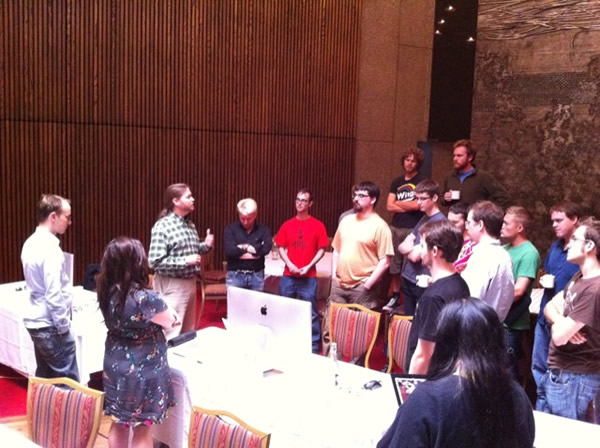
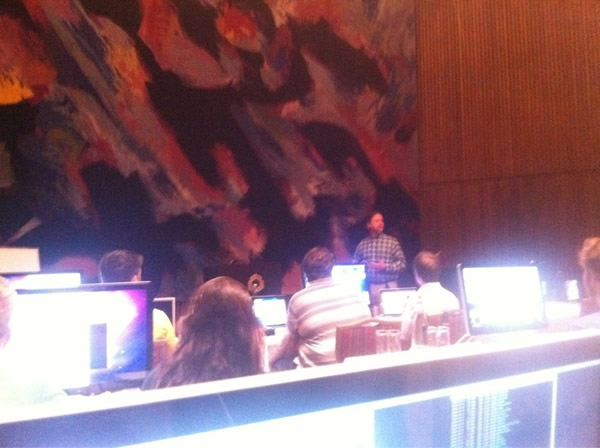
I’m not the only Shopifolk getting a good geek fix today. Back in Ottawa, the Shopify office, which is two-thirds developers, is awfully quiet because they’re not there! They’re a few blocks away at the National Arts Centre, where they’re getting yet another perk of the job: a CodeRetreat with Corey Haines!

Code retreat 1

One of the biggest challenges that developers face today is “sharpening the saw”. Typically, they’ve got a lot of work to do and precious little time in which to do it — and that’s when things are running smoothly. Often, it gets much worse, with requirements as slippery as eels in vaseline and deadlines that have come and long since gone, and even the most agile of processes is helping them fail to keep up. As a result, they’re so bogged down with getting their projects up and running that they don’t get much chance to step back and work on their own skills. I’ve seen this firsthand, especially in the enterprise world, back when I was a Microsoft developer evangelist — many of them told me that between rapidly reorganizing business processes, ever-changing tech and just plain old just-not-enough-hours-in-the-day, they were worried that their development skills were atrophying.

Code retreat 2

Corey Haines’ CodeRetreats are all about addressing this problem. Here’s a description of the event, straight from their site:

Coderetreat is a day-long, intensive practice event, focusing on the fundamentals of software development and design. By providing developers the opportunity to take part in focused practice, away from the pressures of ‘getting things done’, the coderetreat format has proven itself to be a highly effective means of skill improvement. Practicing the basic principles of modular and object-oriented design, developers can improve their ability to write code that minimizes the cost of change over time.

It sounds like fun, and were I not doing my thing over here on the Left Coast, I’d be at the CodeRetreat with bells on. It’s this sort of opportunity that Shopify regularly provides to the Shopifolks that make me so glad that I joined the company.

Code retreat 3

Since I’m on the other side of the continent and three time zones away, I have no clue what’s happening at the CodeRetreat. I’ll have to make do with these photos that a couple of people on our development team have been Tweeting and ask them for more details when I get back (and you can be sure I’ll try to turn that into an article for this blog).

This article also appears in the Shopify Technology Blog.

{ 1 comment }

Anna’s Notes on “Landing Your Dream Job 2.0″

by Joey deVilla on June 24, 2011

Anna lambert

One of our great Shopifolks — that’s my own little neologism for “person who works at Shopify” — is Anna Lambert (@alambzz on Twitter). She’s a summer intern, but you wouldn’t know it, as she’s sunk her teeth into the job with the intensity of a co-founder. She shares the front desk with Brittany Forsyth, our head of HR, and things at Shopify run that much more smoothly because of her hard work.

If you saw yesterday’s article on the OCRI smarTALK, Landing Your Dream Job 2.0, you know that I took copious notes at that event. (And if you haven’t seen it, and especially if you’re looking for work in today’s competitive environment, read my notes now!) It turns out that I wasn’t the only one taking notes: Anna was there too, and she distilled her notes into a nicely annotated — or should I say Anna-tated? — top ten list:

  1. Think to yourself: Can I add value to this company?
  2. Justify your claims.
  3. Think otuside the box.
  4. Reduce the risk.
  5. Get your name out there.
  6. Know your audience.
  7. Do research and get your facts straight.
  8. Form a relationship.
  9. Use social media tools to your advantage.
  10. Never use the infamous “to whom it may concern”.

Anna explains each of these points in greater detail in her article in her blog, Little Miss Shopify. Check it out!

This article also appears in the Shopify Blog.

{ 0 comments }

Notes from “Landing Your Dream Job 2.0″

by Joey deVilla on June 23, 2011

Ocri 1

Landing Your Dream Job 2.0

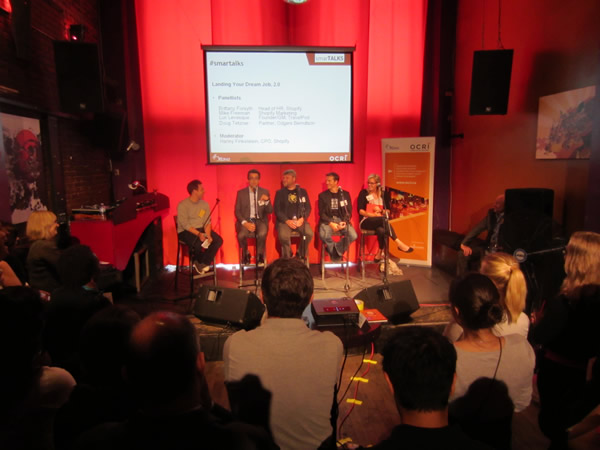
Landing Your Dream Job 2.0 took place late yesterday afternoon at the Mercury Lounge in Ottawa’s ByWard Market. This was one of a series of smarTALKS held by OCRI, the Ottawa Centre for Regional Innovation, an organization whose goal is to promote the area’s knowledge-based businesses and industries. smarTALKS are sessions meant to “engage entrepreneurs, thought leaders and innovators in forward-thinking conversations about ‘what’s next.’ ”

Here’s the abstract for Landing Your Dream Job 2.0:

From custom landing pages to personal branding, the traditional strategy for landing your dream job may no longer be effective. Particularly in the startup and technology space, successful candidates are thinking outside the box and creating customized application packages that market to target employers using unique methodologies and tactics. This renaissance of creativity among motivated candidates has raised the bar for entry into many high growth companies. The panel will focus on sharing some of these contemporary tools as well as best practices for landing a job at the tech firm or startup of you choice. In addition, the panel will discuss trends in current hiring practices and will provide an analysis of how things have changed over the past few years.

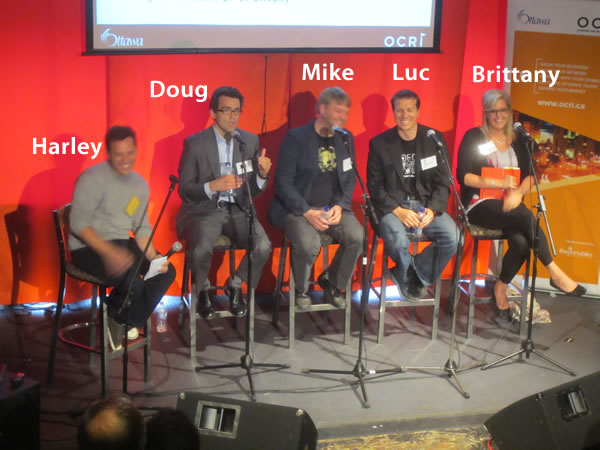
Harley Finkelstein, Shopify’s Chief Platform Officer and Shopify’s representative at OCRI, played the role of host and panel moderator. The panelists were:

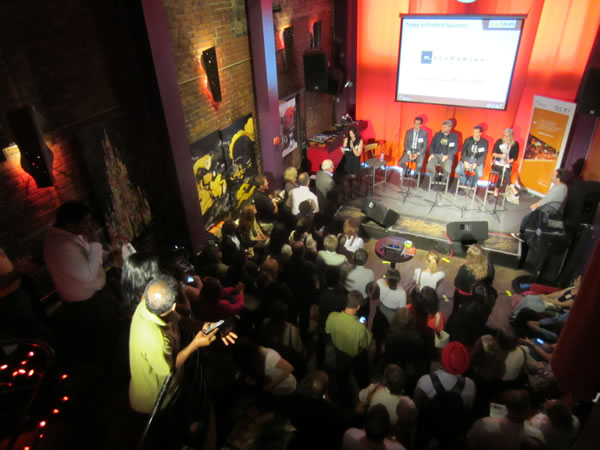
This panel discussion played to a packed room, with attendees filling the the main level of the lounge, the balcony and even the staircase leading up to the balcony. I’d say that there are a number of people in Ottawa either looking for work or workers!

Notes from the Talk

Ocri 2

I took notes during the whole session and have posted them below.

Harley Finkelstein: How have things changed in the way people apply for jobs?

Doug Teztner:

  • These days, there’s so much more information available about places to work and what they’re like
  • Responding to job postings has become like responding to RFPs — you’re not just simply applying, you’re doing research
  • People are getting background information on companies through sources like LinkedIn
  • You can network with people who work at the place you’re applying to
  • Candidates these days have to be more selective — they should be asking themselves these questions:
    • “Where can I add value?”
    • “Which jobs line up with my resume and skillset?”

Harley Finkelstein: When Mike Freeman applied for a job at Shopify, he did something clever: he created a Shopify store selling himself. Mike, how’d you come up with the idea, especially since you essentially a web page with a single purpose: to be landing page for Shopify?

Mike Freeman:

  • I didn’t want to take the shotgun approach — I really wanted to work at Shopify
  • So I did some very heavy research
  • I’ll admit it: I was putting all my eggs in one basket
  • Looked for connections between him and Shopifolks (found a past connection between him and Harley — they worked at the same org)
  • It was all about standing out and getting past all the other applicants

Harley Finkelstein: Speaking of standing out, Luc, what different tacks do you think job applicants should take?

Luc Levesque:

  • It’s a balancing act between standing out and annoying the people you’re trying to reach
  • If you’re applying for a job at my company, do something I can look at and sink my teeth into
  • The question that people who are hiring are asking themselves when evaluating candidates is: “Can they perform?”
  • A great way to stand out is to work on your online profile

Harley Finkelstein: If you’re not applying to TravelPod in some standout way, are you in trouble?

Luc Levesque:

  • The more you can do to “de-risk” the hire, the better
  • The trusted reference — someone who I trust who is recommending you — is the trump card

Harley Finkelstein: This new trend in finding interesting ways to get hired seems to be a product of the tech and the startup scene. But there’s at least one story outside tech where a guy who wanted a job on Madison Avenue set up pages so that when CEOs of adevrtising firms did vanity searches, his resume would appear near the top of the search results. A very creative solution. Brittany, do companies need to encourage this?

Brittany Forsyth:

  • In today’s market, we expect this sort of thing more and more
  • It’s a good answer to the problem of what to do if you’re young and don’t yet have the connections you need
  • When I get a job application for Shopify, I look at the cover letter: it’s the first indicator of their fit with the company
  • One of the best ways to land an interview is to provide some proof that you can do the job
  • If you write code, we can check Github. If you design, we can check your online portfolio
  • Don’t be afraid to go outside the box

Harley Finkelstein: What do you do when you have a position you need to fill?

Doug Teztner:

  • Another big change in hiring is that the word about jobs gets out in nichier ways now; it’s more targeted
  • We’ve been doing more job adveritsing via LinkedIn than with the Globe and Mail
  • Looking for a job is a job: it’s a sales job, in fact. You’re selling yourself!

Ocri 3

Harley Finkelstein: This new style of job-seeking, with extreme customization and a focus on standing out — is it a Gen-Y specific thing?

Brittany Forsyth:

  • No, I think it’s just that the bar has been raised
  • I don’t think it’s specific to any generation

Harley Finkelstein: Is this new-style job-sekking increasing the level of engagement with applicants? Do they know more about the businesses they’re applying for?

Luc:

  • I don’t know
  • It’s too hard to tell if it’s a fundamental change in the way people look for work, or simply that we’re hiring more
  • It could also be that the tools and resources are better these days.

Harley Finkelstein: When you were applying for work at Shopify, did social media play a role in the Shopify job application?

Mike Freeman:

  • Yes!
  • I used LinkedIn to see who worked where and who’d been hired
  • Facebook can also be a good source of information and connections
  • If you’re applying for work, check out the company’s site. You can get a feel for the company’s “voice” and see if you’re a good fit
  • You’ll feel more comfy going into an interview if you know more about them

Harley Finkelstein: Is the quality of candidates changing?

Doug Teztner: People are better prepared now
Ocri 4

Harley Finkelstein: Why applying or interviewing for a job, how important is know the audience?

Brittany Forsyth:

  • Research goes hand in hand with knowing your audience
  • Customize your job application to match

Harley Finkelstein: What is a dream job? Is it a new concept?

Luc Levesque:

  • I don’t think I’m old enough to answer that. Doug? (laughs)
  • There was one applicant — he’s now a rock star in my company – I initially didn’t hire him
  • He found out what events I went to, and whom who I knew, attended those events, befriended those people

Doug Tetzner:

  • Make a list of people who like you

Luc Levesque:

  • Relationships: they’re the trump card
  • I’ve seen who’ve had horrible interviews, but because of a recommendation from a trusted source, I hired them
  • The slam dunk: a recommendation from someone whom I trust, whom you reported to and who depended on you

Brittany Forsyth:

  • We had one application who took our Shopify site marked what was wrong
  • It can be a double-edged sword, but in his case, it worked
  • It proved that he knew us and it showed that he did his homework

Doug Tetzner:

  • Please don’t start your cover or intro letter with “To whom it may concern”. Who uses “whom” anymore?
  • Just find out my name! It’s not that hard
  • Have a couple of good questions that you would ask during the interview
  • “I did 70 hours of prep for the short list!”
  • At the job interview, don’t go for broadcast, but conversation
  • You should be asking yourself: “Is this a good fit? Am I adding value?” Figure out if it’s right for you, they’ll figure out if you’re right for them

Mike Freeman:

  • Coming out of school, you were probably given a lot of examples and templates for cover letters and resumes
  • Break free! Do something different that represents you
  • In my interview, I ended up talking with [Shopify CEO and co-founder] Tobi [Lutke] and Harley about random things
  • If you can’t find your dream job, find your dream company and work towards that dream job

Harley Finkelstein: Mike’s store was a good sign that he was the sort of person we were looking for and that he’d be a good fit

Luc Levesque:

  • Hiring is really more more about getting the right people on the boat
  • If you’re talking to a founder or CEO and you blow them away, they’ll invent a position just for you
  • In the back of their mind, they’re asking themselves “Am I going to have fun working with this person?”
  • You are building a relationship with the hiring manager
  • Turned down a rock star on the interview because they couldn’t build that relationship

Brittany Forsyth:

  • Make sure your social media profile represents you well
  • If your social media software allows it, do a good customization – don’t just go with the boilerplate!
  • And working towards the dream job? I did that: I took an office manager job at start with goal of becoming an HR manager

Doug Tetzner:

  • Include your interests in your resume! I want to know what kind of person you are
  • Will someone please do a video resume?
  • Don’t say “If there’s anything else keep me in mind” — it says you’ll take anything
  • Instead, do a quick follow up
  • You want to build some chemistry with the person you’ll be working for
  • If there’s no chemistry at the start, it will typically not get better

Luc Levesque:

  • Don’t talk money at the first interview
  • It’s a first date! Don’t rush into the sex!

Quotes from the Q&A

Mike Freeman: If you’re trying to make a name for yourself and you’re just starting out, start a blog on a topic in your field

Luc Levesque: A blog is a great way to do that — it builds credibility

Doug Teztner: A lot of companies have a little list of people they’d like to fire

(In response to a question about an older applicant competing with younger ones) Luc Levesque: In the case where it’s you versus a 22 year-old and you’re using same tools, you experience could be the edge you need

(On being invited to lunch by people trying to hire you even though you’re not looking for  job) Luc Levesque:

  • You’re going to eat anyways, take every lunch!
  • The connection you make could be valuable later
  • Oh, and by the way, whoever invites, pays

This article also appears in the Shopify Blog.

{ 0 comments }

Angry Birds: Kickin’ Ass with Their Shopify Store

by Joey deVilla on June 22, 2011

angry birds and shopify

entrepreneur logoOne of the best-known of Shopify’s nearly 14,000 stores is the Angry Birds store, where you can buy plush versions of the birds and pigs from the insanely popular videogame. Entrepreneur magazine has a story titled Anger Management, which covers Rovio (the people behind Angry Birds) and why they chose Shopify to sell their merch:

"We looked at a number of different options, but Shopify made the most sense," [Niklas Kari, head of retail] says. "We had strong recommendations from other partners, and setting up the store was easy."

The Angry Birds store opened in October 2010 with the assistance of Mark Dunkley, one of our superstar designers, who cranked out a whole store design from concept to working ecommerce site in 72 hours. Since its opening, they’ve sold 2 million plush toys.

angry birds store

Check out the article in Entrepreneur, and if you’re thinking of starting an online store, Shopify’s the one to go with!

This article also appears in The Adventures of Accordion Guy in the 21st Century.

{ 1 comment }

Ottawa Techie Events Tonight!

by Joey deVilla on June 22, 2011

wednesday

Don’t forget:

For more details, see my earlier post on tonight’s events.

This article also appears in the Shopify Technology Blog.

{ 0 comments }

BarCamp Seattle

seattle barcamp

This weekend, I’ll be in Seattle for BarCamp as part of the BarCamp tour, a cross-North-America sponsorship put together by five startups: Batchblue, Grasshopper, MailChimp, Wufoo and the company for whom I am representative, Shopify.

BarCamp is an unconference – a gathering that turns the traditional notion of a “conference” upside-down. Rather than the content being determined by its organizers, it’s determined by the attendees. At the start of the conference, any attendee can propose a session topic, and if it’s accepted by the group, that session gets put on the schedule grid and assigned a time slot and a room. Sessions themselves are somewhat different from sessions at a traditional conference: while there’s still roles akin to a “presenter” or “presenters” and an “audience”, the line between the two is considerably more fuzzy. They’re closer in spirit to open discussions rather than lectures.

barcamp-tour-logo

BarCamp Tour are not your typical sponsors. Just as BarCamp is an unconference that turns the notion of a conference upside-down, you might say that we’re “unsponsors” doing the same to what is traditionally viewed as sponsorship. Yes, we provide funding to various BarCamps, but we do something that most sponsors don’t do: we show up and participate. We help out the organizers with everything from putting together parties to helping move furniture and clean up. We take part in the sessions, sometimes as participants in the “audience”, sometimes as “presenters”. While we do promote our companies, it’s not in a hard-sell way, and often, we do it by listening to and learning from the people there – after all, they’re potential customers, partners and even hires.

BarCamp Seattle takes place this weekend on Saturday, June 24th and Sunday June 25th at the Adobe Conference Center in Seattle’s Fremont neighbourhood (801 N 34th Street). Saturday is a full day with check-in starting at 8:00 a.m. and the unconference kicking into full swing at 9:00 a.m.; Sunday is a half day with check-in starting around 8:00 a.m. (emphasis on around; there’s a party on Saturday night) and the unconference resuming at 9:00 a.m..

BarCamp Seattle, like all BarCamps, is free but you need to register. To register, visit BarCamp Seattle’s EventBrite page.

BarCamp New Orleans

barcamp new orleans

My next BarCamp will be BarCamp New Orleans, also known as BarCamp NOLA. I’m rather looking forward to this one for a few reasons:

BarCamp New Orleans takes place on Saturday, July 16th and Sunday, July 17th at the Launch Pad coworking/startup space (643 Magazine Street, Suite 102). Registration on the Saturday is at a very civilized 9:30 a.m. with the unconference getting into full swing at 10:00 a.m. and running until 5:00 p.m.. Sunday is a “Hack Day” with registration at 9:30 a.m., start at 10:00 a.m. and running until 5:00 p.m..

Like all BarCamps, BarCamp New Orleans is free but you need to register. You should register soon – only 76 spaces remain as of this writing!

BarCamp Toronto

barcamp-toronto-anyone

A couple of weeks ago, I put out the call for help in getting together a BarCamp in Accordion City. We haven’t had one in four years and I think it’s about time! The other folks on the BarCamp Tour, most notably Jonathan Kay of Grasshopper who absolutely loves “Toe-RON-toe”, have expressed interest in having one in Canada and are willing to be a sponsor.

A great collection of people have stepped forward and volunteered to help. I’ll be meeting with them online very shortly (I’m in Ottawa for the summer, but I return to Accordion City in the fall) to discuss what happens next, but know this: the first step toward bringing BarCamp back to Toronto has been made.

This article also appears in the Shopify Technology Blog.

{ 0 comments }

Shopify: Developers Wanted!

by Joey deVilla on June 20, 2011

looking for coders right nyan

Do you rock at iOS/Objective-C? How about Ruby and Rails? Or perhaps JavaScript and CoffeeScript? Would you like to do some fun, challenging and profitable work at Shopify? We’d like to have a word with you. Don’t forget, the job has some awesome perks!

Drop me a line at joey@shopify.com and we’ll talk.

This article also appears in the Shopify Technology Blog.

{ 1 comment }

wednesday

If you’re in the Ottawa area on Wednesday and you’ve been looking for tech get-togethers or a chance to meet the Shopify crew, you’re in luck! We’ve got a couple of events taking place, and as the Shopify spokesmodel, I’ll be at both of them:

Land Your Dream Job 2.0

The Venn diagram below shows where your dream job is: smack in the heart of the “Hooray!” zone:

dream job

I’ve been fortunate enough to live in that zone for a good chunk of my career, and my current job as Shopify’s Platform Evangelist certainly applies. I’ve landed these sorts of jobs in rather atypical ways and I think that going outside the “expected” or “typical” gives you the best odds at landing your dream job.

smarTALKSThe Land Your Dream Job 2.0 event is part of OCRI’s smarTALKS series and all about doing just that. My fellow Shopifolks will be among the people there talking about how you can land that job that blends what you do well, what you want to do and what you can be paid to do.

You’ll learn about:

  • The unusual methodologies and tactics that people who land dream jobs use when approaching employers
  • What you can do to land a job at the tech firm or startup of your choice
  • The current trends in hiring practices, what’s changed over the past few years and how you can tune your job search tactics around them

And you’ll hear from:

  • Brittany Forsyth, Head of HR, Shopify
  • Mike Freeman, Marketing Dude, Shopify
  • Luc Levesque, Founder and GM, TravelPod (TripAdvisor)
  • Doug Tetzner, Partner, Odgers Berndtson
  • and Harley Finkelstein, Chief Platform Officer at Shopify, who’ll be moderating the event

Land Your Dream Job 2.0 takes place this Wednesday, June 22nd at Mercury Lounge (56 ByWard Market Square) from 4:00 p.m. to 6:00 p.m.. This is a FREE event, but you do have to register.

register dream job

Node.js Ottawa Pub Nite

node.js

If you’re into JavaScript, Node.js or related tech like CoffeeScript, come to the Sir John A. Pub on Elgin later Wednesday night for Node.js Ottawa Pub Nite! We’ll be there to talk about Node and related technologies, as well as to get to know what people are up to, talk about our projects, answer the “What is Node, anyway?” questions that are still floating about and discuss what we’d like to see happen with the Node.js meetup group.

Node.js Ottawa Pub Nite takes place this Wednesday, June 22nd at the Sir John A. Pub (284 Elgin Street) from 7:00 p.m. to 9:00 p.m.. This is also a FREE event, and we recommend that you register so they have an idea of how much space to claim in the pub.

register node pub nite

This article also appears in the Shopify Technology Blog.

{ 2 comments }

Selling More Shopify Apps, Part 2: Pictures

by Joey deVilla on June 18, 2011

What’s This All About?

Welcome to the second installment of Selling More Shopify Apps! In this article series, I show developers how to sell their apps — add-on applications that extend Shopify’s capabilities. Since this is really more about selling than developing, the series appears here in the Shopify blog instead of in the Shopify Technology blog, even though it’s aimed at developers.

Oh, yes: for those of you who’ve been wondering: I will do a series of articles for shopowners who want to sell more stuff through their Shopify stores. Soon! But in the meantime, give this series a look — even though this series is about selling apps, there are some principles that do apply to regular stores.

A Quick Recap

In the previous article in this series, I talked about the decision-making process that users go through when perusing the app store and deciding whether to buy your app.

They go through these steps:

  1. They see your app’s icon, name and short description on the App Store page.
  2. They click on your app’s icon, taking them to the App Store page for your app.
  3. They look at your app’s screenshots and videos first.
  4. Then they look at the rating.
  5. And finally, they read the description.
  6. That’s when they make their decision. (And hopefully, at that point, they click the “Install App” button.

In this article, we’ll look at a very effective way to make your app’s App Store page better: by adding pictures and video. Pictures and video are part of step 3 of the user’s decision to buy, and they’re the first thing the user looks at when s/he ends up on your app’s page. They make that oh-so-important first impression that can help drive a sale.

Take a look at the screenshot for an app in the App Store:

The video and pictures (which I’ve highlighted above) take up the entire right-hand side of the screen. Your eye is drawn to them. People naturally gravitate towards pictures and videos in app stores, whether they’re Shopify Apps, or apps for mobile phone and tablets or stores for desktop apps, such as the Mac OS App Store. You wouldn’t run a Shopify store without pictures of the goods you’re selling; the same rule applies to apps!

Think of your app’s page as being two sections: the show section and the tell section. The show section is the opener, and it’s where you show your app in action and give your potential customers a broad overview of what it’s for, what it does and what the experience of using it is like. The tell section is the closer, and it’s where you provide a more in-depth view of your app, listing its capabilities and showing the payoff of enhancing the customer’s store with your app.

The pictures and video of your app’s page are the show section, the rating and description of your app’s page are the tell section. You lead with show and finish with tell. Let’s talk about show right now, and in a later article, we’ll delve into tell.

Pictures

Screenshots

People like seeing screenshots of apps. That’s why just about every app store, from mobile to desktop to Shopify includes them. Even the simplest of applications can benefit from a screenshot because they give users a better “feel” for the app, even though the written description may contain far more information useful to their decision to buy or not buy. There’s a reason why bricks-and-mortar shops invest a lot of money in storefront and in-store displays, even if you’re not going to get much information from just looking at the products: people make decisions based on appearances.

The first question that comes to mind at this point is “what screenshots should I use?” I suggest reviewing your app and keeping these questions in mind:

  • Which screen is the one where the user will be spending the most time when using your app? You’ll definitely want a screenshot of that.
  • For customer-facing apps, which screen shows something that makes the customer experience better? If your app has a feature that makes the process of going through the shop’s catalog, make a purchase decision or buying easier and it has some kind of visual element, that feature probably needs a screenshot.
  • For shopowner-facing apps, which screen shows something that makes the shopowner experience better? If your app has a feature that lets them go through their store data more easily, serve and communicate with customers better, process and fulfill orders more quickly or helps them save or make money and it has some kind of visual element, that feature probably needs a screenshot.
  • And finally, which screen just looks good? Perhaps it’s a graph generated by a shopowner-facing app or a cool-looking widget on a store page created by a customer-facing app, but if it’s attractive, you might want to consider including it in the screenshots for your app.

Screenshots Don’t Have to Be Full Screen

If there’s a feature in your app that makes the customer or shopowner experience better and it doesn’t take up the whole screen, remember that you don’t have to use a full-screen screenshot. You can simply use a screenshot of the feature without including the rest of the screen. If the feature is particularly small in comparison to the rest of the screen or if it has a lot of text, you might want to enlarge it using your favourite image editing program.

In their App Store page, Optimizely includes a screenshot of just the portion of the page relevant to their app:

Optimizely

If It Helps, Annotate Your Screenshots

Sometimes it’s hard to tell what’s going on with just a screenshot. If this is the case with your app, annotate it: use you favourite image editing program and use text, arrows, highlighting or whatever else helps to make what’s going on onscreen easier to understand. Just be careful not to go overboard with the text on your screenshots: that’s what the app description is for.

Here’s a quick example of an annotated screenshot:

Annotated screenshot

You Can Include Other Graphics, Not Just Screenshots

When we built the App Store, our original intention for letting you upload pictures to your App Store page was for you to provide screenshots of your app in action. We’ve since discovered that a couple of app makers came up with the clever idea of posting graphics that aren’t screenshots but explain how their app works. We think it’s a great idea, and if you’ve got some kind of image that makes it easier for potential customers to understand your app and why they should use it, you should include it in your App Store page.

For a good example where an app maker used a non-screenshot image, take a look at the App Store page for Canned Banners. They have a screenshot of their app in action, but they also have the graphic below, which explains how you use their software to create quick and easy banner ads for your store:

Canned banners

Clever! I think it’s in the same spirit as cyberpunk author William Gibson’s line from his “Sprawl” stories: “The street finds its own uses for things.” If you’ve got an image that helps potential customers “get” what your app does, use it!


Next: Video!

This article also appears in the Shopify Blog.

{ 0 comments }

decision maker

Shopify? Apps? I Thought It Was an Ecommerce Thingy!

It is. If you want to sell stuff or services online in exchange for money – a business model so crazy that it just might work – Shopify is the best, easiest and most hassle-free way to do it. You can use a store that lives on our hosted service or build a program that calls our API to do the ecommerce stuff: the catalog, the shopping cart, the credit card hoo-hah, and so on.

While Shopify does a lot, it can’t do everything. Perhaps there’s a feature that you wish Shopify had, but it applies only to a small vertical or maybe even only your business. Or there just might be some feature that we haven’t thought of implementing yet.

That’s where apps come in: they’re applications that make use of the Shopify API to:

  • Access a shop’s data (with the owner’s permission, of course)
  • Programmatically perform just about anything the shop owner can do on their shop’s admin panel

Want to declare a “happy hour” where you drop the price of an item from 5 to 7 p.m. next Thursday? Shopify doesn’t do it out of the box, but an app can! Want to send a Twitter direct message or SMS text to a merchant whenever a customer places a big order, so s/he can make sure it gets handled properly? You can write an app for that. If you can think of a feature to make the experience for customers or shopowners (or both) better, you can make it an app. And you can make money doing it!

You can reach the 15,000 Shopify users – a very focused, dedicated bunch – and sell apps to them through the Shopify App Store. We know a number of developers who are doing quite nicely selling apps and making Shopify showowners productive and happy, and when our customers are happy, so are we.

That’s what this series of articles is all about: selling more Shopify Apps. If you’re a Shopify App developer (or thinking of becoming one), this series will show you how to sell them better. We’ll also be publishing articles about writing apps, from how-tos to ideas for apps that we’d like to see become real.

The Decision-Making Process

Take a look at Shopify’s App Store, and I’ll walk you through the typical customer’s decision making process when they’re looking for apps.

1. They see your app’s icon, its name and the short description on the App Store page.

app store

When you visit Shopify’s App Store, you see a page like the one shown above, featuring apps displayed on shelves. Rather than being broken up into pages, the App Store’s main page is an “infinite scroller”; you simply scroll down the page to see all the apps in the Store. For the user, scrolling — especially in the age where most mice have scroll wheels and scrolling-by-flicking is increasingly common thanks to smartphones and tablets — seems faster and more effortless than paging.

Each app is represented by its icon, with its name and a short description (140 characters maximum) to its right. Clicking on the icon, the name or the description will take you to the page for the corresponding app.

There are a number if ways users can sift through the apps in the store. They can filter the apps by category, as shown below:

category

They can also filter apps by which software or services they integrate with:

integrations

And they can also change the way the apps are sorted in the store:

sort order

The default sort is “from newest to oldest”, and the other three options are:

  • From highest-rated to lowest-rated
  • From most to least popular
  • Whether or not to limit the results to free apps

Ideally, you want your app to be as close to the top of the App Store page as possible – what they used to call “above the fold” in the newspaper world. Being on top of the list puts you in the user’s path of least resistance and makes it more likely that the user will move to the next step on the path to purchasing your app: your app’s page.

Your app will be on top of the list just after you submit your app for the first time, as it will be newest. However, your app won’t remain the newest forever, so your eventual goal will be to make your app the highest rated, the most popular, or preferably both.

You’ll also want to make sure that your app makes a good first impression on the App Store’s main page. The good news (and the bad news, too) is that once the user sees your app on the page, there are only three things that you have at your disposal to catch his/her attention:

  1. Your app’s icon. Is it visually appealing? Does it hint at what your app does or what its effects will be?
  2. Your app’s name. Is it catchy or memorable? Does it give the user an idea of what your app does or what its effects will be?
  3. Your app’s description. Does it clearly state what your app does or why someone would want to use it, all in 140 characters or less?

Get all three right, and you’ll increase the odds that the user will get to the next step in the decision-making process: moving away from the big list of apps and focusing on just yours.

2. They click on your app’s icon, taking them to the App Store page for your app

app page

If your app has piqued the user’s interest on the App Store’s main page, s/he’ll click on it and be taken to your app’s page, which displays a lot of information about it, namely:

  • The app’s icon
  • The name of the app
  • The app’s publisher
  • The app’s rating
  • How much the app costs
  • Any additional software required by the app
  • The “Install App” button
  • The full description of the app
  • A list of the services that the app can integrate with
  • One or more screenshots of the app
  • [Optional] One or more videos of the app
  • User reviews and responses from the publisher

Each of these items affects the user’s decision-making process, and in this series of articles, we’ll look at what you can do with them to make it more likely that the user will buy it.

Based on experience with app stores of all sorts, from Shopify’s to shareware to smartphone and tablet stores, here’s what the users typically do next…

3. They look at your app’s screenshots and videos first.

pictures first

Eye- and click-tracking studies show that once the user has landed on your app’s page, they tend to look at the screenshots and videos first. This means a couple of things:

  • You should make sure that you include at least one screenshot of your app in action. Better still, you should include a screenshot for every major feature of your app.
  • Although it’s optional, you should include a video. It could be a video capture of your app in action or something that explains what your app does and why you’d want to buy and install it. The better selling apps tend to include videos on their app pages.

In this series of articles, we’ll cover ways to get the most out of the video and pictures on your app’s page.

4. Then they look at the rating.

rating

A very important factor affecting how well something sells online is the rating. Ever since Amazon, we’ve become quite accustomed to checking the ratings before buying something. It happens not just online, but in real life; I’ve seen people at all sorts of bricks-and-mortar stores – restaurants, liquor stores, big-box electronics stores, car dealerships – whip out their smartphones and check out the ratings for something they’re thinking of buying. That’s why social media and word-of-mouth marketing are hot topics these days: they influence people’s opinions, which in turn can make or break sales.

“Get a good rating” is the obvious advice. Less obvious is how you get that rating. We’ll cover what we believe are best practices for getting good ratings, and through them, good sales.

5. And finally, they read the description.

then description

Once the user’s done with the quick-and-dirty visual scan of your app’s page, they then look at your app’s description. If the user has come this far in the process, they’re close to the point where they make the decision to buy or not buy. The description is where you close the deal, and we’ll show you what successful apps do in their descriptions.

6. That’s when they make their decision.

install app button

If you’ve done everything right, this is when the user clicks the “Install App” button. Get enough users doing that, and life’s like this:

oh yeah

Next: A picture is worth a thousand…bucks?

This article also appears in the Shopify Blog.

{ 0 comments }

I just noticed this tweet from our HR queen, Brittany:

brittany tweet

and here’s the photo she linked to, featuring Tobi, our CEO, being a 1337 H4X0R (and an agile one, too!):

pair programming with tobi

As much as I’d like to do pair programming with Tobi, I’m afraid I’d be completely outclassed by him. What with all the great coders in this office, I’m certain that I’m the dumbest guy in the room (which is nowhere as bad as it sounds).

This article also appears in the Shopify Technology Blog.

{ 1 comment }