If you’ve spent time with theOpenZiti Appetizer, you may have noticed this response:
you sent a message, but it can’t be qualified at this time for offensiveness
There’s a hate-speech classifier on the path every message takes, and it’s been waiting for a classifier to talk to. On theSeptember 18 Ziti TV episode, I got curious about it and went down the “How do I get this thing to work?” rabbit hole. It turned out to be a nice tour of how OpenZiti authorization actually works!
Here’s the fun part. The first thing you notice is that the classifier URL has no instance prefix, while every other service name in the demo is scoped. That looked like the answer, but it wasn’t.Prepare tags the Appetizer’s own identity with an unprefixed classifier-clients attribute, deliberately, in a file where everything else goes through scopedName. The dial side was built with one shared classifier in mind rather than one per instance. The URL is right as written.
What’s left to build is the network side: the service and a dial policy. The application was always correct, and it’s been accurately reporting that it couldn’t reach something that wasn’t there yet.
In the end, the fix was a service and two policies, and (yay!) no changes to the code at all.
In the exercise, you add a real classifier (a RoBERTa model fine-tuned on OffensEval tweets) and host it as a dark service. By the end you have two processes talking by service name, with ss -ltn showing nothing listening inside the classifier container while the controller shows it actively hosting. Then you take access away with one policy change and watch the caller get “not found” for a service that’s running perfectly well three feet away.
The exercise shouldn’t take longer than a half hour, and it all runs in Docker containers, which means you don’t need Python, Go, or even the ziti CLI installed locally. I wrote it for people new to OpenZiti, with the diagnosis reasoning spelled out rather than just the commands, since that part transfers to debugging your own dials.
A few things I’d have liked to know going in, which I haven’t seen written down elsewhere:
Flask’s built-in dev server can’t host a ziti service. The bind succeeds and a terminator registers, but it never accepts. werkzeug polls the listening fd through selectors, and a ziti fd isn’t pollable that way. Callers see EOF and the Python side logs nothing. waitress works, and it’s what the SDK’s own Flask sample uses.
The SDK enumerates services at startup and doesn’t re-check per dial, so a service created after your process starts stays invisible until it refreshes.
Thanks to Clint for the Appetizer, which is a genuinely good teaching demo, and for co-hosting the episode this came from.
This is the first in a series! I’m turning Ziti TV episodes into standalone repos people can work through on their own. Episodes:https://www.youtube.com/@OpenZiti/streams
Issues and PRs welcome, especially if you hit something the troubleshooting section misses. Help make it better!
Once again, the repo is here: https://github.com/AccordionGuy/openziti-appetizer-classifier
We recently got a great set of questions from someone evaluating hosted zrok for a web-based e-commerce content tool.
Their situation: a small team of internal colleagues testing a tool for business work that might later become part of their daily workflow, and their budget was zero dollars.
Their main question: Could they use the Free hosted version of zrok?
The super-short answer
Yes!
The short (but with some details) answer
If you’re on a small internal team with zero budget, zrok’s Free hosted plan will cover your core needs:
A stable HTTPS address
Browser access with no install for users
Login-gated access for approved colleagues/users.
Watch the daily bandwidth (you’re limited to 5GB in any 24-hour period), make sure team knows about the interstitial page, and test from every region where you plan to use it.
Before the detailed 5 answers: What’s zrok?
zrok(pronounced “zee-rock”) is an open-source tool for sharing things running on your machine, such as…
A web app,
an API, or
a folder of files…
…without the need for you to open firewall ports or set up servers. You run one command on the machine where the service lives, and zrok gives you a way for other people to reach it. If you’ve used tunneling tools like ngrok, zrok covers similar ground, with private sharing and zero trust networking built in, and with a much bigger bandwidth allowance, too!
zrok can share in two ways:
Public shares give your service a regular HTTPS URL that anyone with a browser can open. zrok handles the TLS certificate. You can optionally require a Google or GitHub login so only approved people get in.
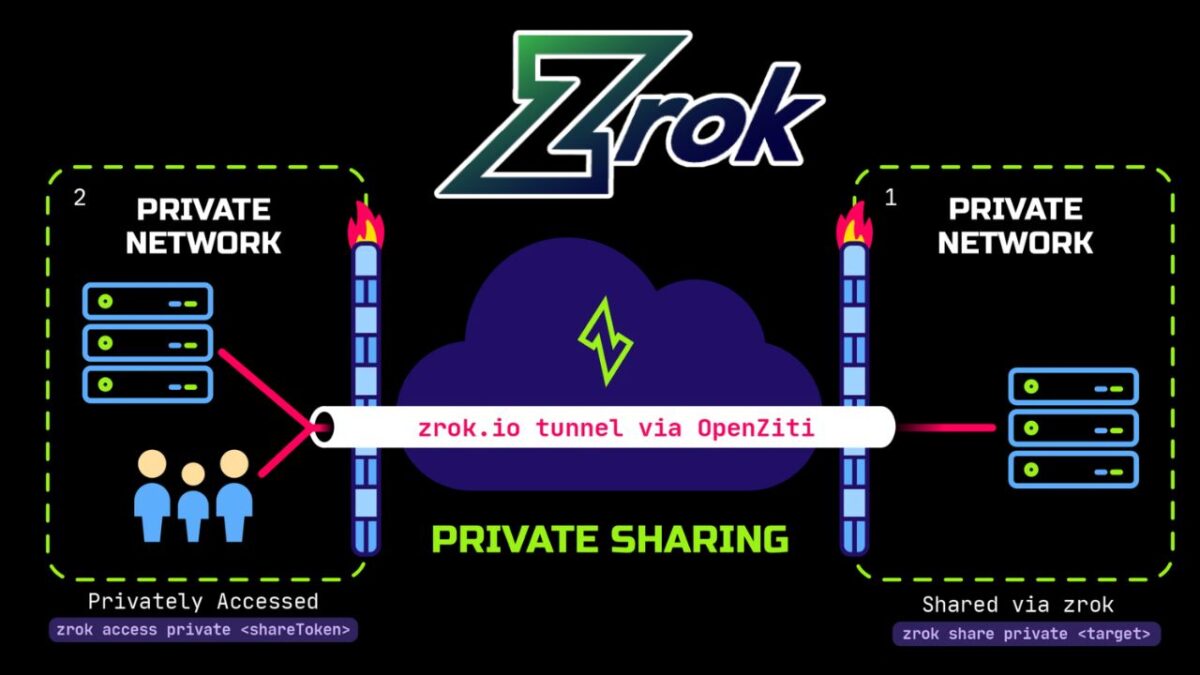
Private shares are reachable only by people who also run zrok and have been given access, so the service is never exposed to the open internet.
zrok is built on OpenZiti, the open-source zero trust networking platform created by NetFoundry. Your service makes outbound connections to the zrok network instead of listening for inbound ones, which means there are no inbound ports on your machine for scanners and attackers to find. As far as unauthorized parties are concerned, nothing’s happening on your machine, and there’s no way in.
You can use the hosted version at zrok.io, run by NetFoundry, or self-host it under the Apache 2.0 license. This article is about the hosted Free plan.
The 5 questions, answered
1. Is small-team, business-related use allowed on the Free plan?
Yes! Testing a business tool with a few colleagues, and using it internally afterward, is allowed on the hosted Free plan. You don’t need a paid tier for commercial use.
The terms that apply are in NetFoundry’s Self Service Subscriptions Agreement. As with any service agreement, have someone read it before you build a workflow on top of it.
2. Can I reserve a persistent, custom-named public HTTPS address without a payment method?
Yes! By default, zrok2 share gives you a random share token that disappears when the share ends. zrok 2.0 adds namespaces and names, which let you keep a stable address:
A namespace works like a DNS zone. The public namespace corresponds to share.zrok.io.
A name works like a DNS record inside that zone. A reserved name persists across runs of zrok2 share.
If you reserve the name contenttool in the public namespace, your app is available at https://contenttool.share.zrok.io. That address stays the same every time you restart the share, and it comes with a trusted TLS certificate automatically.
3. Can colleagues use the app in a normal browser without installing zrok? Can I limit who gets in?
Yes to both! A public share is a regular HTTPS URL, so your colleagues just open it in a browser. Only the machine running your app needs zrok installed.
To limit access to approved people, turn on OAuth for the share. zrok supports Google and GitHub login for public shares, and you can restrict access by email address pattern:
# bash
zrok2 share public --backend-mode proxy \
  --oauth-provider google \
  --oauth-email-address-pattern '*@yourcompany.com' \
  http://localhost:8080
Anyone who visits is sent to sign in first. Only accounts whose email matches the pattern get through. You can repeat --oauth-email-address-pattern to allow several domains or specific addresses.
There’s also a bonus for developers. Once someone is authenticated, zrok adds headers such as zrok-auth-email to every request it forwards to your app. That means your app can tell who’s using it without you building a login system. See OAuth public frontend for the full flow.
4. Are there mandatory charges, usage limits, or restrictions?
No mandatory charges. The Free plan costs $0 a month and doesn’t require a credit card. It does come with limits you should plan around:
5 GB of bandwidth per day, measured over a rolling 24-hour window. If you go over, your running shares are disabled and you can’t create new ones until usage drops back under the limit. For a small team using a content tool this is usually plenty, but heavy media uploads could reach it.
25 environments, 50 share backends, and 50 private access frontends. A small team won’t come close.
Rate limits on public shares: 2,000 requests per IP and 7,500 requests per share, each per 5-minute window.
An interstitial page. Accounts without a card on file show an anti-phishing page the first time someone visits a public share. It’s a one-time click-through for each visitor, but tell your colleagues about it so it doesn’t surprise them. Adding a card removes it, and you’re still on the Free plan.
In case you were wondering, here’s what the interstitial page looks like:
All the details are on the zrok pricing page and in the service limits docs. If you outgrow the Free plan, you can self-host zrok with no limits under the Apache 2.0 license, or talk to NetFoundry about commercial options.
5. Are there known restrictions on reaching hosted zrok shares from mainland China or other countries?
We don’t publish a list of country-by-country access guarantees. Whether a public URL is reachable from a given country depends partly on things outside our control, like local network policy.
Our advice is to review the terms of service linked above, then test your exact setup from the locations your users will be in before you roll it out. Stand up a throwaway share, have a colleague in each region load it and click around, and confirm it performs well enough for your needs.
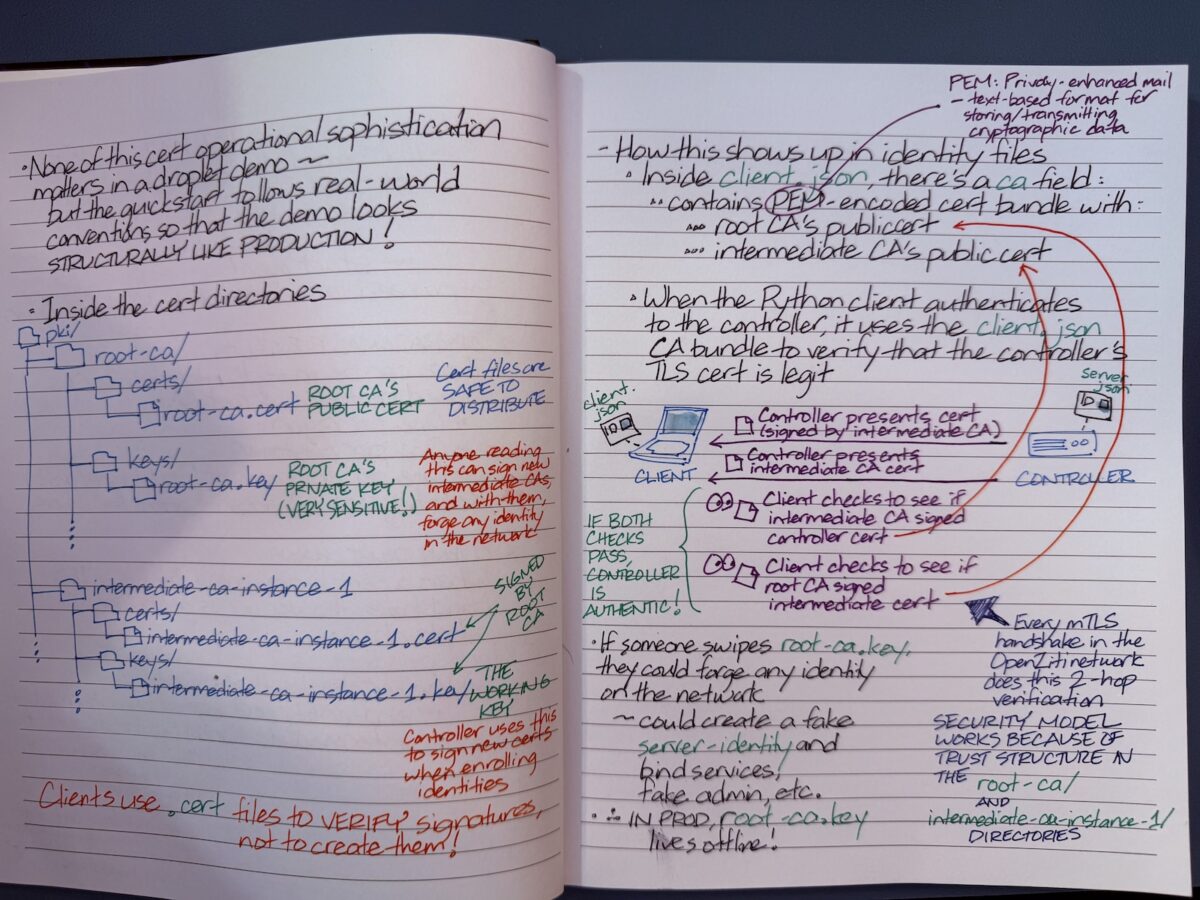
For the curious, here are my notes for an upcoming Ziti TV episode where we’ll be talking about what’s in the OpenZiti Quickstart.
OpenZiti Quickstart is a single command (ziti edge quickstart) that launches a complete, working OpenZiti network a few seconds. It does a lot behind the scenes, by
creating a fresh certificate authority hierarchy,
initializing a controller database,
creating and enrolling a router identity,
bootstrapping an admin user,
and starting both the controller and router as a single running process.
It does all this with sensible default policies already in place, which means identities can immediately connect through the router to any service.
As its name implies, the Quickstart is meant to get an OpenZiti zero trust network up and running is very short order, and it’s meant for demos, local development, and learning the platform. It has everything a production deployment would spread across multiple processes, machines, and days of setup, but it’s packed into a single instance that you can tear down and re-run whenever you want.
Simply put, it’s the fastest path from zero to a working network you can actually build against.
As for the question of why I go with handwritten notes: it’s easier to add diagrams, and I end up understanding and retaining things better.
It’s a quick but deep dive prompted by a great question over on our Discourse forums: “What’s the service configuration for the hosts part when using identity?”
Short answer: there isn’t one. No host.v1, no tunneler hosting it.
The core idea: in 2.0+, the controller is the hosting app. Give it an identity and it binds the service itself. There’s no separate tunneler, no host config. That’s the whole trick behind darkening an API you’d normally have no choice but to expose.
What the demo does: starting from a fresh 2.0.2 quickstart, Clint splits the controller’s APIs across two web listeners. The edge client and OIDC APIs stay on the public listener (0.0.0.0:1280). The management API gets no internet-facing port at all! It’s bound to the controller’s own Ziti identity and reachable only over the overlay by identities authorized to dial it. Then he proves it three ways: over loopback, with the ziti CLI over the overlay, and with a plain curl through ziti-edge-tunnel.
Before you try this in your own lab:
The intercept hostname has to be in the listener’s server cert. Recreate the server cert to include the intercept name (management.z in the demo), or the ziti CLI won’t connect over the overlay.
The edge-oidc snag. The moment you split listeners, edge-oidc’s auto-binding will bite you. It’s tracked in openziti/ziti#4185. If you’d like confirmation you’re not losing your mind, there’s a matching Discourse thread from folks whose ziti edge login broke on 2.0.0 right after a split.
It’s written by Tod Burtchell, Associate Director Service Planning & Development in Management & Operations Platform (long title, dude!), whom I had the pleasure of meeting at a planning meeting last week.
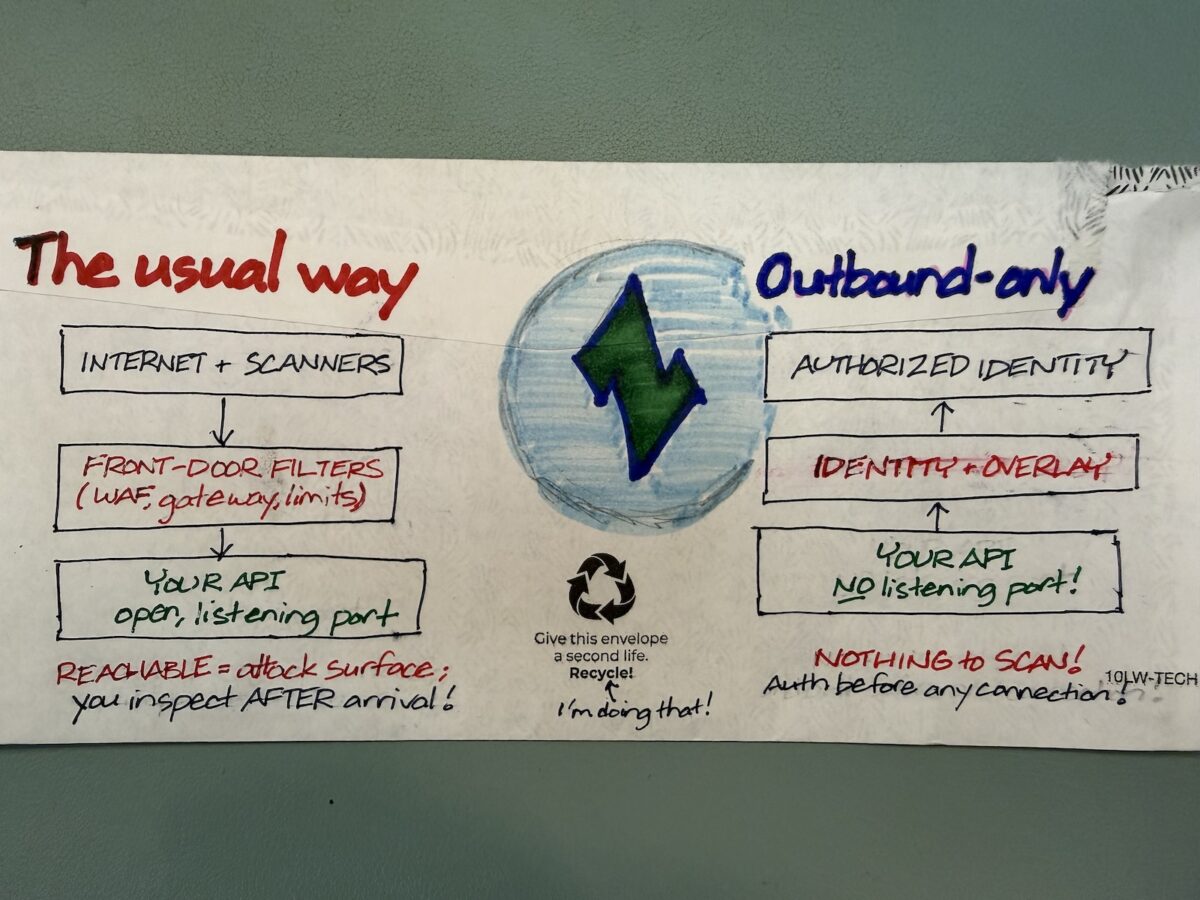
Most API security spend goes into inspecting inbound traffic (WAFs, rate limiting, an API gateway parked out front), and all of it inspects traffic that has already arrived at your infrastructure. The exploit is already inside the door even before the door can do anything.
The general gist of the article leans on NetFoundry CEO Galeal Zino’s earlier article, Squaring the Circle: How to Make Public APIs Private, where he describes APIs as “snowflakes”. They’re snowflakes in the sense that they’re always changing, and each change quietly opens a new attack vector that signature-based defenses haven’t seen yet.
The tl;dr: Hardening the front door is one thing, but why not remove it instead? Picture and API with outbound-only connections, no listening ports, and identity-and-auth before anything connects. As a result, the API stays usable for the people who should reach it and is simply invisible to everyone else. OpenZiti is the open-source plumbing underneath if you want to see how it actually works.
I thought I’d make another “back of the envelope” diagram showing the difference between the usual way of building APIs, and the OpenZiti-powered outbound-only approach.
If you’ve been building anything with agents in the past year, you already know the shape of the problem even if you haven’t named it: you’ve got a model in one cloud, a vector store in another, a tool server somewhere on-prem, an MCP gateway facing the public internet, and a handful of A2A flows stitching the whole thing together. It works. Better than that, it’s exciting!
Let me say this as someone who’s spent a few years in cybersecurity and the last couple of weeks elbow-deep in OpenZiti: the AI systems that we’re implementing are built on a network model that was designed before any of this stuff existed, and that network model hasn’t kept up with what we’re doing today.
The core argument that Philip makes in his presentation is one I think every developer working on agentic systems needs to internalize, regardless of what they’re shipping on top of:
The traditional internet model lets you connect first and authenticate second. Agentic AI breaks that model so badly that we can’t pretend anymore.
Let me walk through why.
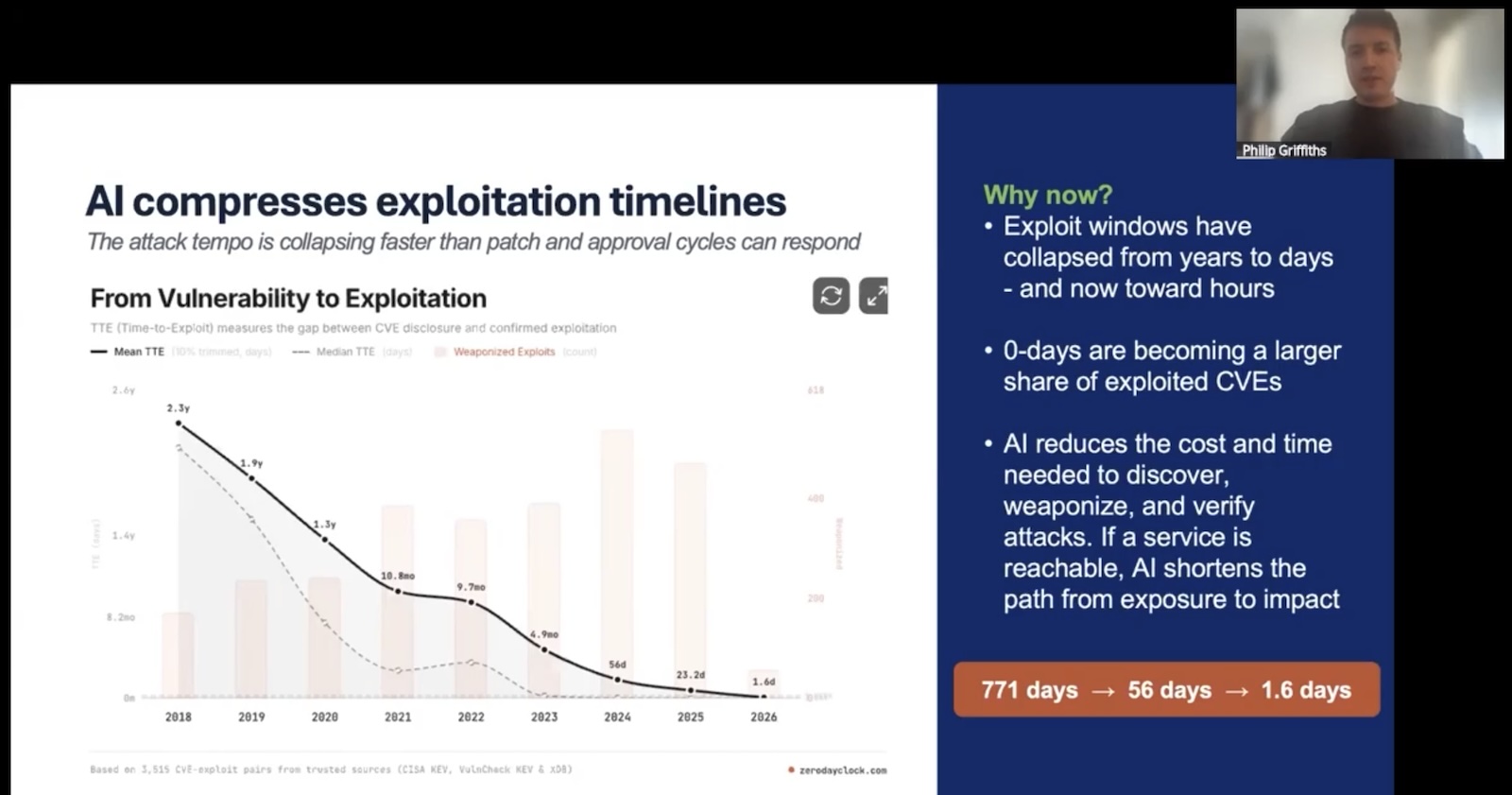
The exploit window has collapsed, and AI is the reason
Tap to view at full size
Philip opened with this knowledge bomb: the median time-to-exploit for newly disclosed vulnerabilities has dropped from days to hours.
AI has joined the Red Team. There’s AI-assisted reconnaissance, AI-assisted fuzzing, AI-assisted exploit synthesis, and more. Every part of the attacker’s pipeline is getting the same productivity boost the rest of us are getting from Copilot and Claude. The asymmetry is brutal. Defenders have to be right about every service they expose, while attackers only have to be right about one.
The LiteLLM supply-chain incident is a useful recent example. An exploit got injected upstream, and because the compromised library ran in environments where it could see them, attackers walked off with SSH keys, Kubernetes tokens, cloud credentials, and the rest of the usual environment-variable buffet. None of that would’ve happened if the service running LiteLLM wasn’t reachable from the place the attacker was sitting. Reachability was the precondition for everything else that went wrong.
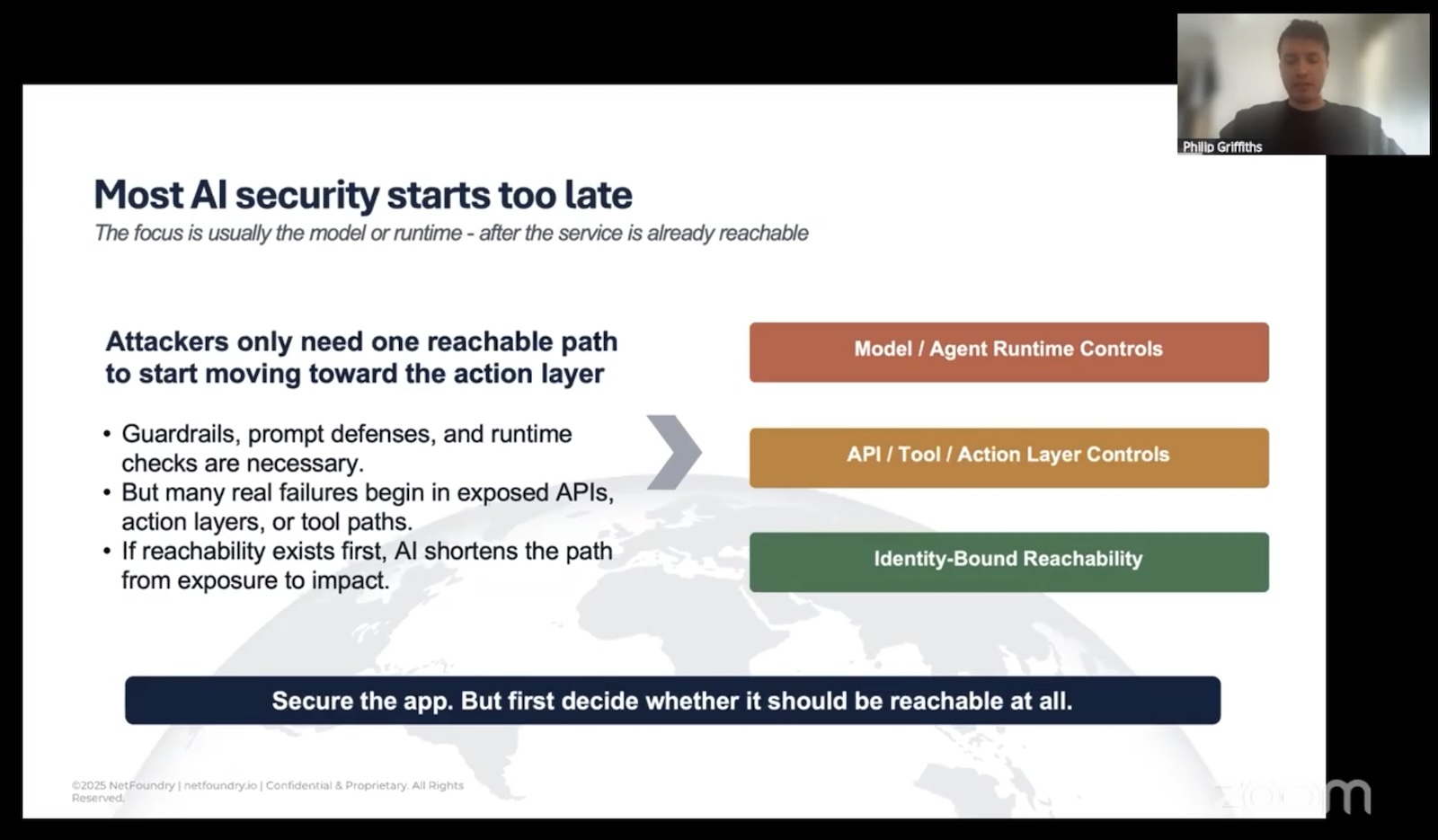
In most “AI security” conversations, the talk is about the model: prompt injection, jailbreaks, output filtering, runtime guardrails, and so on. These issues matter, but there’s a much more “boring” question that’s worth asking…
Can the attacker even get a packet to your service in the first place?
If the answer is “yes”, all the model-layer controls in the world are working with their hands tied.
Reachability is the problem
Here’s the structural issue Philip kept circling back to, and it’s worth stating plainly because we’ve all just internalized it as how computers work:
The traditional networking model allows connectivity before authentication.
In your standard server application, you open a port. Clients, including ones that have no business knowing the server exists, sends SYN. The server completes the handshake, and then it asks the client “Who are you?”
By the time a malicious client is answering that question, the people behind it have already fingerprinted your TLS stack, learned your server software, probed for known CVEs, and maybe even identified an exploit they’d like to try.
This is fine for, say, a public web server that genuinely wants to be discovered by anyone. It is wildly inappropriate for an internal MCP gateway, an LLM endpoint scoped to a specific agent, or an A2A flow between two services that should have no business talking to anyone but each other.
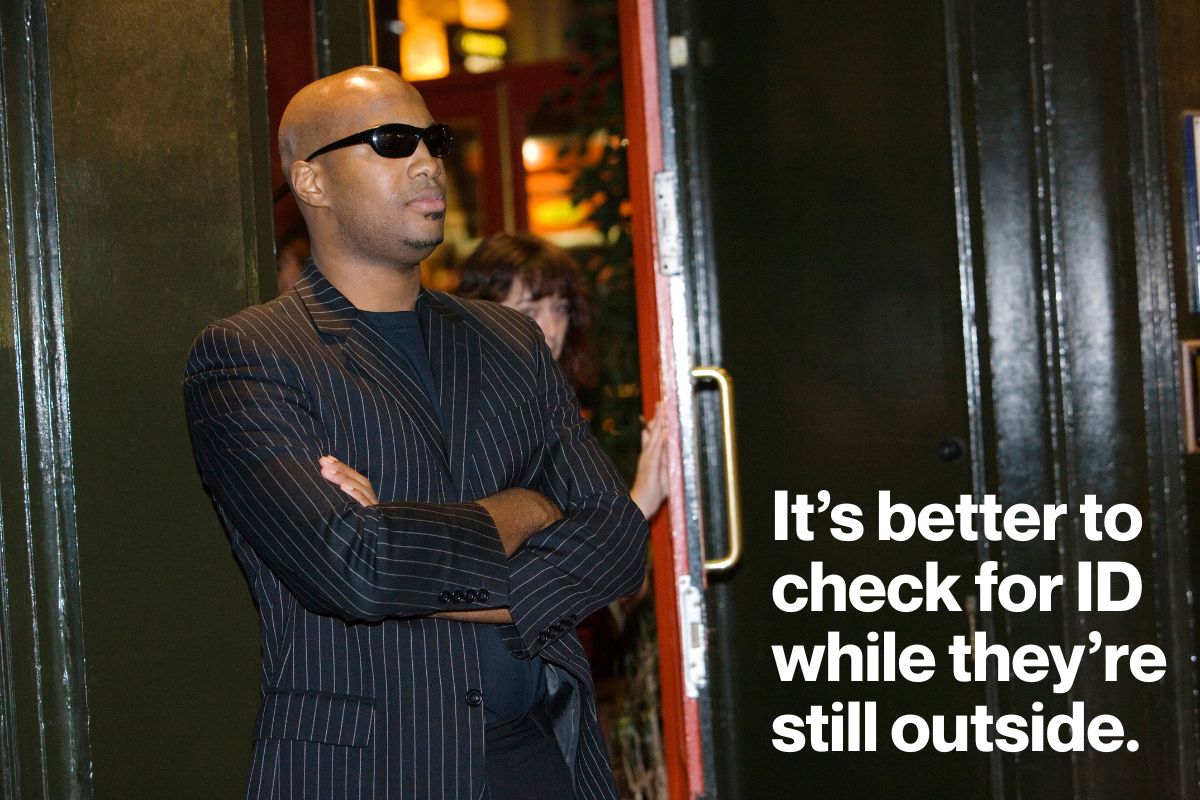
There’s a reason bouncers check for ID while you’re still outside the nighclub.
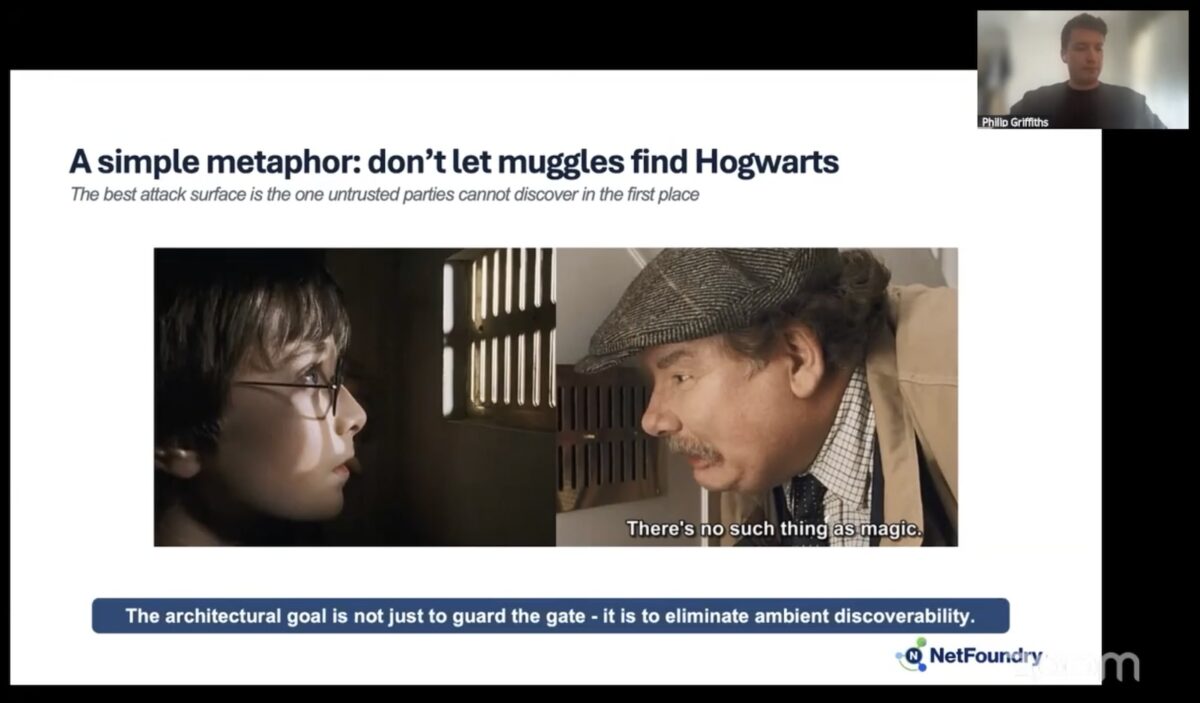
Philip’s metaphor for this is…Hogwarts. Because of course it is.
Imagine if any random Muggle could walk up to Platform 9¾, see the magical world clearly visible behind a flimsy enchantment, and start poking at the bricks to figure out which sequence opens the wall. The whole point of the wizarding world’s security model is that Muggles don’t even know it’s there. Reachability is the threat. Once something is known to exist, it’s only a matter of time before somebody works out how to get in.
Most of our infrastructure today is like Hogwarts with a “Muggles Keep Out” sign on the gate. Everyone can see it. Everyone can probe it. We’re hoping the lock holds.
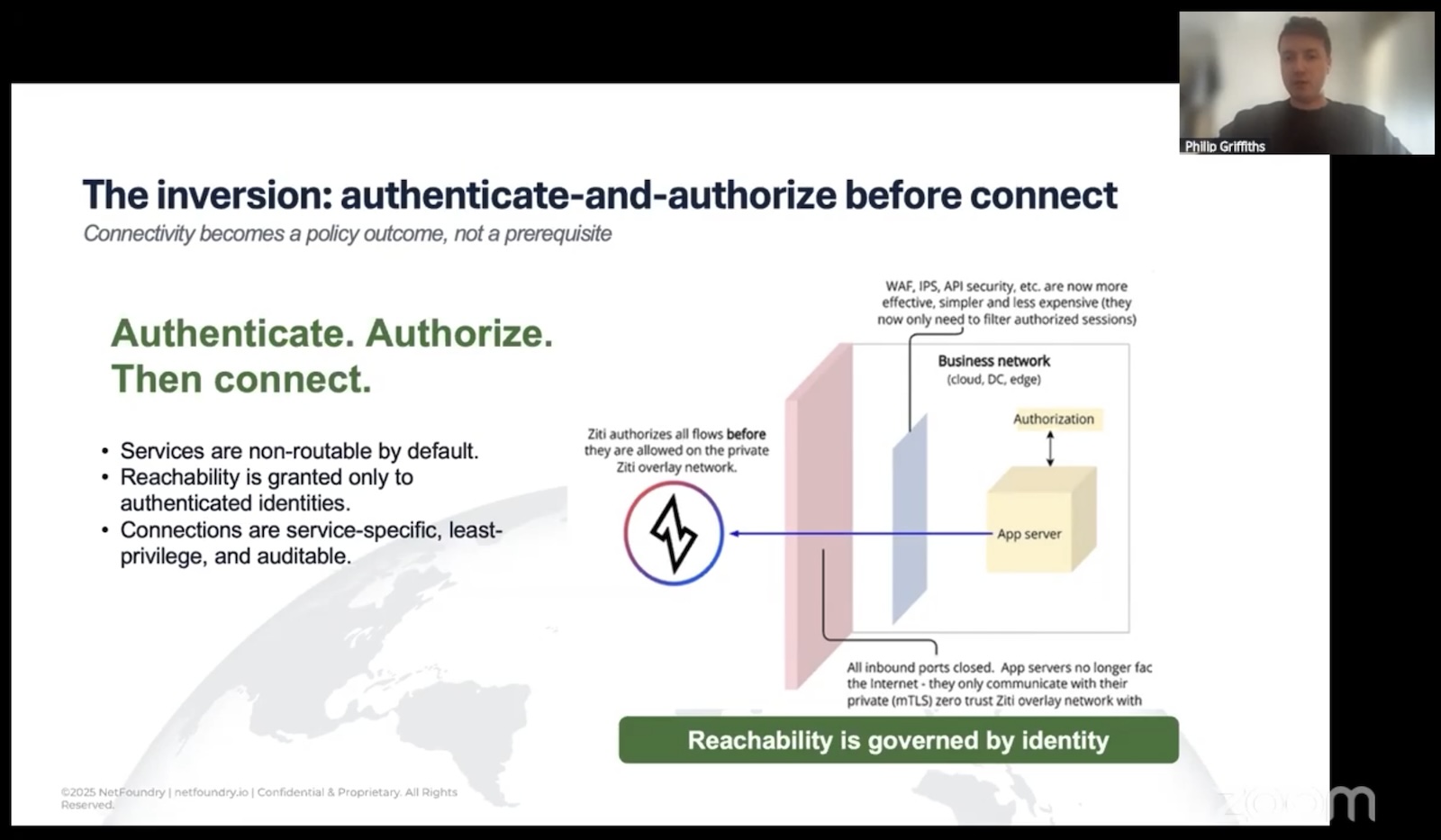
The identity-first approach
Tap to view at ffull size.
The inversion Philip proposes is something that NetFoundry’s OpenZiti project actually implements. It’s straightforward to describe and surprisingly hard to undo once you’ve seen it:
Strong cryptographic identity comes first. Every agent, every service, every endpoint gets a unique, attestable identity. Not a shared secret. Not a long-lived token someone copy-pasted into an env. An actual cryptographic identity tied to the workload.
Authentication and authorization happen before any data plane exists. No TCP handshake. No UDP packet. No DNS resolution that even confirms the service is real. If you don’t have a valid identity for this specific service under the current policy, there is nothing on the network for you to interact with.
Reachability is granted, scoped, and revocable. A policy says that identity X can talk to service Y for purpose Z. Change the policy, change the reachability. No firewall ticket. No VLAN reshuffle. No RMF package update.
Here’s the phrase that Philip used:
Connectivity should be an outcome of policy.
It shouldn’t be a prerequisite. That’s the difference:
In the traditional model, the network is a thing you build first, and then layer controls on top of it.
In the identity-first model, the network only exists between identities that have been explicitly authorized to see each other. Everything else is dark.
Tap to view at full size.
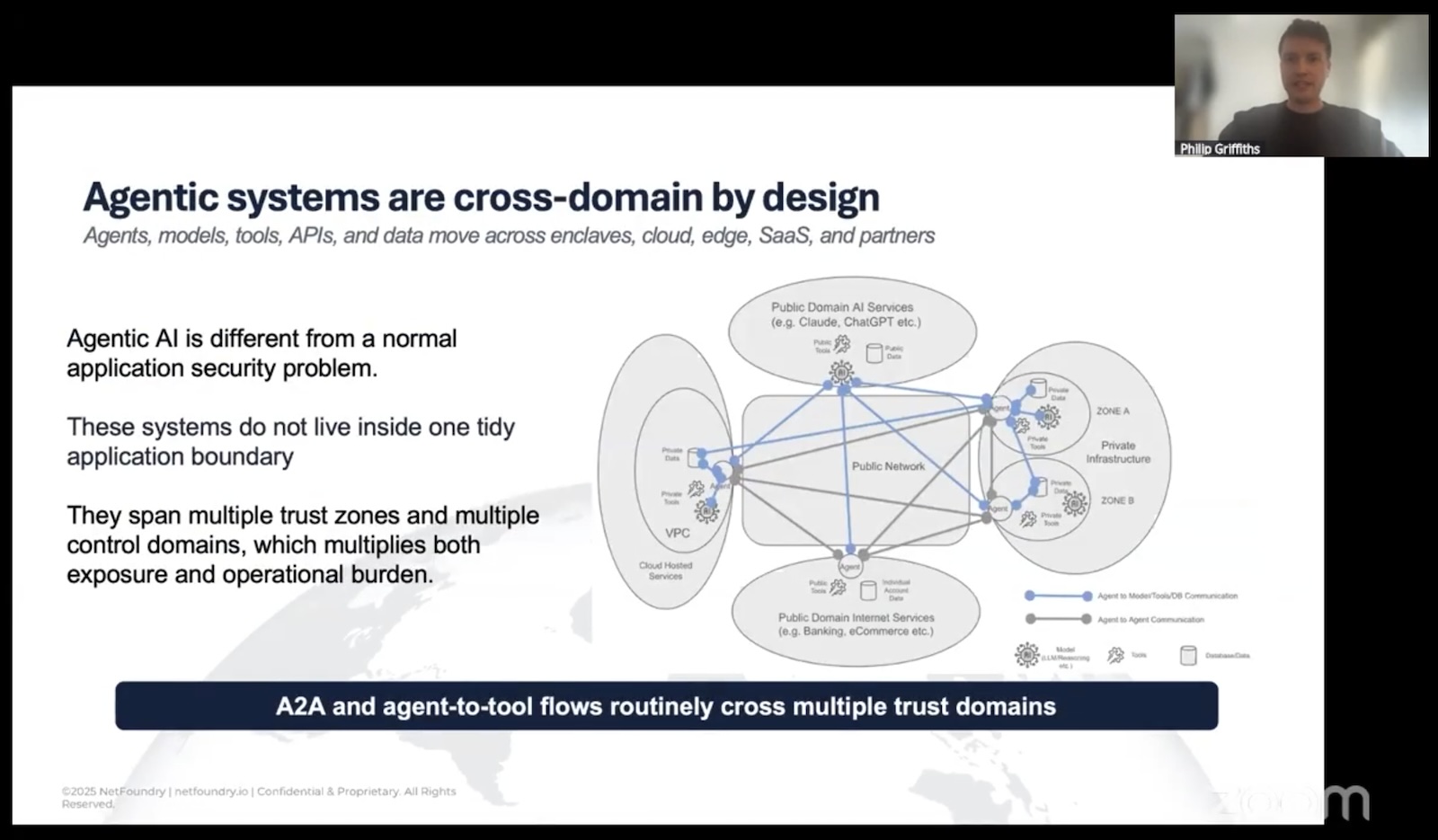
For agentic systems specifically, this matters because the topology is insanely fan-out. An agent may need to call three LLMs, four tool servers, two vector stores, and a partner organization’s API in a single workflow. Each of those is a trust boundary:
In the traditional model, every one of those flows is a potential firewall rule, a potential exposed endpoint, a potential lateral-movement path if something upstream gets popped.
In the identity-first model, each flow is a policy, and only the policy-permitted flows have any network presence at all.
The developer-velocity argument
Sure, the security argument is the headline, but if you’ve ever worked anywhere with a serious change-management process, the velocity argument might land harder.
Philip mentioned someone he’d recently spoken with who was building a new service. The platform supported outbound 443. The service needed thirty different ports. Each port change was a firewall ticket. Each ticket was an RMF update. The math on that timeline is grim, and it’s grim in commercial environments too. Anyone who’s tried to get a new outbound rule through a Fortune 500 change board has stories.
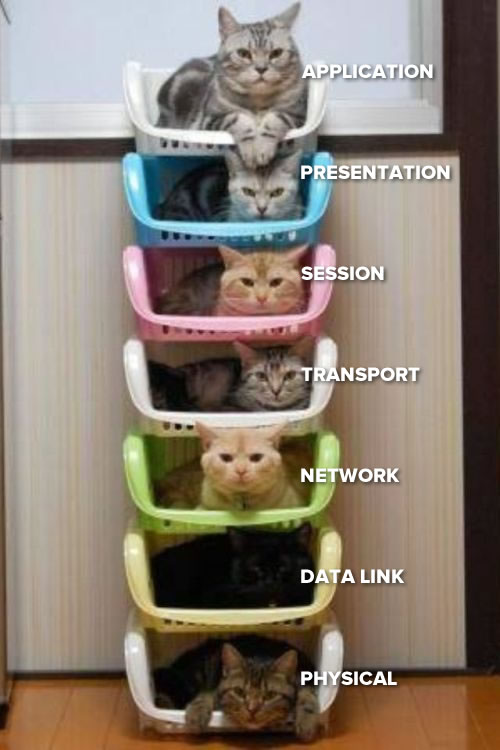
In a network where reachability is governed by policy on top of identity rather than by plumbing at OSI levels 3 and 4, that whole category of friction collapses. You’re not asking the network team to change the network. You’re updating a policy that says “this identity can now reach this service.” The underlay (your VLANs, your security groups, your jump hosts) doesn’t have to know or care.
Oh, and in case you don’t remember your OSI levels, here they are, illustrated with cats:
(Layers 3 and 4 are the network and transport layers.)
The downstream effects compound:
Telemetry gets quieter. When the only traffic that exists on a path is authenticated, authorized traffic, your SOC stops drowning in scan noise from the open internet. The signal-to-noise ratio on alerts goes way up.
Credentials simplify. No more shared service tokens that everybody on the team has a copy of. Identity is per-workload, scoped, and revocable.
The underlay becomes boring (and in security, boring is good). You can run the same workload across satcom, LTE, hotel Wi-Fi, and a hyperscaler VPC, and the security posture doesn’t change. The overlay handles it.
That last point matters more than it sounds for AI work specifically. Agents don’t sit in one tidy network segment. They reach across clouds, across organizations, across SaaS boundaries. Trying to enforce zero trust by keeping all that traffic inside a controlled underlay is a losing battle. Enforcing it at the identity layer means the underlay can be anything.
Where’s this going for agents?
Tap to view at full size
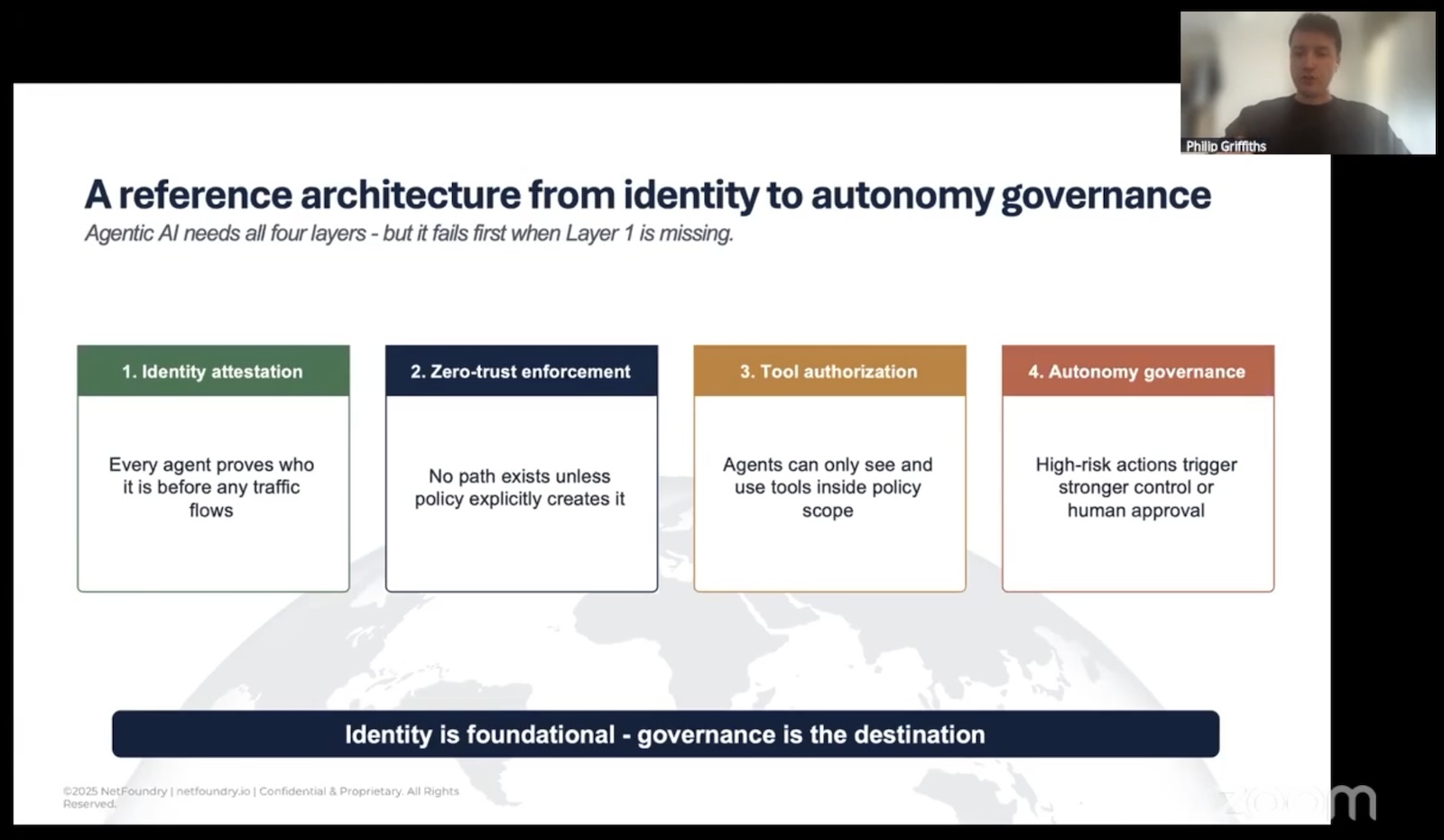
In his talk, Philip mentioned Cloud Security Alliance work, building a reference architecture for agentic systems on top of identity-first connectivity. It’s taking on this shape:
Foundation: cryptographic identity and attestation. Every agent proves what it is before any path exists.
Reachability: policy-driven, identity-scoped, no ambient network presence.
Authorization: agents see only the tools, models, and data their policy permits. No tool discovery for things they’re not allowed to touch.
Governance: human-in-the-loop for high-risk actions, audit trails tied to the cryptographic identity that took the action.
The thing I like about this stack is that the Foundation layer fixes the boring-but-fatal problem (reachability), which lets the upper layers actually do their jobs without being constantly undermined from below. You can have the world’s best prompt-injection defenses, and they don’t help you if your tool server got pwned because somebody port-scanned it from the open internet.
What you should take away if you’re a developer
It’s the middle of my third week at NetFoundry, and I’m still in the “drinking from the firehose” phase, where I’m interalizing these things:
If your threat model says “we’ll catch them at the application layer,” update your threat model. The exploit window is too short for that to be the only defense.
“Is this service reachable from where the attacker is sitting?” is the first question, not the last. If the answer can be “no,” make it “no.”
Identity-first is not a product category you buy. It’s a property your architecture either has or doesn’t. You can get there with OpenZiti, with various commercial overlays, with SPIFFE/SPIRE for the identity piece, with combinations. The label matters less than the property. (But hey, I’d love it if you went with OpenZiti, and double if you tell NetFoundry you heard about it from me!)
The biggest unlock isn’t security, it’s that you stop spending your week filing firewall tickets.
Philip closed with a line that I think is the right one to leave on, paraphrased: any sufficiently advanced security model looks like magic. In this context, magic means the thing you’re trying to attack isn’t there. That’s the bar. Not “well-defended.” Not “hardened.” Not visible at all unless you’ve already proven who you are.
For agentic AI, where the speed of attack and the fan-out of the topology are both moving in directions that make traditional networking less viable every month, that bar is starting to look less like a nice-to-have and more like the only model that actually scales.
If you want to dig in: the OpenZiti project is open source and a reasonable place to get hands-on with what identity-first overlay networking actually looks like in practice.
Last week was my first week at NetFoundry, where I’m the Senior Developer Advocate. It was fun, and it was also like drinking from a high-tech, encrypted firehose!
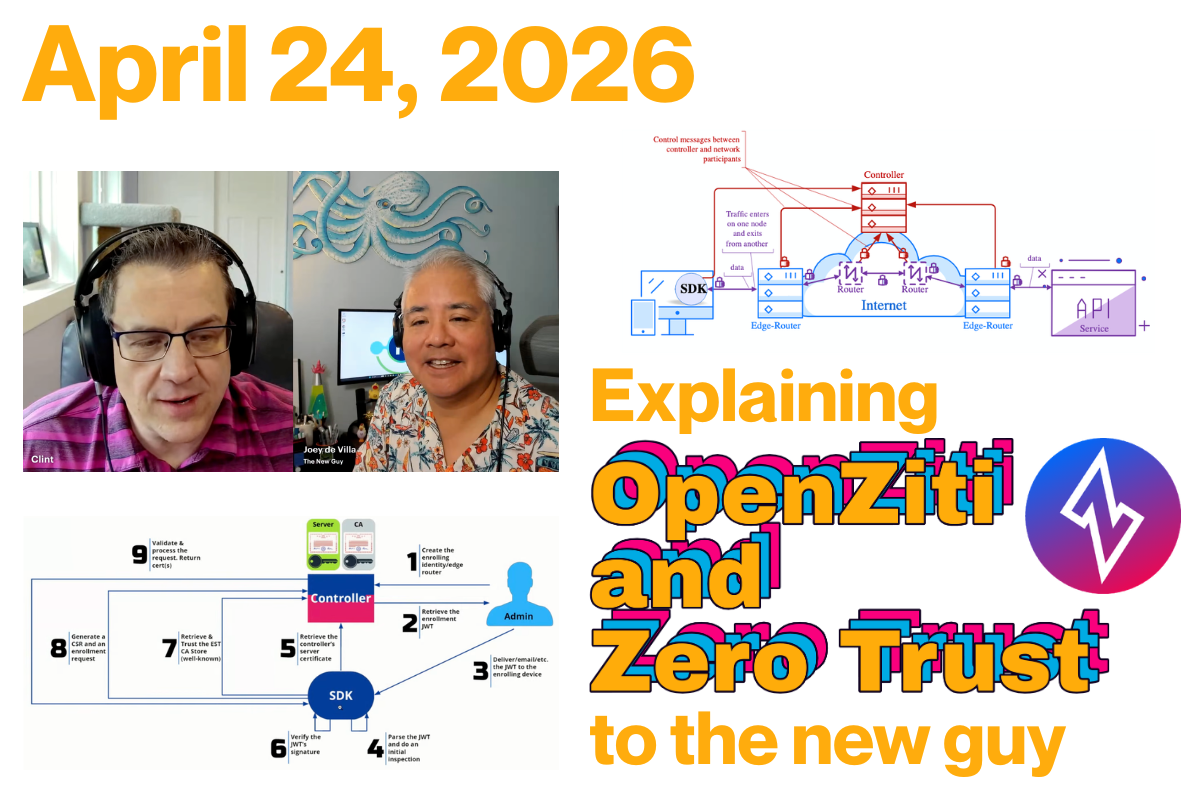
To mark the occasion, I sat down with NetFoundry’s Head of Developer Experience (and also developer; he does a lot!) Clint Dovholuk for my first episode on Ziti TV. We spent an hour diving into the “meat” of Zero Trust, networking architecture, and why your traditional VPN might be the “castle and moat” that finally (and unintentionally) lets the invaders in.
If you’re a developer who has always viewed networking infrastructure as someone else’s problem (and as a recovering mobile developer, I’m certainly guilty on that charge), here’s the deep-dive breakdown of what I learned in my first week on the job.
Clint said that Zero Trust might be better understood if you called it Explicit Trust. In the old “Castle and Moat” model, if you’re in the castle, you’re trusted. In the OpenZiti model, we assume the network is already compromised. You have zero privileges until they are explicitly granted based on:
Authentication: “Who are you?”
Authorization: “What are you allowed to do?”
A lot of resources will authenticate and authorize you through some kind of sign-in process. Clint describes OpenZiti as moving the process out by one layer into the network so you can’t even connect to an OpenZiti-protected resource without being authenticated and authorized first.
Or, to quote Clint:
With OpenZiti and Zero Trust, if you have a service that’s protected by OpenZiti, you first need to authenticate to the OpenZiti overlay network, and then you need to have an authorization that permits the operation you’re trying to perform.
OpenZiti also uses a Zero Privilege approach. Once again, to quote Clint:
The whole idea is that you have no privileges until you are granted privileges, and only then are you able to take whatever operation you want.
“Jay double-you tee” vs. “Jawt”
Apparently we’re on different sides of this debate. Clint prefers referring to JWTs as “Jay double-U tees,” while I prefer to call them “Jawts.”
OpenZiti and NetFoundry: How are they related?
OpenZiti is the network overlay project, and NetFoundry is the company behind OpenZiti.
The “Open” in OpenZiti comes from the fact that it’s an open source project. This is in keeping with the philosophy that a cybersecurity product should be open source because making source code publicly visible enables a community of developers, analysts, and other experts to audit, test, and improve it.
If you have the time, tech skills, and inclination, you can use OpenZiti and run your own overlay network at zero cost — if you don’t count the cost of said time and tech skills. It’s all up for grabs here.
However, if you’d rather spend your time and technical expertise elsewhere, especially once your needs get up to scale, such as on your main line of business, NetFoundry is here to provide you with a managed OpenZiti platform.
It’s easy to run one controller and two routers on your laptop. But when you’re an enterprise managing a fleet of routers, handling upgrades, and monitoring metrics, you’re suddenly in the “overlay business” instead of your actual business. NetFoundry is the “Easy Button” that manages OpenZiti for you [19:10].
The quickstart
Clint then gave a quick demonstration of the OpenZiti quickstart, which creates a fully functional OpenZiti network overlay on your system in a couple of seconds. This overlay has both a router and a controller, and each has a specific job.
Controller
The OpenZiti controller [24:36] serves as the brain of the overlay network. It’s the authority responsible for managing the state of the environment and ensuring that all connections are secure and verified before traffic ever flows.
Its responsibilities can be broken down into several key functions:
1. API surface and management
The controller surfaces several critical APIs that different components of the network interact with. These include:
Edge Client API: Used by SDKs and tunnelers to authenticate and discover services.
Management API: The interface used by administrators (often via the Ziti CLI) to configure the network, such as creating new identities or defining service policies.
Fabric and OIDC APIs: Used for internal mesh communication and identity provider integration.
2. The authority on explicit trust
The controller is the primary decision-maker for the two pillars of Zero Trust security:
Authentication: It verifies the identity of any user, device, or “workload” attempting to connect (answering “Who are you?”).
Authorization: It checks configured policies to determine exactly what that identity is allowed to access (answering “What are you allowed to do?”).
Unlike a traditional network where a firewall might be open by default, the controller ensures the network is dark by default. No connection is permitted until the controller has explicitly authorized it.
3. Bootstrapping trust, a.k.a. enrollment
The controller is the starting point for bringing new devices into the fold through a process called “Bootstrapping Trust”.
It issues One-Time Tokens (OTTs) (essentially signed JSON Web Tokens) that are delivered to users.
When a client initiates enrollment, the controller validates the token and facilitates a Certificate Signing Request (CSR) exchange.
The end result is a strong, cryptographically verifiable identity that the client uses for all future secure communications.
4. Orchestrating the mesh
While the controller does not actually handle the data traffic (that is the job of the routers), it provides the “map.” It coordinates with the edge routers to broker data channels, ensuring that when a client “dials” a service, the routers know how to steer that traffic to the correct destination.
Router
The OpenZiti router [26:09] is the workhorse of the network. While the controller acts as the brain and makes policy decisions, routers constitute the data plane: the actual infrastructure that moves bits from point A to point B.
According to Clint, the router’s job can be broken down into these core functions:
1. Forming the mesh overlay
The routers are responsible for creating the “mesh overlay network”. Unlike a traditional hub-and-spoke networking model, these routers connect to one another to form an interconnected fabric. Even if you start with just one router, you can deploy many others to extend this mesh.
2. Brokering data channels
The primary job of a router is to broker data channels. When an application wants to send data, the router facilitates the creation of a secure path. It effectively “steers” the traffic through the mesh to ensure it reaches the intended destination router and, ultimately, the target service.
3. Serving as the entry point for clients
Everything in OpenZiti is technically an SDK client, whether it’s a standalone app or a “tunneler.” These clients connect directly to the routers to form the necessary channels for communication. The router acts as the listener that accepts these connections once the controller has given the “okay.”
4. Shuttling the actual data
The router is where the heavy lifting happens. It is the component that actually sends your data from one side to the other. While the controller handles the logic of authentication and authorization, it never touches the application data itself. That task is handled entirely by the routers.
5. Enforcing the “dark network”
By acting as the only point of entry into the mesh, routers help enforce the “dark by default” philosophy. Unless a client has been explicitly authorized by the controller, a router will not broker a channel for it, effectively keeping the protected services invisible to the public internet, and by extension, unauthorized and malicious parties.
The coolest part for a developer? You can spin this all up on your local machine in about seven seconds with a simple ziti edge quickstart [23:00].
Why not just use a VPN?
One of my questions was the one every developer asks: “Why can’t I just use a VPN?”
Clint insists that an OpenZiti overlay actually is a VPN [34:05] in the broadest sense, in that it’s a virtual network that’s closed off to unauthorized parties. It just functions much differently than the “one big mush” of traditional VPNs, which are open by default, and once you’re in, you can see everything.
On the other hand, OpenZiti is dark by default [35:45]. If you have a server on the open internet, it usually has an open port (such as port 22 for SSH or 443 for HTTPS). With Ziti, you close those ports entirely. The service becomes “dark,” and the ports are invisible, and you can’t attack what you can’t even find.
The “magic dance” of bootstrapping trust
I’ll admit, when I first tried to set up a client and server, I got a little lost in the “magic dance” of certificates. Clint called this process bootstrapping trust [38:47].
It starts with a One-Time Token (OTT), which is a signed JWT, and the process goes like this:
The admin creates an identity on the controller [41:09].
The client uses the token to find the Controller’s URL [43:11].
The handshake takes place, where the client verifies the controller’s certificate, and they exchange a CSR (Certificate Signing Request) [44:43].
Strong identity: The result is a JSON file containing a key that must be protected like a secret.
AI Agents and the MCP Gateway
We also took a detour into Agentic AI. Clint has been using MCP (Model Context Protocol) Gateways to let Claude interact with the Ziti CLI.
The breakthrough here is efficiency and security. By using an MCP Gateway, you don’t have to give your raw credentials to the AI [57:02]. Plus, by using a targeted MCP server, you can strip a massive 100k data object down to a 10k summary, saving a fortune in tokens [59:12].
Real-world use: From blue bubbles to drones
I asked Clint who is actually using this in the wild. The “Adopters” list is growing, including projects like Blue Bubbles (the tool that brings iMessage features to Android) [50:33].
But the stakes get higher. We discussed Zero Trust Drones and secure communications on the battlefield [52:12]. When you’re in a high-stakes environment like Ukraine, having secure, “dark” comms is a necessity, not a luxury.
More coming soon!
This was the first of many Ziti TV livestreams featuring Clint and Yours Truly. The next one’s scheduled for Friday, April 30th at 11:00 a.m. U.S. Eastern / 8:00 a.m. U.S. Pacific / 1500 UTC, and you can view past livestreams in the Live section of the OpenZiti YouTube channel.