 I know, I know, it’s been over a fortnight since I last post a tutorial. Things have been a little bit crazy at work, but I plan to hope to use the next couple of days to get caught up, and then post a new tutorial next week.

In the last installment, I posted another installment of my iOS development tutorial series, iOS Fortnightly: SimpleWeather, a simple weather app that made use of the AFNetworking library to fetch the current weather conditions for any given city from Open Weather Map. If you’d followed the tutorial to the end, you’d have an app that looks like this when immediately after you launch it:
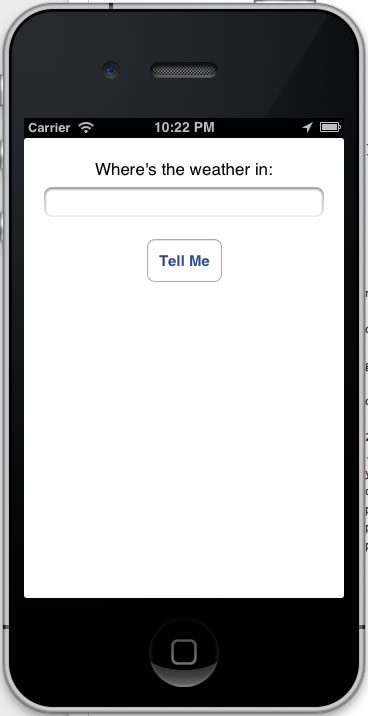
…and here’s what it looks like when displaying the current weather:
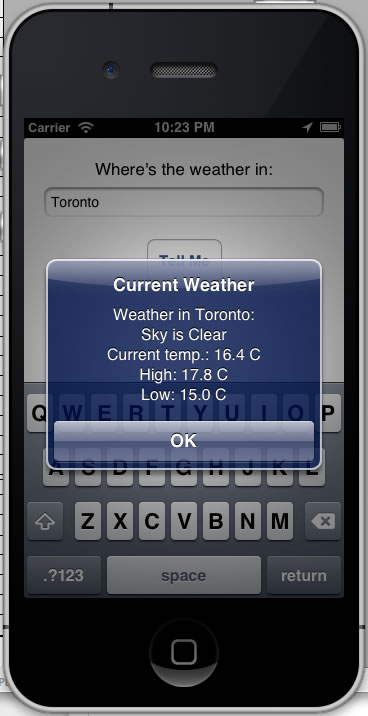
It’s nowhere near ready for the App Store, but in a few lines of code, it accomplishes a fair bit. If you’re new to Objective-C, it also covers some unfamiliar territory. This week’s set of articles will expand on the Simple Weather app. In this one, I’ll explain those parts of the code that might not be familiar to the novice iOS developer, namely Objective-C’s blocks and properties.
JSON Requests in AFNetworking
 The meat of the SimpleWeather app is in the
 Weather class’ getCurrent: method. It makes the call to Open Weather Map’s API, and it does so with this line:
AFJSONRequestOperation *operation =
[AFJSONRequestOperation JSONRequestOperationWithRequest:weatherRequest
    success:^(NSURLRequest *request, NSHTTPURLResponse *response, id JSON) {
        weatherServiceResponse = (NSDictionary *)JSON;
        [self parseWeatherServiceResponse];
    }
    failure:^(NSURLRequest *request, NSHTTPURLResponse *response, NSError *error, id JSON) {
        weatherServiceResponse = @{};
    }
];
AFJSONRequestOperation is a class in the AFNetworking library for requesting and retrieving JSON data from a given URL. It has a single method, a class method called JSONRequestOperationWithRequest:success:failure:. Here’s what its declaration looks like:
+ (AFJSONRequestOperation *)JSONRequestOperationWithRequest:(NSURLRequest *)urlRequest
    success:(void ( ^ ) ( NSURLRequest *request, NSURLResponse *response, id JSON ))success
    failure:(void ( ^ ) ( NSURLRequest *request, NSURLResponse *response, NSError *error , id JSON ))failure
JSONRequestOperationWithRequest:success:failure: is a method that makes a request for some JSON from a given URL and:
- Does something if the requested JSON was successfully received
- Does something else if the requested JSON was not successfully received
Here are the method’s parameters:
| Parameter Name |
Description |
urlRequest |
A NSURLRequest object representing our request for the current weather from Open Weather Map. |
success |
A function that should be executed if the operation was a success, meaning that the requested JSON object was successfully retrieved. |
failure |
A function that should be executed if the operation was a failure. This could mean that requested JSON object was not successfully retrieved, or that it was successfully retrieved, but couldn’t be parsed as JSON. |
The urlRequest argument is pretty straightforward, but the success and failure arguments look more complicated. They’re block literals, and to talk about them, we need to talk about blocks.
A Very Quick Intro to Objective-C’s Blocks
If you’re reasonably well-versed in JavaScript, it’s quite likely that you’re familiar with anonymous functions. Here’s a quick and dirty example: an anonymous function that takes two numbers and returns their sum, stored inside a variable named doSomething:
var doSomething = function(firstNumber, secondNumber)
{
  return firstNumber + secondNumber;
}
alert(doSomething(2, 3));
In Ruby, there are a couple of types of anonymous functions: procs and blocks. Procs are the anonymous function type that you can bind to a local variable, which is close to the spirit of anonymous functions in JavaScript and Objective-C. Here’s the Ruby version of the anonymous function from the example above:
doSomething = Proc.new {|firstNumber, secondNumber| firstNumber + secondNumber}
puts doSomething.call(2, 3)
And now, the Objective-C version:
int(^doSomething)(int, int) = ^(int firstNumber, int secondNumber) {
        return firstNumber + secondNumber;
    };
NSLog(@"%d", doSomething(2, 3));
It’s not all that different from the JavaScript and Ruby versions; it’s just that Objective-C requires explicit type information. Let’s take a look at the left side of the assignment first:
int(^doSomething)(int, int)
Here’s where cdecl comes in handy. It’s a site that translates declarations and casts from “C gibberish to English” and vice versa, comes in quite handy.
Enter int(^doSomething)(int, int) into cdecl. cdecl will translate it as “declare doSomething as block (int, int) returning int“. This in turn can be interpreted as “doSomething is a variable containing an anonymous function that takes two ints and returns an int“.
Now let’s look at the right side of the assignment:
^(int firstNumber, int secondNumber) {
        return firstNumber + secondNumber;
};
With the exception of the ^ character in front of the parameters, it looks like a like a standard function definition.
JSONRequestOperationWithRequest‘s Block Parameters, success and failure
Let’s look at JSONRequestOperationWithRequest‘s success parameter, which expects a block that should be executed if the JSON request operation is a success. Here’s its type:
(void ( ^ ) ( NSURLRequest *request, NSURLResponse *response, id JSON ))
This means that it expects a function that expects three parameters of type NSURLRequest *, NSURLResponse *, and id, and doesn’t return anything. Here’s what we’ll pass to it:
^(NSURLRequest *request, NSHTTPURLResponse *response, id JSON) {
    weatherServiceResponse = (NSDictionary *)JSON;
    [self parseWeatherServiceResponse];
}
It does two things:
- It takes the retrieved JSON, casts it to
NSDictionary *, and stores it in the instance variable (or, as they like to say in Objective-C, ivar) weatherServiceResponse. Note that the block “knows” about weatherServiceResponse
- It calls the method
parseWeatherServiceResponse, which extracts the data from the JSON retrieved from Open Weather Map and puts them into the instance variables behind the class’ properties.
Let’s now look at JSONRequestOperationWithRequest‘s failure parameter, which expects a block that should be executed if the JSON request operation is a failure. Here’s its type:
(void ( ^ ) ( NSURLRequest *request, NSURLResponse *response, NSError *error , id JSON ))
This means that it expects a function that expects four parameters of type NSURLRequest *, NSURLResponse *, NSError * and id, and doesn’t return anything. Here’s what we’ll pass to it:
^(NSURLRequest *request, NSHTTPURLResponse *response, NSError *error, id JSON) {
    weatherServiceResponse = @{};
}
Right now, we’re not worrying about what to do in the event of a failure, so for the moment, the failure block simply sets weatherServiceResponse to be an empty dictionary.
A Quick Look at Objective-C’s Properties and the Invisible Goodies that Come with Them
Consider the first line in the parseWeatherServiceResponse method:
_cloudCover = [weatherServiceResponse[@"clouds"][@"all"] integerValue];
If you look around the class, you’ll find that the variable _cloudCover hasn’t been declared anywhere. Yet Xcode hasn’t thrown up any error messages, and it colour-codes it as it would any declared variable. What’s going on here?
It turns out that there’s a little behind-the-scenes magic that takes place whenever a @property is declared. If you look in Weather.h, you’ll see this declaration:
@property (nonatomic, readonly) NSInteger cloudCover;
Implicit in this declaration is this corresponding line in the class’ .m file:
@synthesize cloudCover = _cloudCover;
This line doesn’t actually appear in the .m file, but it’s effectively there thanks to a little compiler magic. @synthesize itself does its own magic; it creates an invisible corresponding instance variable and invisible “getter” and “setter” methods. Implicit in the line above is this instance variable declaration:
NSInteger _cloudCover;
and these methods:
- (NSInteger)cloudCover {
    return _cloudCover;
}

- (void)setCloudCover:(BOOL)newValue {
    _cloudCover = newValue;
}
Property and ivar Order
Speaking of properties and ivars, take a look at the order of the ivars in parseWeatherServiceResponse, which lives in Weather.m:
- (void)parseWeatherServiceResponse
{
// clouds
_cloudCover = [weatherServiceResponse[@"clouds"][@"all"] integerValue];

// coord
_latitude = [weatherServiceResponse[@"coord"][@"lat"] doubleValue];
_longitude = [weatherServiceResponse[@"coord"][@"lon"] doubleValue];

// dt
_reportTime = [NSDate dateWithTimeIntervalSince1970:[weatherServiceResponse[@"dt"] doubleValue]];

// main
_humidity = [weatherServiceResponse[@"main"][@"humidity"] integerValue];
_pressure = [weatherServiceResponse[@"main"][@"pressure"] integerValue];
_tempCurrent = [Weather kelvinToCelsius:[weatherServiceResponse[@"main"][@"temp"] doubleValue]];
_tempMin = [Weather kelvinToCelsius:[weatherServiceResponse[@"main"][@"temp_min"] doubleValue]];
_tempMax = [Weather kelvinToCelsius:[weatherServiceResponse[@"main"][@"temp_max"] doubleValue]];

// name
_city = weatherServiceResponse[@"name"];

// rain
_rain3hours = [weatherServiceResponse[@"rain"][@"3h"] integerValue];

// snow
_snow3hours = [weatherServiceResponse[@"snow"][@"3h"] integerValue];

// sys
_country = weatherServiceResponse[@"sys"][@"country"];
_sunrise = [NSDate dateWithTimeIntervalSince1970:[weatherServiceResponse[@"sys"][@"sunrise"] doubleValue]];
_sunset = [NSDate dateWithTimeIntervalSince1970:[weatherServiceResponse[@"sys"][@"sunset"] doubleValue]];

// weather
_conditions = weatherServiceResponse[@"weather"];

// wind
_windDirection = [weatherServiceResponse[@"wind"][@"dir"] integerValue];
_windSpeed = [weatherServiceResponse[@"wind"][@"speed"] doubleValue];
}
In this method, I’m extracting data from the JSON objects returned by Open Weather Map, so they’re ordered from that perspective: by the keys of the top-level dictionaries in alphabetical order: clouds, coord, dt, main, name, rain, snow, sys, weather, wind. Those dictionaries’ elements are also listed in alphabetical order by key. The idea is to make things easy to find when programming with Open Weather Map’s API in mind.
The order of the corresponding @properties exposed in Weather.h is different. Here, I also want things to be easy to find, but I also want to abstract away any details about the format in which Open Weather Map returns its info. Instead, I want an order that’s useful for when you just want the weather, so I’ve used comments to break the properties into three groups: place and time, qualitative, and quantitative.
// Properties
// ==========

// Place and time
@property (nonatomic, copy, readonly) NSString *city;
@property (nonatomic, copy, readonly) NSString *country;
@property (nonatomic, readonly) CGFloat latitude;
@property (nonatomic, readonly) CGFloat longitude;
@property (nonatomic, copy, readonly) NSDate *reportTime;
@property (nonatomic, copy, readonly) NSDate *sunrise;
@property (nonatomic, copy, readonly) NSDate *sunset;

// Qualitative
@property (nonatomic, copy, readonly) NSArray *conditions;

// Quantitative
@property (nonatomic, readonly) NSInteger cloudCover;
@property (nonatomic, readonly) NSInteger humidity;
@property (nonatomic, readonly) NSInteger pressure;
@property (nonatomic, readonly) NSInteger rain3hours;
@property (nonatomic, readonly) NSInteger snow3hours;
@property (nonatomic, readonly) CGFloat tempCurrent;
@property (nonatomic, readonly) CGFloat tempMin;
@property (nonatomic, readonly) CGFloat tempMax;
@property (nonatomic, readonly) NSInteger windDirection;
@property (nonatomic, readonly) CGFloat windSpeed;
As with the ordering in parseWeatherServiceResponse, the objective is to make things easy to read and find, but this time, I’m doing so not from the perspective of a programmer trying to get data from the Open Weather Map API, but a programmer trying to get data from an instance of the Weather class.
Previous Installments in the iOS Fortnightly Series
In case you missed them, here’s a list of the previous articles in this series: